소개
This manual provides instructions for the operation and maintenance of your Timex Expedition Digital Chrono Alarm Timer 33mm Watch, Model TW4B13100. This digital outdoor watch features a chronograph, alarm, and timer, designed for everyday use.

그림 1: 앞쪽 view of the Timex Expedition Digital Watch. The watch features a black case, a clear digital display showing the time and date, and a durable gray and blue striped fabric strap. Buttons for 'SET', 'MODE', 'START/SPLIT', and 'STOP/RESET' are visible on the sides of the watch case.
설정
초기 활성화 및 시간 설정
Upon first use, or after a battery replacement, you may need to activate the watch and set the time and date.
- If a plastic guard is present under the SET button, remove it.
- 를 누르고 계세요 세트 디스플레이가 깜빡이며 시간 설정 모드임을 나타낼 때까지 버튼을 누르십시오.
- 사용하세요 시작/분할 button to adjust the flashing segment (e.g., hours, minutes).
- 를 누르세요 방법 button to advance to the next segment (e.g., minutes, AM/PM, month, day, year).
- 원하는 설정이 모두 완료될 때까지 3단계와 4단계를 반복하십시오.
- 를 누르세요 세트 button again to exit time setting mode.
배터리 정보
Your watch comes with one product-specific battery included. When the display dims or functions become erratic, it may be time to replace the battery. Timex recommends having battery replacement performed by a qualified service center to maintain water resistance.
작동 모드
시계에는 다음을 통해 액세스할 수 있는 여러 모드가 있습니다. 방법 단추.

그림 2: 옆 view of the Timex Expedition Digital Watch. This image highlights the textured buttons on the right side of the watch case, labeled 'START/SPLIT' and 'STOP/RESET', which are used for various functions across different modes.
시간 모드
이는 현재 시간, 요일 및 날짜를 표시하는 기본 표시 모드입니다.
크로노그래프(스톱워치)
The chronograph measures elapsed time.
- 시간 모드에서 다음을 누릅니다. 방법 "CHRONO" 또는 이와 유사한 표시가 나타날 때까지.
- 누르다 시작/분할 타이밍을 시작합니다.
- 누르다 시작/분할 again to record a split time (the display will freeze, but timing continues in the background). Press 시작/분할 again to return to current elapsed time.
- 누르다 정지/리셋 크로노그래프를 일시 중지합니다.
- With the chronograph paused, press 정지/리셋 again to reset it to zero.
타이머(카운트다운)
The countdown timer allows you to set a specific duration, after which an alarm will sound.
- 시간 모드에서 다음을 누릅니다. 방법 "타이머" 또는 이와 유사한 표시가 나타날 때까지.
- 누르고 있으세요 세트 디스플레이가 깜박일 때까지.
- 사용 시작/분할 to adjust the hours, minutes, or seconds.
- 누르다 방법 시간, 분, 초 사이를 이동합니다.
- 누르다 세트 타이머 설정을 확인하세요.
- 누르다 시작/분할 카운트다운을 시작합니다.
- 누르다 정지/리셋 타이머를 일시 정지하거나 다시 시작합니다.
- 타이머가 0에 도달하면 알람이 울립니다. 아무 버튼이나 누르면 알람이 꺼집니다.
경보
The watch features an alarm function to alert you at a set time.
- 시간 모드에서 다음을 누릅니다. 방법 "알람" 또는 이와 유사한 표시가 나타날 때까지.
- 누르고 있으세요 세트 알람 시간이 깜빡일 때까지.
- 사용 시작/분할 시와 분을 조정하기 위해.
- 누르다 방법 to move between hours, minutes, and AM/PM.
- 누르다 세트 알람 시간을 확인하세요.
- 알람을 활성화/비활성화하려면 누르세요. 시작/분할 경보 모드일 때 (일반적으로 종 모양 아이콘이 활성화를 나타냅니다).
- 알람이 울리면 아무 버튼이나 눌러서 알람을 끄세요.
인디글로 야간 조명
The INDIGLO night-light illuminates the watch display for visibility in low-light conditions.
- 를 누르세요 인디 글로 button (typically located on the front of the watch, below the display) to activate the backlight.
- 표시등은 몇 초 동안 켜져 있을 것입니다.
유지
방수성
This watch is water resistant to 100 meters (330 feet). This means it is suitable for showering, swimming, and snorkeling. It is not suitable for scuba diving.
- 시계가 젖었거나 물에 잠겨 있을 때는 어떤 버튼도 누르지 마세요.
- Avoid exposing the watch to extreme temperature changes (e.g., hot shower then cold water).
- 소금물에 노출된 후에는 깨끗한 물로 시계를 헹구고 완전히 말리세요.
청소
Clean your watch regularly to remove dirt and debris.
- For the case and crystal, use a soft, damp 옷감.
- For the fabric strap, it can be gently hand-washed with mild soap and water. Ensure it is completely dry before wearing.
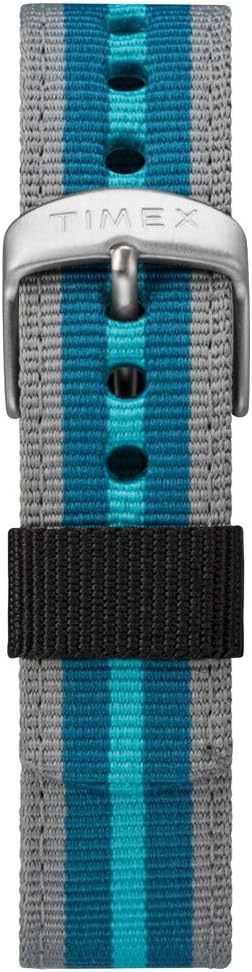
그림 3: 클로즈업 view of the Timex Expedition watch's fabric strap. The strap features alternating stripes of gray and two shades of blue, secured by a silver-colored buckle with the Timex logo.
문제 해결
| 문제 | 가능한 원인 | 해결책 |
|---|---|---|
| 디스플레이가 비어 있거나 어둡습니다. | 배터리가 부족하거나 방전되었습니다. | 배터리를 교체하세요. |
| 버튼이 반응하지 않습니다. | Watch may be in a locked mode or internal error. | Try pressing all buttons simultaneously for a few seconds to reset (if applicable). If problem persists, consult service. |
| 시간이 정확하지 않습니다. | 시간이 올바르게 설정되지 않았거나 배터리가 부족합니다. | Re-set the time and date. If issue recurs, replace battery. |
명세서
- 상표: 타임스
- 모델 번호: TW4B13100
- 디스플레이 유형: 디지털
- 케이스 직경: 33mm
- 방수 기능: 100미터(330피트)
- 특징: Chronograph, Alarm, Timer, INDIGLO Night-Light
- 스트랩 소재: 구조
- 배터리: 제품별 배터리 1개(포함)
- 부서: 남녀공용-성인용
제품 끝view 동영상
For a visual guide on the Timex Expedition Digital watch, please refer to the video below.
동영상 1 : 오버view of the Timex Expedition Digital 33mm Nylon Strap watch. This video demonstrates the watch's design and features, providing a visual understanding of its appearance and basic functionalities.
보증 및 지원
Timex watches are manufactured to high standards and are backed by a limited warranty. For specific warranty details, registration, or support inquiries, please refer to the official Timex website or contact Timex customer service.
더 자세한 정보를 원하시면 팀엑스 공식 스토어를 방문하세요. 아마존의 타이맥스 스토어


