1. 서론
구매해주셔서 감사합니다asing the PNI Clementine 9545 Car MP5 Stereo Player. This manual provides essential information for the correct installation, operation, and maintenance of your new car stereo. Please read this manual thoroughly before using the device to ensure optimal performance and safety.
The PNI Clementine 9545 is a versatile 1DIN car multimedia player featuring a 4-inch color LCD screen, Bluetooth connectivity, FM/AM radio, USB and SD card playback, and video input/output capabilities. Enjoy your favorite music and videos on the go, make hands-free calls, and connect a reverse camera for enhanced safety.
2. 안전 정보
- 전문 설치 권장: 안전과 정상적인 작동을 위해 자격을 갖춘 전문가에게 본 제품 설치를 의뢰하는 것을 강력히 권장합니다.
- 전원 공급 장치: Ensure the device is connected to a 12V DC power supply with proper grounding. Incorrect wiring can cause damage or fire.
- 주의 산만을 피하세요: Do not operate the device or watch videos while driving. This can lead to accidents. Always prioritize road safety.
- 온도: 기기를 극한의 온도, 직사광선 또는 높은 습도에 노출시키지 마세요.
- 청소: 부드럽고 마른 천으로 닦아주세요. 연마성 세제나 용제는 사용하지 마세요.
- 통풍: 과열을 방지하기 위해 장치 주변에 적절한 환기를 확보하세요.
3. 제품 오버view
3.1 전면 패널 컨트롤 및 포트
The front panel of the PNI Clementine 9545 features a 4-inch LCD touchscreen display and various buttons and ports for easy operation.

이미지 설명: This image displays a detailed, labeled diagram of the PNI Clementine 9545 car stereo's front panel. Key components include the power/mode/end call button, menu button, equalizer button, band/AMS button, a central main knob for volume control, and various numbered buttons for functions like pause, repeat, file list, and track navigation. On the right side, there's an IR receiver, microphone, Micro SD slot, USB port, AUX in, and a reset button. The central part is dominated by the 4-inch touchscreen display.

이미지 설명: 클로즈업 정면 view of the PNI Clementine 9545 car stereo. The left side features several control buttons and a prominent central rotary knob with red backlighting. The right side is dominated by the 4-inch color display, currently showing FM radio information with frequency 87.5 MHz. Below the display, there are touch-sensitive buttons for radio presets. The overall design is sleek and functional.
3.2 패키지 내용
패키지에는 일반적으로 다음 품목이 포함됩니다.
- PNI Clementine 9545 Car MP5 Stereo Player
- 마운팅 바
- 원격 제어
- 연결 케이블
- 사용자 설명서
4. 설정 및 설치
This device is designed for 1 DIN installation. Proper wiring is crucial for safe and correct operation. Refer to the wiring diagram below.
4.1 배선도

이미지 설명: This image displays a detailed wiring diagram for the PNI Clementine 9545 car stereo. It shows color-coded wires for speaker connections (Right rear, Right front, Left front, Left rear, with positive and negative terminals), and power connections (Rear view camera sensor, positive pole, car antenna, negative pole, lighter plug). Each wire is clearly labeled with its function and corresponding color, facilitating correct installation.
4.2 일반 설치 단계
- 배터리 분리: 전기 작업을 시작하기 전에 차량의 배터리 음극 단자를 분리하여 단락을 방지하세요.
- 설치: Install the mounting bar into your car's dashboard opening (1 DIN size). Secure the player into the mounting bar.
- 배선: Connect the power wires (12V DC, ground), speaker wires (4 x 50W output), and any auxiliary inputs/outputs (RCA, AUX, USB, SD) according to the diagram.
- Reverse Camera (Optional): If installing a reverse camera, connect its video output to the dedicated RCA video input on the player. Connect the camera's power to the reverse light circuit.
- 배터리를 다시 연결하십시오: 모든 연결이 완료되면 차량의 배터리 음극 단자를 다시 연결합니다.
- 테스트 기능: Turn on the car stereo and test all functions (radio, media playback, Bluetooth, camera) to ensure correct installation.
5. 사용 설명서
5.1 기본 컨트롤
- Power/Mode (PWR MOD): Press to turn the unit ON/OFF. Short press to switch between modes (Radio, USB, SD, AUX, Bluetooth).
- Volume Control (Main Knob): 중앙의 조절 손잡이를 돌려 볼륨을 조절하세요.
- 메뉴: Press to access the main menu or settings.
- EQ (이퀄라이저): Press to cycle through preset equalizer settings or access custom EQ adjustments.
- Band/AMS (BND AMS): In radio mode, press to switch between FM bands (FM1, FM2, FM3) or AM bands. Long press for Automatic Memory Store (AMS).
- Navigation Buttons (◀◀ / ▶▶): Use to skip tracks, fast forward/rewind, or tune radio frequencies.
- 1/PAU (Pause): Play/Pause media playback.
- 2/LIST: In media mode, press to view 그만큼 file 목록.
- 리셋(RST): Use a thin object to press the reset button to restore factory settings if the unit malfunctions.
5.2 무선 작동
The unit supports FM (87.5 – 108.0 MHz) and AM (522 KHz - 1620 KHz) radio bands.
- 튜닝 : Use the navigation buttons (◀◀ / ▶▶) to manually tune frequencies.
- 자동 검색 : Long press the navigation buttons to automatically search for the next strong station.
- 사전 설정된 방송국: The unit can store up to 18 FM preset stations. Use the numbered buttons (1-6) to select or save presets. Long press a numbered button to save the current station to that preset.
5.3 미디어 재생(USB/SD)
Insert a USB drive into the USB port or an SD card into the SD card slot. The unit will automatically switch to USB/SD mode and begin playback of supported files (MP5, MP3, MP4, WMA, WAV, etc.).
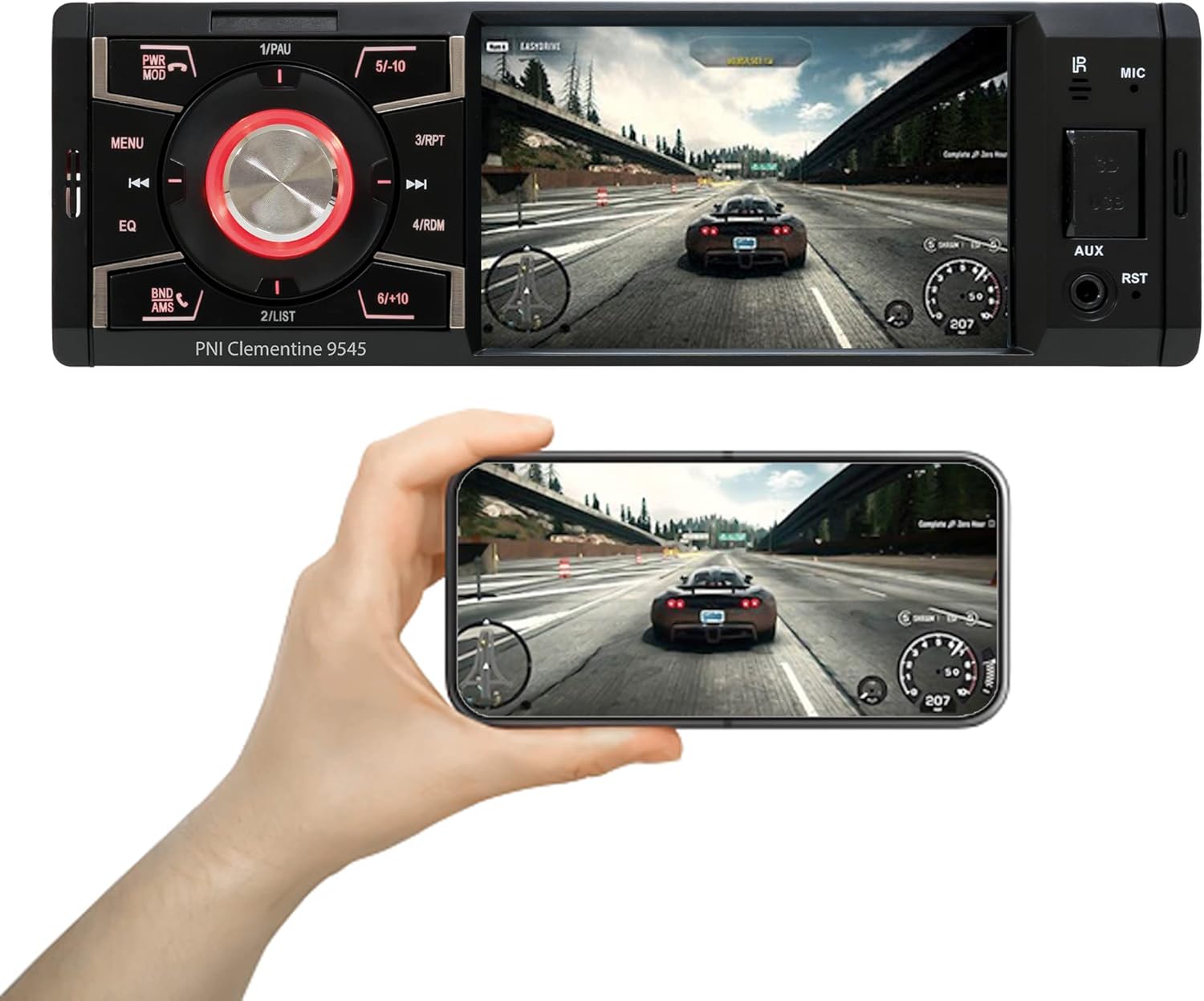
이미지 설명: The PNI Clementine 9545 car stereo is shown playing a video game scene on its 4-inch display. Below the stereo, a hand holds a smartphone that mirrors the same video content, demonstrating the unit's video playback capabilities and potential for screen mirroring or external display connection.
5.4 블루투스 기능
The integrated Bluetooth feature allows for hands-free calling and audio streaming.
- 편성: Enable Bluetooth on your mobile device and search for "PNI Clementine 9545". Select it to pair.
- 핸즈프리 통화: Once paired, you can make and receive calls directly through the car stereo. Use the PWR MOD button to answer/end calls.
- 오디오 스트리밍 : Play music from your paired phone through the car's audio system.
5.5 AUX 입력
Connect external audio devices (e.g., MP3 players, smartphones) to the 3.5mm AUX input jack on the front panel using an audio cable.
5.6 터치스크린 조작
The 4-inch LCD display is a touchscreen, allowing for intuitive control of various functions and settings.

이미지 설명: A human finger is shown touching the 4-inch touchscreen display of the PNI Clementine 9545 car stereo. The screen displays a 'HOME' menu with various media and function icons, indicating the interactive nature of the display for navigating the stereo's features.
5.7 후방 카메라 기능
When an optional reverse camera is connected and the vehicle is put into reverse gear, the player's display will automatically switch to show the reverse camera feed, assisting with parking and maneuvering.

이미지 설명: The PNI Clementine 9545 car stereo's display shows a reverse camera view of a parking garage, complete with colored parking guidelines (red, yellow, green) overlaid on the image. Below the stereo, a small image of an optional rear view camera is shown, indicating the unit's compatibility with such accessories.
6. 유지관리
- 장치 청소: 부드럽고 마른 천을 사용하여 전면 패널과 디스플레이를 닦으세요. 잘 지워지지 않는 오염의 경우, 가볍게 두드리세요.ampen the cloth with water. Do not use harsh chemicals, abrasive cleaners, or solvents as they may damage the finish or screen.
- Cleaning Ports: Periodically check USB and SD card slots for dust or debris. Use a can of compressed air to gently clear them if necessary.
- 일반 관리 : Avoid placing heavy objects on the unit. Protect it from direct sunlight and extreme temperatures when the vehicle is parked for extended periods.
7. 문제 해결
If you encounter issues with your PNI Clementine 9545, refer to the following common problems and solutions:
| 문제 | 가능한 원인 | 해결책 |
|---|---|---|
| 전원이 없습니다 | 배선 오류; 퓨즈 단선; 차량 배터리 방전. | Check power connections and fuses. Ensure battery voltage is sufficient. Consult a professional for wiring inspection. |
| 소리가 나지 않습니다 | 볼륨이 너무 낮음; 음소거가 활성화됨; 스피커 선이 분리됨; 오디오 소스가 올바르지 않음. | 볼륨을 높이세요. 음소거가 활성화되어 있는지 확인하세요. 스피커 연결을 확인하세요. 올바른 오디오 소스를 선택하세요. |
| 블루투스가 연결되지 않음 | Bluetooth not enabled on phone; Device not in pairing mode; Interference. | Ensure Bluetooth is active on your phone. Put the stereo in Bluetooth pairing mode. Try restarting both devices. |
| USB/SD 카드가 재생되지 않습니다 | 지원되지 않음 file 형식 오류; 손상된 미디어; 잘못 삽입됨. | 확인하다 file formats (MP5, MP3, MP4, WMA, WAV). Ensure media is not corrupted. Reinsert USB/SD card correctly. |
| Screen Frozen/Unresponsive | 소프트웨어 오류. | Press the RST (Reset) button with a thin object to restart the unit. |
이러한 해결 방법을 시도한 후에도 문제가 지속되면 고객 지원 센터 또는 자격을 갖춘 서비스 기술자에게 문의하십시오.
8. 사양
| 특징 | 사양 |
|---|---|
| 모델 | Clementine 9545 |
| 공급량tage | 12V 직류 |
| 임피던스 | 4옴 |
| 최대 오디오 전력 출력 | 4 x 50W |
| FM 라디오 주파수 | 87.5~108.0MHz |
| AM 무선 주파수 | 522kHz - 1620kHz |
| USB 포트 | USB 2.0 |
| 카드 슬롯 | SD 카드 |
| 신호/잡음 비율 | > 40dB |
| 치수(폭 x 높이 x 깊이) | 178 x 50 x 110mm |
| 무게 | 0.627kg |
| 최대 전류 소비 | 10 Amp에레스 |
| AUX 오디오 입력 | 3.5mm 미니 잭 |
| 설치 유형 | 1 딘 |
| 표시하다 | 4-inch LCD, 800 x 480 pixels, Red button illumination |
| 비디오 재생 | Full HD 1920 x 1080px (AVI format) |
| 오디오 재생 | MP5, MP3, MP4, WMA, WAV, etc. (Stereo output) |
| 작동 온도 | -26°C ~ +80°C |
| 블루투스 | Integrated Bluetooth for calls and audio streaming |
| 비디오 입력/출력 | 1 x RCA Video Input/Output, 1 x RCA Video Input for Reverse Camera |
9. 보증 및 지원
9.1 보증 정보
Your PNI Clementine 9545 Car MP5 Stereo Player is covered by a manufacturer's warranty. Please refer to the warranty card included in your package or contact your retailer for specific warranty terms and conditions. Keep your proof of purchase for any warranty claims.
9.2 고객 지원
For technical assistance, troubleshooting beyond this manual, or warranty inquiries, please contact the retailer where you purchased the product or visit the official PNI web지원 리소스 사이트.


