소개
구매해주셔서 감사합니다asing the VONYX SPX-PA9210 Portable PA System. This manual provides essential information for the safe and efficient operation of your device. Please read it thoroughly before use and retain it for future reference.
안전 지침
- 기기를 작동하기 전에 모든 지침을 주의 깊게 읽으세요.
- 제품을 물, 습기 및 극한 온도로부터 멀리하십시오.
- c를 열지 마세요asing; 모든 서비스는 자격을 갖춘 인력에게 의뢰하세요.
- 충전 시에는 지정된 전원 어댑터만 사용하십시오.
- 과열을 방지하려면 적절한 환기를 유지하세요.
- 청력 손상을 방지하려면 높은 볼륨 레벨에 장기간 노출되지 마십시오.
패키지 내용
패키지에 모든 품목이 들어 있는지 확인하세요.
- VONYX SPX-PA9210 Portable PA System Unit
- UHF 무선 마이크 2개
- 전원 어댑터/충전 케이블
- 사용 설명서 (본 문서)
제품 끝view
The VONYX SPX-PA9210 is a portable PA system designed for various audio applications. It features integrated speakers, media playback options, and wireless microphones for versatile use.
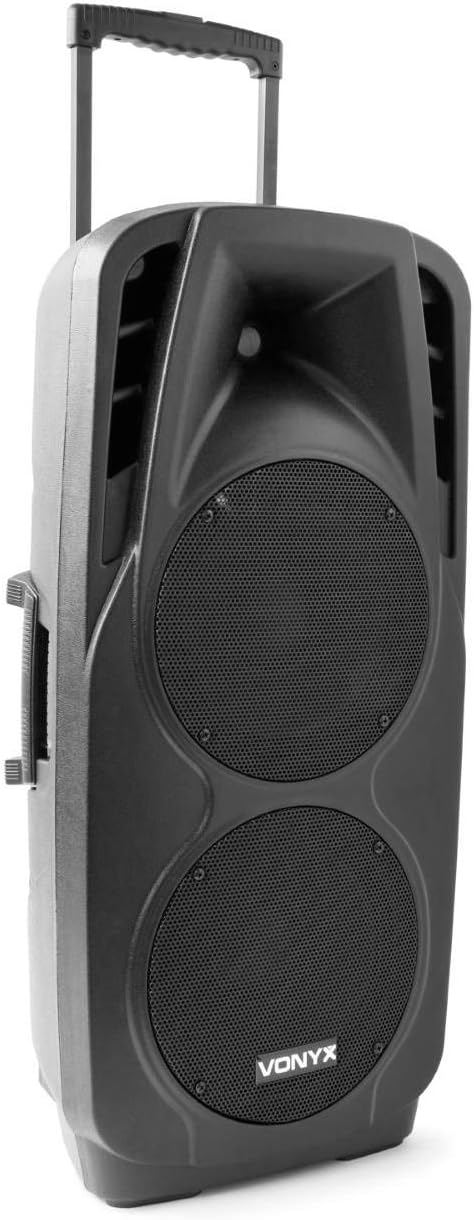
An image showing the VONYX SPX-PA9210 portable PA system. It features a black casing, two large speaker grilles on the front, and a retractable handle at the top for easy transport. A side handle is also visible.
주요 특징:
- Integrated 2x 10-inch speakers with titanium tweeter controller.
- Built-in media player with USB and SD/MMC card slots.
- 무선 오디오 스트리밍을 위한 블루투스 연결 기능.
- High-performance 12V/7A rechargeable battery for 4-6 hours of autonomy.
- Two UHF wireless microphones with up to 50m range.
- Integrated trolley with telescopic handle and wheels for portability.
- LCD screen for media information display.
설정
1. 초기 충전
Before first use, fully charge the internal 12V/7A battery. Connect the provided power adapter to the charging port on the PA system and then to a suitable power outlet. The charging indicator will show the charging status. A full charge typically provides 4-6 hours of operation.
2. 전원 켜기 / 끄기
- To power on the unit, locate the power switch (usually on the rear or control panel) and set it to the "ON" position.
- To power off, set the switch to the "OFF" position.
3. 마이크 설정
- Insert fresh batteries into the two UHF wireless microphones.
- Turn on the microphones. They should automatically connect to the PA system.
- Adjust the microphone volume on the PA system's control panel. The wireless range is up to 50 meters.
작동 지침
1. Media Playback (USB/SD/MMC)
- Insert a USB flash drive or an SD/MMC card into the corresponding slot on the control panel.
- The system will automatically detect the media and begin playback, or you may need to select the input source using the "Mode" button.
- Use the playback controls (Play/Pause, Next, Previous) on the control panel to manage your music.
- The LCD screen will display track information.
2. 블루투스 페어링
- Press the "Mode" button on the PA system until "Mode" button on the PA system until "Bluetooth" is selected.
- 스마트폰, 태블릿 또는 기타 Bluetooth 지원 기기에서 Bluetooth를 활성화하고 사용 가능한 기기를 검색하세요.
- Select "VONYX SPX-PA9210" (or similar name) from the list to pair.
- 페어링이 완료되면 기기에서 PA 시스템으로 오디오를 무선으로 스트리밍할 수 있습니다.
3. 볼륨 및 톤 조절
- Adjust the master volume knob to control the overall sound output.
- Separate volume controls are available for microphones and media playback.
- Use the bass and treble controls (if available) to adjust the tone of the audio.
유지
1. 청소
Wipe the exterior of the unit with a soft, dry cloth. Do not use abrasive cleaners or solvents. Ensure no liquids enter the device.
2. 배터리 관리
- 배터리 수명을 연장하려면 배터리를 자주 완전히 방전하지 마세요.
- Charge the unit regularly, even if not in use, to maintain battery health.
- 장기간 사용하지 않을 때에는 시원하고 건조한 곳에 보관하세요.
문제 해결
- 전원 없음: Ensure the unit is charged or connected to a power source, and the power switch is in the "ON" position.
- 소리 없음: Check all volume controls (master, microphone, media player). Ensure the correct input source is selected. Verify microphone batteries.
- 블루투스가 연결되지 않음: Ensure the PA system is in Bluetooth mode and discoverable. Turn off and on Bluetooth on your device and try pairing again. Move closer to the PA system.
- 왜곡된 소리: Reduce the volume. Check audio cables if using wired inputs. Ensure microphones are not too close to the speakers (feedback).
명세서
| 상표 | 보 닉스 |
| 모델 번호 | Sky-170.082 (SPX-PA9210) |
| 치수(길이 x 너비 x 높이) | 27 x 38.5 x 81cm |
| 무게 | 16.25kg |
| 연결 기술 | 블루투스, USB |
| 권장 제품 사용 | 스마트폰 또는 태블릿 |
| 특별 기능 | Bluetooth, USB Port, Portable, LCD Screen |
| 전원 | Wireless (Internal Battery) |
| 배터리 | 12V/7A, 4-6 hours autonomy |
| 재료 | 아크릴로니트릴 부타디엔 스티렌(ABS) |
| 채널 수 | 5 |
| 스피커 | 2x 10-inch woofers, Titanium tweeter controller |
| 마이크 | 2x UHF Wireless Microphones (up to 50m range) |
보증 및 지원
For warranty information and technical support, please refer to the documentation provided with your purchase or contact VONYX customer service directly.
예비 부품 가용성: 현재 이 제품의 예비 부품 구매 가능 여부에 대한 정보를 얻을 수 없습니다.
소프트웨어 업데이트: Information regarding guaranteed software updates for this product is currently unavailable.


