1. 서론
This manual provides essential information for the safe and efficient operation of your AUXUS iRis AX32LSP01-SM 32-inch Smart Android LED TV. Please read these instructions thoroughly before using the product and retain them for future reference.
The AUXUS iRis AX32LSP01-SM features a 32-inch HD Ready LED display, integrated Android operating system for smart functionality, wireless display capabilities, and multiple connectivity options. It is designed to provide an immersive viewing and interactive experience.

그림 1.1: 전면 view of the AUXUS iRis 32-inch Smart Android LED TV, showcasing가 표시됩니다.
2. 안전 정보
TV 손상을 방지하고 개인 안전을 확보하기 위해 다음 안전 수칙을 준수하십시오.
- 화재나 감전을 예방하려면 TV를 비나 습기에 노출시키지 마세요.
- TV를 열지 마세요asing. 모든 서비스는 자격을 갖춘 담당자에게 의뢰하세요.
- 적절한 환기를 유지하세요. 환기구를 막지 마세요.
- TV가 떨어지는 것을 방지하려면 안정적이고 평평한 표면에 놓으세요.
- 전원 코드가 밟히거나 끼지 않도록 보호하세요.
- 번개가 칠 때나 장기간 사용하지 않을 때는 TV의 플러그를 뽑아 두세요.
3. 패키지 내용
패키지에 모든 품목이 들어 있는지 확인하세요.
- 1 x AUXUS iRis 32-inch LED TV
- 탁상용 스탠드 1세트
- 1 x 사용자 매뉴얼(이 문서)
- 1 x 보증 카드
- 1 x 원격 제어
4. 설정
4.1 풀기
TV와 모든 액세서리를 포장에서 조심스럽게 꺼내십시오. 향후 운송 또는 서비스 시 필요할 수 있으므로 포장재를 보관하십시오.
4.2 스탠드 설치
If using the table-top stand, attach the stand bases to the bottom of the TV using the provided screws. Ensure the stand is securely fastened before placing the TV on a flat, stable surface.
4.3 벽면 장착
The TV supports VESA-compatible wall mounts (not included). Consult a professional for wall mounting to ensure proper installation and safety.
4.4 주변기기 연결하기
Refer to the back panel diagram for port locations. Ensure the TV is powered off before making any connections.
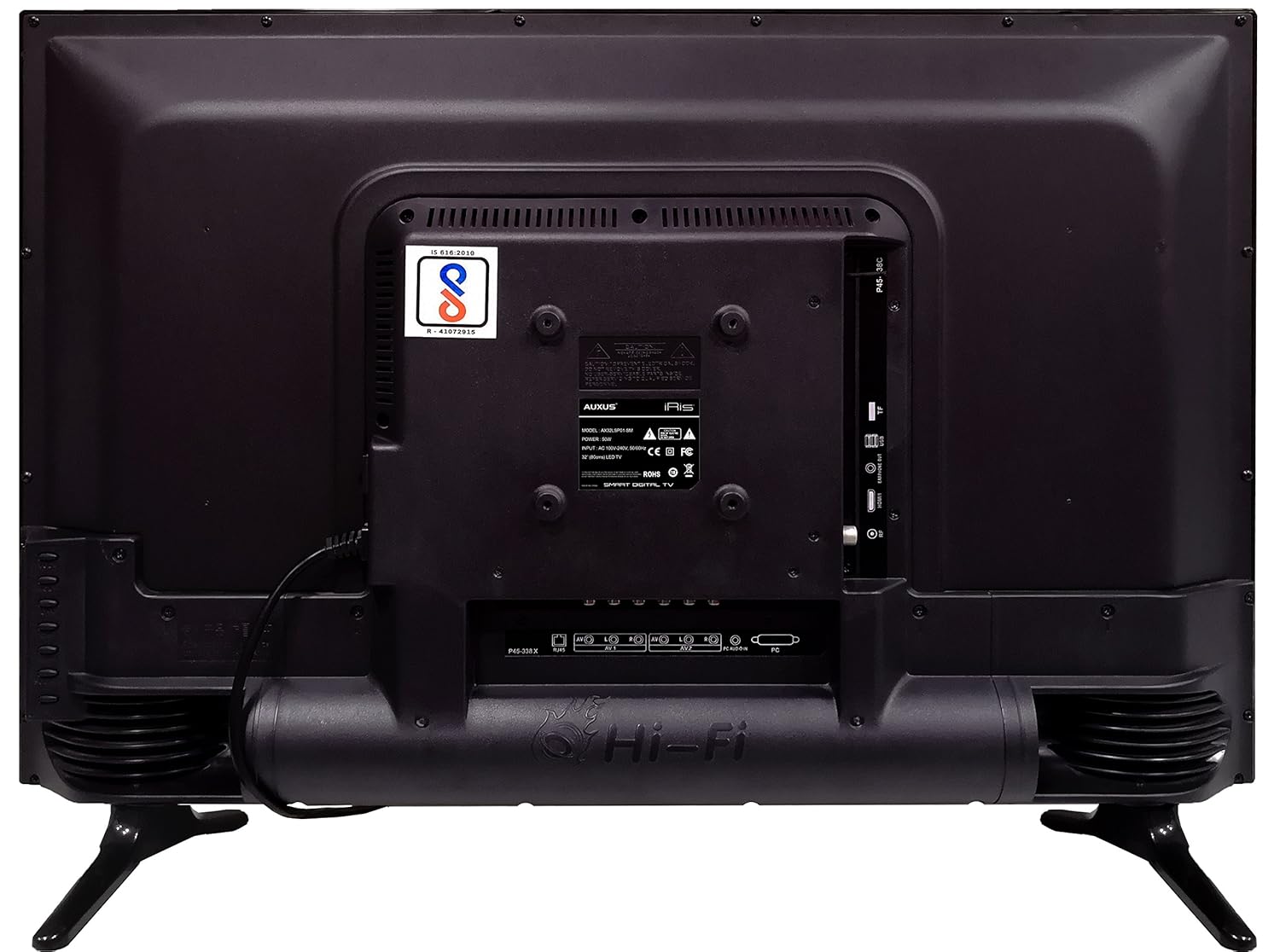
그림 4.1: 다양한 입출력 포트가 있는 TV 후면 패널.

그림 4.2: 상세 view of the bottom interface ports.

Figure 4.3: Icons representing multiple connectivity options.
- 힘: 전원 코드를 TV에 연결한 다음 벽면 콘센트에 연결하세요.
- 안테나/케이블: Connect an antenna or cable TV signal to the RF port.
- USB: Insert USB drives for media playback or software updates into the USB ports. The TV has 2 USB ports.
- 이더넷(RJ45): 유선 인터넷 연결을 위해 이더넷 케이블을 연결합니다.
- AV(오디오/비디오): Use RCA cables for older devices. The TV has AV1 and AV2 inputs.
- PC IN (VGA): Connect a computer using a VGA cable for video and a 3.5mm audio cable for sound (PC AUDIO IN).
- 헤드폰: Connect headphones to the 3.5mm jack for private listening.
5. TV 작동
5.1 첫 번째 설정
- After connecting the power, press the Power button on the remote control or TV.
- 화면 안내에 따라 언어, 국가 및 시간대를 선택하십시오.
- Connect to your network: Choose Wi-Fi and enter your password, or ensure an Ethernet cable is connected.
- Complete the channel scan if connecting an antenna/cable.
5.2 리모컨
The remote control allows you to navigate menus, adjust volume, change channels, and access smart features. Familiarize yourself with its buttons for optimal use.
5.3 스마트 TV 기능(안드로이드 OS)
Your TV runs on the Android operating system, providing access to a variety of applications and internet services.

Figure 5.1: TV displaying a smart interface, such as Netflix.
- 항해: Use the directional pad and 'OK' button on the remote to browse the Android interface.
- 무선 디스플레이: Utilize the built-in wireless display feature to mirror content from compatible smartphones or tablets to your TV.
- Internet Browsing & Apps: Connect to the internet to browse websites or download and use applications from the app store.
- 노름: The Android platform supports various games, offering an adrenaline-pumping gaming experience.
5.4 화면 및 사운드 설정
TV의 설정 메뉴에 접속하여 화면과 사운드 기본 설정을 사용자 지정하세요.
- 그림: Adjust brightness, contrast, color, sharpness, and select picture modes (e.g., Standard, Dynamic, Movie).
- 소리: Optimize audio with settings for volume, balance, equalizer, and sound modes. The TV features 'Boomr Speakers' for enhanced audio output.
5.5 입력 소스 선택
Press the 'Source' or 'Input' button on your remote to switch between connected devices (HDMI 1, HDMI 2, AV 1, AV 2, PC, TV).
6. 유지관리
6.1 TV 청소
- 청소하기 전에는 항상 TV의 플러그를 뽑아 두세요.
- Use a soft, dry cloth to wipe the screen and TV casing.
- For stubborn marks on the screen, use a screen cleaner specifically designed for LED displays, applied to the cloth, not directly to the screen.
- 연마성 세척제, 왁스, 용매 사용을 피하세요.
6.2 소프트웨어 업데이트
최적의 성능을 유지하고 최신 기능을 이용하려면 TV 설정 메뉴를 통해 정기적으로 소프트웨어 업데이트를 확인하십시오.
7. 문제 해결
TV에 문제가 발생하면 다음의 일반적인 문제와 해결 방법을 참조하세요.
| 문제 | 가능한 해결책 |
|---|---|
| 전원이 없습니다 | Check if the power cord is securely connected and the power outlet is working. |
| 화면은 나오지 않지만 소리는 나옵니다 | 올바른 입력 소스가 선택되었는지 확인하세요. 외부 장치와의 케이블 연결을 확인하세요. |
| 소리는 나지 않지만 화면은 나옵니다 | 볼륨 레벨과 음소거 상태를 확인하십시오. 오디오 케이블 연결 상태를 확인하십시오. |
| 리모컨이 작동하지 않습니다 | 배터리를 교체하세요. 리모컨과 TV 사이에 장애물이 없는지 확인하세요. |
| Android system hangs or is slow | Restart the TV by unplugging it for a few minutes. Close unused applications. |
| 네트워크 연결 문제 | Check Wi-Fi password or Ethernet cable connection. Restart your router. |
8. 사양
| 특징 | 사양 |
|---|---|
| 상표 | 옥서스 |
| 모델명 | AX32LSP01-SM |
| 화면 크기 | 32 인치 (82cm) |
| 디스플레이 기술 | LED, IPS 패널 |
| 해결 | HD 지원(1366 x 768p) |
| View잉 각도 | 178도 |
| 운영 체제 | 기계적 인조 인간 |
| 디지털 저장 용량 | 8GB (XNUMX기가바이트) |
| 숫양 | 1GB (XNUMX기가바이트) |
| 오디오 출력 모드 | Surround (Boomr Speakers) |
| HDMI 포트 | 다수의 |
| USB 포트 | 2 |
| 연결 기술 | Ethernet, Wi-Fi (Wireless Display) |
| 기타 포트 | AV (RCA), PC IN (VGA), PC Audio In, Headphone (3.5mm), RF (Antenna) |
| 장착 유형 | Wall Mount / Table Top Stand |
| 제품 크기(LxWxH) | 84 x 13 x 59cm |
| 품목 무게 | 6.5kg |
9. 보증 및 지원
Your AUXUS iRis AX32LSP01-SM TV comes with a warranty. Please refer to the included Warranty Card for specific terms, conditions, and duration of the warranty coverage.
For technical support, service requests, or further inquiries, please contact AUXUS customer service. Contact details can typically be found on the warranty card or the official AUXUS web대지.


