1. 서론
The Pyle PPHP1537UB is a versatile 15-inch powered PA loudspeaker system designed for robust sound reproduction. It features a built-in amplifier, Bluetooth wireless streaming, and multiple input options, making it suitable for various audio applications. This manual provides detailed instructions to ensure optimal performance and longevity of your device.
주요 특징:
- High-Quality Sound Reproduction: Equipped with a 15-inch woofer and 1.75-inch tweeter for a full audio spectrum.
- 블루투스 무선 스트리밍 : Seamlessly connect and stream audio from your Bluetooth-enabled devices.
- 다중 소스 재생: Supports USB flash drives, SD memory cards, AM/FM radio, and Aux-In (3.5mm).
- 통합 믹서: Fully featured 3-channel mixer with adjustable Mic Level, Input Level, Volume, Treble, and Bass controls.
- Audio Recording Ability: Record audio directly to USB or SD card from streamed content or microphone input.
- 다양한 연결성: Multiple input/output options including 1/4'' Microphone Input, 1/4'' Line Output, and XLR Input/Output jacks.
- 휴대성 있는 디자인: Engineered with heavy-duty ABS housing, convenient carry handles, and a 35mm speaker stand mount.
2. 제품 오버view



공식 제품 영상:
3. 설정 가이드
3.1 풀기
Carefully remove all components from the packaging. Verify that all items listed in the 'What's in the Box' section are present. Keep the packaging for future storage or transport.
3.2 전원 연결
- Ensure the speaker's power switch is in the 끄다 위치.
- Connect the included power cable to the AC INPUT port on the rear control panel.
- Plug the other end of the power cable into a standard wall outlet (110V/220V selectable, ensure correct voltage is selected on the unit).
3.3 스피커 배치
- 스피커를 안정적이고 평평한 표면에 놓으세요.
- For optimal sound projection, utilize the built-in 35mm speaker stand mount to elevate the speaker on a compatible stand (sold separately).
- The speaker features convenient carry handles and wheels for easy transport.
3.4 초기 전원 켜기
Once connected to power and placed appropriately, flip the POWER switch on the rear panel to the ON position. The digital display will illuminate, indicating the unit is ready for operation.
4. 사용 설명서
4.1 MP3 Control Digital Display
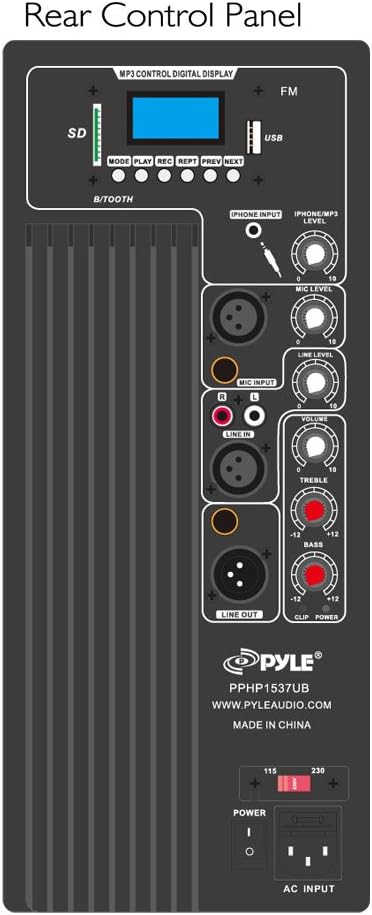
The top section of the rear control panel features a digital display and controls for various media playback options:
- 오시는 길 : Press to cycle through input sources (Bluetooth, USB, SD, FM Radio, Aux).
- 재생/일시 정지: 재생을 시작하거나 일시 중지합니다.
- REC : Initiate audio recording (to USB/SD).
- 보고: 현재 재생 중인 트랙 또는 모든 트랙을 반복 재생합니다.
- 이전/다음: Navigate between tracks or radio stations.
- USB/SD 슬롯: Insert USB flash drives or SD memory cards for MP3 playback and recording.
4.2 블루투스 페어링
- 를 누르세요 방법 button until 'Bluetooth' is selected on the digital display.
- 외부 기기(스마트폰, 태블릿 등)에서 블루투스를 활성화하세요.
- 검색 the Bluetooth network name 'Pyle Speaker' and connect.
- 페어링이 완료되면 스피커로 오디오를 무선으로 스트리밍할 수 있습니다.
4.3 오디오 입력
- Microphone Inputs (1/4'' & XLR): Connect wired microphones or instruments. Adjust 마이크 레벨 for individual microphone volume.
- Aux-In (3.5mm): Connect external audio devices like MP3 players or smartphones using a 3.5mm audio cable.
- RCA (L/R) Stereo Line Input: Connect devices with RCA outputs. Adjust 라인 레벨 for input volume.
4.4개의 오디오 출력
- 1/4'' Line Output & XLR Output: Use these to chain multiple speakers together or connect to other audio equipment.
4.5 사운드 조정
- 음량: 전체 출력을 위한 마스터 볼륨 제어.
- 고음부: Adjusts high-frequency sounds.
- 베이스: Adjusts low-frequency sounds.
- 에코: Adds an echo effect to microphone inputs.
4.6 녹음 기능
The PPHP1537UB allows you to record audio directly to a connected USB flash drive or SD memory card.
- Insert a USB flash drive or SD card into the appropriate slot.
- Ensure your desired audio source (microphone, line-in, or Bluetooth stream) is active.
- 를 누르세요 기록 button on the MP3 control panel to start recording.
- 누르다 기록 again to stop recording. Audio files are saved in .WAV format.
5. 사양
| 특징 | 사양 |
|---|---|
| 최대 전력 출력 | 1200와트 |
| RMS 전원 출력 | 600와트 |
| Ampliifier 클래스 | AB |
| 우퍼 크기 | 15인치 |
| 우퍼 소재 | Stamp에드 스틸 바스켓 |
| 트위터 크기 | 1.75인치 |
| 트위터 소재 | 티탄 |
| 주파수 응답 | 30Hz - 22kHz |
| 블루투스 버전 | 2.1+EDR |
| 블루투스 무선 범위 | 100피트 이상 |
| 디지털 오디오 File 호환성 | MP3, WMA |
| 최대 SD/USB 플래시 메모리 지원 | 32GB |
| 고조파 왜곡 | 1% |
| 신호대잡음비 | 76데시벨 |
| 교차 주파수 | 2.2kHz |
| 권tage 선택 가능 | 110/220V |
| 치수(길이 x 너비 x 높이) | 19.0인치 x 15.7인치 x 29.1인치 |
| 품목 무게 | 39.7 파운드 |
| 하우징 소재 | 고강도 ABS |
6. 유지관리 및 관리
6.1 일반 청소
To maintain the appearance and performance of your speaker, regularly wipe the exterior with a soft, dry cloth. Avoid using harsh chemicals or abrasive cleaners.
6.2 배터리 관리
The PPHP1537UB uses a rechargeable battery. To maximize battery life:
- 충전하기 전에 배터리를 완전히 방전시키지 마세요.
- Charge the unit fully before extended storage.
- If the battery performance degrades significantly over time, it may need to be replaced. Refer to the warranty section or contact customer support for replacement options.
7. 문제 해결
- 전원 없음:
Ensure the power cable is securely connected to both the speaker and a working power outlet. Check the power switch position. Verify the correct voltage (110V/220V) is selected. - 소리 없음:
Check all volume controls (master, mic, line, MP3) and ensure they are not set to minimum. Verify the correct input source is selected (MODE button). Ensure audio cables are properly connected and functional. For Bluetooth, confirm successful pairing. - 블루투스 연결 문제:
Ensure the speaker is in Bluetooth mode. Delete 'Pyle Speaker' from your device's Bluetooth list and attempt to re-pair. Move your device closer to the speaker (within 100 feet). - USB/SD Playback Problems:
USB 드라이브 또는 SD 카드에 호환되는 오디오 파일이 있는지 확인하십시오. files (MP3, WMA). Check that the media is inserted correctly. Try a different USB drive or SD card to rule out media issues. - 왜곡된 소리:
Reduce the volume levels of both the input source and the speaker. Check for damaged cables. Ensure microphone levels are not too high, causing feedback.
8. 보증 및 지원
8.1 보증 정보
This Pyle product typically comes with a 1-year limited warranty. Please refer to the warranty card included in your product packaging for specific terms and conditions. Keep your purchase receipt as proof of purchase.
8.2 고객 지원
For technical assistance, troubleshooting, or warranty claims, please visit the official Pyle web사이트에서 www.pyleaudio.com or contact their customer service department. Have your model number (PPHP1537UB) and purchase details ready.