1. 제품 오버view
The SONICAKE Twiggy Blues is a compact multi-effect pedal designed for guitarists seeking essential blues and retro rock tones. It integrates four core effects: Compressor, Overdrive, Delay, and Reverb, along with a built-in cabinet simulator for direct connection options. This pedal offers a streamlined solution for various playing environments.

Image 1.1: The SONICAKE Twiggy Blues pedal, showcasing its compact design and integrated effects.
2. 설정
Follow these steps to set up your Twiggy Blues pedal:
- 전원 연결: Connect a standard 9V DC power adapter (center negative) to the "DC 9V" input jack on the pedal. Ensure the power source provides stable and clean power to prevent noise.
- 기기 입력: 표준 1/4인치 악기 케이블을 사용하여 페달 오른쪽의 "IN" 잭에 기타를 연결합니다.
- 출력 연결: 페달 왼쪽에 있는 "OUT" 잭을 연결하세요. amplifier's input or an audio interface/mixer using a standard 1/4-inch instrument cable.
- 캐비닛 시뮬레이션: If connecting directly to a PA system, mixer, or audio interface, ensure the "CABINET SIM" switch is set to "ON". If connecting to a guitar amplifier, set the switch to "OFF" to bypass the cabinet simulation.

Image 2.1: Proper connection of the Twiggy Blues pedal to a guitar and an amp리퍼.
3. 사용 설명서
The Twiggy Blues pedal features four footswitches, each activating a specific effect module. Each module has dedicated control knobs with LED indicators to show the active status.

Image 3.1: Labeled components of the Twiggy Blues pedal.
3.1. 구성 요소 식별
- DC 9V 입력: 전원 어댑터 연결.
- IN 잭: 기타 입력.
- Cabinet Simulation Switch: Toggles cabinet simulation ON/OFF.
- 출력 잭: 출력 amplifier 또는 오디오 시스템.
- COMP Footswitch & Knobs: Activates/deactivates Compressor effect. Knobs control Volume and Compression level.
- BLUES Footswitch & Knobs: Activates/deactivates Overdrive effect. Knobs control Volume, Tone, and Gain.
- SLAPBACK Footswitch & Knobs: Activates/deactivates Delay effect. Knobs control Blend, Repeat, and Time.
- AIR Footswitch & Knob: Activates/deactivates Reverb effect. Knob controls Mix level.
3.2. 이펙트 모듈
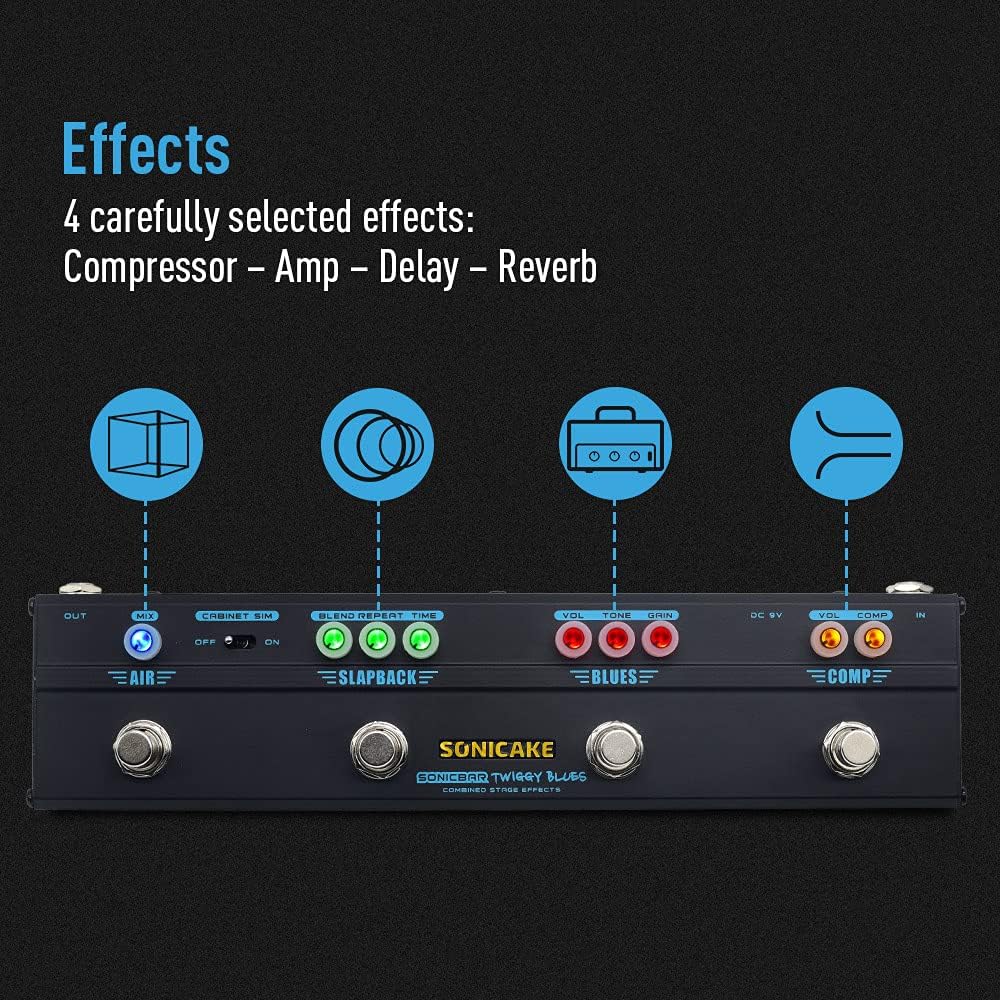
이미지 3.2: 이상view of the four integrated effects.
3.2.1. Compressor (COMP)
The Compressor module provides a smooth and sustained tone. Use the footswitch to engage or bypass the effect.
- VOL : Adjusts the overall output volume of the compressor.
- 비교: Controls the amount of compression applied to the signal. Higher settings result in more sustain and a more even dynamic range.
3.2.2. Overdrive (BLUES)
The BLUES module simulates a vintage Dumble-style tube amplifier, offering a range of overdrive tones suitable for blues and classic rock. Engage with its dedicated footswitch.
- VOL : Sets the output volume of the overdrive effect.
- 음정: 어두운 색에서 밝은 색까지 색조를 조절합니다.
- 이득: Controls the amount of distortion or saturation. Lower settings provide a subtle breakup, while higher settings yield more aggressive overdrive.
3.2.3. Delay (SLAPBACK)
The SLAPBACK module provides an analog-voiced delay effect, ideal for adding depth and rhythmic repeats. Activate using its footswitch.
- 혼합하다: Controls the mix between the dry signal and the delayed signal.
- 반복하다: 지연 반복 횟수를 조정합니다.
- 시간: Sets the delay time, from short slapback echoes to longer repeats (up to 500ms).
3.2.4. Reverb (AIR)
The AIR module offers a high-quality reverb effect to add spaciousness to your sound. Engage with its footswitch.
- 혼합: 원음 신호에 섞이는 리버브의 양을 조절합니다.
3.3. 캐비닛 시뮬레이션
The built-in cabinet simulation allows for direct connection to a PA system, mixer, or audio interface, providing a guitar cabinet-like sound without needing an amplifier. Use the toggle switch to activate or deactivate this feature.

Image 3.3: The Cabinet Simulation switch for direct output.
3.4. LED 표시기
Each effect module features LED indicators around its control knobs. These LEDs illuminate when the corresponding effect is active, providing clear visual feedback on the pedal's status during use.
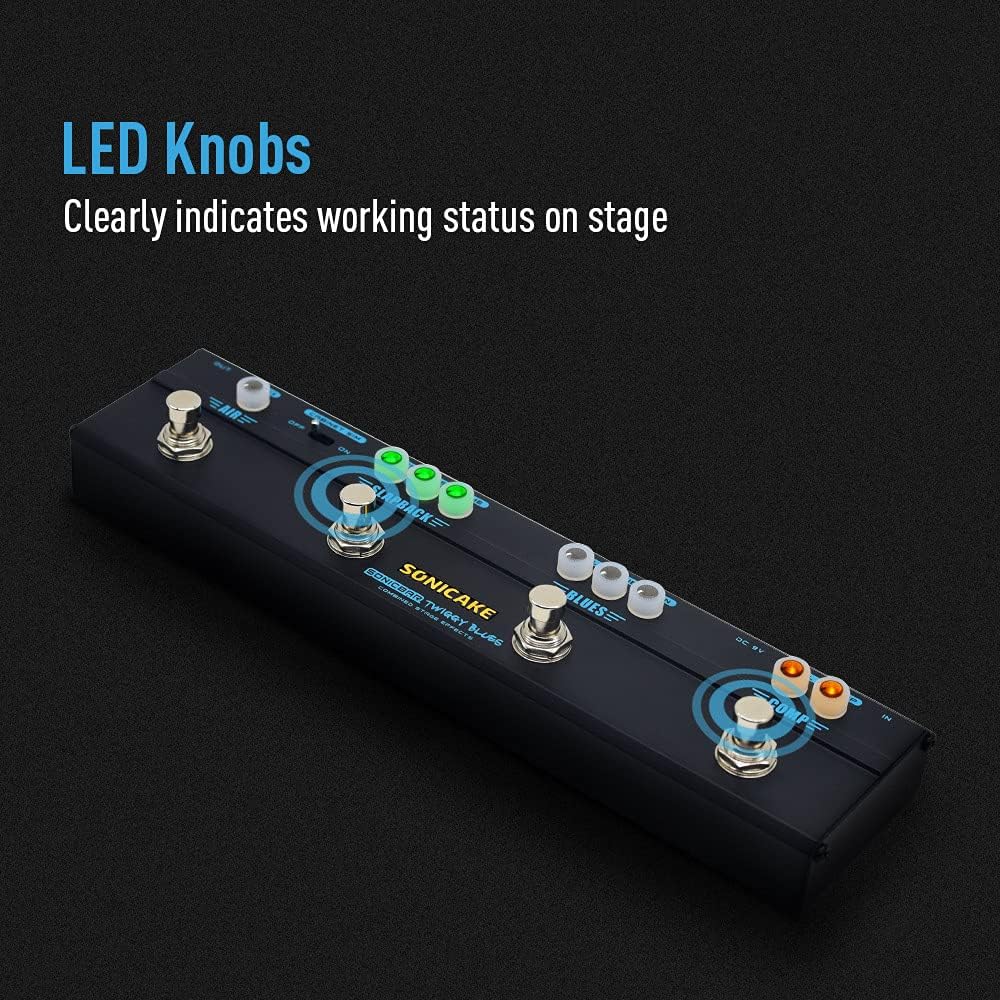
Image 3.4: LED knobs indicating active effects.
4. 유지관리
Proper maintenance ensures the longevity and optimal performance of your Twiggy Blues pedal.
- 청소: Use a soft, dry cloth to clean the pedal's surface. Avoid abrasive cleaners or solvents, which can damage the finish or internal components.
- 저장: Store the pedal in a dry environment, away from extreme temperatures, humidity, and direct sunlight. When not in use for extended periods, disconnect the power adapter.
- 사이: 모든 케이블 연결 부위의 마모나 손상을 주기적으로 점검하세요. 잭에 먼지나 이물질이 없는지 확인하세요.
5. 문제 해결
If you encounter issues with your Twiggy Blues pedal, refer to the following common troubleshooting steps:
- 소리 없음:
- 모든 케이블(입력, 출력, 전원)이 단단히 연결되어 있는지 확인하십시오.
- Verify the power adapter is functioning correctly and providing 9V DC (center negative).
- 기타와 amp증폭기는 독립적으로 작동합니다.
- Ensure the volume knobs on the pedal and your amplifier are not set to zero.
- 원치 않는 소음/윙윙거림:
- Use a high-quality, regulated 9V DC power supply specifically designed for guitar pedals.
- 모든 케이블이 차폐되어 있고 상태가 양호한지 확인하세요.
- Try isolating the pedal from other electronic devices that might cause interference.
- 효과가 나타나지 않음:
- Press the footswitch firmly to ensure it engages. The LED indicator should light up.
- Check the knob settings for the specific effect; some effects may be subtle at low settings.
If problems persist, contact SONICAKE customer support for further assistance.
6. 사양
| 특징 | 사양 |
|---|---|
| 모델 번호 | QCE-10-40 |
| 품목 무게 | 0.48킬로그램(1.06파운드) |
| 제품 치수 | 길이 10.31인치 x 너비 1.73인치 x 높이 2.52인치 (26.19cm x 4.39cm x 6.40cm) |
| 본체 소재 | 금속 |
| 전원 | 코드식 전기 |
| 권tage | 9볼트 직류 |
| 신호 형식 | 비슷한 물건 |
| 하드웨어 인터페이스 | 3.5mm Audio (likely referring to internal components or specific connections, standard guitar jacks are 1/4 inch) |
| 커넥터 유형 | 3.5 mm audio (likely referring to internal components or specific connections, standard guitar jacks are 1/4 inch) |
7. 보증 및 지원
For warranty information, product registration, or technical support, please visit the official SONICAKE web사이트에서 확인하거나 고객 서비스에 직접 문의하세요. 구매 증빙 자료로 구매 영수증을 보관하세요.
SONICAKE Official Web대지: 아마존의 SONICAKE 스토어를 방문하세요.


