소개
The DigiTech TRIO Band Creator Pedal is an innovative device designed to automatically generate bass and drum parts that complement your guitar playing. It listens to your chords and rhythm, then creates a virtual band to accompany you. This manual provides detailed instructions for setting up, operating, maintaining, and troubleshooting your TRIO pedal.
The TRIO offers seven distinct music genres and twelve song styles within each genre, allowing for versatile musical accompaniment. It supports both 3/4 and 4/4 time signatures.
제품 끝view
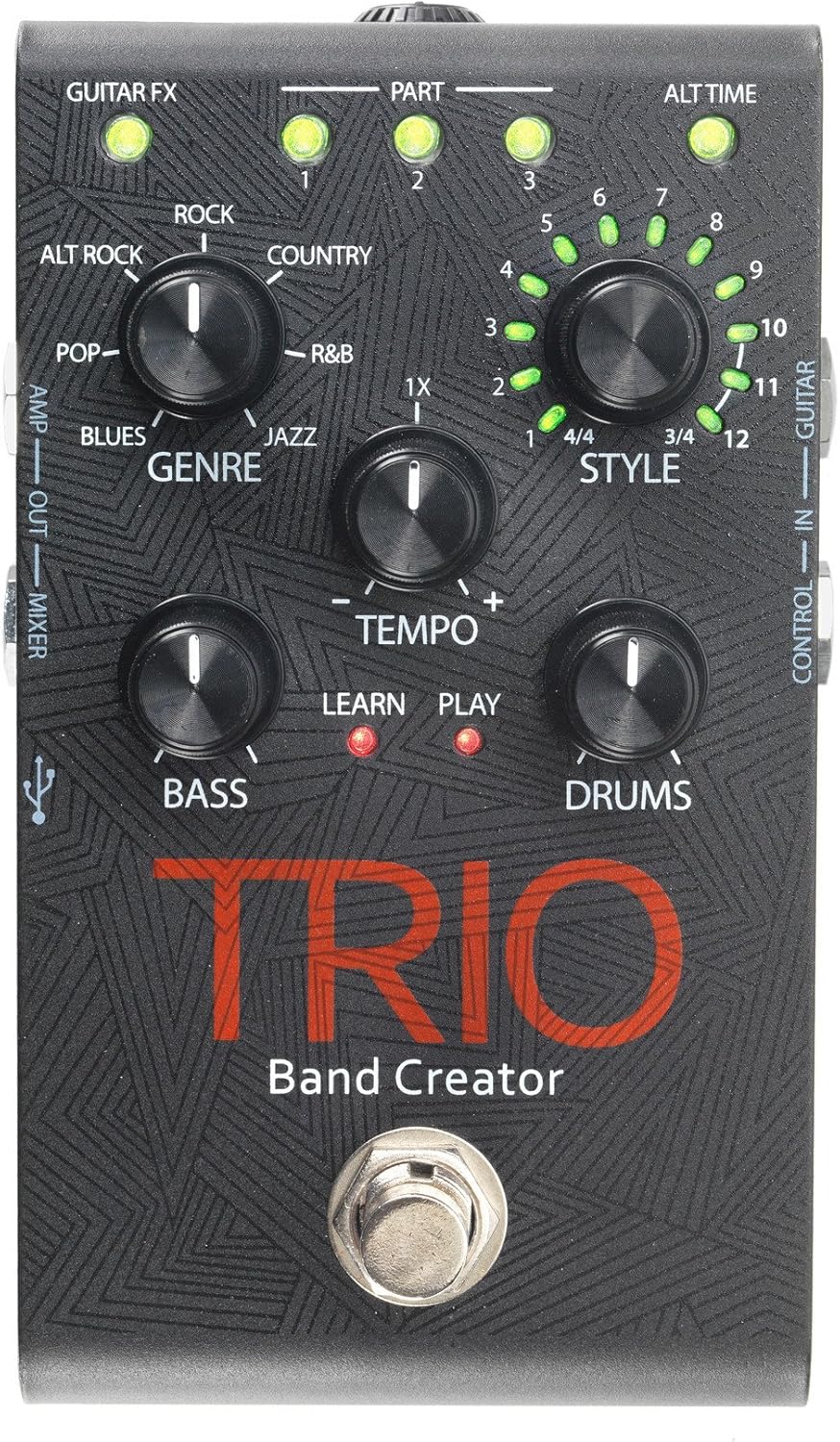
Figure 1: DigiTech TRIO Band Creator Pedal Front Panel. This image displays the pedal's layout, including the Genre, Style, Tempo, Bass, and Drums knobs, the footswitch, and various LED indicators and input/output jacks.
The TRIO pedal features a robust design with intuitive controls. Key components include:
- Genre Knob: Selects one of seven music genres (Blues, Pop, Alternative Rock, Rock, Country, R&B, Jazz).
- 스타일 조절 노브: Chooses from twelve song styles within the selected genre, and also indicates 3/4 or 4/4 time signatures.
- Tempo Knob: Adjusts the playback speed of the generated band.
- 베이스 노브: Controls the volume level of the generated bass line.
- Drums Knob: Controls the volume level of the generated drum track.
- 풋스위치: Used for teaching the pedal your song, starting/stopping playback, and switching song parts.
- LED 표시등: Provide visual feedback for Guitar FX, Part (1, 2, 3), Alt Time, Learn, and Play status.
- 입력/출력 잭: Include Guitar In, Control In, Amp Out, Mixer Out, and Headphone Out.
- USB 포트: 펌웨어 업데이트용.
설정
Before using your DigiTech TRIO pedal, ensure all connections are made correctly.
- 전원 연결: Connect the included 9V DC power supply (300mA minimum) to the TRIO's power input jack. Plug the power supply into a standard AC outlet.
- 기타 입력: 기타를 연결하십시오. 기타 인 jack on the TRIO pedal using a standard 1/4-inch instrument cable.
- 출력 Amp리파이어/믹서:
- 기타에 연결하기 위해 amplifier, use the AMP 밖으로 jack. This output includes your guitar signal and is optimized for guitar amps.
- For connecting to a mixing console, PA system, or headphones, use the 믹서 아웃 jack. This output provides a full-range signal suitable for these devices.
- 헤드폰 출력: 개인 연습을 위해 헤드폰을 연결하세요. 헤드폰 출력 jack. Adjust the headphone level using the dedicated control.
- Optional Footswitch (DigiTech FS3X): If using an optional FS3X footswitch for extended control, connect it to the 컨트롤 인 잭.
Ensure all cables are securely connected before powering on your amplifier 또는 오디오 시스템.
작동 지침
Basic Operation: Creating a Song
- 장르를 선택하세요: 켜다 장르 knob to choose your desired musical style (e.g., Rock, Blues, Jazz).
- 스타일 선택: 켜다 스타일 knob to select a specific song style within the chosen genre. The LEDs around the knob indicate the style number (1-12) and the time signature (3/4 or 4/4).
- Teach the TRIO:
- Press the TRIO's footswitch once. The 배우다 LED will illuminate red.
- Play your guitar chords and rhythm for the first section of your song. Play clearly and consistently for 4-8 measures.
- Press the footswitch again to stop teaching. The 배우다 LED will turn off, and the 놀다 LED will illuminate red. The TRIO will then generate and play the bass and drum parts based on what you played.
- Play with the Band: Once the band starts playing, you can play along with your guitar.
고급 기능
- 템포 조절하기: 사용하세요 속도 knob to increase or decrease the speed of the generated band.
- Adjusting Bass and Drum Levels: 사용하세요 베이스 그리고 드럼 knobs to set the individual volume levels of the bass and drum parts relative to your guitar.
- Song Parts: The TRIO can learn up to three distinct song parts. After teaching the first part, press the footswitch twice quickly to enter "Part 2" learn mode, and three times for "Part 3". You can then switch between these parts during playback by pressing the footswitch. The PART 1, 2, 3 LEDs indicate the active part.
- Alternate Time: Some styles offer an "Alternate Time" option (e.g., half-time or double-time). The 대체 시간 LED will illuminate when this option is available and active.
- Guitar FX: 그만큼 GUITAR FX LED indicates if the TRIO is applying a subtle guitar effect (e.g., compression, chorus) to your signal, which is often genre-dependent.
- Using the FS3X Footswitch: The optional DigiTech FS3X footswitch provides hands-free control over various functions, such as cycling through song parts, stopping/starting playback, and more. Refer to the FS3X manual for detailed usage.
유지
Proper care will ensure the longevity and optimal performance of your DigiTech TRIO pedal.
- 청소: 페달 외부를 닦을 때는 부드럽고 마른 천을 사용하십시오. 연마성 세척제, 용제 또는 왁스는 마감재와 내부 부품을 손상시킬 수 있으므로 사용하지 마십시오.
- 저장: 장기간 사용하지 않을 경우, 페달을 직사광선과 극한 온도 변화를 피해 서늘하고 건조한 곳에 보관하십시오.
- 전원 공급 장치: 반드시 지정된 9V DC 전원을 사용하십시오. 잘못된 전원을 사용하면 제품이 손상되고 보증이 무효화될 수 있습니다.
- 사이: 주기적으로 모든 케이블 연결부의 마모 및 손상 여부를 점검하십시오. 신호 손실이나 단락을 방지하기 위해 손상된 케이블은 교체하십시오.
문제 해결
If you encounter issues with your TRIO pedal, refer to the following common problems and solutions:
| 문제 | 가능한 원인 | 해결책 |
|---|---|---|
| 페달에서 소리가 나지 않습니다. | Incorrect power supply; loose cables; incorrect input/output connections. | Ensure correct 9V DC power supply is used and connected. Check all instrument cables are securely plugged into the correct jacks (Guitar In, Amp Out/Mixer Out). Verify amplifier/mixer is on and volume is up. |
| Band not generating or sounds incorrect. | Poor "teaching" performance; incorrect genre/style selected; low input signal. | Ensure you play clearly and consistently during the "Learn" phase. Try re-teaching the song part. Experiment with different Genres and Styles. Ensure your guitar's volume is adequate. |
| Bass or Drums are too loud/quiet. | Bass/Drums knob setting. | 조정하다 베이스 그리고 드럼 knobs to your desired levels. |
| Tempo is too fast/slow. | Tempo knob setting. | 조정하다 속도 knob to increase or decrease the playback speed. |
| LEDs not illuminating. | No power; pedal malfunction. | Check power connection. If power is confirmed and LEDs still don't light up, contact customer support. |
명세서
| 특징 | 세부 사항 |
|---|---|
| 모델 번호 | TRIOV01 |
| 품목 무게 | 1.32파운드 |
| 패키지 크기 | 17.24 x 9.25 x 6.5 인치 |
| 색상 | 검은색 |
| 하드웨어 인터페이스 | HP-HSC |
| 신호 형식 | 비슷한 물건 |
| 전원 | 코드식 전기 |
| 권tage | 9 볼트 |
| Amp에라 지 | 300밀리amps |
보증 및 지원
보증 정보 및 기술 지원에 대해서는 DigiTech 공식 웹사이트를 참조하십시오. web사이트를 방문하거나 고객 서비스 부서에 문의하세요. 보증 청구에 대비해 구매 증빙 자료로 구매 영수증을 보관하세요.
You can often find additional resources, FAQs, and firmware updates on the manufacturer's support pages.


