소개
The Reloop RP-7000 MK2 is a professional direct-drive turntable system designed for DJs and audiophiles. Engineered for club environments, it features a robust construction and precise motor control, offering exceptional performance and reliability.
주요 특징:
- Built for the Club: Heavy-duty housing structure with additional reinforcement using metal, rubber, and plastic elements.
- Refined Motor Control: Further reduction of synchronization fluctuations and adjustable starting torque (2.8 - 4.5 kg/cm).
- Newly Designed Tonearm Base: Height-adjustable (VTA) tonearm base with satin-finished, low-resonance tonearm material.
- Improved Pitch Section and Connections: Precisely readable pitch scale and optional ground connection for added protection in club environments.
- 고품질 디자인: Elegant and discreet finish in deep metallic black and easily replaceable, rotatable LED needle illumination.
1. 설정
1.1 포장 풀기 및 초기 검사
Carefully remove all components from the packaging. Inspect the turntable and accessories for any signs of damage during transit. Retain the original packaging for future transport or storage.
1.2 포함된 구성 요소
The Reloop RP-7000 MK2 package includes:
- Reloop RP-7000 MK2 턴테이블 유닛
- Universal attachment for pick-up cartridge systems (PMI)
- Reloop Headshell
- Pick-up (stylus/cartridge not included, sold separately)
- 전원 케이블
- RCA 케이블
1.3 배치 및 연결
Place the turntable on a stable, level surface away from direct sunlight, heat sources, and excessive vibrations. Ensure adequate ventilation around the unit.

Figure 1: Reloop RP-7000 MK2 Turntable overview. This image shows the complete turntable unit, highlighting its robust design and key components like the platter, tonearm, and control buttons.
Connect the turntable to your audio system using the provided RCA cables. The RP-7000 MK2 features 2 x RCA connections. Connect the RCA output from the turntable to the PHONO input of your mixer or amplifier. If your mixer/amplifier does not have a PHONO input, you can use the built-in phono pre-amp by setting the switch on the rear panel to "LINE" and connecting to a standard line input.
Ensure the ground wire (if present and separate) is connected to the ground terminal on your mixer or amplifier to minimize hum and noise.

Figure 2: Rear connections of the Reloop RP-7000 MK2. This image illustrates the RCA output ports and the power input, crucial for connecting the turntable to an audio system.
Finally, connect the power cable to the turntable and then to a suitable power outlet (230 Volt AC).
2. 사용 설명서
2.1 Power On/Off and Basic Playback
To power on the turntable, rotate the power knob located on the top left of the unit. The platter illumination will light up. Place a record on the platter and select the appropriate speed (33, 45, or 78 RPM) using the speed selection buttons.
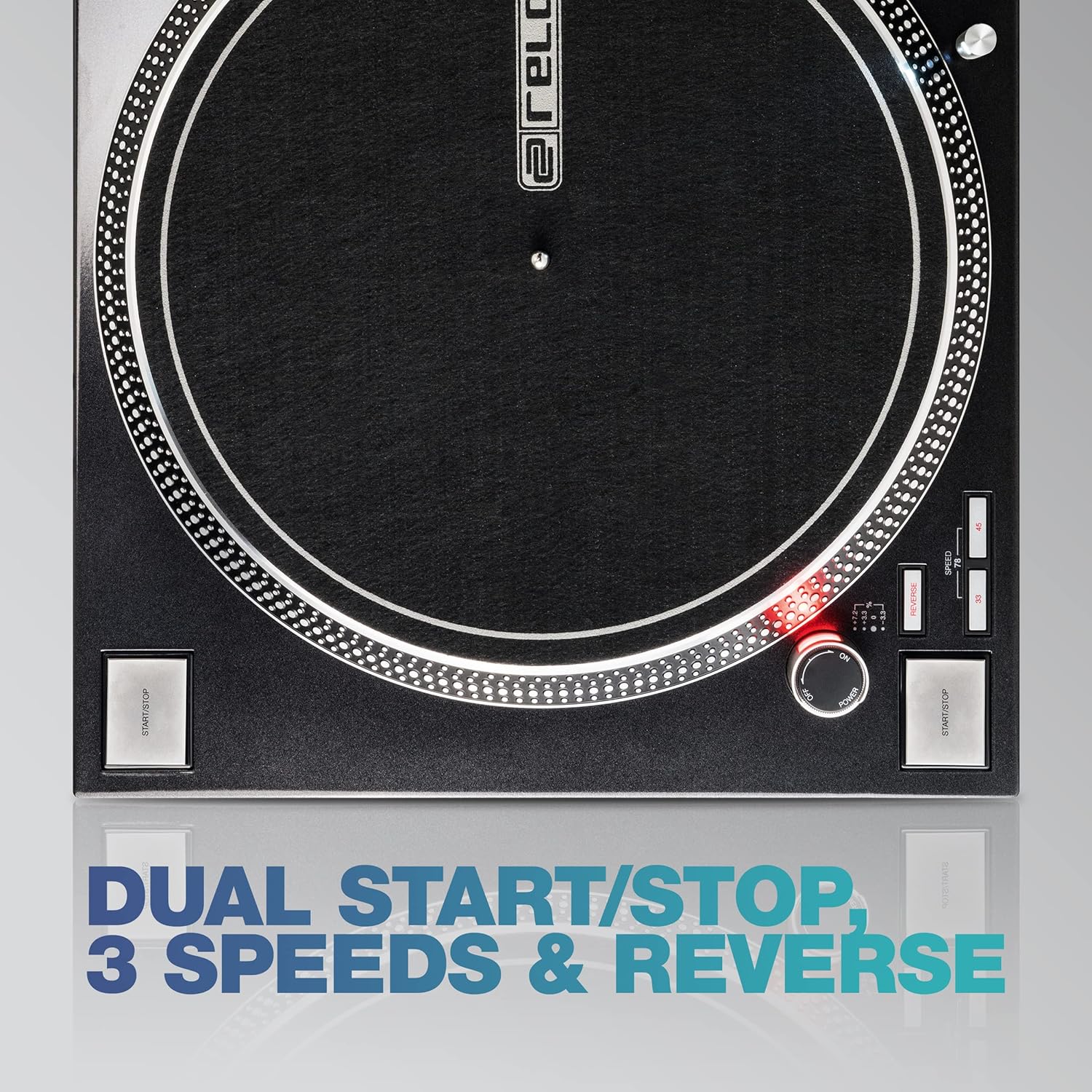
Figure 3: Close-up of speed selection and start/stop buttons. This image highlights the controls for adjusting playback speed and initiating/stopping the platter rotation, including the dual start/stop buttons for flexible setup.
다음 중 하나를 누르십시오. 시작/중지 buttons to begin platter rotation. Gently lower the tonearm onto the record using the cueing lever. To stop playback, lift the tonearm and press a 시작/중지 단추.
2.2 고급 제어
- 피치 컨트롤: Use the pitch slider to adjust the playback speed within a specified range. The RP-7000 MK2 offers precise pitch adjustment for beatmatching.
- Torque and Brake Adjustment: The turntable features adjustable starting torque (2.8 - 4.5 kg/cm) and brake speed. These can be fine-tuned to your preference for quick starts and stops, essential for DJing.
- 역방향 기능: Activate the reverse function for creative playback effects.
- Tonearm Height Adjustment (VTA): The tonearm base allows for Vertical Tracking Angle (VTA) adjustment. This feature enables precise alignment of the stylus with the record groove, optimizing sound quality and minimizing record wear.

Figure 4: Close-up of the S-shaped tonearm and VTA adjustment. This image details the tonearm assembly, showing the counterweight, anti-skate dial, and the VTA adjustment ring, which allows for precise calibration of the stylus angle.

Figure 5: Hands-on operation of the Reloop RP-7000 MK2. This image captures a DJ interacting with the turntable, demonstrating the ergonomic placement of controls for seamless mixing and scratching.
3. 유지관리
3.1 청소
Regular cleaning will ensure the longevity and optimal performance of your turntable.
- Chassis and Platter: Wipe the surface of the turntable and platter with a soft, dry, lint-free cloth. For stubborn marks, a slightly damp 천을 사용하여 세척 후 바로 말리세요. 연마성 세척제나 용제는 사용하지 마세요.
- 첨필: Use a dedicated stylus brush to gently clean the stylus tip. Always brush from back to front to avoid damaging the cantilever. Clean the stylus regularly to prevent dust and debris buildup, which can degrade sound quality and damage records.
- Dust Cover (if applicable): If you have an optional dust cover, clean it with a soft, damp 옷감.
3.2 일반 관리
- Always handle records by their edges to prevent fingerprints and dirt.
- When not in use, ensure the tonearm is secured in its rest and the stylus guard is in place.
- Avoid exposing the turntable to extreme temperatures, humidity, or direct sunlight.
4. 문제 해결
If you encounter issues with your Reloop RP-7000 MK2, refer to the following common problems and solutions:
| 문제 | 가능한 원인 | 해결책 |
|---|---|---|
| 소리가 나지 않거나 볼륨이 작음 | 잘못된 연결, amplifier/mixer input not selected, damaged stylus/cartridge. | Check RCA cable connections. Ensure the PHONO/LINE switch on the turntable is set correctly. Verify the correct input is selected on your amplifier/mixer. Inspect stylus and cartridge for damage. |
| 윙윙거리는 소리 | Grounding issue, interference from other electronics. | 접지선이 턴테이블과 본체에 제대로 연결되어 있는지 확인하십시오. amplifier/mixer. Try relocating the turntable away from other electronic devices. Check for loose connections. |
| 소리가 끊기거나 왜곡됨 | Dirty or worn stylus, incorrect tracking force, damaged record. | Clean the stylus. Adjust the tracking force according to your cartridge's specifications. Inspect the record for scratches or debris. Ensure the turntable is on a stable surface. |
| 접시가 회전하지 않음 | No power, START/STOP button not pressed, motor fault. | Check power cable connection and power outlet. Ensure the power knob is turned on. Press a START/STOP button. If the issue persists, contact customer support. |
If the problem persists after attempting these solutions, please contact Reloop customer support or your authorized dealer for further assistance.
5. 사양
Below are the technical specifications for the Reloop RP-7000 MK2 Professional DJ Turntable:
| 특징 | 세부 사항 |
|---|---|
| 제품 치수 | 53.34 x 43.18 x 17.78cm |
| 품목 무게 | 11.2 킬로그램 |
| 모델 번호 | AMS-RP-7000-MK2 |
| 본체 소재 | Metal, Technopolymer (rear part) |
| 호환 주변기기 | 스피커, Amp리퍼, 믹서 |
| 커넥터 유형 | RCA 2 개 |
| 파워 타입 | 코드식 전기 |
| 권tage | 230볼트(AC) |
| 특별 기능 | Powerful direct drive motor, statically balanced S-shaped tonearm, heavy body design, additional start/stop button, special keys for forward and reverse mode. |
6. 보증 및 지원
Reloop products are manufactured to high quality standards and come with a manufacturer's warranty. The specific terms and duration of the warranty may vary by region and retailer. Please refer to the warranty card included with your product or consult the retailer from whom you purchased the unit for detailed warranty information.
For technical support, service, or spare parts, please contact your authorized Reloop dealer or visit the official Reloop website for support resources and contact information. When contacting support, please have your product model number (AMS-RP-7000-MK2) and serial number ready.
자세한 내용은 다음을 방문하세요. Reloop official web대지.


