제품 끝view
The ARGOM TECH Combat Gaming Mouse is designed for an enhanced gaming experience, featuring a robust structure, ergonomic design, and dynamic lighting. It offers precise control and comfort for extended use.
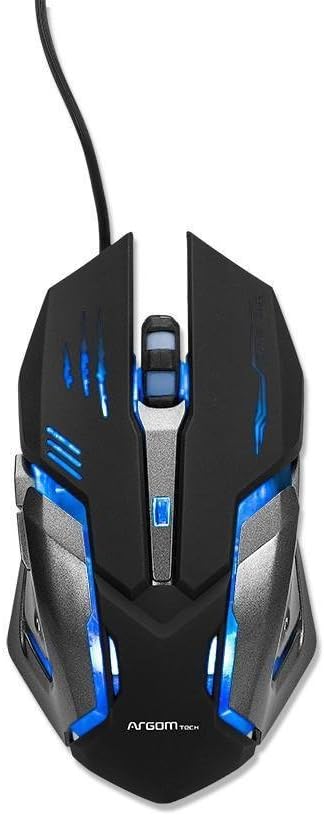
그림 1: 상단 view of the Combat Gaming Mouse, highlighting its illuminated design and USB connection.
주요 특징:
- Robust structure and ergonomic design for gamers. Background rainbow changing light.
- Plug & Play compatible with most Operating Systems.
- DPI switch (1000/1200/1600/2400 DPI) for adjustable sensitivity.
- Built-in weighted Iron Plate for enhanced stability.
- 1.5m extra long and durable braided USB cable.
설치 가이드
- 마우스 풀기: Carefully remove the Combat Gaming Mouse from its packaging.
- 컴퓨터에 연결: 컴퓨터에서 사용 가능한 USB 포트를 찾으세요. 마우스의 USB 커넥터를 해당 USB 포트에 단단히 꽂으세요.
- 드라이버 설치(플러그 앤 플레이): The mouse is designed for Plug & Play functionality. Your operating system (Windows, macOS, Linux, etc.) should automatically detect and install the necessary drivers. This process typically takes a few seconds.
- 기능 확인: Once connected, the mouse's rainbow lights should illuminate, indicating it is powered on. Move the mouse to confirm cursor movement on your screen.
기본 기능을 사용하기 위해 추가 소프트웨어를 설치할 필요가 없습니다.
작동 지침
DPI 조정:
The Combat Gaming Mouse features a dedicated DPI switch button, usually located behind the scroll wheel. Pressing this button allows you to cycle through different sensitivity settings:
- 1000DPI(기본값)
- 1200DPI
- 1600DPI
- 2400DPI
Adjusting the DPI allows you to change the cursor speed to suit your preference for different tasks, from precise aiming in games to fast navigation on the desktop.
조명 효과:
The mouse features a background rainbow changing light effect, which activates automatically upon connection. This provides an aesthetic enhancement to your gaming setup.
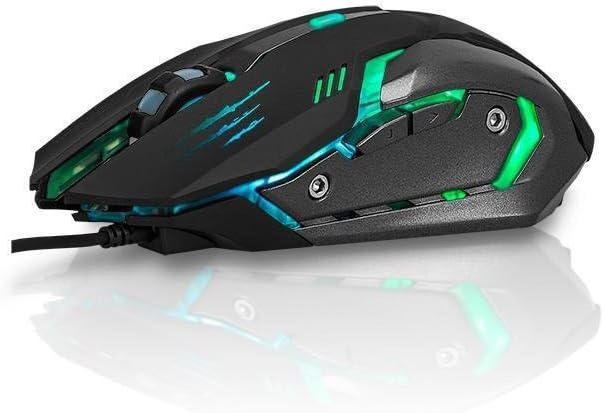
그림 2: 측면 view of the Combat Gaming Mouse, illustrating its ergonomic design and dynamic lighting.
유지
To ensure the longevity and optimal performance of your Combat Gaming Mouse, follow these simple maintenance guidelines:
- 청소: 부드럽고 마른 보풀 없는 천을 사용하여 마우스 표면을 닦으세요. 잘 지워지지 않는 오염의 경우, 가볍게 두드리세요.amp천에 물이나 순한 세척액을 묻힌 후 즉시 닦아 말리세요. 강한 화학 물질이나 연마재는 사용하지 마세요.
- 센서 관리: Keep the optical sensor on the underside of the mouse clean and free from dust or debris. A cotton swab can be used gently if needed.
- 케이블 관리 : 손상을 방지하려면 USB 케이블을 급격하게 구부리거나 과도하게 당기지 마세요.
- 저장: 장기간 사용하지 않을 경우, 마우스를 깨끗하고 건조한 곳에 보관하고 극한 온도는 피하십시오.
문제 해결
| 문제 | 가능한 원인 | 해결책 |
|---|---|---|
| 마우스가 반응하지 않음 / 커서가 움직이지 않음. |
|
|
| 조명이 꺼져 있습니다. |
|
|
| 커서 이동이 불규칙적입니다. |
|
|
명세서
| 특징 | 세부 사항 |
|---|---|
| 모델 번호 | A00251 |
| 상표 | ARGOM TECH |
| 연결 기술 | USB(유선) |
| 움직임 감지 기술 | 광학 |
| DPI 설정 | 1000 / 1200 / 1600 / 2400 DPI |
| 케이블 길이 | 1.5미터(브레이드) |
| 색상 | 검은색 |
| 제품 크기(L x W x H) | 7.48 x 2.36 x 5.51 인치 |
| 품목 무게 | 0.011 ounces (approx. 0.34 lbs as per feature bullets) |
| 특징 | Ergonomic Design, Built-in Weighted Iron Plate, Rainbow Changing Light |
| 호환성 | Most Operating Systems (Plug & Play) |
보증 및 지원
보증 정보:
Specific warranty terms and conditions for the ARGOM TECH Combat Gaming Mouse are typically provided with your purchase documentation or can be found on the official ARGOM TECH web사이트. 보증 청구를 위해 구매 증빙 자료를 보관하세요.
고객 지원:
For further assistance, technical support, or inquiries regarding your ARGOM TECH Combat Gaming Mouse, please visit the official ARGOM TECH website or contact their customer service department through the channels provided on their site. Always refer to the manufacturer's official resources for the most accurate and up-to-date support information.
공식 제품 영상
제공된 데이터에서 해당 제품에 대한 판매자의 공식 제품 동영상을 찾을 수 없었습니다.