소개
This manual provides detailed instructions for the setup, operation, and maintenance of your Zebronics ZEB-BT6860RUCF 5.1 Channel Multimedia Speaker System. Please read this manual thoroughly before using the product to ensure proper functionality and to maximize your audio experience.
패키지 내용
아래 나열된 모든 품목이 패키지에 포함되어 있는지 확인하세요.
- 서브우퍼 유닛 1개
- 5 x Satellite Speaker Units
- 1 x 원격 제어
- Audio Cables (AUX, RCA)
- 사용자 설명서
제품 끝view

Image: The complete Zebronics ZEB-BT6860RUCF 5.1 speaker system, including the subwoofer, five satellite speakers, and the remote control.

Image: Close-up of the subwoofer's front panel, illustrating the 'Input', 'Previous', 'Next', 'Play', 'Volume' controls, along with the SD/MMC card slot and USB port.
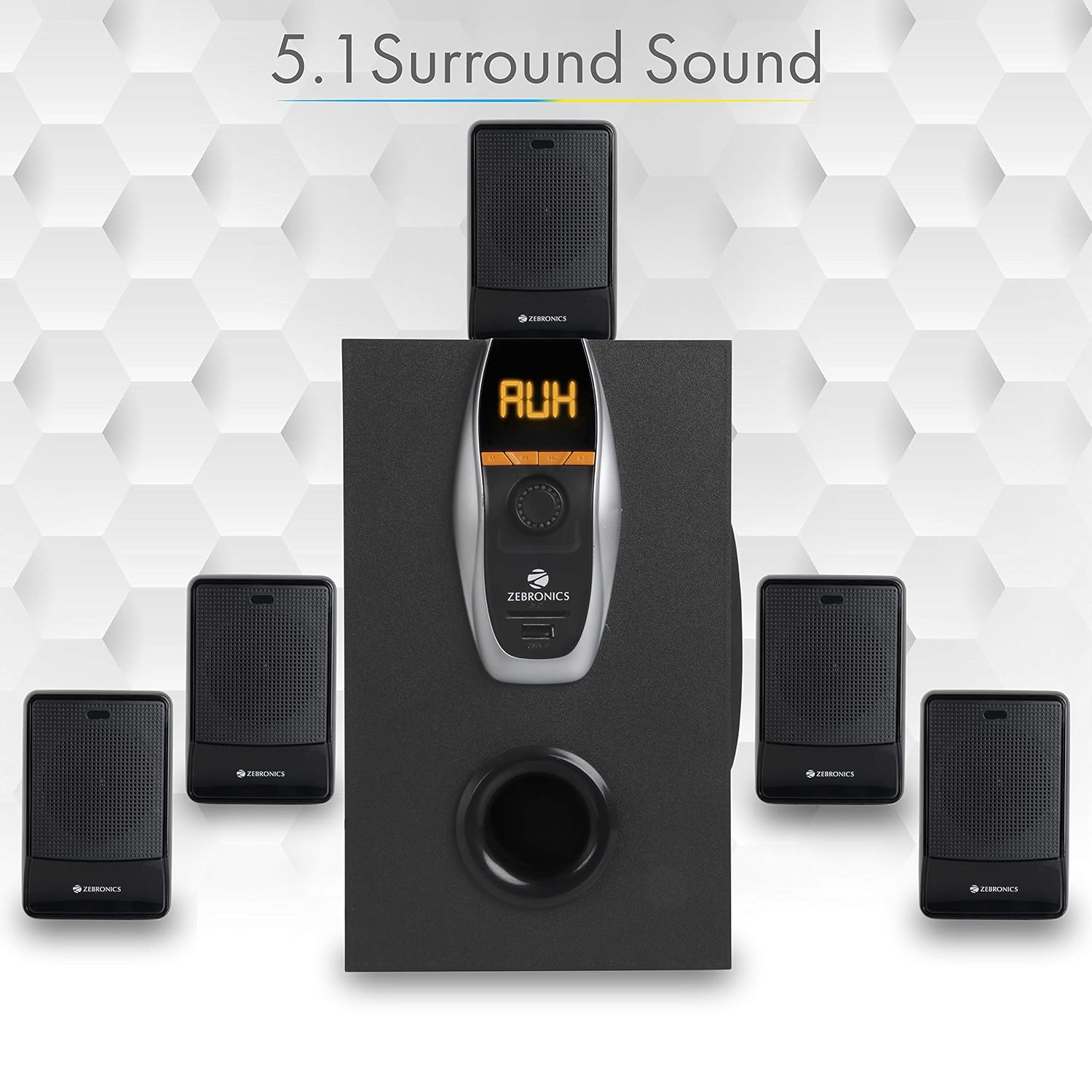
Image: A visual representation of the recommended 5.1 surround sound speaker setup, showing the central subwoofer and the five satellite speakers positioned for optimal audio distribution.

이미지: 자세한 view of the subwoofer, highlighting its wooden enclosure design, which contributes to sound quality.

Image: The rear panel of the subwoofer, showing the various input and output ports, including Stereo Input, 5.1 Input, Satellite Output terminals, and the main Power Switch.

Image: A diagram illustrating the physical dimensions of the subwoofer unit: 160 mm (Width), 240 mm (Depth), and 277 mm (Height).
설치 지침
- 스피커 배치: Position the subwoofer centrally. Place the five satellite speakers around your listening area for optimal 5.1 surround sound. Refer to the 5.1 Surround Sound Speaker Placement image for guidance.
- 위성 스피커 연결: Connect each of the five satellite speakers to the corresponding output terminals on the rear panel of the subwoofer. Ensure correct polarity (positive to positive, negative to negative).
- 전원 연결: Connect the power cable to the subwoofer and then plug it into a suitable power outlet.
- 오디오 소스 연결:
- For 5.1 Input: Use the provided RCA cables to connect your 5.1 channel audio source (e.g., DVD player, compatible TV) to the 5.1 Input ports on the subwoofer's rear panel.
- For Stereo/AUX Input: Use a 3.5mm to RCA cable to connect your stereo audio source (e.g., computer, laptop, MP3 player) to the Stereo Input (AUX) ports on the subwoofer's rear panel.
- 전원 켜기: Flip the power switch on the rear panel of the subwoofer to the 'ON' position. The front display will illuminate.
작동 지침
전면 패널 컨트롤
The subwoofer's front panel features controls for various functions:
- 입력: Press to cycle through input modes (Bluetooth, USB, SD, AUX, FM).
- 이전의: Short press for previous track/station. Long press for fast rewind (USB/SD).
- 다음: Short press for next track/station. Long press for fast forward (USB/SD).
- 재생/일시 중지: Play or pause audio playback. In FM mode, long press to auto-scan and save stations.
- 볼륨 노브: 마스터 볼륨 레벨을 조정하려면 회전합니다.
- USB 포트: MP3 재생을 위해 USB 플래시 드라이브를 삽입하세요.
- SD/MMC 카드 슬롯: Insert an SD or MMC card for MP3 playback.
원격 제어 기능
함께 제공되는 리모컨을 통해 모든 스피커 기능을 편리하게 사용할 수 있습니다.
- 힘: Turn the speaker system On/Off.
- 방법: Select input source (BT/USB/SD/AUX/FM).
- 볼륨 +/- : 마스터 볼륨을 조정합니다.
- 무음: 오디오를 음소거하거나 음소거 해제합니다.
- 재생/일시 중지: 재생을 제어합니다.
- 이전 다음: 음악 트랙이나 FM 방송국을 탐색하세요.
- EQ : (사용 가능한 경우) 이퀄라이저 사전 설정값을 선택하십시오.
- 숫자 키: Direct track selection (USB/SD) or FM station input.
블루투스 동작
- 스피커 시스템의 전원을 켜세요.
- Press the 'Input' button on the front panel or 'Mode' button on the remote until 'BT' mode is selected. The display will show 'BT' and a pairing indicator will flash.
- Enable Bluetooth on your mobile device or computer and search for available devices.
- Select 'ZEB-BT6860RUCF' from the list of devices.
- 페어링이 완료되면 스피커가 연결을 확인하고 장치에서 오디오를 재생할 수 있습니다.
USB/SD 카드 작동
- Insert a USB flash drive or SD/MMC card (up to 32GB) containing MP3 audio file전면 패널의 해당 포트/슬롯에 삽입하십시오.
- The speaker system will automatically switch to USB or SD mode and begin playing the first track. If not, press the 'Input' or 'Mode' button to select the correct source.
- Use the 'Previous', 'Next', and 'Play/Pause' buttons on the front panel or remote control to manage playback.
AUX 입력 작동
- Connect your audio source to the AUX input ports on the rear panel using an appropriate audio cable.
- Press the 'Input' button on the front panel or 'Mode' button on the remote until 'AUX' mode is selected.
- 연결된 장치에서 오디오를 재생합니다.
FM 라디오 작동
- Press the 'Input' button on the front panel or 'Mode' button on the remote until 'FM' mode is selected.
- To auto-scan and save available FM stations, long press the 'Play/Pause' button on the front panel or remote control. The system will scan and store stations automatically.
- Use the 'Previous' and 'Next' buttons to navigate through the saved FM stations.
유지
- 청소: 스피커 표면은 부드럽고 마른 천으로 닦으십시오. 연마성 세척제, 왁스 또는 용제를 사용하지 마십시오.
- 통풍: Ensure the subwoofer and satellite speakers have adequate ventilation. Do not block any ventilation openings.
- 환경: Avoid exposing the speaker system to direct sunlight, extreme temperatures, high humidity, or dusty environments.
- 전원 끄기 : Always power off the system and unplug it from the power outlet before cleaning or if it will be unused for an extended period.
문제 해결
| 문제 | 가능한 원인 | 해결책 |
|---|---|---|
| 전원이 없습니다 | 전원 케이블이 연결되지 않았습니다. 전원 스위치가 꺼져 있습니다. 전원 콘센트가 고장났습니다. | 전원 케이블이 제대로 연결되어 있는지 확인하십시오. 전원 스위치를 켜십시오. 다른 기기를 사용하여 전원 콘센트가 제대로 작동하는지 확인하십시오. |
| 소리가 나지 않습니다 | Volume too low; Incorrect input mode; Audio cables loose/faulty; Mute activated. | Increase volume. Select correct input mode. Check audio cable connections. Deactivate mute function. |
| 블루투스가 연결되지 않습니다 | Speaker not in BT mode; Device Bluetooth off; Already connected to another device; Interference. | Ensure speaker is in BT mode. Turn on device Bluetooth. Disconnect from other devices. Move closer to the speaker. |
| USB/SD 재생 문제 | 잘못된 file 형식; 손상됨 files; USB/SD card not inserted correctly; Max memory size exceeded. | 보장하다 files are MP3 format. Check for corrupted files. Reinsert USB/SD card. Use cards up to 32GB. |
| 리모컨이 작동하지 않습니다 | Batteries depleted; Obstruction; Remote sensor blocked. | Replace remote control batteries. Remove any obstructions between remote and speaker. Ensure remote sensor on subwoofer is clear. |
| FM 수신 불량 | 신호가 약합니다. 안테나가 확장되지 않았습니다. | Extend the FM antenna fully. Try repositioning the antenna or the speaker system for better signal. |
명세서
| 특징 | 사양 |
|---|---|
| 총 출력 전력(RMS) | 70 와트 |
| 서브우퍼 출력 전력 | 40 와트 |
| 위성 출력 전력 | 6와트 x 5 |
| 주파수 응답 | 35Hz - 20KHz |
| 감광도 | 600mV |
| 블루투스 버전 | 2.1 + 업데이트 |
| USB/SD Max. Memory Size | 32GB |
| USB/SD File 형식 지원 | MP3 |
| 연결 옵션 | Bluetooth, USB, SD/MMC, AUX, FM |
| 호환 장치 | Desktop, Laptop, MP3 Player, DVD Players, Televisions |
| 서브우퍼 치수(D x W x H) | 35D x 39W x 45H Centimeters (Product Dimensions) |
| 품목 무게 | 5.4kg |
| 전력 소비 | 45와트 |
| 제어 방법 | 리모컨, 유닛 버튼 |
| 원산지 | 중국 |
보증 및 지원
Your Zebronics ZEB-BT6860RUCF Multimedia Speaker System comes with a 1-year carry-in warranty to the service center from the date of purchase. Please retain your purchase receipt for warranty claims.
For technical support, service, or warranty inquiries, please contact Zebronics customer service. Refer to the official Zebronics web가장 최신의 연락처 정보는 해당 사이트나 제품 포장에서 확인하세요.
수입자: ZEBRONICS INDIA PVT LTD, NO : 118, POONAMMALE HIGH ROAD , VEPERY