1. 서론
This manual provides comprehensive instructions for the installation, operation, and maintenance of your FIBARO FGT-001 Z-Wave Plus Smart Heating Radiator Thermostat. The FIBARO Heat Controller is designed to provide precise temperature management for your home, integrating seamlessly with Z-Wave smart home systems. Please read this manual thoroughly before using the device to ensure proper functionality and safety.

Image 1.1: The FIBARO FGT-001 Z-Wave Plus Smart Heating Radiator Thermostat and its retail packaging.
2. 안전 정보
- 사용하기 전에 모든 지침을 주의 깊게 읽으세요.
- 기기를 직접 수리하거나 개조하지 마십시오. 모든 서비스는 자격을 갖춘 전문가에게 맡기십시오.
- 장치를 물과 높은 습도에서 멀리 두십시오.
- 장치를 극한의 온도나 직사광선에 노출시키지 마십시오.
- Ensure the device is securely installed on the radiator valve.
- 현지 규정에 따라 배터리를 폐기하십시오.
3. 패키지 내용
The FIBARO FGT-001 package typically includes:
- FIBARO Heat Controller Head (FGT-001)
- 사용 설명서 (본 문서)
- Adapters for various radiator valves (M30 x 1.5, Danfoss RTD-N, Danfoss RA-N) - Note: Specific adapters may vary by region or package.
4. 제품 오버view
The FIBARO Heat Controller is a smart radiator thermostat designed to regulate the temperature in rooms by controlling the flow of hot water through the radiator. It features Z-Wave Plus connectivity for integration into smart home systems, allowing for remote control and automation. The device is powered by a built-in rechargeable battery.
주요 특징:
- Z-Wave Plus Compatibility: Works with any Z-Wave or Z-Wave+ Controller.
- 보안 모드: Supports S0 with AES-128 encryption and S2 with PRNG-based encryption.
- 충전식 배터리: Built-in battery recharged via a standard micro-USB port.
- 밸브 호환성: Designed for M30 x 1.5, Danfoss RTD-N, and Danfoss RA-N valves.
- LED 표시등: Features an LED ring that changes color to indicate temperature settings.

Image 4.1: A hand manually adjusting the FIBARO Heat Controller on a radiator valve.

Image 4.2: The FIBARO Heat Controller displaying a target temperature of 18°C.
5. 설정 및 설치
5.1. 장치 충전
Before installation, ensure the device's built-in battery is fully charged. Connect a standard micro-USB cable to the charging port on the device. The LED indicator will show charging status.
5.2. 라디에이터 밸브 장착
The FIBARO Heat Controller is designed for easy, tool-free installation.
- 밸브 유형을 확인하십시오: Determine if your radiator valve is M30 x 1.5, Danfoss RTD-N, or Danfoss RA-N. Select the appropriate adapter if necessary.
- Remove Existing Thermostat: Unscrew and remove any existing thermostat head from your radiator valve.
- 어댑터를 연결하십시오(필요한 경우). If your valve is not M30 x 1.5, attach the correct adapter to the valve.
- Mount Heat Controller: Screw the FIBARO Heat Controller onto the radiator valve or adapter. Ensure it is hand-tightened securely.
- 구경 측정: The device will automatically begin a calibration process after installation. This may involve the valve opening and closing to learn its range.

Image 5.1: The FIBARO Heat Controller installed on a radiator in a residential setting.
5.3. Z-Wave 네트워크 통합
To integrate the Heat Controller into your Z-Wave network:
- Place the Heat Controller within direct range of your Z-Wave controller.
- Set your Z-Wave controller into inclusion (add) mode. Refer to your Z-Wave controller's manual for specific instructions.
- Press the button on the Heat Controller three times quickly.
- The device will be detected and added to your Z-Wave network. The LED ring may indicate successful inclusion.
6. 사용 설명서
6.1. 수동 온도 조절
You can manually adjust the desired temperature by rotating the outer ring of the Heat Controller. The LED ring will change color to indicate the set temperature:
- 파란색: Lower temperatures
- 녹색: 적당한 온도
- 빨간색: Higher temperatures
- 보라: Boost/Maximum heating
6.2. Z-Wave Control and Automation
Once included in your Z-Wave network, the FIBARO Heat Controller can be controlled remotely via your Z-Wave gateway's interface or mobile application. This allows for:
- Setting precise temperature schedules.
- Creating scenes and automations (e.g., turn off heating when a window is open).
- Monitoring current room temperature (if an external sensor is paired).
- Voice control integration with compatible smart assistants (e.g., Google Assistant).

Image 6.1: Remote control of the heating system via a smartphone application.
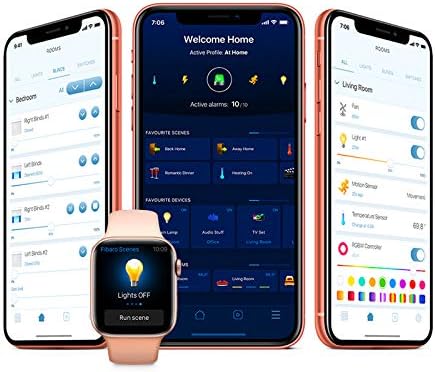
이미지 6.2: Example of the FIBARO smart home application interface for managing devices and settings.
7. 유지관리
7.1. 배터리 충전
The built-in battery should be recharged when the low battery indicator appears (usually a flashing LED). Connect the device to a micro-USB power source. A full charge typically takes several hours.
7.2. 청소
부드럽고 마른 천으로 기기를 닦으십시오. 연마성 세제나 용제는 표면을 손상시킬 수 있으므로 사용하지 마십시오.
8. 문제 해결
8.1. 장치가 응답하지 않음
- 배터리 확인: Ensure the battery is charged. Connect to a micro-USB charger.
- Z-Wave Network: Verify the device is properly included in your Z-Wave network and within range of the controller.
- 재보정: If the valve movement seems incorrect, try re-calibrating the device by detaching and reattaching it, or through your Z-Wave controller's interface if supported.
8.2. Incorrect Temperature Readings
- The Heat Controller measures temperature near the radiator, which can be warmer than the room's ambient temperature. Consider pairing with an external FIBARO temperature sensor for more accurate room temperature readings.
- Ensure the device is not obstructed or exposed to direct heat sources (e.g., direct sunlight, other appliances).
8.3. Difficulty with Z-Wave Inclusion/Exclusion
- Ensure the device is close to the Z-Wave controller during the inclusion/exclusion process.
- Perform a factory reset on the Heat Controller if it fails to include or exclude. Refer to the FIBARO support website for specific reset procedures.
9. 사양
| 특징 | 세부 사항 |
|---|---|
| 상표 | 피바로 |
| 모델명 | Head (FGT-001) |
| 연결 기술 | Z-Wave Plus |
| 전원 | Built-in rechargeable Lithium Polymer battery (charged via Micro-USB) |
| 컨트롤러 유형 | Z-Wave Gateway, Google Assistant (via compatible gateway) |
| 특징 | 스마트 홈 시스템과의 통합 |
| 색상 | 하얀색 |
| 재료 | 플라스틱 |
| 품목 무게 | 3.53온스(100그램) |
| 제품 치수 | 2.28 x 3.43 x 2.56 인치 |
| 디스플레이 유형 | Digital (LED ring) |
| 제어 방법 | App, Voice, Manual Rotation |
| 장착 유형 | 라디에이터 밸브 마운트 |
| 밸브 호환성 | M30 x 1.5, 댄포스 RTD-N, 댄포스 RA-N |
10. 보증 및 지원
FIBARO products are covered by a manufacturer's warranty. For detailed warranty terms and conditions, please refer to the warranty card included with your product or visit the official FIBARO web대지.
For technical support, troubleshooting assistance, or further information, please visit the FIBARO support portal or contact their customer service.
- 피바로 Web대지: www.fibaro.com
- 지원하다: 공식 지원 섹션을 참조하세요. website for FAQs, guides, and contact information.


