
소개
This manual provides essential information for the installation, operation, and maintenance of your Proxicast High Gain 10 dBi Universal Wide-Band 4G / LTE, 5G & WiFi Omni-Directional Outdoor Antenna. This antenna is designed to improve signal strength and speed for various cellular broadband services and Wi-Fi networks.

Figure 1: Proxicast High Gain Omni-Directional Antenna (Model ANT-126-002)
제품 끝view
The Proxicast ANT-126-002 is an omni-directional antenna designed for outdoor use. It supports a wide frequency range, making it compatible with 4G LTE, 5G Sub-6 cellular services, and Wi-Fi. Its robust construction ensures durability in various weather conditions.
- 주파수 범위: 600~6000MHz
- 얻다: 10dBi
- 커넥터 유형: N-여성
- 건설: Weather and impact resistant ABS radome
- 설치: Includes stainless steel 2-way pole/wall mounting bracket

Figure 2: Antenna compatibility with 5G, LTE, and WiFi networks.

Figure 3: Integrated N-Female connector for coaxial cable attachment.
설정 및 설치
Proper installation is crucial for optimal performance. The antenna comes with a versatile mounting bracket for pole or wall installation.
상자 안에 무엇이 들어있나요?
- 1 x Proxicast Omni-Directional Antenna
- 1 x L 브라켓
- 2 x U Bolts
- 4 x 와셔
- 4 x 잠금 와셔
- 4 x 너트

Figure 4: Included mounting hardware for the antenna.
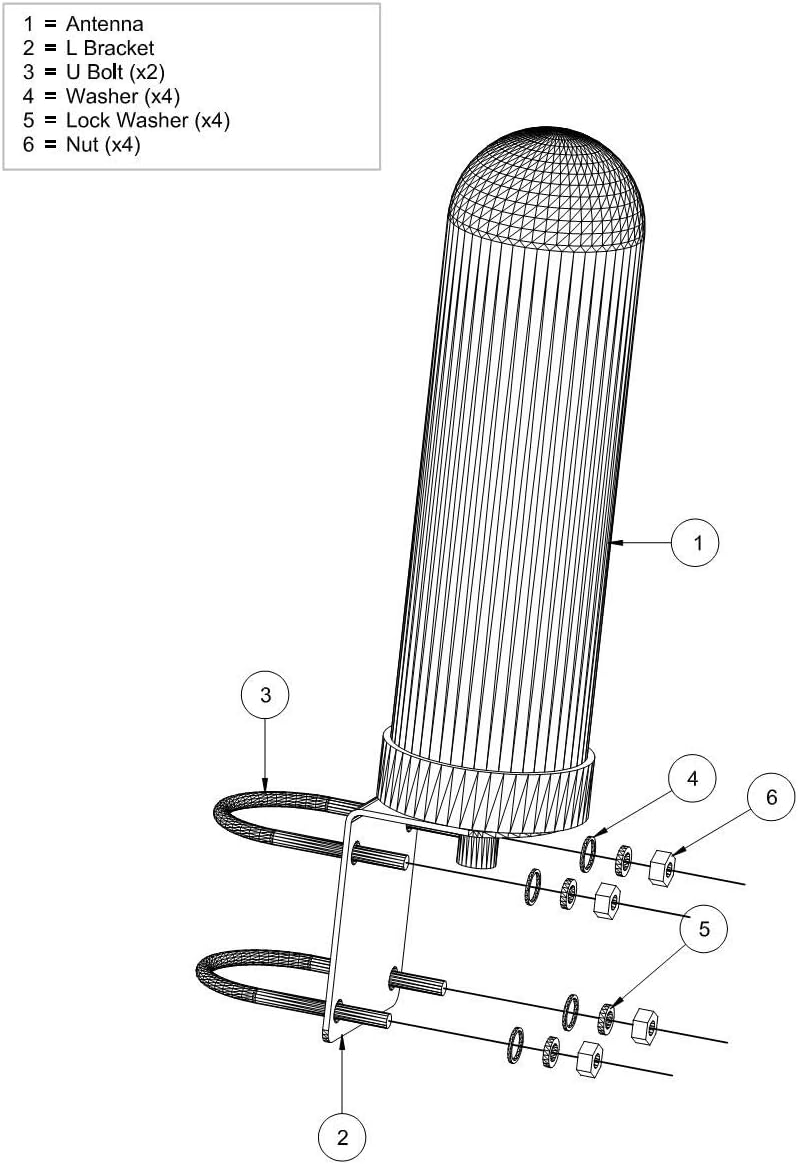
그림 5: 폭발 view of antenna and mounting components.
장착 지침:
- 위치를 선택하십시오 : Select an outdoor location with a clear line of sight to cellular towers or Wi-Fi access points. Consider mounting on a pole or wall.
- 브래킷 조립: Attach the L-bracket to the antenna using the provided nuts and washers.
- 보안 안테나:
- For pole mounting: Use the U-bolts to secure the L-bracket to a mast (mast sold separately).
- For wall mounting: Use appropriate screws (not included) to secure the L-bracket directly to a sturdy wall surface.
- 동축 케이블 연결: Connect a 50 Ohm coaxial cable (not included) to the N-Female connector on the antenna. Ensure the connection is tight and weatherproofed.
- 케이블 경로: Route the coaxial cable to your cellular modem, router, or radio device.
중요 참고 사항: This antenna must be connected via a 50 Ohm coaxial cable to an existing cellular modem/router/radio device. It does not improve signal for cell phones or other devices not directly wired to the antenna.
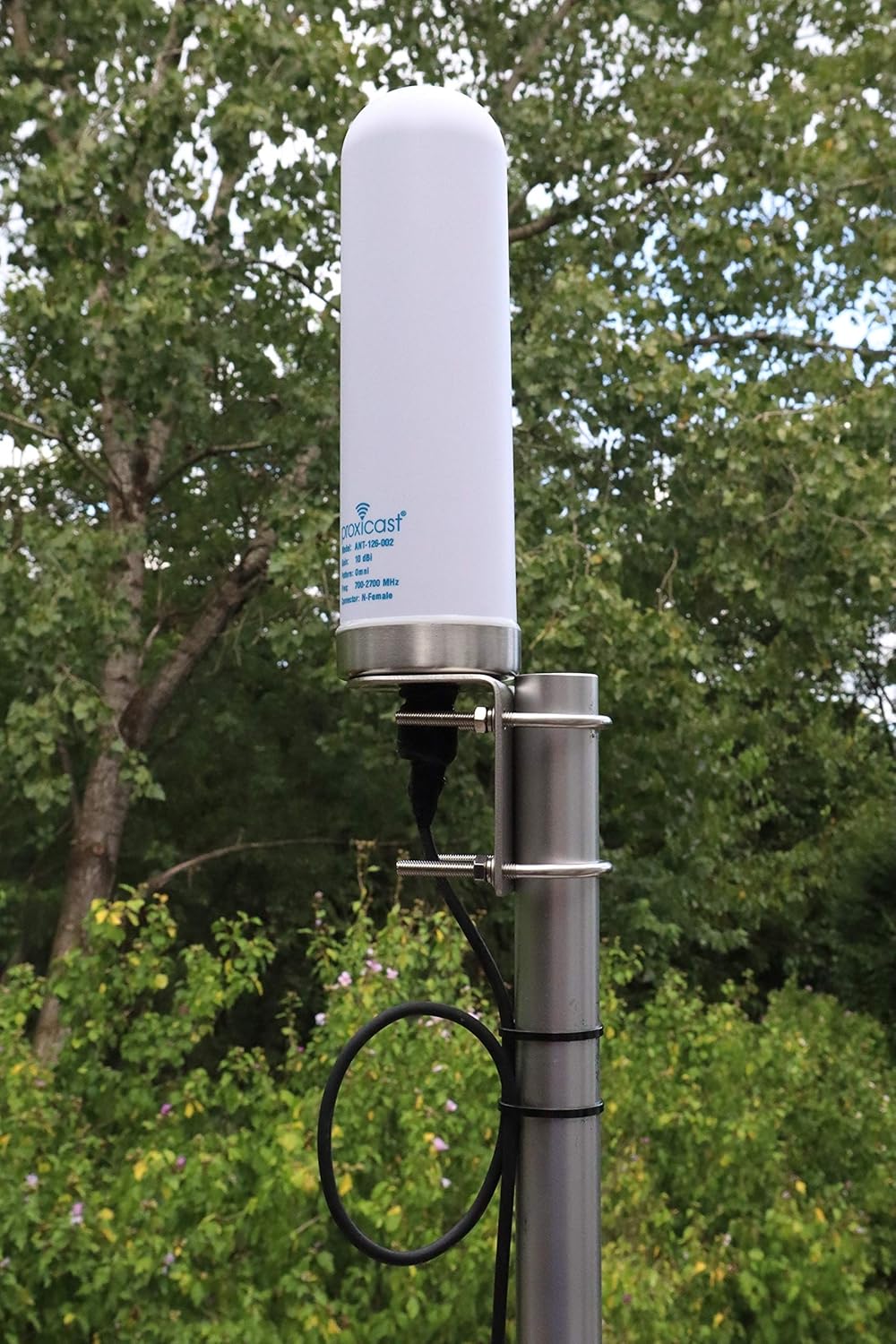
그림 6: 예ample of the antenna mounted on an outdoor pole.
작동 원리
The Proxicast ANT-126-002 is an omni-directional antenna, meaning it receives and transmits signals in a 360-degree pattern around its axis. This makes it suitable for locations where the exact direction of the signal source is unknown or where signals may come from multiple directions.
It is designed to enhance the signal strength and data throughput for compatible devices by providing a higher gain connection to cellular and Wi-Fi networks. The antenna's wideband capability ensures compatibility across various frequency bands used by major carriers like Verizon, AT&T, T-Mobile, Telus, Bell Canada, Rogers, and DigiCel.
비디오 1: 간략한 설명view of the Proxicast 10 dBi Wide-Band Omni Antenna, showcasin디자인과 기능.
유지
The Proxicast antenna is built for outdoor durability with a weather and impact resistant ABS radome. Minimal maintenance is required.
- 정기 검사: Annually inspect the antenna and its mounting hardware for any signs of wear, corrosion, or loosening. Ensure all connections remain secure.
- 청소: 필요한 경우, 부드러운 천으로 안테나 외부를 살살 닦아주세요.amp 옷감. 가혹한 화학 물질이나 연마재를 사용하지 마십시오.
- 케이블 무결성: Check the coaxial cable for any damage, kinks, or degradation of the outer jacket. Ensure weatherproof seals at connectors are intact.
문제 해결
If you experience issues with signal improvement, consider the following troubleshooting steps:
- 연결 확인: Ensure the 50 Ohm coaxial cable is securely connected to both the antenna's N-Female port and your modem/router/radio device. A loose connection can significantly degrade performance.
- 케이블 유형: Verify that you are using a 50 Ohm coaxial cable. Using a 75 Ohm cable (common for TV) will result in poor performance.
- Required Adapters: If your device uses a different connector type (e.g., SMA), ensure you are using the correct 50 Ohm adapter (e.g., N Male to SMA Female). Incorrect adapters can cause signal loss.
- 안테나 배치: Experiment with different mounting locations and heights. Even small changes in position can impact signal reception, especially if obstructions are present.
- 장치 호환성: Confirm that your modem/router/radio device is configured to use an external antenna and is compatible with the antenna's frequency range.
- 신호 소스: While omni-directional, performance can still be affected by distance to the nearest cell tower or Wi-Fi access point.
If problems persist after following these steps, contact Proxicast customer support for further assistance.
명세서
| 특징 | 세부 사항 |
|---|---|
| 모델 번호 | 개미-126-002 |
| 상표 | 프록시캐스트 |
| 안테나 유형 | 4G/LTE, 5G, WiFi Omni-Directional Wideband Antenna |
| 주파수 범위 | 600~6000MHz |
| 피크 게인 | 10dBi |
| 임피던스 | 50옴 |
| 커넥터 유형 | N-여성 |
| 제품 치수 | 3 x 3 x 10.6인치(7.6 x 7.6 x 26.9cm) |
| 품목 무게 | 1kg (0.45 파운드) |
| 색상 | 하얀색 |
| 특별 기능 | 360 Degree, High Gain, Multidirectional, Signal Booster, Wireless |

Figure 7: Physical dimensions of the Proxicast antenna.

Figure 8: Detailed technical drawing showing antenna dimensions.

Figure 9: Antenna performance verified through independent lab testing.
보증 및 지원
For information regarding product warranty, please refer to the official Proxicast website or contact their customer service directly. Protection plans may also be available for purchase separately.
고객 지원: If you require technical assistance or have questions about your Proxicast antenna, please visit the Proxicast Store on Amazon 아니면 그들의 공식 web연락처 정보 사이트.