Apple MLA02LL/A

Apple Magic Mouse 2 (MLA02LL/A) Instruction Manual

Model: MLA02LL/A

제품 끝view

The Apple Magic Mouse 2 is a wireless, rechargeable mouse designed for seamless integration with Mac OS X. It features a multi-touch surface for intuitive gestures and an ambidextrous design for comfortable use by both left and right-handed users. Its optimized foot design allows for smooth gliding across surfaces, enhancing precision and ease of use.

주요 특징

설정

Pairing Your Magic Mouse 2

The Magic Mouse 2 pairs automatically with your Mac when connected via the included USB-C to Lightning cable. For initial setup or re-pairing:

  1. Ensure your Mac's Bluetooth is turned on. Go to 시스템 설정 > 블루투스.
  2. Connect your Magic Mouse 2 to your Mac using the USB-C to Lightning cable. This will automatically pair the mouse and begin charging it.
  3. Once paired, you can disconnect the cable for wireless use. The mouse will remain connected via Bluetooth.
  4. If the mouse does not appear in the Bluetooth settings, ensure it is charged and the power switch on the bottom of the mouse is in the 'On' position.

배터리 충전

The Magic Mouse 2 features a built-in rechargeable lithium-ion battery. To charge:

  1. Connect the Lightning port on the bottom of the Magic Mouse 2 to a USB-C port on your Mac or a USB power adapter using the provided USB-C to Lightning cable.
  2. A full charge typically takes about 2 hours. A quick 2-minute charge can provide approximately 9 hours of use.
  3. You can check the battery level in the Bluetooth menu on your Mac's menu bar.
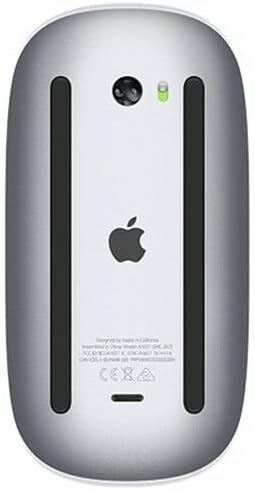
맨 아래 view of the Apple Magic Mouse 2 showing the Lightning charging port and power switch.
맨 아래 view of the Apple Magic Mouse 2, highlighting the Lightning charging port and power switch. The green indicator light shows the mouse is powered on.

Operating Your Magic Mouse 2

멀티 터치 제스처

The Magic Mouse 2's smooth, seamless Multi-Touch surface allows for simple gestures to navigate your Mac:

맨 위 view of the Apple Magic Mouse 2, showcasing its sleek, white multi-touch surface.
맨 위 view of the Apple Magic Mouse 2, illustrating its minimalist design and multi-touch surface for gesture control.

마우스 설정 사용자 정의

You can customize the tracking speed, scrolling speed, and gesture settings for your Magic Mouse 2:

  1. 이동하다 System Settings > Mouse Mac에서.
  2. 조정하다 추적 속도 그리고 스크롤 속도 sliders to your preference.
  3. 에서 더 많은 제스처 tab, you can enable or disable specific Multi-Touch gestures and view demonstrations of how to perform them.

유지

Cleaning Your Magic Mouse 2

To keep your Magic Mouse 2 clean and functioning optimally:

배터리 관리

To maximize the lifespan of your Magic Mouse 2's rechargeable battery:

문제 해결

일반적인 문제 및 솔루션

명세서

특징세부 사항
제품 치수2 x 2 x 2 인치
품목 무게12.3 온스
ASINB074T2NWVL
배터리충전식(내장형)
상표사과
색상
연결 기술무선(블루투스)
버튼의 수3 (virtual, via Multi-Touch)

보증 및 지원

제품 보증

Apple products typically come with a one-year limited warranty against defects in materials and workmanship. For detailed warranty information, please refer to the official Apple warranty documentation included with your product or visit the Apple Support web대지.

고객 지원

추가적인 지원, 기술 지원 또는 서비스 문의 사항이 있는 경우 Apple 공식 지원 페이지를 방문하십시오. website or contact Apple Customer Service:

관련 문서 - MLA02LL/A

사전view Apple Magic Mouse Teardown Guide
A detailed teardown guide for the Apple Magic Mouse, exploring its internal components and design.
사전view Apple Magic Mouse User Guide: Setup, Features, and Troubleshooting
Official user guide for the Apple Magic Mouse, covering quick start, software updates, pairing with Macs, battery replacement, Multi-Touch gestures, cleaning, ergonomics, and regulatory compliance information.
사전view Apple Magic Mouse 2 Teardown Guide
A comprehensive teardown guide detailing the internal components, assembly, and repairability of the Apple Magic Mouse 2.
사전view Apple iMac 빠른 시작 가이드: 설정 및 기본 사용법
Apple iMac 사용을 시작해 보세요. 이 가이드에서는 초기 설정, Magic Mouse 및 키보드와 같은 액세서리 연결, 포트 이해, 기본 탐색 방법을 설명합니다.
사전view Apple iMac Quick Start Guide: Setup, Usage, and Support
A concise guide to setting up and using your Apple iMac, covering accessories, ports, basic operations, and support resources. Learn how to connect peripherals, navigate the interface, and find help.
사전view iMac Quick Start Guide
Get started with your new iMac. This guide covers accessory setup, basic usage, and identifies key components of your iMac desktop computer.