1. 서론
This manual provides essential information for the safe and effective use of your Vivibright GP90 UP Portable Video Projector. Please read it thoroughly before operating the device and retain it for future reference. The Vivibright GP90 UP is a portable video projector featuring an Android 4.42 operating system, 3200 lumens brightness, and 1280x800 native resolution, designed for multimedia entertainment and presentations.
2. 안전 지침
- 통풍구를 막지 마십시오. 프로젝터의 과열을 방지하기 위해 적절한 공기 흐름을 확보하십시오.
- 감전이나 화재를 방지하기 위해 프로젝터를 비나 습기에 노출시키지 마십시오.
- 프로젝터 렌즈를 직접 쳐다보지 마십시오.amp 밝은 빛이 눈 손상을 유발할 수 있으므로 조명을 켜 두십시오.
- 프로젝터가 넘어지지 않도록 안정적이고 평평한 표면에 놓으십시오.
- 프로젝터와 함께 제공된 전원 어댑터만 사용하세요.
- 프로젝터를 직접 분해하거나 수리하려고 하지 마십시오. 모든 서비스는 자격을 갖춘 전문가에게 맡기십시오.
- 프로젝터를 열원과 직사광선으로부터 멀리 두십시오.
3. 패키지 내용
패키지에 모든 품목이 들어 있는지 확인하세요.
- Vivibright GP90 UP Projector
- 전원 케이블
- Remote Control (may not be included with all models)
- 사용 설명서 (본 문서)
4. 제품 오버view
Familiarize yourself with the projector's components and connection ports.
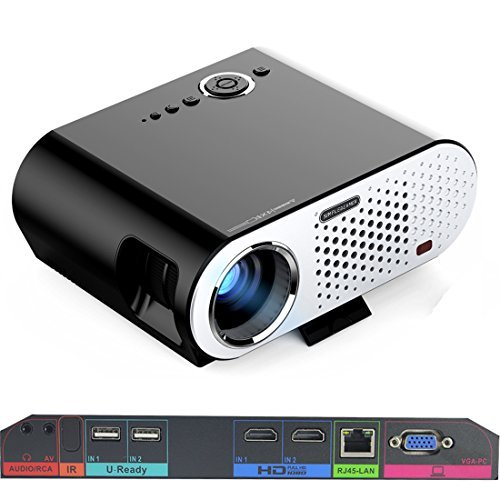
Image: The Vivibright GP90 UP projector showing its top controls, lens, and various input/output ports on the rear panel. The top features power and navigation buttons. The front has the projection lens. The rear panel includes Audio/RCA, IR receiver, two USB ports (U-Ready), two HDMI ports (HD), an RJ45-LAN port, and a VGA-PC port.
4.1 전면 패널
- 투사 렌즈: 이미지를 방출합니다.
4.2 상단 패널
- 제어 버튼: Power, navigation, and menu access.
4.3 후면 패널(입력/출력 포트)
- AUDIO/RCA: Audio output and composite video input.
- 영어: 원격 제어용 적외선 수신기.
- IN 1 / IN 2 (USB): Two USB ports for connecting USB storage devices.
- IN 1 / IN 2 (HDMI): Two HDMI inputs for digital video and audio sources.
- RJ45-LAN: 유선 네트워크 연결을 위한 이더넷 포트.
- VGA-PC: VGA input for connecting to computers.
5. 설정
5.1 배치
- Place the projector on a flat, stable surface or mount it on a ceiling or tripod.
- Ensure the projector is positioned directly in front of the screen or wall. Avoid angled placement as horizontal keystone correction is not available.
- The optimal projection distance ranges from 1.2m to 8.5m, producing screen sizes from 35 to 280 inches. For a 100-inch image, a distance of approximately 3 meters is recommended.
5.2 전원 연결
- 프로젝터의 전원 입력 단자에 전원 케이블을 연결하세요.
- Plug the other end of the power cable into a suitable electrical outlet (90~240V/50~60Hz).
5.3 입력 장치 연결
- HDMI : Connect an HDMI cable from your source device (e.g., laptop, Blu-ray player, gaming console) to one of the projector's HDMI ports.
- USB: Insert a USB flash drive or external hard drive into a USB port to access media files.
- VGA : Connect a VGA cable from your computer to the projector's VGA-PC port.
- 유명인 : Use an RCA cable to connect older devices to the AV input.
- LAN : Connect an Ethernet cable to the RJ45-LAN port for a wired internet connection.
5.4 초점 및 키스톤 조정
- 집중하다: Rotate the focus ring around the lens until the projected image is sharp and clear.
- 키스톤 보정: Use the manual vertical keystone correction feature (±15°) to adjust the image shape if the projector is not perfectly perpendicular to the screen. This corrects trapezoidal distortion.
6. 사용 설명서
6.1 전원 켜기/끄기
- 전원 켜기: Press the power button on the projector or the remote control. The indicator light will change, and the projector will start.
- 전원 끄기 : 전원 버튼을 다시 누르십시오. 종료하라는 메시지가 나타나면 확인하십시오. 프로젝터가 식을 때까지 기다린 후 전원 코드를 뽑으십시오.
6.2 안드로이드 OS 탐색하기
- The projector runs on Android 4.42. Use the remote control or connect a wireless mouse (recommended for easier navigation) to interact with the interface.
- Access pre-installed apps or download compatible applications from the app store. Note that some newer applications may not be compatible with Android 4.42.
6.3 무선 프로젝션
- 와이파이: Connect to a wireless network via the settings menu. Supports dual-band Wi-Fi 2.4G.
- 블루투스: Supports Bluetooth 4.0 for connecting wireless devices such as speakers. Note that Bluetooth audio output may only be available when using USB or Android sources, not HDMI.
- Wireless Push (EZCast / Miracast / Airplay): Use compatible apps on your smartphone or tablet to mirror your device's screen to the projector. Ensure your device and the projector are on the same Wi-Fi network.
6.4 오디오 설정
- The projector features built-in 4Ω, 5W stereo speakers with SRS sound technology.
- For enhanced audio, connect external speakers via the Audio Out port or wirelessly via Bluetooth (when using Android or USB sources).
7. 유지관리
7.1 청소
- 렌즈: 부드럽고 보풀이 없는 광학 렌즈용 천을 사용하세요. 연마성 세척제는 사용하지 마세요.
- Casing: 프로젝터 외부를 부드럽고 마른 천으로 닦으십시오. 잘 지워지지 않는 얼룩은 약간 거친 천을 사용하십시오.amp 천으로 닦아낸 후 완전히 말리세요.
- 환기구: 먼지 축적을 방지하고 성능 및 수명 향상을 위해 주기적으로 부드러운 브러시나 압축 공기를 사용하여 통풍구를 청소하십시오.
7.2 보관
- 장기간 사용하지 않을 경우 프로젝터를 직사광선과 극한 온도를 피해 시원하고 건조한 곳에 보관하세요.
- 렌즈에 먼지와 흠집이 생기지 않도록 렌즈 캡으로 덮어주세요.
8. 문제 해결
| 문제 | 가능한 원인 | 해결책 |
|---|---|---|
| 이미지가 투영되지 않았습니다 | 전원이 연결되지 않았습니다. 입력 소스가 선택되지 않았습니다. 렌즈 캡이 씌워져 있습니다. | 전원 연결을 확인하십시오. 올바른 입력 소스를 선택하십시오. 렌즈 캡을 제거하십시오. |
| 이미지가 흐릿함 | 초점이 조정되지 않음; 프로젝터가 너무 가깝거나 멀음 | Adjust focus ring; Adjust projection distance |
| 이미지는 사다리꼴입니다 | 프로젝터가 스크린에 수직이 아닙니다. | Adjust vertical keystone correction; Reposition projector to be centered |
| 소리가 나지 않습니다 | Volume too low; Muted; External speakers not connected/selected | Increase volume; Unmute; Check external speaker connections/settings |
| Wireless projection unstable | Weak Wi-Fi signal; Device incompatibility; Outdated Android OS | Ensure strong Wi-Fi signal; Check device compatibility with Miracast/Airplay; Consider wired connection if issues persist with older Android version. |
9. 사양
| 특징 | 세부 사항 |
|---|---|
| 상표 | Vivibright |
| 모델 | GP90 UP |
| 운영 체제 | 안드로이드 4.42 |
| 명도 | 3200 Lumens (LED Luminous efficiency) |
| 네이티브 해상도 | 1280 x 800 (supports up to 1080P) |
| 대비율 | 3000:1 (Dynamic up to 10,000:1) |
| 투사 크기 | 35-280 인치 |
| 투사 거리 | 1.2m - 8.5m |
| 투사율 | 1.45시 1분 |
| 키스톤 보정 | 수동 수직 ±15° |
| 빛의 근원 생명 | 최대 30,000시간 |
| 연결성 | Wi-Fi (2.4G), Bluetooth 4.0, 2x HDMI, 2x USB, VGA, AV, RJ45-LAN |
| 오디오 | Built-in 4Ω, 5W stereo speakers with SRS sound |
| 전원 공급 장치 | 90~240V/50~60Hz |
| 제품 치수 | 27 x 22 x 9cm |
| 품목 무게 | 3.17kg |
10. 보증 및 지원
For warranty information and technical support, please refer to the documentation provided at the time of purchase or contact Vivibright customer service. Keep your purchase receipt as proof of purchase for warranty claims.


