제품 끝view
The Sulion Model 078100 is a wireless remote control system designed for ceiling fans. It offers convenient control over fan speeds and lighting, including a specialized sleep function. This system features 3 infrared fan speeds and a programmable shut-off timer, allowing users to set the fan to turn off automatically after 1/2 hour, 1 hour, or 3 hours.
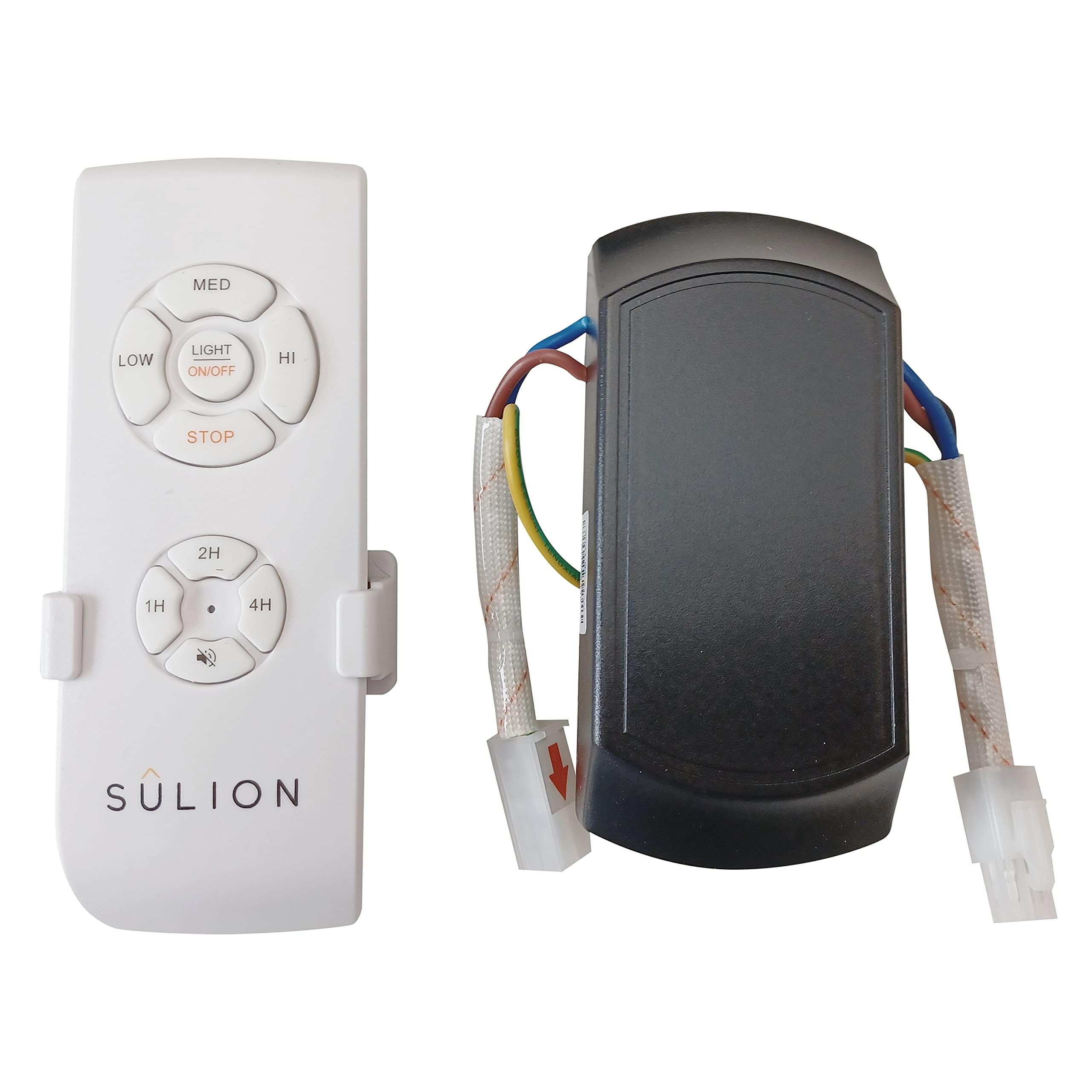
Image: Sulion Ceiling Fan Remote Control Kit, showing the remote and receiver unit.
안전 정보
- Always disconnect power at the main circuit breaker before installing or servicing the fan or remote control system.
- 설치는 자격을 갖춘 전기 기술자가 수행하거나 해당 지역의 전기 규정에 따라 수행해야 합니다.
- 모든 전기 연결부가 단단히 고정되어 있고 적절하게 절연되어 있는지 확인하십시오.
- Do not use this product with dimmer switches or other variable speed controls not specified for ceiling fans.
- 리모컨을 물과 극한의 온도에 두지 마세요.
패키지 내용
설치를 시작하기 전에 모든 구성 요소가 있는지 확인하세요.
- 원격 제어 장치
- 수신기 유닛
- 리모컨 벽걸이 브래킷
- 장착 나사
- 배선 커넥터
- 사용 설명서
영상: 클로즈업 view of the remote control and receiver unit, demonstrating the components included in the package.
설정 및 설치
1. 수신기 장치 배선
Before proceeding, ensure the power supply to the ceiling fan is completely disconnected at the circuit breaker.
- Identify the existing wiring from your ceiling fan and the main power supply.
- Connect the receiver unit's wires to the corresponding fan and power supply wires using appropriate electrical connectors. Typically, this involves connecting the live (L) and neutral (N) wires from the power supply to the receiver's input, and the fan's light and motor wires to the receiver's output. Refer to the wiring diagram provided in the video for detailed connections.
- Securely mount the receiver unit within the fan's canopy or junction box, ensuring it does not interfere with the fan's operation.
2. 리모컨 페어링
After wiring the receiver, you may need to pair the remote control with the receiver.
- Restore power to the ceiling fan at the circuit breaker.
- Within 30 seconds of restoring power, press and hold the "Light" button on the remote control for approximately 5 seconds.
- The fan light should blink or the fan should briefly turn on/off to indicate successful pairing.
3. Smartphone App Pairing (if applicable)
Some models may support smartphone app control. Follow these general steps for pairing:
- Download the recommended smart home app (e.g., Tuya Smart, Smart Life) from your device's app store.
- 스마트폰이 2.4GHz Wi-Fi 네트워크에 연결되어 있는지 확인하세요.
- Open the app and select "Add Device" or "Auto Scan".
- Follow the on-screen instructions to put the device into pairing mode (often involves cycling power or pressing a button on the receiver). The indicator light on the receiver should blink rapidly.
- Confirm the indicator is blinking rapidly in the app and proceed with the pairing process.
작동 지침
원격 제어 기능
- 조명 켜기/끄기: 를 누르세요 빛 button to toggle the fan light on or off.
- 팬 켜기/끄기: 를 누르세요 팬 팬을 켜거나 끄는 버튼.
- 팬 속도 제어: 사용하세요 1, 2, 3 buttons to select low, medium, or high fan speeds respectively.
- 수면 타이머 : 를 누르세요 1/2H, 1H, 3H buttons to set the fan to automatically turn off after 30 minutes, 1 hour, or 3 hours.
- 역방향 기능: If your fan supports it, the reverse button (often depicted as two arrows forming a circle) changes the fan blade direction for summer or winter use.
스마트폰 앱 기능
- 조명 제어: Toggle the light on/off directly from the app interface.
- 팬 속도 조정: Adjust fan speed using a slider or predefined levels within the app.
- 타이머 설정 : Set custom timers for fan and light operation.
- 음성 제어: Integrate with smart assistants (e.g., Alexa, Google Assistant) for voice commands (if supported by the app and device).
유지
- 청소: 리모컨과 수신기를 부드럽고 마른 천으로 닦으십시오. 연마성 세제나 용제를 사용하지 마십시오.
- 배터리 교체: Replace the remote control batteries when the indicator light dims or the remote's range decreases. Refer to the remote's battery compartment for battery type (typically AAA or similar).
- 정기 점검: 정기적으로 모든 배선 연결부의 조임 상태와 마모 여부를 점검하십시오.
문제 해결
| 문제 | 가능한 원인 | 해결책 |
|---|---|---|
| Fan/Light not responding to remote. |
|
|
| Fan operates but light does not. |
|
|
| 앱이 장치에 연결할 수 없습니다. |
|
|
명세서
- 모델 번호: 078100
- 상표: 술리온
- 제품 크기: 12 x 5 x 3cm; 170그램
- 연결 기술 : Radio Frequency, Infrared
- 특징: 고속
- 호환 장치: 팬
- 색상: 하얀색
- 원산지: 중국
보증 및 지원
This Sulion product is covered by a standard manufacturer's warranty. For specific warranty details, please refer to the documentation included with your purchase or contact Sulion customer support. For technical assistance, troubleshooting, or to inquire about replacement parts, please visit the official Sulion web사이트 또는 고객 서비스 부서에 문의하십시오.


