소개
Thank you for choosing the Dörr 204473 8 MP Snapshot IR TFT Trail Camera. This camera is designed for versatile surveillance, offering high-quality images and videos both day and night. Its robust, weatherproof design makes it ideal for outdoor use, capturing wildlife or monitoring property with its motion detection capabilities. Please read this manual carefully before operating the camera to ensure proper use and to maximize its performance.
안전 정보
- 카메라를 극한 온도나 직사광선에 장시간 노출시키지 마십시오.
- 방수 기능을 유지하려면 배터리함이 단단히 닫혀 있는지 확인하십시오.
- Use only recommended battery types (AA batteries). Do not mix old and new batteries, or different types of batteries.
- 카메라를 강한 자기장에서 멀리 두세요.
- 카메라를 분해하거나 개조하지 마십시오. 그렇게 하면 보증이 무효화됩니다.
- 배터리와 전자 부품은 현지 규정에 따라 책임감 있게 폐기하세요.
제품 끝view
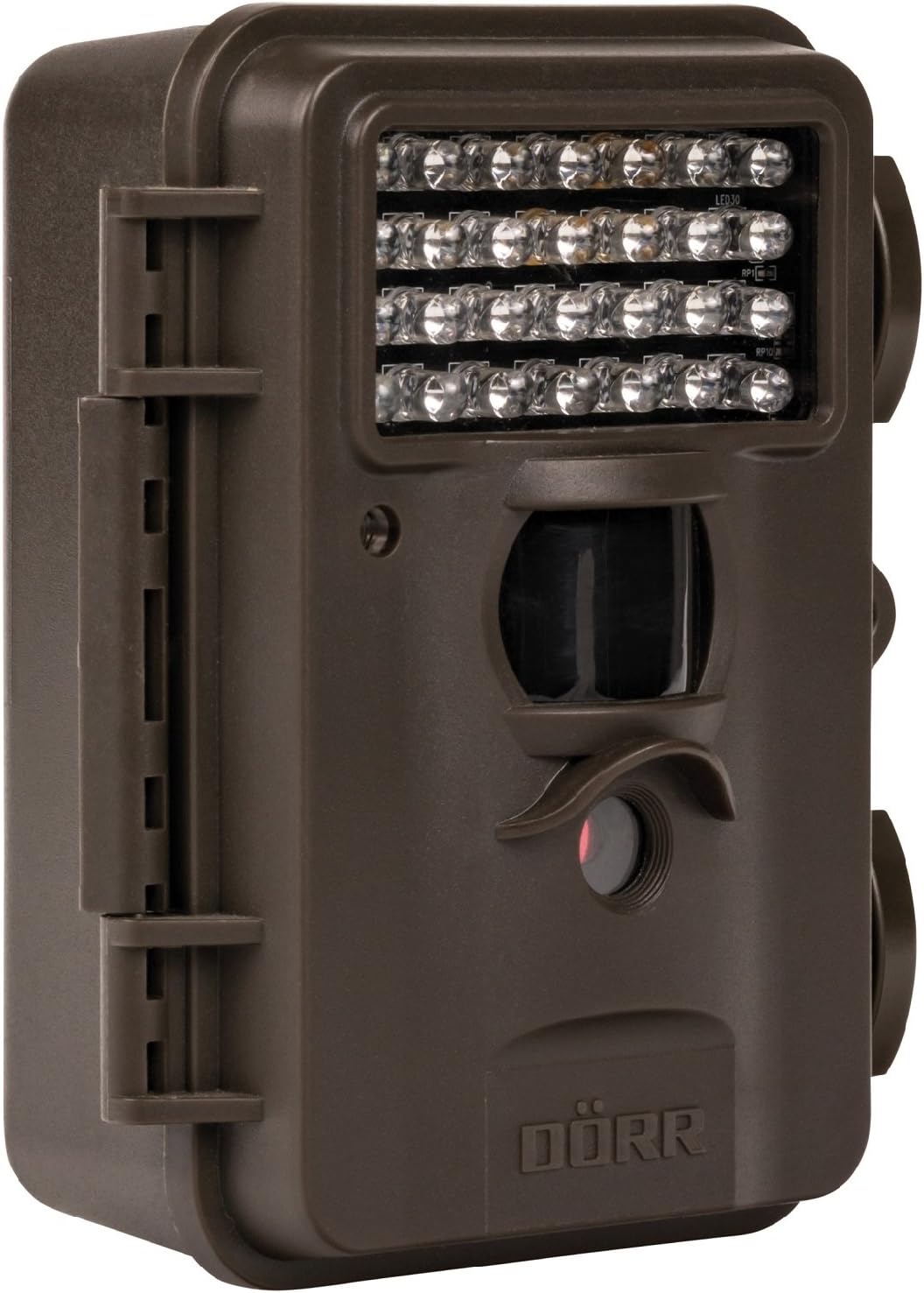
This image displays the front of the Dörr 204473 Trail Camera. Visible features include the array of 28 infrared LEDs at the top, the passive infrared (PIR) motion sensor below the LEDs, and the camera lens at the bottom. The camera has a rugged, dark brown, weatherproof casing with a latch on the left side.
The Dörr 204473 camera features a compact and durable design. Key components include:
- 적외선 LED: 28 nearly invisible LEDs for night illumination up to 15 meters.
- PIR 모션 센서 : Detects movement to trigger photo or video capture.
- 카메라 렌즈: Captures 8MP still images and video.
- TFT 디스플레이: 메뉴 탐색을 위해 viewing captured media (located inside the camera).
- Control Keypad: For setting up and operating the camera.
- 방수 하우징: Protects the camera from environmental elements.
설정
1. 배터리 설치
- 측면에 있는 카메라 하우징 잠금장치를 여세요.
- 배터리함을 찾습니다.
- AA 배터리 4개 또는 8개를 삽입할 때, 극성(+/-)을 정확히 확인하십시오.
- 배터리 덮개를 단단히 닫으세요.
2. SD 카드 설치
- With the camera housing open, locate the SD/SDHC card slot.
- Insert an SD/SDHC memory card (up to 32 GB) into the slot until it clicks into place. Ensure the card is inserted in the correct orientation.
- 제거하려면 카드가 튀어나올 때까지 조심스럽게 밀어 넣으세요.
3. 카메라 장착
The camera can be mounted using a strap or a wall mount. Ensure the camera is positioned to capture the desired area without obstructions. The mounting type is wall mount.
- 스트랩 장착: Thread the provided strap through the slots on the back of the camera and secure it around a tree or pole.
- 벽면 장착: Use appropriate screws and anchors (not included) to secure the camera to a wall or flat surface.
작동 지침
1. 전원 켜기 / 끄기
- 전원을 켜려면 전원 스위치를 'ON' 위치로 밀어주세요.
- 전원을 끄려면 전원 스위치를 'OFF' 위치로 밀어주세요.
2. 메뉴 탐색
Once powered on, the TFT display will activate. Use the keypad buttons (UP, DOWN, LEFT, RIGHT, OK, MENU) to navigate through the settings menu. The menu is available in English and German.
3. 날짜 및 시간 설정
- Enter the menu and navigate to 'Date/Time' settings.
- Use the navigation buttons to set the current date and time.
- Confirm with 'OK'. Each captured image will display the time, date, and temperature in °C.
4. Photo/Video Modes and Settings
The camera supports both still image and video capture. Adjust settings such as resolution, trigger interval, and burst mode via the menu.
- 해결: Set to 8MP for still images.
- 트리거 시간: The camera has a fast trigger time of 1.3 seconds.
- 동작 감지: Configure the sensitivity of the PIR sensor.
- 야간 투시경: The 28 IR LEDs automatically activate in low light conditions for night vision up to 15 meters.
5. View잉 Files
당신은 할 수 있습니다 view captured photos and videos directly on the camera's TFT display or by connecting the camera to a computer via USB (cable not included) or by inserting the SD card into a card reader.
유지
- 청소: 카메라 렌즈와 하우징을 닦을 때는 부드럽고 마른 천을 사용하십시오. 연마성 세척제나 용제를 사용하지 마십시오.
- 배터리 관리 : 장기간 카메라를 사용하지 않을 경우 배터리 누출을 방지하기 위해 배터리를 제거하세요.
- 저장: 카메라를 사용하지 않을 때는 직사광선을 피해 서늘하고 건조한 곳에 보관하십시오.
문제 해결
| 문제 | 가능한 원인 | 해결책 |
|---|---|---|
| 카메라 전원이 켜지지 않음 | 배터리 잔량이 부족하거나 방전되었거나, 배터리 극성이 잘못되었을 수 있습니다. | 배터리를 교체할 때는 극성이 올바른지 확인하십시오. |
| 이미지/동영상이 촬영되지 않았습니다. | SD card full or not inserted correctly; motion sensor blocked or sensitivity too low. | Insert/replace SD card; format SD card; clear sensor path; increase sensor sensitivity. |
| 야간 화질이 좋지 않음 | Subject too far from camera; IR LEDs obstructed. | Ensure subject is within 15m range; clear any obstructions from IR LEDs. |
| 카메라가 움직임을 감지하지 못함 | PIR sensor sensitivity too low; camera positioned incorrectly. | Increase PIR sensitivity; reposition camera for optimal detection angle. |
명세서
| 특징 | 세부 사항 |
|---|---|
| 상표 | 되르 |
| 모델 번호 | 204473 |
| 효과적인 스틸 해상도 | 8 MP |
| 효과적인 비디오 해상도 | 8 MP |
| 나이트 비전 범위 | 15 미터 |
| IR LED 수 | 28 |
| 방아쇠 시간 | 1.3초 |
| 저장 | SD/SDHC Memory Card (up to 32 GB) |
| 전원 | 4x or 8x AA Batteries |
| 색상 | 검은색 |
| 재료 | 금속 |
| 품목 치수(L x W x H) | 10 x 7 x 12.2cm |
| 방수 레벨 | 방수복 |
| 장착 유형 | 벽걸이형 |
| 추천 응용 프로그램 | Motion Detection, Night Vision |
보증 및 지원
For warranty information and technical support, please refer to the documentation provided with your purchase or visit the official Dörr web사이트. 보증 청구를 위해 구매 증빙 자료를 보관하세요.


