1. 서론
The HP EliteOne 800 G3 All-in-One PC is designed to provide a powerful and integrated computing experience. This manual will guide you through the setup, operation, and maintenance of your new device, ensuring optimal performance and longevity.
Key features include a 23.8-inch display, robust processors, advanced security features, and enhanced collaboration tools. The sleek design integrates all components into a single unit, minimizing cable clutter and maximizing workspace efficiency.
2. 상자 안에 무엇이 들어있나요?
모든 구성품이 포장에 들어 있는지 확인하세요.
- Personal computer (HP EliteOne 800 G3 All-in-One)
- 리클라이닝 스탠드
- 생쥐
- 건반
- 전원 어댑터 및 케이블
- 문서(이 매뉴얼, 보증 정보)
3. 설정
Follow these steps to set up your HP EliteOne 800 G3 All-in-One PC:
- PC 압축 풀기: Carefully remove the All-in-One PC and its components from the packaging. Place the PC on a stable, flat surface.
- 스탠드 부착: Securely attach the recline stand to the back of the All-in-One PC according to the instructions provided in the quick setup guide (if applicable). Ensure it clicks into place or is fastened with screws as directed.
- 주변기기 연결:
- Connect the USB keyboard to an available USB port on the PC.
- Connect the USB mouse to another available USB port on the PC.
- 유선 네트워크를 사용하는 경우 이더넷 케이블을 RJ-45 포트에 연결하십시오.
- 전원 연결: Connect the power cable to the power adapter, then plug the adapter into the PC's power input port. Plug the other end of the power cable into a grounded electrical outlet.
- 전원 켜기: Press the power button, usually located on the side or bottom bezel of the display. The PC will boot up, and the Windows 10 Pro operating system will begin its initial setup process. Follow the on-screen prompts to complete the setup, including language selection, network connection, and user account creation.
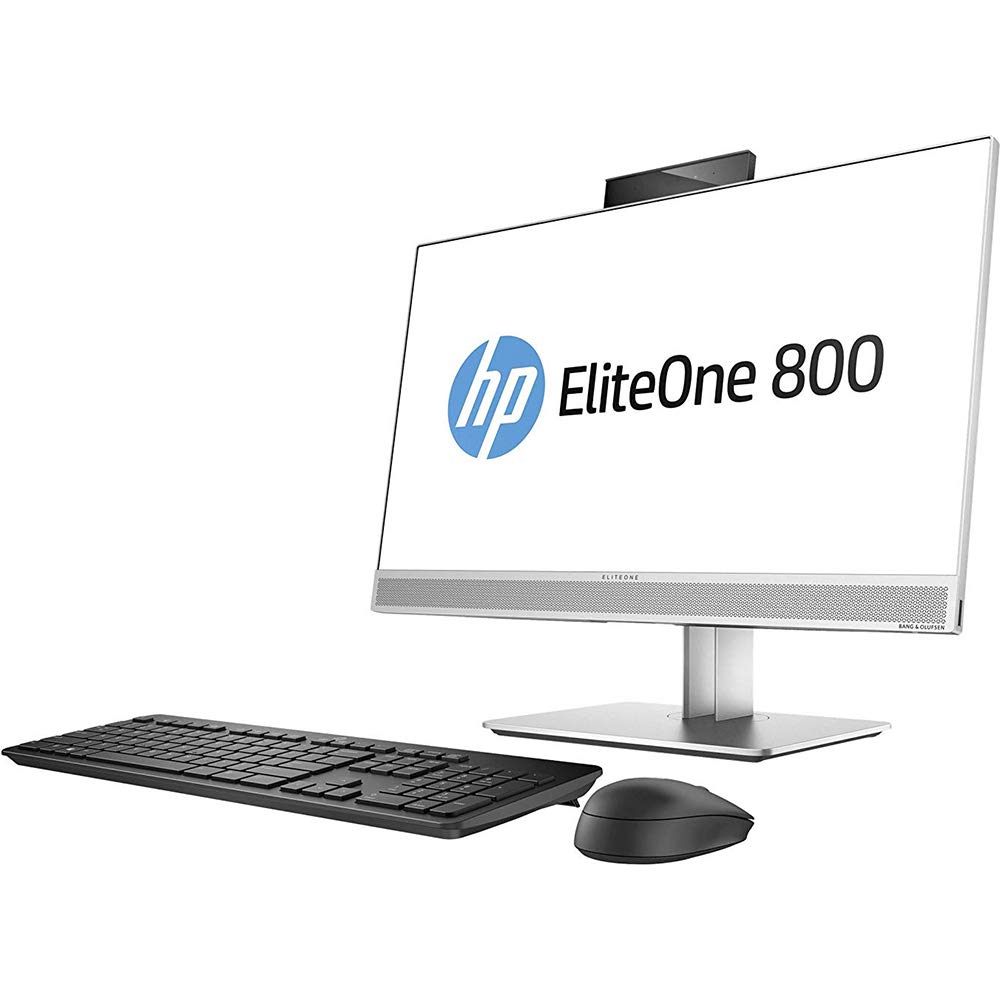
그림 3.1: HP EliteOne 800 G3 All-in-One PC with connected peripherals. This image illustrates the general appearance of the computer and its basic setup components.
4. PC 작동 방법
Your HP EliteOne 800 G3 is pre-installed with Windows 10 Pro, offering a familiar and productive computing environment. Here are some operational highlights:
- 표시하다: The 23.8-inch Full HD (1920x1080) display provides clear visuals for work and entertainment. Some models may feature an optional non-glare touchscreen for interactive use.
- 오디오: Experience enhanced audio with Audio by Bang & Olufsen. The PC also includes HP Noise Cancellation software and HP Audio Boost for clear communication during calls and meetings.
- Web캠: Utilize the integrated front and optional rear-facing webcams for video conferencing and capturing images.
- 성능: Equipped with powerful Intel processors, 8 GB DDR4 RAM, and a 256 GB SSD, the system delivers responsive performance. Intel HD Graphics 630 handles visual tasks efficiently.
- 연결성: Connect to networks via 802.11abg wireless or Gigabit Ethernet. Multiple USB ports are available for connecting external devices.
- 보안: Benefit from HP's integrated security features designed to protect your data and system.
5. 유지관리
Proper maintenance ensures the longevity and optimal performance of your All-in-One PC:
- 디스플레이 청소: 전자제품용으로 특별히 제작된 부드럽고 보푸라기가 없는 천을 사용하세요. 가볍게amp물이나 마모성이 없는 화면 세척제를 천에 묻혀 닦으십시오. 화면에 직접 액체를 분사하지 마십시오.
- 섀시 청소: 부드러운 d로 외부 표면을 닦으십시오.amp 옷감. 강한 화학 물질이나 연마성 세제를 사용하지 마십시오.
- 소프트웨어 업데이트: Regularly check for and install operating system updates (Windows Update) and driver updates (HP Support Assistant) to ensure system stability and security.
- 통풍: Ensure that the ventilation openings on the PC are not blocked to prevent overheating. Keep the PC in a well-ventilated area.
- 데이터 백업: 데이터 손실을 방지하려면 중요한 데이터를 주기적으로 외장 드라이브나 클라우드 스토리지에 백업하세요.
6. 문제 해결
이 섹션에서는 다음과 같은 일반적인 문제에 대해 설명합니다.
- 전원이 켜지지 않음 / PC가 켜지지 않음:
- Ensure the power cable is securely connected to both the PC and the electrical outlet. Try a different outlet. Verify the power adapter is functioning correctly.
- No Display / Blank Screen:
- Check if the PC is powered on. If the PC is on but the screen is blank, try restarting the computer. Ensure no external display cables are connected that might be redirecting the output.
- 오디오 없음:
- Check the volume settings in Windows. Ensure speakers are connected and powered on (if external). Verify audio drivers are installed and up to date in Device Manager.
- 네트워크 연결 문제:
- For Wi-Fi, ensure the wireless adapter is enabled and you are connected to the correct network. For wired connection, check the Ethernet cable and router status. Restart your router/modem.
- System Slowdown / Unresponsive:
- Close unnecessary applications. Check Task Manager for processes consuming high CPU or RAM. Run a virus scan. Ensure sufficient free space on the SSD.
문제가 지속되면 HP 지원팀에 문의하십시오. web사이트를 방문하거나 고객 서비스에 문의하세요.
7. 사양
Detailed technical specifications for the HP EliteOne 800 G3 All-in-One PC:
| 특징 | 사양 |
|---|---|
| 모델 번호 | 1JF75UT#ABA |
| 디스플레이 크기 | 23.8 인치 |
| 최대 화면 해상도 | 1920x1080픽셀(풀 HD) |
| 프로세서 | Intel Core (3.4 GHz Cortex) |
| 숫양 | 8GB DDR4 |
| 저장 | 256GB SSD |
| 그래픽 코프로세서 | 인텔 HD 그래픽 630 |
| 운영 체제 | 윈도우 10 프로 |
| 무선형 | 802.11abg |
| 광학 드라이브 유형 | DVD-R |
| 품목 무게 | 13.29파운드(약 6.03kg) |
| 제품 크기(LxWxH) | 21.2 x 2.1 x 13.5인치(약 53.8 x 5.3 x 34.3cm) |
| 색상 | 블랙/실버 |
8. 보증 및 지원
Your HP EliteOne 800 G3 All-in-One PC comes with a standard manufacturer's warranty. Please refer to the warranty documentation included with your product for specific terms and conditions, including coverage duration and service procedures.
기술 지원, 드라이버 다운로드 및 추가 리소스에 대해서는 공식 HP 지원을 방문하세요. website. You may also consider optional protection plans for extended coverage and support, such as the 3-Year Protection Plan or Complete Protect monthly plan, which can be purchased separately.
When contacting support, have your product model number (1JF75UT#ABA) and serial number ready.