1. 서론
The Withings Body Digital Wi-Fi Smart Scale is designed to provide accurate weight and Body Mass Index (BMI) measurements, helping you monitor your health and fitness progress. This smart scale offers seamless data synchronization to the Health Mate app via Wi-Fi or Bluetooth, supports multiple users, and includes specialized modes for pregnancy tracking and baby weighing. This manual provides detailed instructions for setup, operation, maintenance, and troubleshooting to ensure optimal performance of your device.

Image: Withings Body Smart Scale, highlighting its clinically tested status for weight and BMI measurements.
2. 시작하기
2.1. 상자 안에 무엇이 들어있나요?
- Withings Body Smart Scale (Black)
- Alkaline cells (AAA batteries) - already installed
- 빠른 설치 가이드
- Carpet feet (for use on soft surfaces)
2.2. 배터리 설치
The Withings Body scale comes with batteries pre-installed. If you need to replace them, locate the battery compartment on the underside of the scale. Insert four standard AAA batteries, ensuring correct polarity. The scale is designed for long-lasting battery life, operating for up to 18 months on a single set of batteries.
2.3. Initial Setup & App Connection
To begin using your Withings Body scale, you must first connect it to the Health Mate app. This app is compatible with iPhone (4S or higher), iPod Touch (5th generation or higher), iPad (3rd generation or higher, as well as any iPad Mini), and Bluetooth Low Energy compatible Android devices (OS 5.0 or higher).
- 다운로드 Health Mate app 애플 앱 스토어 또는 구글 플레이 스토어에서.
- 앱을 열고 화면의 지시에 따라 새 계정을 만들거나 기존 계정에 로그인하세요.
- Select 'Install a device' and choose 'Scales', then 'Body'.
- Follow the app's prompts to pair your scale via Bluetooth and configure its Wi-Fi connection. Ensure your Wi-Fi network is 802.11 b/g/n compatible with WEP/WPA/WPA2-personal networks.
- Once connected, the scale will automatically synchronize data to the app after each weigh-in.

Image: The Withings Body scale showing a weight trend on its display, alongside a smartphone running the Health Mate app with detailed weight and BMI data.
3. 사용 설명서
3.1. 측정하기
For accurate readings, place the scale on a hard, flat surface. If using on carpet, attach the included carpet feet.
- Step onto the scale barefoot. The scale will automatically turn on.
- 특허 Position Control Technology will guide you to center yourself on the scale using on-screen arrows, ensuring the most precise measurement.
- Stand still until your weight is displayed and stabilized. The scale will then show your BMI and a trend graph of your last 8 measurements.
- Your data will automatically sync to the Health Mate app via Wi-Fi or Bluetooth.

Image: A person's feet positioned on the Withings Body Smart Scale, illustrating proper stance for measurement. Icons for Wi-Fi and Bluetooth connectivity are shown.
3.2. 다중 사용자 인식
The Withings Body scale can automatically recognize up to 8 different users. Each user can weigh themselves and access their personal weight histories within the Health Mate app. Ensure each user creates a profile in the app and performs an initial weigh-in for the scale to learn their profile.
3.3. Pregnancy Tracker & Baby Mode
The scale offers specialized modes to support family health monitoring:
- 임신 진행 상황 추적기: Monitor healthy weight gain range and access obstetrician-reviewed advice within the Health Mate app.
- 베이비 모드 : Track the weight of the youngest family members by holding the baby while weighing yourself, then subtracting your own weight in the app.
3.4. 표시값 이해하기
The scale's display provides instant feedback:
- Instant Weight: Your current weight is displayed prominently.
- Weight Trends: A small graph shows your weight trend over your last 8 measurements, helping you visualize progress.
- BMI : Your Body Mass Index is calculated and displayed, indicating if you are within a healthy range.

Image: The Withings Body scale's display showing current weight and BMI, along with a visual representation of weight trends over time.
4. 고급 기능
4.1. Wi-Fi & Bluetooth Synchronization
The Withings Body scale offers robust connectivity options:
- 자동 데이터 동기화: Data from every weigh-in appears automatically in the Health Mate app via Wi-Fi or Bluetooth. This means you do not need your phone nearby during measurements for data to be recorded. The scale can store up to 16 readings if it cannot sync wirelessly immediately.
- 높은 호환성: The Health Mate app syncs with Apple Watch and over 100 top health and fitness apps, including Apple Health, Fitbit, and Google Fit.
4.2. Position Control Technology
This exclusive patented technology guides you into the correct stance on the scale, ensuring each weigh-in is precise up to 0.1 kg / 0.2 lbs. The scale also adjusts its measurements based on Wi-Fi location to compensate for gravity, further enhancing accuracy.

Image: Visual representation of the Withings Body scale's exceptional reliability due to Position Control Technology and its ease of use with automatic Wi-Fi synchronization.
4.3. Health Mate App Features
The free Withings Health Mate app is central to your experience, providing important trends and insights:
- 종합적인 건강 추적: View your weight history, BMI, and other health metrics.
- 다중 사용자 지원: 프로 관리file최대 8명의 사용자가 사용할 수 있습니다.
- Nutrition Tracking: Integrate with MyFitnessPal to put your caloric intake into perspective.
- Daily Weather & Activity: The scale can display daily weather forecasts and activity levels on its screen.

Image: A collage showing the Health Mate app interface on a smartphone, alongside icons representing multi-user support, pregnancy & baby mode, athlete mode, daily weather & activity display, and up to 18 months battery life.
5. 관리 및 유지 관리
5.1. 청소
위딩스 체중계를 청소하려면 부드러운 천을 사용하세요.amp cloth. Do not use abrasive cleaners or immerse the scale in water. Keep the surface dry to prevent slipping.
5.2. 배터리 교체
When the battery indicator appears on the scale's display or in the Health Mate app, it's time to replace the batteries. Open the battery compartment on the underside of the scale and replace the four AAA batteries with new ones, observing correct polarity. Ensure the scale is properly reconnected to the app after battery replacement.
6. 문제 해결
6.1. 일반적인 문제 및 해결책
- 저울이 켜지지 않음:
- 배터리가 올바르게 설치되었는지, 충전량이 충분한지 확인하십시오. 필요한 경우 교체하십시오.
- Scale not connecting to app/Wi-Fi:
- Ensure Bluetooth is enabled on your smartphone during initial setup.
- Verify your Wi-Fi network credentials in the Health Mate app.
- Move the scale closer to your Wi-Fi router.
- Restart your Wi-Fi router and the scale (by removing and reinserting batteries).
- If issues persist after battery change, re-pair the scale with the app.
- 부정확한 판독값:
- Ensure the scale is on a hard, flat surface. Use carpet feet if on carpet.
- Stand still and centered on the scale during measurement, following the Position Control Technology guidance.
- 발이 깨끗하고 건조한지 확인하세요.
- 다중 사용자 인식 문제:
- 각 사용자에게 고유한 장점이 있는지 확인하세요.file in the Health Mate app and has performed an initial weigh-in.
- If the scale cannot identify a user, it may display a question mark or prompt you to assign the measurement in the app.
7. 사양
7.1. 기술 사양
| 특징 | 세부 사항 |
|---|---|
| 모델 번호 | WBS06-블랙-올-인터 |
| 제품 치수 | 12.87 x 12.87 x 0.91인치; 4.41파운드 |
| 전원 | 4 x AAA 배터리(포함) |
| 배터리 수명 | 최대 18개월 |
| 연결성 | Wi-Fi 802.11 b/g/n (WEP/WPA/WPA2-personal), Bluetooth Low Energy |
| 디스플레이 유형 | OLED |
| 측정 단위 | kg, 파운드, st 파운드 |
| 무게 정확도 | 0.1kg / 0.2파운드 |
| 최대 사용자 수 | 8명의 사용자 |
| 제조업체 | 위딩스 |
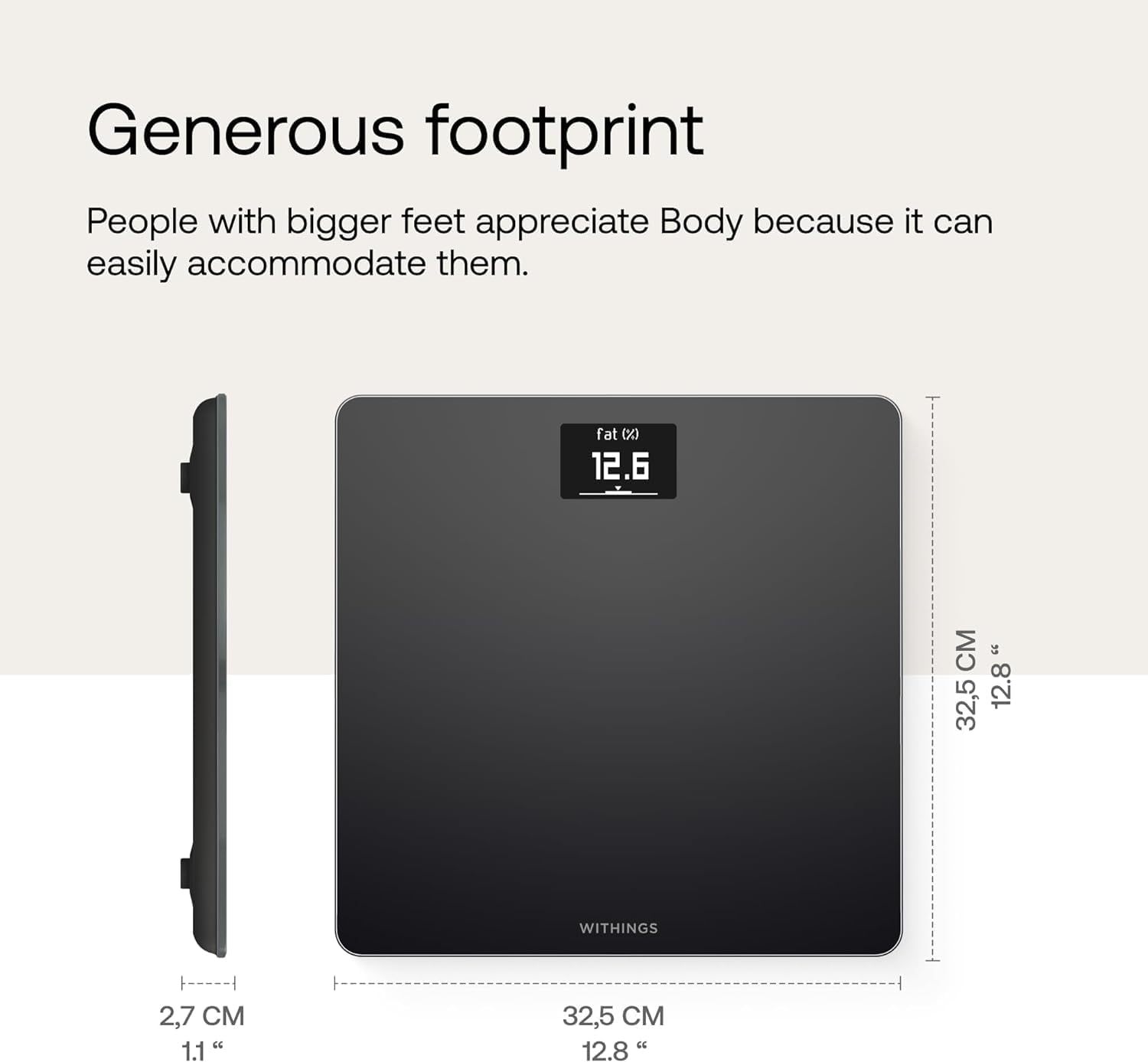
이미지: 측면 및 상단 view of the Withings Body Smart Scale, illustrating its compact dimensions of 32.5 cm (12.8 inches) by 32.5 cm (12.8 inches) and a thickness of 2.7 cm (1.1 inches).
8. 보증 및 지원
8.1. 보증 정보
Withings products are manufactured to the highest quality standards. For specific warranty terms and conditions, please refer to the warranty information provided with your purchase or visit the official Withings web대지.
8.2. Customer Support & Resources
For further assistance, technical support, or to access additional resources, please use the following:
- 공식 사용자 매뉴얼(PDF): PDF 다운로드
- Withings Brand Store: Visit Withings Store on Amazon
- Health Mate App: Access FAQs and support directly within the app.


