소개
Thank you for choosing the Eyoyo 12-inch monitor, Model EM12B. This compact monitor is designed for versatile applications, including CCTV surveillance, secondary display for computers, and multimedia playback. It features multiple input options such as HDMI, VGA, AV, and BNC, along with a 1366x768 resolution display. This manual provides detailed instructions for setup, operation, maintenance, and troubleshooting to ensure optimal performance and longevity of your device.

Image: The Eyoyo 12-inch monitor, suitable for various applications including security monitoring.
상자 안에 무엇이 들어있나요?
패키지에 모든 품목이 들어 있는지 확인하세요.
- 1 x 11.6" Monitor
- 1 x Monitor stand
- BNC 케이블 1개
- 1 x 벽 걸이
- 1 x HDMI 케이블
- 1 x VGA 케이블
- 1 x 원격 제어
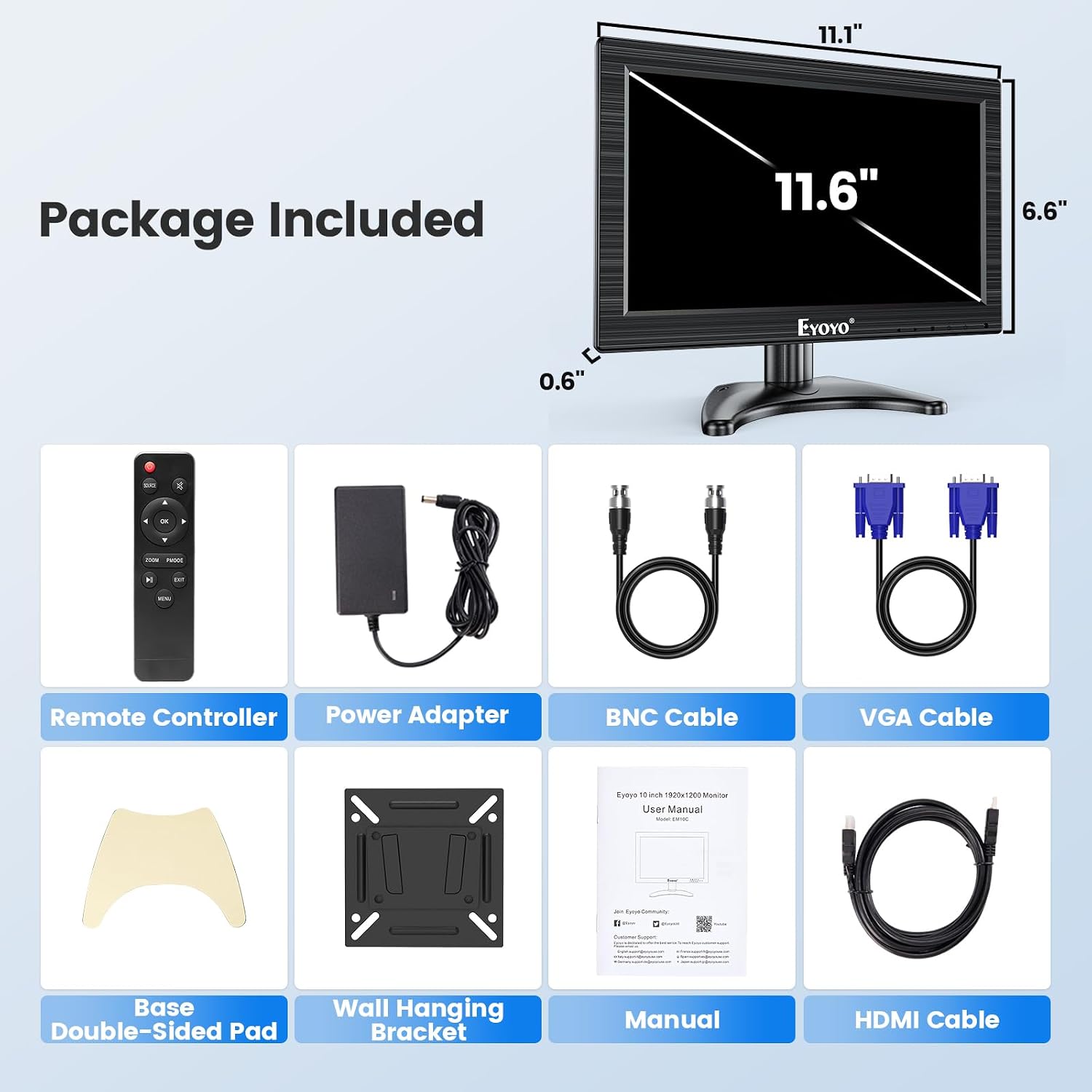
이미지: Eyoyo 12인치 모니터 패키지에 포함된 모든 구성품.
설정
모니터 스탠드 설치
Follow these steps to assemble and install the monitor stand:
- Unpack the monitor and stand components.
- Turn the screw on the stand base to loosen it.
- Disassemble the parts of the stand arm.
- Place the stand arm components onto the stand base.
- Adjust the angle of the stand arm as desired.
- Tighten the parts to secure the stand arm.
- Set up the stand to the monitor by aligning the mounting points.
- Adjust the height and turn the gear to lock the monitor in place.
- Ensure the monitor is securely attached and stable.

Image: Visual guide for monitor stand assembly.
Video: Instructions on how to install the monitor stand.
장치 연결
The Eyoyo EM12B monitor supports multiple input types. Connect your devices to the appropriate ports on the back of the monitor:
- HDMI 입력: For high-definition digital video and audio from devices like laptops, desktop PCs, Raspberry Pi, or gaming consoles.
- VGA 입력: For analog video from older computers or laptops.
- AV 입력: For standard definition analog video and audio from devices like DVD players or TV boxes.
- BNC 입력: Specifically designed for direct connection to CCTV security cameras and analog surveillance systems.
- USB 포트: For connecting USB storage devices (U-disk) up to 32GB for media playback.

이미지: 이상view of the monitor's multi-input professional connectivity.

Image: Connectivity options and compatible devices for the Eyoyo monitor.
작동 지침
전원 켜기/끄기 및 입력 선택
Use the power button on the monitor or the remote control to turn the device on or off. To switch between input sources (HDMI, VGA, AV, BNC), press the 'Input' or 'Source' button on the monitor's control panel or the remote control. Navigate through the available inputs until your desired source is displayed.
Image Flip Function
The monitor includes an image flip function, allowing you to rotate the display horizontally or vertically. This feature is useful for specialized installations such as teleprompters or when the monitor needs to be mounted in an inverted position. Access this function through the OSD (On-Screen Display) menu using the monitor buttons or remote control.

Image: Demonstration of the monitor's image flip capabilities.

Image: The instant image flip feature for quick display adjustments.
USB 재생
Insert a USB flash drive (U-disk) into the USB port on the monitor. The monitor supports media playback from USB devices up to 32GB. Use the remote control to navigate through files and play videos or view 이미지.
Video: Demonstration of the monitor's features, including USB playback and various input connections.
오디오
The monitor features built-in dual speakers for basic audio output. Adjust the volume using the remote control or the monitor's control buttons.

Image: Location of the built-in speakers on the monitor.
유지
Eyoyo 모니터의 수명과 최적의 성능을 보장하려면 다음 유지 관리 지침을 따르십시오.
- 청소: 부드럽고 마른 천으로 화면과 외부를 닦으세요. 잘 지워지지 않는 얼룩은 가볍게 두드려 닦아주세요.ampen the cloth with water or a mild, non-abrasive screen cleaner. Avoid using harsh chemicals, alcohol, or abrasive materials.
- 통풍: 과열을 방지하려면 모니터의 통풍구가 막히지 않았는지 확인하세요.
- 저장: 장기간 사용하지 않을 경우 모니터를 직사광선과 극한 온도 변화를 피해 서늘하고 건조한 곳에 보관하십시오.
- 손질: Handle the monitor with care to avoid physical damage. Do not place heavy objects on top of it.
문제 해결
모니터에 문제가 발생하면 다음의 일반적인 문제 해결 단계를 참조하세요.
- 전원 없음:
- 전원 어댑터가 모니터와 작동하는 전원 콘센트에 제대로 연결되어 있는지 확인하십시오.
- Ensure the power button on the monitor or remote control is pressed.
- 신호 없음:
- Verify that the input cable (HDMI, VGA, AV, BNC) is correctly connected to both the monitor and the source device.
- Select the correct input source using the 'Input' button on the monitor or remote.
- 소스 장치의 전원이 켜져 있고 신호를 출력하고 있는지 확인하세요.
- 이미지 왜곡/화질 저하:
- Check the cable connections for looseness or damage. Try a different cable if possible.
- Adjust the display settings (brightness, contrast, resolution) through the OSD menu.
- Ensure the source device's output resolution is compatible with the monitor's native resolution (1366x768).
- 소리 없음:
- Increase the volume using the remote control or monitor buttons.
- Check if the audio is muted on the monitor or the source device.
- If using AV input, ensure the red and white audio cables are correctly connected.
- 원격 제어가 작동하지 않음:
- 리모컨의 배터리를 교체하세요.
- Ensure there are no obstructions between the remote and the monitor's IR receiver.
명세서
| 모델 번호 | EM12B |
| 화면 크기 | 11.6인치(스탠딩 스크린 디스플레이 크기) |
| 해결 | 1366 x 768 픽셀 (HD+) |
| 종횡비 | 16시 9분 |
| 이미지 밝기 | 350 칸델라 |
| 입력 | HDMI, VGA, AV, BNC |
| 총 USB 포트 | 1 |
| 권tage | 12 볼트 |
| 제품 치수 | 1.3 x 13 x 7.9 인치 |
| 품목 무게 | 0.01 온스 |
| 제조업체 | China OEM |
보증 및 지원
For warranty information and technical support, please refer to the documentation included with your purchase or visit the official Eyoyo web사이트. 보증 청구를 위해 구매 증빙 자료로 구매 영수증을 보관하세요.


