소개
This manual provides instructions for the installation, operation, and maintenance of the Black Box SERVSWITCH EC USB Server Cable, Model EHN9000U-0006. This 6-foot (1.8-meter) cable is designed to connect a server to a KVM switch, providing both USB and VGA connectivity.
안전 정보
Please read and understand all safety instructions before using this product. Failure to follow these instructions may result in damage to the product or connected equipment.
- Do not expose the cable to excessive moisture or extreme temperatures.
- 케이블을 심하게 구부리거나 꺾지 마십시오. 내부 전선이 손상될 수 있습니다.
- Ensure all connections are secure before powering on equipment.
- Disconnect power from devices before connecting or disconnecting cables.
패키지 내용
패키지에 다음 품목이 포함되어 있는지 확인하세요.
- 1 x Black Box SERVSWITCH EC USB Server Cable (EHN9000U-0006)
제품 끝view
The Black Box SERVSWITCH EC USB Server Cable is a specialized cable designed for KVM (Keyboard, Video, Mouse) applications. It integrates VGA video and USB keyboard/mouse signals into a single cable for streamlined connectivity between a server and a KVM switch.
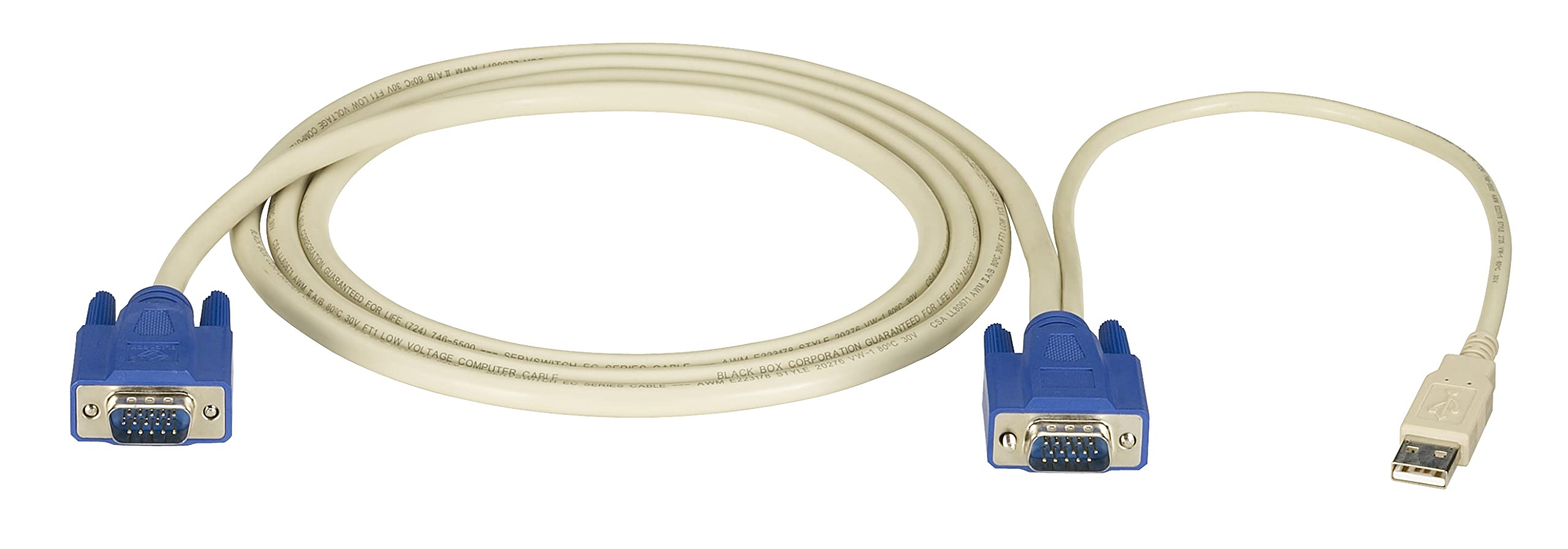
영상: Black Box SERVSWITCH EC USB Server Cable. This image displays the 6-foot cable with its distinct VGA (HD-15) and USB connectors, designed for server-to-KVM switch connections.
주요 특징:
- 통합 연결성: Combines VGA video and USB data into one cable.
- 길이: 6 feet (1.8 meters) for flexible placement.
- 호환성: Designed for use with Black Box SERVSWITCH KVM systems.
- 꼬임 방지 디자인: Helps prevent tangles and simplifies cable management.
설정
- 전원 끄기 장치: Ensure both the server and the KVM switch are powered off before making any connections.
- 서버에 연결: Locate the VGA output port and an available USB port on your server. Connect the corresponding VGA (HD-15 male) and USB (Type-A male) connectors of the EHN9000U-0006 cable to these ports on the server.
- KVM 스위치에 연결하세요: Locate the KVM port on your KVM switch designated for the server. Connect the combined VGA (HD-15 female) and USB (Type-A female) end of the EHN9000U-0006 cable to the KVM switch's input port. Ensure a secure fit for both connectors.
- 전원 켜기: Once all connections are secure, power on the KVM switch, then power on the server.
운영
Once the cable is properly connected and devices are powered on, the KVM switch should detect the connected server. Use the KVM switch's controls (buttons, hotkeys, or OSD) to switch to the server connected via this cable. You should then have control over the server's video, keyboard, and mouse.
- Refer to your KVM switch's user manual for specific instructions on switching between connected servers.
- Ensure the KVM switch is configured to recognize the USB keyboard and mouse signals.
유지
The Black Box SERVSWITCH EC USB Server Cable requires minimal maintenance. Follow these guidelines to ensure longevity:
- 청소: 부드럽고 마른 천으로 케이블과 커넥터를 닦으십시오. 액체 세척제나 용제를 사용하지 마십시오.
- 저장: When not in use, store the cable in a cool, dry place, away from direct sunlight and extreme temperatures. Avoid tight coiling to prevent internal damage.
- 손질: Always grasp the connector housing when plugging or unplugging the cable. Avoid pulling on the cable itself.
문제 해결
| 문제 | 가능한 원인 | 해결책 |
|---|---|---|
| 비디오 표시 없음 | Loose VGA connection; Incorrect KVM port selected; Server video output issue. | Ensure VGA connectors are fully seated and secured. Select the correct KVM port. Check server's video output directly. |
| 키보드/마우스가 응답하지 않습니다 | Loose USB connection; KVM switch USB emulation issue; Server USB port issue. | Ensure USB connectors are fully seated. Verify KVM switch USB settings. Test server USB ports with another device. |
| 간헐적인 연결 | Damaged cable; Loose connections; Electrical interference. | Inspect cable for visible damage. Re-seat all connections. Ensure cable is not near strong electromagnetic sources. |
명세서
- 모델: EHN9000U-0006
- 상표: 블랙박스
- 케이블 유형: USB, VGA
- Connector Type (Server End): HD-15 Male (VGA), USB Type-A Male
- Connector Type (KVM End): HD-15 Female (VGA), USB Type-A Female
- 길이: 6피트(1.8미터)
- 색상: 검정/빨강
- 특징: 엉킴 프리
- 호환 장치: Server (with VGA and USB ports)
- 제품 크기: 5 x 0.5 x 5인치(대략적인 포장 치수)
- 품목 무게: 8.4온스(0.24킬로그램)
- 한국어: 822088018322
보증 및 지원
For warranty information and technical support, please refer to the official Black Box web해당 사이트를 방문하거나 고객 서비스 부서에 문의하세요. 보증 청구를 위해 구매 영수증을 보관하세요.
블랙박스 Web대지: www.blackbox.com


