소개
This manual provides comprehensive instructions for the safe and effective use of your Winplus AC55925-80 3-in-1 Emergency Socket Power Bank. This device combines a compact power bank, a USB car charger, and an emergency glass-breaking tool. Please read this manual thoroughly before operation and retain it for future reference.
제품 끝view
The Winplus 3-in-1 Emergency Socket Power Bank is designed for convenience and safety, offering multiple functionalities in a compact form factor.

Figure 1: Winplus 3-in-1 Emergency Socket Power Bank with key features highlighted.
구성 요소:
- Compact Power Bank: Provides portable power for charging devices.
- USB 차량용 충전기: Plugs into a 12V car socket to charge devices and the power bank.
- Emergency Glass-Breaking Tool: Integrated for emergency situations.
- USB 출력 포트: For connecting charging cables to devices.
- 마이크로 USB 입력 포트: For charging the internal power bank.
- LED 표시등: 충전 상태를 표시합니다.

그림 2: 상세 view of the device's ports.
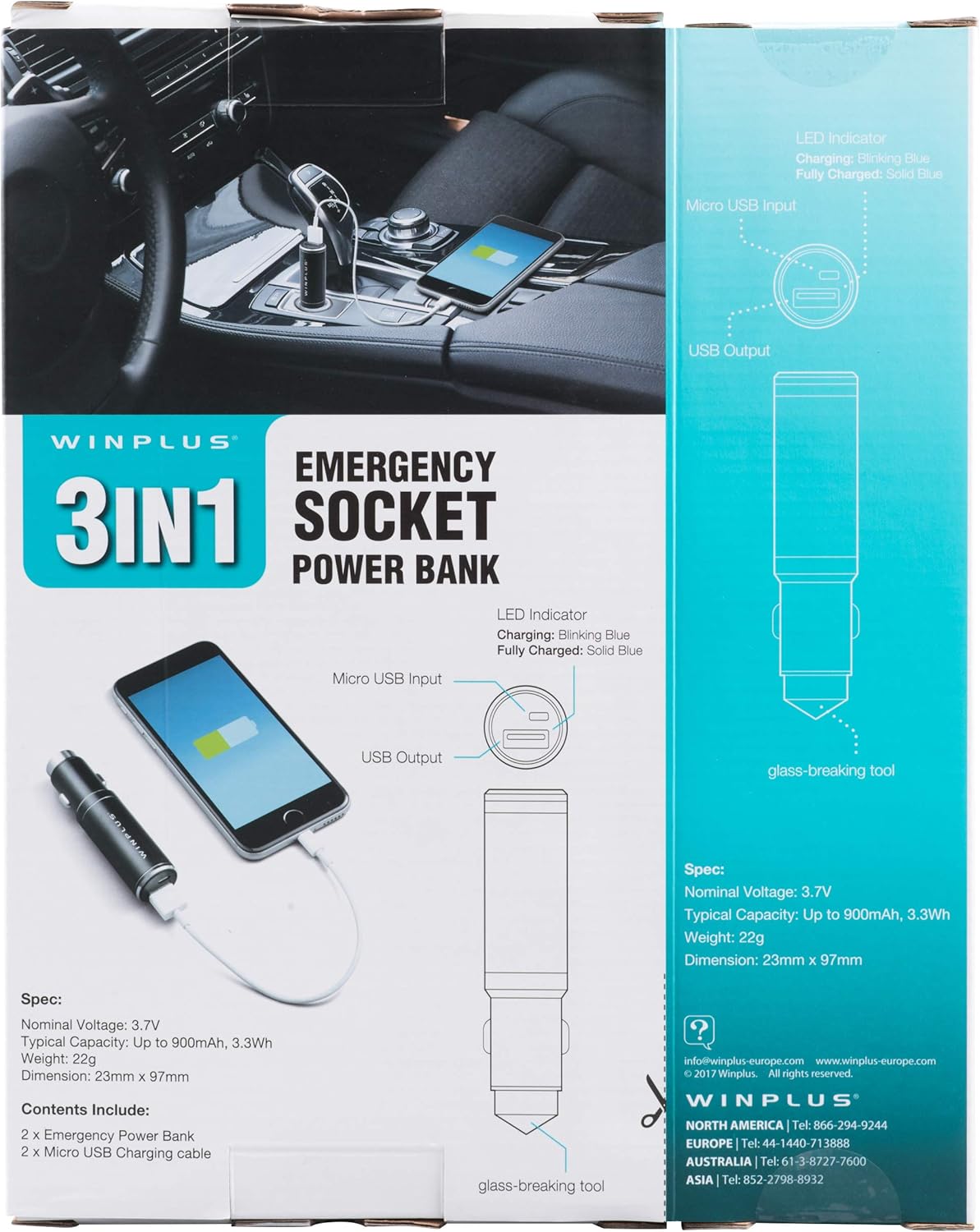
Figure 3: LED indicator status and glass-breaking tool location.
설정
파워뱅크 초기 충전:
- Locate the Micro USB Input port on the device.
- Connect the provided Micro USB charging cable to the Micro USB Input port.
- Connect the other end of the USB cable to a standard USB power source (e.g., a computer USB port, a wall adapter, or the car's 12V socket when used as a car charger).
- The LED indicator will blink blue during charging.
- 완전히 충전되면 LED 표시등이 파란색으로 켜집니다.
참고: 처음 사용하기 전에 보조 배터리를 완전히 충전하는 것이 좋습니다.
작동 지침
휴대용 전원 은행으로 사용:
- Ensure the power bank is charged (solid blue LED indicator).
- Connect your device's charging cable to the USB Output port on the power bank.
- 케이블의 다른 쪽 끝을 모바일 기기(스마트폰, 태블릿 등)에 연결하세요.
- 모바일 기기가 자동으로 충전을 시작합니다.
Using as a USB Car Charger:
- Insert the Winplus 3-in-1 device into your vehicle's 12V accessory socket (cigarette lighter socket).
- Connect your device's charging cable to the USB Output port on the Winplus device.
- 케이블의 다른 쪽 끝을 모바일 장치에 연결합니다.
- Your device will begin charging. The internal power bank will also charge simultaneously if it is not full.
Using the Emergency Glass-Breaking Tool:
The emergency glass-breaking tool is located at the tip of the device, opposite the USB ports. This tool is intended for emergency use only to break vehicle side windows in situations where occupants are trapped.
- In an emergency, firmly press the tip of the tool against a corner of a side window.
- Apply steady pressure until the spring-loaded mechanism activates and shatters the glass.
- Once the glass is broken, carefully clear any remaining shards before exiting the vehicle.
경고: Use this tool only in genuine emergencies. Misuse can cause serious injury. Keep out of reach of children.
유지
- 기기를 건조하게 유지하십시오. 습기는 내부 회로를 손상시킬 수 있습니다.
- 극단적인 온도(덥거나 추운)에 노출시키지 마십시오.
- 부드럽고 마른 천으로 기기를 닦으세요. 강한 화학 물질이나 연마성 세제는 사용하지 마세요.
- 사용하지 않을 때는 시원하고 건조한 곳에 보관하세요.
- 장치를 떨어뜨리거나 강한 충격을 가하지 마십시오.
문제 해결
| 문제 | 가능한 원인 | 해결책 |
|---|---|---|
| 장치가 충전되지 않습니다. | 보조 배터리가 방전되었습니다. 케이블에 문제가 있습니다. USB port is dirty or damaged. | 파워 뱅크를 충전하십시오. 다른 충전 케이블을 사용해 보세요. Clean the USB ports carefully or try another port. |
| LED 표시등이 켜지지 않습니다. | Device is not connected to a power source. Device is fully charged (if solid blue). 장치에 결함이 있습니다. | Ensure proper connection to a power source. Check if it's already solid blue. 문제가 지속되면 고객 지원에 문의하세요. |
| 느린 충전. | Cable is not suitable. Power source is low current. Device being charged has high power requirements. | 고품질 충전 케이블을 사용하십시오. Connect to a higher current USB adapter. This device provides 2.1A output, which is standard for fast charging most phones. |
명세서
- 모델: AC55925-80
- 공칭 권tage: 3.6V
- 일반적인 용량: Up to 2500 mAh, 9 Wh
- 배터리 셀 구성: 리튬폴리머
- USB 출력: 5V / 2.1A
- 마이크로 USB 입력 : 5V / 0.5A
- 치수: 23mm x 127mm(대략)
- 품목 무게: 510g (2개 묶음 기준)
- 커넥터 유형: Micro USB (Input), USB Type-A (Output)
안전 정보
- 배터리 팩을 분해, 열거나, 파쇄하지 마십시오.
- 배터리 팩을 열이나 불에 노출시키지 마십시오. 직사광선에 보관을 피하십시오.
- 배터리 팩을 단락시키지 마십시오. 배터리 팩을 상자나 서랍에 함부로 보관하지 마십시오. 배터리 팩이 서로 단락되거나 다른 금속 물체에 의해 단락될 수 있습니다.
- 배터리 팩에 기계적 충격을 가하지 마십시오.
- 배터리 누액 발생 시, 액체가 피부나 눈에 닿지 않도록 하십시오. 만약 닿았다면, 즉시 해당 부위를 흐르는 물에 깨끗이 씻고 의사의 진료를 받으십시오.
- 해당 장비와 함께 사용하도록 특별히 제공된 충전기 외에는 다른 충전기를 사용하지 마십시오.
- 배터리 팩을 어린이의 손이 닿지 않는 곳에 보관하세요.
- 배터리 팩을 삼킨 경우 즉시 의사의 진료를 받으십시오.
- 항상 장비에 맞는 배터리 팩을 구입하십시오.
- 배터리 팩을 깨끗하고 건조하게 유지하십시오.
- 사용하지 않을 때 배터리를 장시간 충전 상태로 두지 마십시오.
- 배터리 팩은 현지 규정에 따라 적절하게 폐기하십시오.
보증 및 지원
For warranty information or technical support, please contact Winplus North America Inc. directly.
- 제조업체: Winplus North America Inc
- 연락처 정보: Refer to product packaging or the official Winplus web최신 지원 세부 정보는 사이트를 참조하세요.
You can also visit the Winplus web자주 묻는 질문(FAQ) 및 추가 제품 정보는 다음 사이트를 참조하십시오. www.winplus-europe.com


