1. 서론
The MS8229 is an auto-ranging digital multimeter designed for professional and home use. It combines multiple measurement functions including AC/DC voltage and current, resistance, frequency, duty cycle, and capacitance. Additionally, it features built-in sensors for sound level, light (Lux), ambient temperature, and humidity, making it a versatile 5-in-1 testing instrument. Its large dual LCD display with backlight ensures clear readings in various conditions.

그림 1.1: 전면 view of the MS8229 Digital Multimeter, showing the display, rotary switch, and input jacks.
2. 주요 특징
- 표시하다: 4000 counts, large dual LCD with backlight.
- 통합 센서: Built-in Sound Level Meter, Light Meter (Lux), Ambient Temperature, and Humidity Tester.
- Core Measurements: Tests AC/DC Voltage and Current, Resistance, Frequency, Duty Cycle, and Capacitance.
- 다이오드 및 연속성: Diode Check and Continuity Test with audible buzzer (if resistance is less than 40 ohms).
- 온도 측정 : Type K thermocouple contact temperature measurement.
- 데이터 함수: Data Hold and Relative Measurement.
- 작업: Auto Ranging / Selection.
- 전원 표시기: 배터리 부족 표시.
3. 패키지 내용
패키지를 열 때 아래 나열된 모든 품목이 들어 있고 상태가 양호한지 확인하세요.
- 1 x MASTECH MS8229 Digital Multimeter
- 1 x Test Clip (Test Leads)
- 1 x Temperature Probe (Type K Thermocouple)
- 1 x 영어 설명서

Figure 3.1: The MS8229 Multimeter shown with its included test leads, temperature probe, and user manual.
4. 안전 정보
계량기의 안전한 작동 및 서비스를 위해 다음 안전 수칙을 준수하십시오.
- Always ensure the meter is in the correct function and range for the measurement being taken.
- 볼륨을 적용하지 마십시오tage or current that exceeds the maximum rated input for the selected range.
- 볼륨을 사용할 때는 주의하세요tag30V AC RMS, 42V 피크 또는 60V DC 이상입니다. 이러한 볼륨tag이것은 충격 위험을 초래합니다.
- 기능이나 범위를 변경하기 전에 테스트 대상 회로에서 테스트 리드를 분리하십시오.
- 사용 전 테스트 리드의 절연 손상이나 금속 노출 여부를 검사하세요. 손상된 경우 교체하세요.
- 계량기가 손상된 것처럼 보이거나 케이스가 열려 있는 경우 작동하지 마십시오.
- Replace the batteries as soon as the low battery indicator appears to ensure accurate readings.
- 모든 지역 및 국가 안전 규정을 준수하십시오.
5. 설정
5.1 배터리 설치
The MS8229 requires three (3) 1.5V AAA batteries (not included) for operation.
- 계량기가 꺼져 있는지 확인하십시오.
- 측정기 뒷면에서 배터리 덮개를 찾으세요.
- 드라이버를 사용하여 배터리 덮개를 고정하는 나사를 풀어주세요.
- 덮개를 제거하세요.
- 배터리 칸 내부에 표시된 극성(+와 -)을 확인하여 AAA 배터리 3개를 삽입하십시오.
- 배터리 커버를 교체하고 나사로 고정합니다.
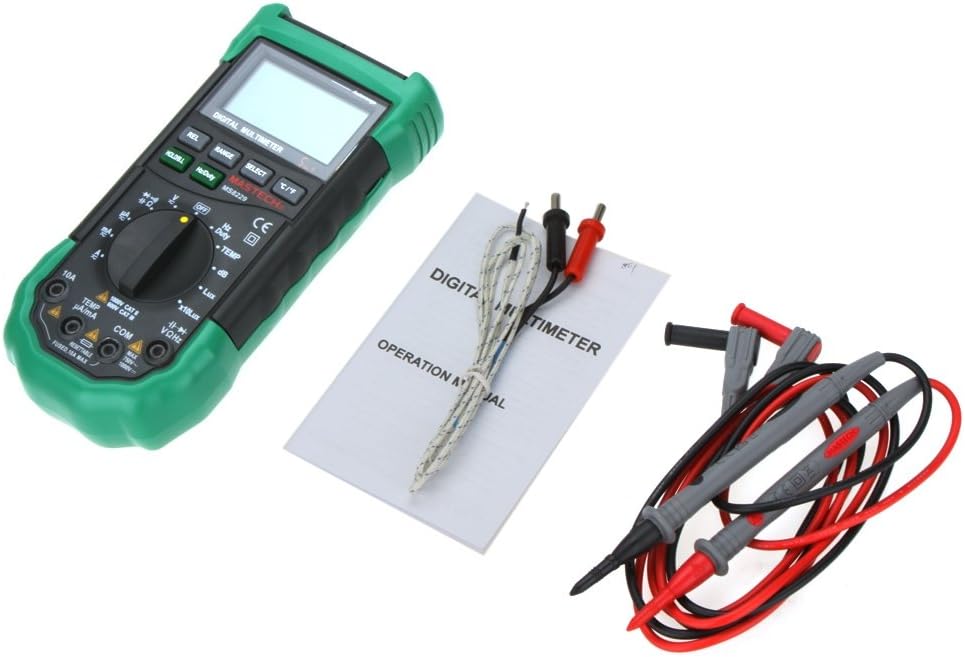
그림 5.1: View of the battery compartment, showing the slots for three AAA batteries and the fuse location.
5.2 테스트 리드 연결
정확하고 안전한 측정을 위해서는 테스트 리드를 올바르게 연결하는 것이 매우 중요합니다.
- 대부분의 볼륨의 경우tage, resistance, frequency, capacitance, diode, and continuity measurements, insert the red test lead into the VΩHz 잭과 검은색 테스트 리드를 코. 잭.
- 전류(mA/µA)를 측정하려면 빨간색 테스트 리드를 삽입하십시오. TEMP µA/mA 잭과 검은색 테스트 리드를 코. 잭.
- For high current measurements (10A), insert the red test lead into the 10A 잭과 검은색 테스트 리드를 코. 잭.
- For temperature measurements, connect the Type K thermocouple probe to the TEMP µA/mA 그리고 코. 잭을 연결할 때는 해당되는 경우 극성을 확인하십시오.

Figure 5.2: The MS8229 Multimeter with red and black test leads properly inserted into the input jacks.
6. 사용 설명서
The MS8229 features a rotary switch for function selection and several buttons for additional features.

Figure 6.1: The MS8229 Multimeter display showing typical readings for humidity and temperature, along with a main measurement.
6.1 회전 스위치 기능
Turn the rotary switch to select the desired measurement function:
- OFF : 계량기를 끕니다.
- 뷔~: AC 볼륨tag측정.
- V-: DC 볼륨tag측정.
- Ω: 저항 측정.
- 다이오드/연속성: 다이오드 테스트 및 연속성 테스트.
- Hz/듀티: 주파수 및 듀티 사이클 측정.
- TEMP : Temperature measurement using the Type K thermocouple.
- 데시벨: Sound Level measurement.
- Lux / x10Lux: Light (Illumination) measurement.
- RH : Relative Humidity measurement.
- A~: AC Current measurement (400µA to 10A).
- ㅏ-: DC Current measurement (400µA to 10A).
6.2 버튼 기능
- HOLD/B.L: Press once to hold the current display reading. Press and hold to activate/deactivate the backlight.
- Hz/듀티: In Frequency/Duty Cycle mode, press to toggle between Hz and Duty Cycle display.
- 관계: Activates relative measurement mode, displaying the difference between the current reading and a stored reference value.
- 범위: Manually selects the measurement range (overrides auto-ranging).
- 선택하다: Toggles between different functions within a single rotary switch position (e.g., AC/DC in voltage/current modes, Diode/Continuity).
- °C/°F: In Temperature mode, toggles between Celsius and Fahrenheit units.
6.3 Performing Measurements (Examp레)
6.3.1 DC 볼륨tage 측정
- 로터리 스위치를 V-.
- 빨간색 테스트 리드를 VΩHz 잭과 검은색 테스트 리드를 코. 잭.
- 테스트 리드를 DC 전압에 병렬로 연결하십시오.tag측정 대상 소스 또는 구성 요소.
- vol을 읽어보세요tag디스플레이의 e 값.
6.3.2 저항 측정
- 저항을 측정하기 전에 회로 또는 부품의 전원이 차단되었는지 확인하십시오.
- 로터리 스위치를 Ω.
- 빨간색 테스트 리드를 VΩHz 잭과 검은색 테스트 리드를 코. 잭.
- 저항을 측정하려는 부품에 테스트 리드를 연결하십시오.
- 디스플레이에서 저항 값을 읽으십시오.
6.3.3 온도 측정
- 로터리 스위치를 온도.
- Connect the Type K thermocouple probe to the TEMP µA/mA 그리고 코. 잭.
- Place the tip of the thermocouple probe on or near the object/area whose temperature is to be measured.
- 를 누르세요 ° C / ° F 버튼을 눌러 섭씨와 화씨 사이를 전환합니다.
- 디스플레이에 표시된 온도 값을 읽으십시오.
7. 유지관리
7.1 청소
광고로 케이스를 닦으세요amp 천과 순한 세제를 사용하십시오. 연마제나 용제를 사용하지 마십시오. 입력 단자에 먼지나 이물질이 끼지 않도록 하십시오.
7.2 배터리 교체
When the low battery indicator appears on the display, replace the batteries as described in Section 5.1. Prompt battery replacement ensures continued accuracy and proper operation.
7.3 퓨즈 교체
The 10A input jack is protected by a resettable fuse. If the 10A current measurement function stops working, it indicates the fuse has tripped. Disconnect the meter from the circuit, turn it off, and wait a few moments for the fuse to reset. If the fuse continues to trip, check for short circuits or excessive current draw in your application.
7.4 보관
If the meter is not to be used for an extended period, remove the batteries to prevent leakage and damage to the meter.
8. 문제 해결
계량기가 제대로 작동하지 않으면 다음 사항을 확인하십시오.
- 디스플레이가 없거나 희미함: 배터리 설치를 확인하고 필요한 경우 배터리를 교체하십시오.
- 잘못된 판독: Ensure the correct function and range are selected. Verify test lead connections. Check for damaged test leads.
- "OL" 또는 과부하 표시: The measured value exceeds the selected range. Switch to a higher range or ensure the input is within the meter's maximum specifications.
- 현재 측정이 작동하지 않음: Check if the 10A fuse has tripped (see Section 7.3). Ensure test leads are connected to the correct current input jacks.
- 연속성 경고음이 울리지 않음: Ensure the resistance is below 40 ohms for the buzzer to activate.
문제가 지속되면 고객 지원에 문의하십시오.
9. 사양
| 측정 유형 | 범위 / 값 | 정확성 |
|---|---|---|
| DC 볼륨tag전자(DCV) | 400m/4/40/400/1000V | 0.7 % + 2 |
| AC 볼륨tag전자(ACV) | 400m/4/40/400V; 750V | 0.8%+3; 1%+3 |
| DC 전류(DCA) | 400/4000µ/40m/400mA; 4/10A | 1.2%+3; 2.0%+10 |
| 교류 전류(ACA) | 400/4000µ/40m/400mA; 4/10A | 1.5%+5; 3.0%+10 |
| 저항 | 400/4K/40K/400K/4MΩ; 40MΩ | 1.2%+5; 2%+5 |
| 정전 용량 | 40n/400n/4µ/40µ/100µF | 3.0 % + 3 |
| 빈도 | 10/100/1K/10K/100KHz | 2.0 % + 5 |
| 온도 | -20 ~ 1000°C; 4 ~ 1832°F | 2.0% |
| 상대 습도(RH) | 20~95% | 5.0% |
| 빛(룩스) | 4,000/40,000 Lux | 5.0% |
| 사운드 레벨(dB) | 40 ~ 100dB | 3.5% |
| 다이오드 테스트 | 예 | |
| 연속성 테스터 | Buzzer if resistance < 40 ohms | |
| 듀티 사이클 | 0.1% - 99.9% | 3.0% |
| 전원 공급 장치 | 1.5V AAA 배터리 3개 (별도 구매) | |
| 차원 | 195 * 92 * 55mm | |
| 제품 무게 | 390g |
10. 보증 및 지원
This product is designed for reliability and performance. For any issues or inquiries not covered in this manual, please refer to your purchase documentation for warranty details or contact the retailer/manufacturer's customer support. Keep your purchase receipt as proof of purchase.


