1. 제품 오버view
The GREE MC20700140 Wired Controller is designed for managing multi-zone ductless HVAC systems. It features a fully lit large LCD display and push buttons for easy operation. This controller allows users to adjust fan speeds, set precise room temperatures, and utilize various operational modes to optimize comfort and energy efficiency.
Key features include a timer mode for scheduled operation, a sleep mode for energy savings during rest, a turbo mode for rapid temperature changes, and an X-Fan function to prevent moisture buildup. The controller also includes a privacy lock feature to prevent unauthorized setting changes and stores settings in non-volatile memory in case of power loss. It supports both Fahrenheit and Celsius display modes and provides error codes for troubleshooting.
2. 설정 및 설치
The GREE MC20700140 Wired Controller is designed for straightforward installation. It can be mounted flush on a wall or using a standard electrical box. The package includes keyed connectors and a 26-foot cable for connection to the indoor unit.
2.1 장착 옵션
- 벽에 밀착하여 설치하는 방식: Secure the controller directly to the wall surface.
- Electrical Box Mount: Install the controller using a standard electrical box for a recessed finish.
2.2 배선 연결
Connect the controller to the indoor unit using the provided 26-foot cable and keyed connectors. Ensure all connections are secure before powering on the system.
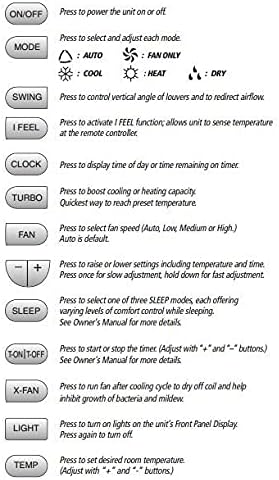
Figure 1: GREE MC20700140 Wired Controller. This image displays the front view of the wired controller, showing its LCD screen and button layout.
2.3 호환성
The XK-19 series controller (MC20700140) is compatible with various multi-zone indoor units. Refer to the compatibility chart below to ensure your unit is supported.

Figure 2: GREE Tether Wired Controller Compatibility Chart. This chart lists the XK-19 series (MC20700140) and its compatibility with multi-zone cassette, multi-slim duct, and multi-floor/ceiling units.
3. 사용 설명서
The wired controller provides comprehensive control over your HVAC system. Upon powering on, the unit will resume operation with the last saved settings.
3.1 버튼 기능
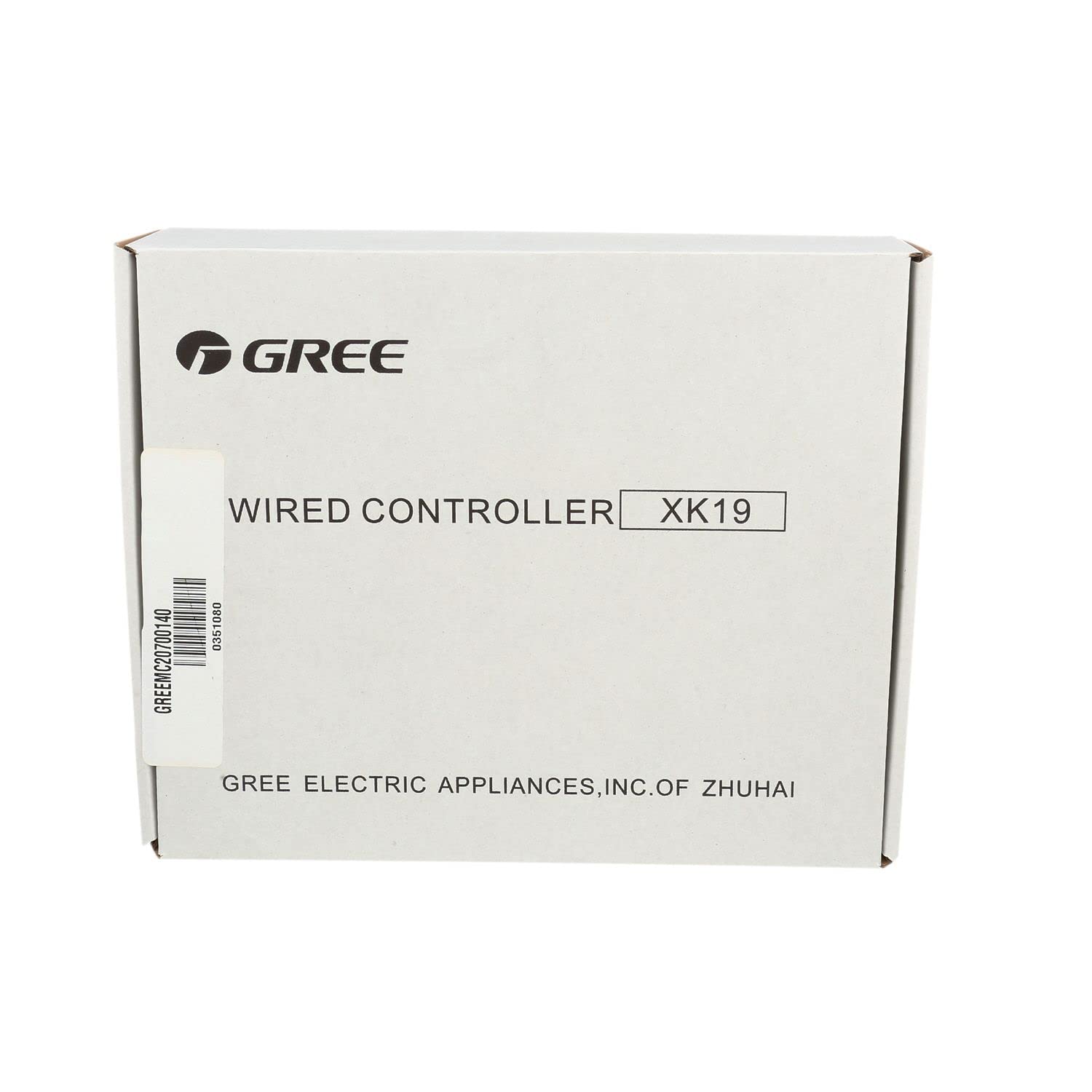
Figure 3: GREE Wired Controller Button Functions. This image illustrates each button on the controller and its primary function.
- 켜기/끄기: 기기의 전원을 켜거나 끄려면 누릅니다.
- 오시는 길 : Press to select and adjust each operating mode: Auto, Cool, Heat, Dry, Fan Only.
- SWING : Press to control the vertical angle of the louvers and redirect airflow.
- 나는 느낀다: Press to activate the I FEEL function, allowing the unit to sense temperature at the controller's location.
- 시계: Press to display the current time or remaining timer duration.
- 터보: Press to boost cooling or heating capacity for rapid temperature changes.
- 부채: Press to select fan speed (Auto, Low, Medium, High). Auto is the default setting.
- +/- 버튼: Press to raise or lower settings, including temperature. Press once for slow adjustment, hold down for fast adjustment.
- 잠: Press to select one of three sleep modes, which adjust room temperature during sleep for comfort and energy savings. Refer to the owner's manual for more details.
- T-ON/T-OFF: Press to start or stop the timer. Adjust with the "+" and "-" buttons. Refer to the owner's manual for more details.
- X-팬: Press to run the fan after the cooling cycle to dry off the coil, helping to inhibit bacteria and mildew growth.
- 빛: Press to turn on lights on the unit's Front Panel Display. Press again to turn off.
- TEMP : Press to set the desired room temperature. Adjust with the "+" and "-" buttons.
3.2 주요 특징 및 기능
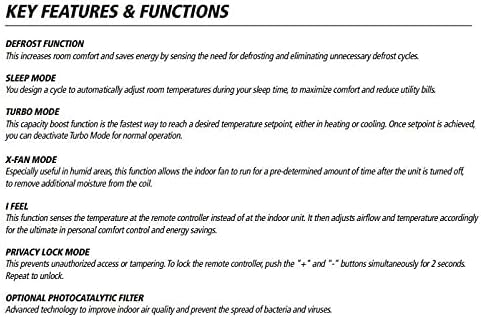
Figure 4: GREE Wired Controller Key Features and Functions. This image details advanced operational modes and settings.
- 해동 기능: Increases room comfort and saves energy by sensing the need for defrosting and eliminating unnecessary defrost cycles.
- 수면 모드: Automatically adjusts room temperatures during sleep time to maximize comfort and reduce energy consumption.
- 터보 모드 : A boost function to quickly reach a desired temperature setpoint for heating or cooling. Once the setpoint is achieved, Turbo Mode can be deactivated for normal operation.
- X-FAN MODE: Especially useful in humid areas, this function allows the indoor fan to run for a predetermined amount of time after the unit is turned off to remove additional moisture from the coil.
- 나는 느낀다: This function senses the temperature at the remote controller instead of at the indoor unit. It then adjusts airflow and temperature accordingly for optimal personal comfort and energy savings.
- PRIVACY LOCK MODE: Prevents unauthorized access or tampering with the system's settings. To lock the controller, push the "+" and "-" buttons simultaneously for 2 seconds. Repeat to unlock.
- OPTIONAL PHOTOCATALYTIC FILTER: Advanced technology to improve indoor air quality and prevent the spread of bacteria and viruses.
4. 유지관리
Regular maintenance ensures optimal performance and longevity of your HVAC system. The X-Fan function is a key feature for maintaining indoor unit hygiene.
- X-팬 기능: Utilize the X-Fan function to remove moisture from the indoor coil when the system is turned off. This helps prevent the growth of mold, bacteria, and mildew, keeping your indoor coil and fan clean.
- 필터 청소: Periodically clean or replace the air filters in your indoor unit as per your HVAC system's specific instructions.
- 컨트롤러 청소: Wipe the surface of the wired controller with a soft, dry cloth. Do not use abrasive cleaners or solvents.
5. 문제 해결
The system constantly monitors operating conditions for errors and malfunctions. If issues arise, the controller will display status codes to assist with troubleshooting and repair.
5.1 자주 묻는 질문(FAQ)
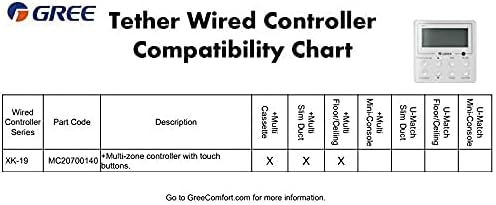
Figure 5: GREE Wired Controller Frequently Asked Questions. This image provides answers to common operational questions.
- 냉각 또는 가열이 되지 않는데도 팬이 계속 작동하는 이유는 무엇입니까?
일정한 온도를 유지하고 일정한 시작 및 정지로 인한 에너지 손실을 최소화하기 위해 팬은 온도 조절 장치를 지나는 공기 흐름을 유지합니다. - 조종기에 어떤 온도가 표시되나요?
The remote always displays your desired indoor temperature. You may view current indoor and outdoor temperatures on the indoor unit's Front Panel Display. - 리모컨을 분실하거나 손상된 경우 어떻게 됩니까?
Use the Manual Override button to manually operate the unit. Lift up the front panel section on the indoor unit and locate the button on the right-hand side. Press the button to turn ON the unit. (Note: Not all functions will be available.) Press again to cancel Manual Override Mode and transfer control back to the remote controller.
Note: Not all features are available on all models. Your actual air conditioning and heating system and related devices may differ from the images shown in this manual.
6. 사양
| 기인하다 | 세부 사항 |
|---|---|
| 상표 | 그린 |
| 모델 번호 | MC20700140 |
| 제어 유형 | 버튼 제어 |
| 제어 방법 | 원격 제어(유선) |
| 스타일 | 현대의 |
| 백라이트 | 예 |
| 한국어: | 813919029945 |
| ASIN | B06Y5R8XRF |
| 제조업체 | Gree Electric Appliances |
| 필요한 배터리 | 아니요 |


