소개
The JETBeam SF-R26 is a high-performance, rechargeable LED flashlight designed for a wide range of lighting needs. Built with military-grade quality, it offers exceptional brightness and durability, making it suitable for various applications. This manual provides essential information for the safe and effective operation, maintenance, and troubleshooting of your SF-R26 flashlight.

Figure 1: JETBeam SF-R26 Rechargeable Flashlight, showcasin컴팩트하고 견고한 디자인입니다.
안전 정보
- 눈 안전: Do not shine the flashlight directly into eyes. The powerful beam can cause temporary vision impairment or permanent eye damage.
- 열: The flashlight may become warm during prolonged use, especially on higher output modes. Handle with care.
- 배터리 안전:
- Use only recommended battery types (1x 18650 or 2x CR123A).
- 오래된 건전지와 새 건전지, 다른 종류의 건전지를 혼용하지 마세요.
- 설치 시 배터리 극성이 올바른지 확인하세요.
- 배터리를 불 속에 버리지 마십시오. 폭발할 수 있습니다.
- 손전등을 장기간 사용하지 않을 경우, 누액을 방지하기 위해 배터리를 제거하십시오.
- 방수 기능: While the SF-R26 is resistant to strong water jets, it is not designed for prolonged submersion. Ensure the USB port cover is securely closed when exposed to water.
- 어린이들: 어린이의 손이 닿지 않는 곳에 보관하세요.
패키지 내용
패키지를 열 때 다음 품목이 모두 포함되어 있는지 확인하세요.
- JETBeam SF-R26 Flashlight
- 마이크로 USB 충전 케이블
- 18650 Rechargeable Battery (if included with specific package)
- 매는 밧줄
- 예비 O-링
- 사용 설명서 (본 문서)

Figure 2: Contents typically included with the JETBeam SF-R26 flashlight, including the flashlight, battery, USB cable, and accessories.
설정
1. 배터리 설치
The SF-R26 can be powered by one 18650 rechargeable Li-ion battery or two CR123A batteries. Ensure the battery is inserted with the positive (+) end facing towards the head of the flashlight.
- 손전등의 테일 캡을 푸십시오.
- Insert the battery(ies) according to the polarity markings. For 18650, the positive end goes towards the head. For CR123A, both positive ends go towards the head.
- 적절한 접촉과 방수 기능을 보장하기 위해 꼬리 캡을 다시 단단히 조여주세요.
2. Charging (for 18650 battery)
The SF-R26 features a convenient micro USB charging port for internal recharging of an 18650 battery. CR123A batteries are NOT rechargeable via the flashlight's USB port.
- Locate the micro USB charging port on the side of the flashlight. It is usually covered by a rubber flap.
- 고무 덮개를 살살 들어 올려 포트를 드러내십시오.
- Connect the micro USB cable to the flashlight's port and the other end to a USB power source (e.g., computer, wall adapter).
- The side switch LED indicator will show charging status (e.g., red for charging, green for fully charged).
- Once charging is complete, disconnect the cable and firmly press the rubber flap back into place to maintain water resistance.

Figure 3: The micro USB charging port on the side of the SF-R26, shown with a charging cable connected.
작동 지침
1. 전원 켜기/끄기 (후미 스위치)
The tactical tail cap switch controls the main power of the flashlight.
- 순간 켜짐: Half-press the tail switch to momentarily turn on the light. Release to turn off.
- 계속 켜짐/꺼짐: Fully press the tail switch until it clicks to turn the light on or off.

Figure 4: The tactical tail switch of the SF-R26, used for power control.
2. 모드 선택 (측면 스위치)
With the flashlight turned on, use the side switch to cycle through different brightness levels and special modes.
- 밝기 레벨: Short press the side switch to cycle through the available brightness modes (e.g., Low, Medium, High, Turbo). The SF-R26 offers 3 dimming outputs (10 lumens, 250 lumens) and a maximum output of 1200 lumens.
- 스트로브 모드: Press and hold the side switch for approximately 1-2 seconds to activate the Strobe mode. Short press again to return to the previous brightness level.

Figure 5: The side switch of the SF-R26, used for cycling through brightness modes and activating strobe.
3. 전원 표시등
The side switch also functions as an LED power indicator. It will flash slowly and then quickly to indicate when the battery charge is low and needs replacement or recharging.
유지
- 청소: 손전등 본체를 부드러운 천으로 닦으세요.amp 천. 연마성 세척제나 용매를 사용하지 마십시오.
- 나사산과 O-링: 방수 기능과 원활한 작동을 유지하려면 나사산과 O링에 실리콘 그리스를 주기적으로 도포하십시오. O링이 손상되었거나 마모된 경우 교체하십시오.
- 배터리 관리 :
- 배터리를 서늘하고 건조한 곳에 보관하십시오.
- If using rechargeable 18650 batteries, recharge them regularly, even if not fully depleted, to prolong battery life.
- Remove batteries from the flashlight if it will not be used for an extended period to prevent potential leakage and damage.
문제 해결
| 문제 | 가능한 원인 | 해결책 |
|---|---|---|
| 손전등이 켜지지 않습니다. |
|
|
| 빛이 어둡거나 깜빡입니다. |
|
|
| 손전등이 충전되지 않습니다. |
|
|
명세서
| 특징 | 세부 사항 |
|---|---|
| 모델 | SF-R26 (9005721) |
| 주도의 | CREE XP-L HI LED |
| 최대 출력 | 1200루멘 |
| 밝기 레벨 | 10 Lumens, 250 Lumens, 1200 Lumens + Strobe |
| 최대 빔 거리 | 373미터(1250피트) |
| 피크 빔 강도 | 34796cd |
| 전원 | 1 x 18650 rechargeable Li-ion battery OR 2 x CR123A batteries |
| 충전 중 | Micro USB (for 18650 only) |
| 재료 | Aerospace-grade aluminum alloy with military-grade Type III hard-anodized finish |
| 치수 | 14.2 x 2.54 x 3.4cm(5.59 x 1.0 x 1.34인치) |
| 무게 | 108.86그램(3.84온스) |
| 색상 | 검은색 |
| 방수성 | Resistant to strong water jets (USB port cover must be closed) |
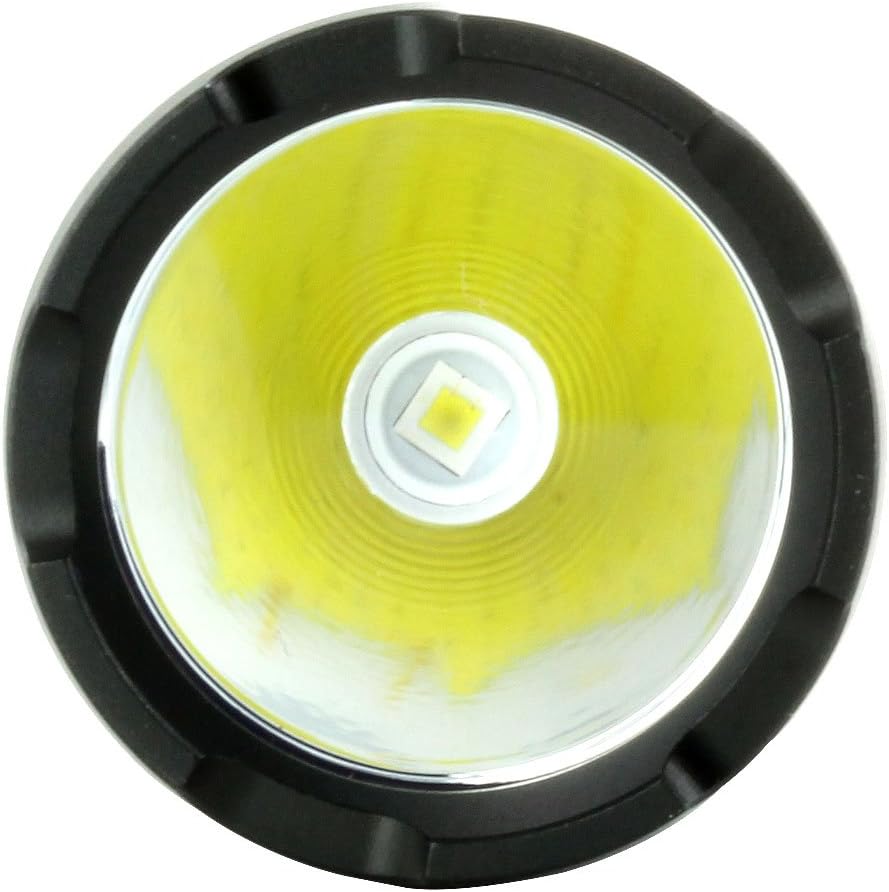
그림 6: 클로즈업 view of the CREE XP-L HI LED emitter, highlighting the light source.
보증 및 지원
JETBeam products are manufactured to high quality standards. For specific warranty details, please refer to the warranty card included with your product or visit the official JETBeam website. If you encounter any issues or require technical assistance, please contact JETBeam customer support or your authorized dealer.
제조업체: 스포츠맨 서플라이 주식회사
첫 이용 가능 날짜: 24년 2017월 XNUMX일


