1. 서론
This manual provides comprehensive instructions for the installation, operation, and maintenance of your AIBOO Linkable Under Cabinet LED Lighting System. This system features hardwired 12V slim aluminum dimmable puck lights with a wireless controller, designed for ambiance lighting in various indoor settings. Please read this manual thoroughly before installation and use.
2. 중요한 안전 정보
- 전기 안전: This product is designed for 110V/120Vac input and requires hardwiring. Installation should be performed by a qualified electrician or an individual with intermediate knowledge of electrical wiring to prevent electric shock or fire hazards. Ensure power is disconnected at the circuit breaker before any installation or maintenance.
- 벽면 콘센트 없음: This system does NOT include a wall plug power adapter. It is intended for direct wiring into your electrical system.
- 실내에서만 사용 가능: This lighting system is designed for indoor use in dry locations. Do not expose to moisture or water.
- 통풍: Ensure adequate ventilation around the LED driver to prevent overheating.
- 구성 요소 호환성: Use only the components provided or specified by AIBOO. Using incompatible parts may damage the system or pose a safety risk.
3. 패키지 내용
아래 나열된 모든 품목이 패키지에 포함되어 있는지 확인하세요.
- LED Puck Lights (6 units)
- RF Wireless Remote Control (1 unit)
- LED Controller (1 unit)
- 12V 1A Hardwired LED Driver (Power Adapter) (1 unit)
- 5ft Extension Cords (2 units)
- 6-Way Splitter (1 unit)
- Mounting Stickers (12 units)
- 장착 나사 (12개)

4. 제품 사양
| 상표 | 아이부 |
| 모델 번호 | YK-300000197 |
| 밝은 색상 | 6000K 데이라이트 화이트 |
| 재료 | 금속(퍽 라이트 하우징), 플라스틱(갓) |
| 퍽 라이트 치수 | 2.36인치 길이 x 2.36인치 너비 x 0.31인치 높이(6cm x 6cm x 0.8cm) |
| 전원 | 유선 전기 (직접 연결) |
| 권tage | 12 Volts (DC output from driver) |
| 광원 유형 | 주도의 |
| 명도 | 1200루멘 (총 6개 조명) |
| 특별 기능 | Dimmable, Linkable, Remote Control |
| 제어 방법 | RF 무선 원격 제어 |
| 한국어: | 712411875756 |

5. 설정 및 설치
설치를 시작하기 전에 설치 장소의 주 전원이 차단기에서 꺼져 있는지 확인하십시오.
5.1 배선도view

5.2 Hardwired Power Adapter Connection
The system includes a hardwired power adapter (LED Driver) designed to connect directly to a 110V/120Vac circuit. This adapter converts AC power to 12V DC for the LED lights. A wall plug is not included.
- 주 회로 차단기의 전원을 끕니다.
- Connect the input wires of the LED driver to your 110V/120Vac circuit wiring. Ensure proper polarity (live to live, neutral to neutral, ground to ground) according to local electrical codes.
- 모든 연결부는 적절한 전선 커넥터를 사용하여 단단히 고정하십시오.
5.3 Connecting the Puck Lights
The puck lights can be connected in two primary configurations: Series Connection or Parallel Connection.
5.3.1 직렬 연결
In a series connection, the puck lights are linked one after another. This method is suitable for linear installations where lights are spaced evenly in a line.

- Connect the LED controller to the output of the hardwired LED driver.
- Connect the first puck light to the LED controller.
- Connect the subsequent puck lights to each other using their integrated cables.
- Use extension cords if additional length is required between lights.
5.3.2 병렬 연결
For installations requiring lights to branch out from a central point, the 6-way splitter allows for parallel connection.
- Connect the LED controller to the output of the hardwired LED driver.
- Connect the 6-way splitter to the LED controller.
- Connect individual puck lights to the available ports on the 6-way splitter.
- Use extension cords if additional length is required for individual lights.
5.4 Mounting the Puck Lights
The puck lights can be mounted using either the provided screws or adhesive stickers.
- 표면 준비: 장착 표면이 깨끗하고, 건조하고, 매끄러운지 확인하세요.
- 접착 장착: Peel the backing from the adhesive sticker and firmly press the puck light onto the desired surface. Hold for 30 seconds to ensure a strong bond.
- 나사 장착: Use the provided screws to secure the puck lights to the surface. Pre-drilling pilot holes may be necessary depending on the material.
6. 사용 설명서
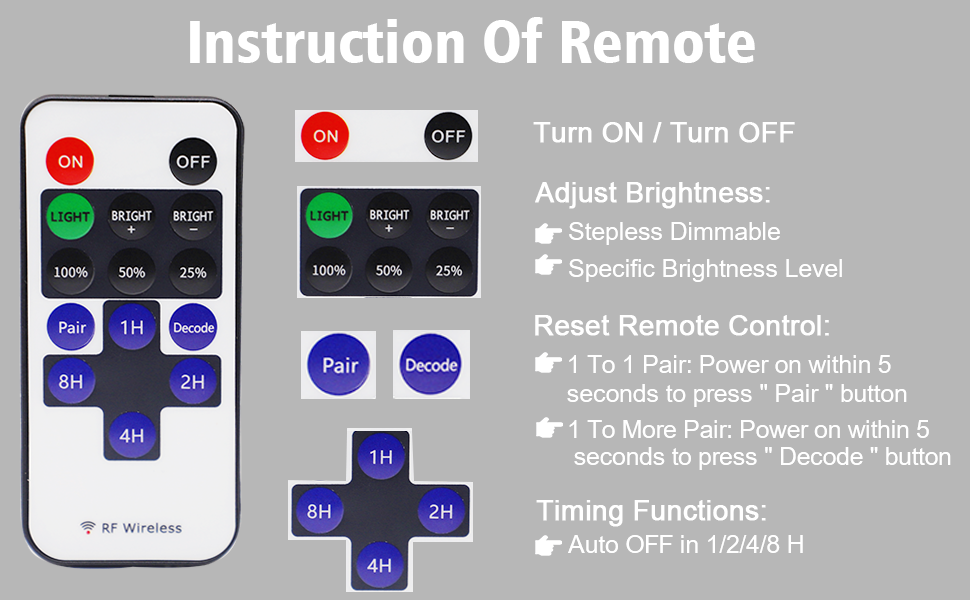
The AIBOO LED Lighting System is controlled by an RF wireless remote control.
6.1 리모콘 기능

- 켜기/끄기: 를 누르세요 ON 불을 켜는 버튼과 끄다 버튼을 눌러 끕니다.
- 밝기 조정:
- 누르다 LIGHT + or LIGHT - to gradually increase or decrease brightness (stepless dimming).
- 사용하세요 100%, 50%, 25% buttons for quick brightness presets.
- 편성: To pair the remote with the controller, press the 쌍 button within 5 seconds of powering on the lights until the lights flicker.
- Decoding (1 to More Pair): To pair one remote with multiple controllers, press the 풀다 button within 5 seconds of powering on the lights until the lights flicker.
- 타이밍 기능: 누르다 1H, 2H, 4H, 또는 8H to set the lights to automatically turn off after 1, 2, 4, or 8 hours, respectively.


7. 유지관리
The AIBOO LED Lighting System requires minimal maintenance.
- 청소: Ensure the lights are off and cool before cleaning. Wipe the puck lights and controller with a soft, dry cloth. Do not use abrasive cleaners or solvents.
- 점검: Periodically check all connections for tightness and inspect cables for any signs of damage.
- 배터리 교체: The remote control requires 1 CR2 battery. Replace the battery when the remote's range decreases or it stops responding.
8. 문제 해결
If you encounter issues with your AIBOO LED Lighting System, refer to the following common problems and solutions:
| 문제 | 가능한 원인 | 해결책 |
|---|---|---|
| 표시등이 켜지지 않습니다. | No power to the LED driver; Remote control battery is dead; Remote not paired; Loose connections. | Check circuit breaker. Replace remote battery. Re-pair remote (see Section 6.1). Verify all cable connections are secure. |
| Lights are flickering or strobing. | Too many lights connected to a single power supply; Faulty power supply. | Ensure no more than 6 lights are connected to one power supply. If flickering persists, inspect the power supply for signs of damage (e.g., warped casing, discoloration). A damaged power supply may need replacement. |
| 리모컨이 반응하지 않습니다. | Remote control battery is dead; Remote is out of range; Remote is not paired with the controller. | Replace the CR2 battery in the remote. Move closer to the LED controller. Re-pair the remote with the controller (see Section 6.1). |
| Lights do not dim or respond to brightness controls. | Remote not paired correctly; Controller malfunction. | Re-pair the remote (see Section 6.1). If the issue persists, contact customer support. |
9. 보증 정보
AIBOO products are manufactured to high-quality standards. For specific warranty details regarding your Linkable Under Cabinet LED Lighting System, please refer to the warranty card included with your purchase or visit the official AIBOO web사이트. 보증 청구에 대비해 구매 증빙 자료로 구매 영수증을 보관하세요.
10. 고객 지원
For technical assistance, troubleshooting, or product inquiries, please contact AIBOO customer support.
- U.S. Live Customer Support: 월요일~금요일, 오전 9시~오후 5시 (미국 동부시간)
- 온라인 리소스: 방문하세요 아마존에서 AIBOO 스토어를 만나보세요 추가 제품 정보 및 지원은 여기를 참조하세요.


