1. 소개 및 이상view
The SparkFun Bi-Directional Logic Level Converter is a compact device designed to safely interface between systems operating at different voltage levels. It facilitates the conversion of signals from a higher voltage (e.g., 5V) to a lower voltage (e.g., 3.3V) and simultaneously from a lower voltage를 더 높은 볼륨으로tage. This converter is compatible with 5V, 3.3V, 2.8V, and 1.8V devices, offering flexible voltage translation capabilities across four independent channels.
Each converter board supports four high-side pins and four low-side pins, allowing for bi-directional communication on each channel. This enables seamless integration of components that require different operating voltages within a single project.
2. 특징
- Bi-directional voltage translation for seamless communication.
- 여러 볼륨 지원tage levels: 5V, 3.3V, 2.8V, and 1.8V.
- Four independent channels for signal conversion.
- Compact design for easy integration into projects.
- Simple power requirements from existing system voltag전자 소스.
3. 설정 및 연결
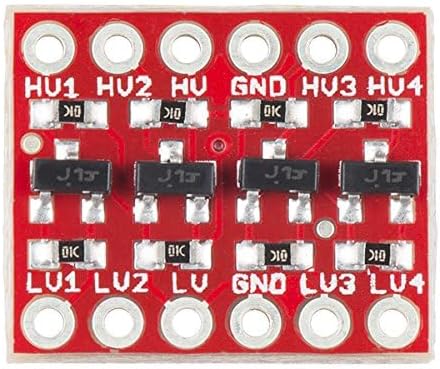
Proper connection of the logic level converter is crucial for its operation. The board requires power from both the high voltage(HV) 및 저용량tage (LV) sources of your system, along with a common ground connection.
- 전원 연결 :
- 고음량을 연결하세요tage supply (e.g., 5V) to the pin labeled 'HV'.
- 저음량 장치를 연결하세요tage supply (e.g., 3.3V) to the pin labeled 'LV'.
- Connect the common ground of your systems to the pin labeled 'GND'.
- 신호 연결:
- Connect your high-voltage signals to the pins labeled 'HV1' through 'HV4'.
- 저용량 연결tage signals to the corresponding pins labeled 'LV1' through 'LV4'. For example, HV1 connects to LV1, HV2 to LV2, and so on.
Ensure all connections are secure and correctly aligned to prevent damage to the converter or connected devices.
4. 사용 설명서
Once the SparkFun Bi-Directional Logic Level Converter is correctly set up and powered, it operates automatically. The converter transparently translates digital signals between the high-voltage 및 저용량tag측면.
- 권tage 매칭: 볼륨을 확인하세요tage supplied to the 'HV' pin precisely matches the operating voltage of your high-voltage system, and similarly, the 'LV' pin matches your low-voltage system. Incorrect voltage inputs can lead to improper signal translation or damage.
- 신호 흐름: Signals applied to an 'HV' pin will be translated to the corresponding 'LV' pin at the lower voltage, and signals applied to an 'LV' pin will be translated to the corresponding 'HV' pin at the higher voltage. This bi-directional capability allows for flexible communication.
- Current Limitations: While the converter handles voltage translation, be aware of the current capabilities of the connected devices. This converter is designed for signal translation, not for high-current power delivery.
5. 유지관리
The SparkFun Bi-Directional Logic Level Converter is a robust electronic component that requires minimal maintenance. Adhering to the following guidelines will help ensure its longevity and reliable performance:
- 청소: Keep the board clean and free from dust, debris, and moisture. Use a soft, dry brush or compressed air for cleaning. Avoid liquid cleaners.
- 환경 조건: Do not expose the converter to extreme temperatures, high humidity, or corrosive environments.
- 정전기 방전: Handle the board with care, especially in environments prone to static electricity. Use anti-static precautions when handling to prevent damage to sensitive components.
- 사용자가 수리할 수 없는 부품: The device contains no user-serviceable parts. Do not attempt to disassemble or modify the converter, as this may void any implied warranty and could damage the unit.
6. 문제 해결
If you encounter issues with your SparkFun Bi-Directional Logic Level Converter, consider the following troubleshooting steps:
- No Signal Conversion:
- Verify that both the 'HV' and 'LV' power pins are correctly connected to their respective voltage sources and are receiving the specified voltag에스.
- Ensure the 'GND' pin is properly connected to the common ground of both systems. A floating ground can prevent proper operation.
- Check all signal connections (HV1-HV4, LV1-LV4) for continuity and correct pin assignment.
- 잘못된 권tage Levels on Output:
- 볼륨을 확인하세요tage supplied to the 'HV' pin accurately matches the high-voltage system's requirement.
- 볼륨을 확인하세요tage supplied to the 'LV' pin accurately matches the low-voltage system's requirement.
- 간헐적 작동:
- Inspect for any loose connections or cold solder joints, especially if the board was assembled by the user.
- Ensure that the power supplies for both HV and LV are stable and free from excessive noise or voltag전자 변동.
- 장치가 응답하지 않음:
- Double-check all wiring against the setup instructions.
- Test the converter with a known working setup if possible, to isolate the issue to either the converter or other components in your system.
7. 사양
| 특징 | 사양 |
| 모델 번호 | 8541715698 |
| ASIN | B01N30ZCW9 |
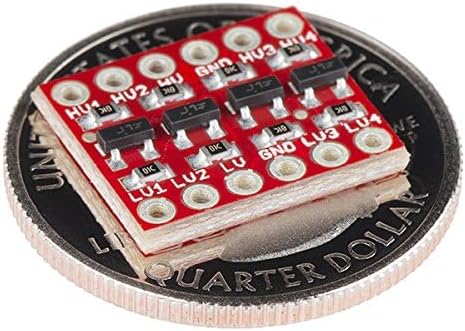
| 치수(보드) | 0.63 x 0.52인치(16.05 x 13.33mm) |
| 패키지 크기 | 2.52 x 1.38 x 0.31 인치 |
| 품목 무게 | 0.01 온스 |
| 제조업체 | 스파크펀 |
| 첫 번째 이용 가능 날짜 | 6년 2017월 XNUMX일 |
8. 보증 및 지원
Warranty information for the SparkFun Bi-Directional Logic Level Converter is not explicitly provided within the product details. For specific warranty terms, technical documentation, or customer support, please refer to the official SparkFun web사이트를 방문하거나 고객 서비스에 직접 문의하세요.
제조업체: 스파크펀
Web대지: Amazon에서 SparkFun 스토어를 방문하세요.


