소개
This manual provides comprehensive instructions for the KING GATES Novo digy numeric combination keypad. This device is a 4-channel rolling-code system designed for secure access control. It features a robust, water-resistant design, ensuring reliable performance in various environments.
제품 끝view
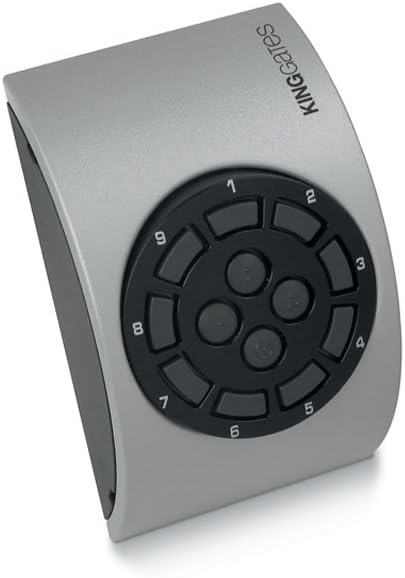
이미지: 앞면 view of the KING GATES Novo digy numeric combination keypad. The keypad features a circular arrangement of numbered buttons (1-9) and three central function buttons, all set within a silver-grey, curved housing. The 'KING GATES' logo is visible on the upper right side.
The Novo digy keypad is designed for ease of use and durability. Its primary function is to transmit a secure rolling code signal upon successful entry of a programmed numeric combination, controlling compatible KING GATES automation systems.
설정
1. 전원 공급
The keypad is battery-powered. Ensure fresh batteries are installed according to the polarity markings inside the battery compartment. The battery compartment is typically located on the rear or underside of the device.
2. 장착
Select a suitable mounting location that is secure and provides clear line-of-sight or proximity to the receiver unit. Use appropriate screws and wall plugs for installation. The keypad can be oriented as needed.
3. Programming the Code
Refer to the specific instructions provided with your KING GATES automation system receiver for pairing and programming the numeric combination. This keypad operates as a transmitter, and the receiver unit is responsible for learning and storing the access codes. Typically, this involves:
- Activating the learning mode on your KING GATES receiver.
- Entering your desired numeric combination on the Novo digy keypad.
- Pressing a confirmation button on the keypad (often one of the central buttons) to transmit the code.
- Confirming successful pairing on the receiver.
It is recommended to choose a strong, memorable combination.
운영
To operate the Novo digy keypad and activate your KING GATES automation system:
- Ensure the keypad is within range of the receiver.
- Enter your pre-programmed numeric combination using the numbered buttons.
- Press the designated activation button (e.g., one of the central buttons) to transmit the rolling code signal.
Upon successful code entry and transmission, the connected KING GATES automation system (e.g., gate opener) will activate. The 4-channel capability allows for programming different codes to control up to four distinct functions or devices, depending on the receiver's capabilities.
유지
청소
Clean the keypad periodically with a soft, damp cloth. Avoid using abrasive cleaners or solvents, as these can damage the plastic material and markings. The keypad is water-resistant, but it should not be submerged in water.
배터리 교체
If the keypad's response becomes sluggish or the range decreases, it may be time to replace the batteries. Open the battery compartment, remove the old batteries, and insert new ones, observing correct polarity. Dispose of old batteries responsibly.
문제 해결
- 키패드가 응답하지 않습니다. Check battery levels and replace if necessary. Ensure the keypad is within operational range of the receiver.
- Code not activating system: Verify that the correct numeric combination is being entered. Re-check the programming procedure with your receiver unit to ensure the code was learned correctly.
- 간섭: If experiencing intermittent issues, ensure there are no strong radio frequency (RF) interference sources nearby.
- 물리적 손상: Inspect the keypad for any visible damage. Although water-resistant, severe impact can affect functionality.
명세서
- 상표: 킹 게이트
- 모델: Novo digy
- ASIN: B01MZFA2HV
- 연결 기술 : RF(무선 주파수)
- 전원: 배터리 구동
- 특징: 방수
- 재료: 플라스틱 또는 합성 소재
- 채널 수: 4 (Rolling-code)
- 호환 장치: KING GATES Automation Systems (e.g., gate openers)
보증 및 지원
Information regarding specific warranty terms and customer support for the KING GATES Novo digy keypad is not available in this document. Please refer to the documentation provided with your purchase or contact KING GATES directly for warranty claims and technical assistance.
For further support, visit the official KING GATES web사이트를 방문하거나 공인 딜러에게 문의하세요.


