1. 서론
Thank you for choosing the Stryker SR-94HPC 10 Meter Radio. This compact and powerful radio is designed for reliable communication, featuring AM/FM modulation, a full-color TFT display, and robust construction. This manual provides essential information for the proper setup, operation, and maintenance of your SR-94HPC radio to ensure optimal performance and longevity.
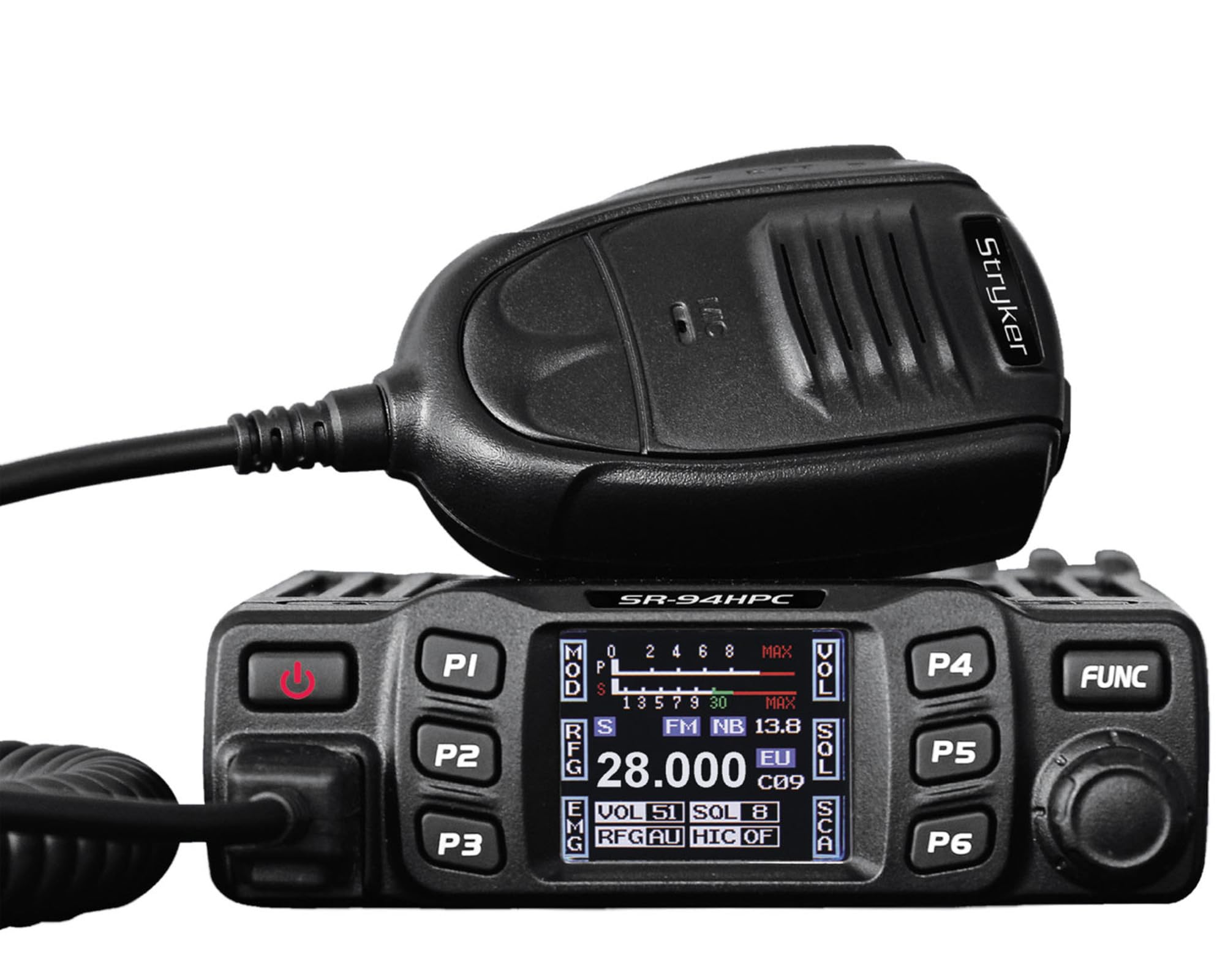
Figure 1: Stryker SR-94HPC 10 Meter Radio. This image shows the compact design of the radio, featuring its front panel with controls and the full-color TFT display.
2. 중요한 안전 정보
Please read and understand all safety instructions before operating the radio. Failure to do so may result in injury, damage to the radio, or voiding the warranty.
- 전원: Connect the radio only to a 12V or 24V DC power source as specified. Incorrect voltag장치가 손상될 수 있습니다.
- 안테나: Always connect a properly tuned antenna before transmitting. Transmitting without an antenna or with a poorly tuned antenna can cause damage to the radio's final transistors.
- 열 발산: Ensure adequate ventilation around the radio, especially the heat sink, to prevent overheating during prolonged transmission.
- 물 노출: While the radio has some water resistance, avoid direct exposure to water or extreme moisture.
- 운전 안전: Do not operate the radio in a manner that distracts you from driving. Prioritize road safety.
- 제안 65 경고: 이 제품은 캘리포니아주에서 암, 선천적 기형 또는 기타 생식 기능 장애를 유발하는 것으로 알려진 화학 물질에 노출될 수 있습니다. 자세한 내용은 다음을 참조하세요. www.P65Warnings.ca.gov.
3. 패키지 내용
패키지에 모든 품목이 들어 있는지 확인하세요.
- Stryker SR-94HPC 10 Meter Radio Unit
- 마이크로폰
- 전원 케이블
- 장착 브래킷 및 하드웨어
- 사용 설명서 (본 문서)
4. 컨트롤 및 기능
The SR-94HPC features a user-friendly interface with a full-color TFT display and intuitive controls. Familiarize yourself with the following:
- Full-Color TFT Display: Shows frequency, voltage, S units, functions, and other operational data. The display is designed for clarity and ease of reading while driving.
- Channel Selector/Encoder: Used to change channels and navigate menu options.
- 볼륨 조절: 오디오 출력 레벨을 조정합니다.
- 스퀠치 제어: 신호가 없을 때 배경 소음을 제거합니다.
- 모드 버튼: Switches between AM and FM modulation modes.
- 기능 버튼: Access various radio features and settings. Refer to the on-screen menu for specific functions.
- 마이크 커넥터: Front-panel connection for the supplied microphone.
- PTT(푸시투토크) 버튼: 마이크에 위치하며 송신에 사용됩니다.
5. 설정
Follow these steps for initial setup of your SR-94HPC radio:
- 설치: Securely mount the radio using the provided bracket and hardware in a location that allows for good ventilation and easy access to controls. Ensure the wrap-around cast aluminum heat sink has clear airflow.
- 안테나 연결: Connect a 10-meter antenna with a UHF, SO-239 connector to the antenna port on the rear of the radio. Ensure the antenna is properly tuned for the 28.000 ~ 29.700MHz frequency range to prevent damage to the radio.
- 전원 연결: Connect the supplied power cable to the radio's power input. Connect the other end to a stable 12V or 24V DC power source in your vehicle or base station. Observe correct polarity (red to positive, black to negative).
- 마이크 연결: Plug the microphone into the dedicated microphone jack on the front panel of the radio.
- 초기 전원 켜기: Once all connections are secure, turn on the radio. The TFT display should illuminate, showing the current operating status.
6. 사용 설명서
This section details the basic operation of your Stryker SR-94HPC radio.
6.1 전원 켜기/끄기
Press and hold the power button (usually integrated with the volume knob or a dedicated button) to turn the radio on or off. A quick tap of the power button may mute the audio.
6.2 채널 선택
Rotate the Channel Selector knob to change the operating frequency or channel. The selected channel will be displayed on the TFT screen.
6.3 Modulation Mode
Press the Mode button to toggle between AM (Amplitude Modulation) and FM (Frequency Modulation) modes. The active mode will be indicated on the display.
6.4 볼륨 및 스퀠치 조정
- 용량: 볼륨 조절 손잡이를 원하는 청취 수준으로 조정하세요.
- 끽소리 못 하게 하는 말: Rotate the Squelch knob clockwise until background noise disappears. Rotate counter-clockwise to hear weaker signals. The SR-94HPC may also feature an automatic squelch control (ASC) setting, which can be adjusted via the menu.
6.5 전송
To transmit, press and hold the PTT button on the microphone. Speak clearly into the microphone. Release the PTT button to receive. Ensure the antenna is properly connected and tuned before transmitting to avoid damage.
6.6 디스플레이 정보
The full-color TFT display provides real-time information, including:
- 주파수/채널: Current operating frequency or channel number.
- 권tage: 입력 볼륨tage to the radio.
- S Units: Signal strength indicator for received signals.
- 전력 출력: Indication of transmitted power.
- 조도: Standing Wave Ratio, indicating antenna tuning efficiency.
7. 유지관리
Proper maintenance ensures the longevity and reliable operation of your SR-94HPC radio.
- 청소: Use a soft, dry cloth to clean the radio's exterior and display. Avoid abrasive cleaners or solvents.
- 안테나 시스템: Regularly check your antenna and coaxial cable for damage. Periodically verify your antenna's SWR (Standing Wave Ratio) to ensure efficient power transfer and prevent damage to the radio. An SWR meter can be used for this purpose.
- 방열판: Ensure the wrap-around cast aluminum heat sink on the rear of the radio remains free of obstructions to allow for proper heat dissipation, especially during high-power transmissions.
- 사이: 모든 케이블 연결부(전원, 안테나, 마이크)를 주기적으로 점검하여 안전하고 부식되지 않았는지 확인하세요.
8. 문제 해결
If you encounter issues with your SR-94HPC, refer to the following common problems and solutions:
| 문제 | 가능한 원인 | 해결책 |
|---|---|---|
| 라디오가 켜지지 않습니다. | No power connection; incorrect voltag예: 퓨즈가 나갔습니다. | Check power cable connections; verify 12V/24V DC source; inspect and replace fuse if necessary. |
| 스피커에서 소리가 나지 않습니다. | Volume too low; squelch set too high; speaker disconnected. | Increase volume; decrease squelch; check speaker connection. |
| "Error" message on display during transmission. | High SWR (Standing Wave Ratio); antenna not connected or poorly tuned. | Check antenna connection; tune antenna using an SWR meter. Do not transmit until SWR is acceptable. |
| Poor transmission or reception range. | Antenna issues; environmental interference; low power setting. | Verify antenna tuning and condition; check for local interference; ensure power output is set correctly. |
If the problem persists after attempting these solutions, please contact Stryker customer support for assistance.
9. 사양
Detailed technical specifications for the Stryker SR-94HPC 10 Meter Radio:
| 특징 | 사양 |
|---|---|
| 변조 모드 | 오전/FM |
| 주파수 범위 | 28.000 ~ 29.700MHz (FM), 28.000 ~ 29.700MHz (AM) |
| 주파수 허용 오차 | ±5.0ppm |
| 입력 Voltage | 12V / 24V DC |
| 주파수 제어 | PLL 신시사이저 |
| 작동 온도 범위 | -4°F ~ +131°F(-20°C ~ +55°C) |
| 안테나 커넥터 | UHF, SO-239 |
| 전력 출력 | 4 Watts FM/AM / 10 Watts AM/FM (PEP up to 45+ watts) |
| Transmission Interference | Inferior to 4nW (-54dBm) |
| 주파수 응답 | 300~3000Hz |
| Modulated Signal Distortion | Inferior to 5% |
| 출력 임피던스 | 50옴 |
| 이미지 거부 | 70데시벨 |
| 인접 채널 거부 | 60데시벨 |
| IF 주파수 | 1st: 10.695MHz, 2nd: 455KHz |
| 치수(폭x깊이x높이) | 4.88” x 6.42” x 1.54” (12.4cm x 16.3cm x 3.9cm) |
| 무게 | 약 1.48파운드(0.67kg) |
| 특별 기능 | Backlit Keys, Full-color TFT Display |
10. 보증 및 지원
Stryker Radios are manufactured to high-quality standards. For warranty information, please refer to the warranty card included with your product or visit the official Stryker Radios web사이트. 구매 증빙 자료로 구매 영수증을 보관하세요.
For technical support, troubleshooting assistance beyond this manual, or service inquiries, please contact Stryker customer support through their official channels. Contact information can typically be found on the manufacturer's web대지.