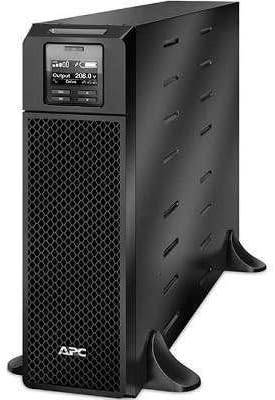
1. 서론
This manual provides essential instructions for the installation, operation, maintenance, and troubleshooting of your APC Smart-UPS SRT 5000VA 208V. Please read this manual thoroughly before attempting to install or operate the UPS. Retain this manual for future reference.
The APC Smart-UPS SRT 5000VA 208V is an Uninterruptible Power Supply (UPS) designed to provide protected power to electronic equipment. It safeguards connected equipment from power outag전압 변동, 전압 강하, 전압 급증 및 기타 전력 장애.
2. 안전 정보
본 설명서의 모든 경고 및 작동 지침을 준수하십시오. 그렇지 않을 경우 부상이나 장비 손상이 발생할 수 있습니다.
일반 안전
- 이 UPS는 실내에서만 사용하도록 설계되었습니다.
- 직사광선이나 액체와 접촉하는 곳, 먼지나 습도가 과도한 곳에서는 이 UPS를 작동하지 마세요.
- Ensure the ventilation openings on the UPS are not blocked.
- Do not connect appliances that would overload the UPS.
- 배터리 서비스는 배터리 및 필요한 예방 조치에 대해 잘 아는 사람이 수행하거나 감독해야 합니다.
전기 안전
- The UPS contains internal batteries that may present a shock hazard even when disconnected from the AC power.
- 무정전 전원 공급 장치(UPS)는 접지된 AC 콘센트에 연결해야 합니다.
- UPS 외함을 열지 마십시오. 내부에는 사용자가 수리할 수 있는 부품이 없습니다.
- Use only the specified power cords and connectors.
3. 패키지 내용
Carefully unpack the UPS and inspect for shipping damage. If any damage is found, notify the carrier and dealer. The package should contain the following items:
- APC Smart-UPS SRT 5000VA 208V Unit
- 문서 CD
- 안전 정보 안내
- USB 케이블
- 시리얼 케이블
- 네트워크 관리 카드 (특정 모델 변형에 포함된 경우)
- Rack-mounting hardware (if applicable)
- Tower stand (if applicable)
4. 설정
4.1 사이트 준비
Before installing the UPS, ensure the installation site meets the following requirements:
- 온도: 0°C ~ 40°C(32°F ~ 104°F)
- 습기: 상대 습도 0% ~ 95%, 비응축
- 정리: Allow adequate space around the UPS for proper ventilation.
- 무게: The UPS is heavy. Use appropriate lifting techniques and personnel.
4.2 물리적 설치
The SRT 5000VA can be installed in a tower configuration or rack-mounted. Refer to the specific installation guide for detailed rack-mounting instructions.
- Place the UPS on a stable, level surface. If using the tower stand, ensure it is securely attached.
- 모든 환기구가 막히지 않았는지 확인하십시오.
4.3 연결 장비
Connect your equipment to the output receptacles on the rear panel of the UPS. Do not overload the UPS. Refer to the specifications section for capacity details.

Image: Rear panel of the UPS, illustrating connection points for input power, output receptacles, and communication ports.
4.4 초기 전원 켜기
- Connect the UPS input power cord to a grounded 208V AC outlet.
- Press the power button on the front panel to turn on the UPS.
- The UPS will perform a self-test. The display will show status information.
5. UPS 작동 방법
5.1 전면 패널 디스플레이
The front panel LCD provides real-time status information and allows configuration of UPS settings. Use the navigation buttons to scroll through menus and select options.

이미지: 상세 view of the UPS front panel display, indicating current operational status and settings.
5.2 기본 기능
- 전원 켜기/끄기: Press the power button to turn the UPS on or off.
- 자가 진단: Initiate a manual self-test through the LCD menu to verify battery and UPS functionality.
- 알람 음소거: Temporarily silence audible alarms via the front panel button.
- 배터리 상태: Monitor battery charge level and estimated runtime on the display.
6. 유지관리
6.1 배터리 교체
The UPS uses hot-swappable, user-replaceable battery modules. Replace batteries only with APC-approved replacement battery cartridges (RBCs). Refer to the specific battery replacement guide for detailed instructions.
경고: Risk of explosion if battery is replaced by an incorrect type. Dispose of used batteries according to the manufacturer's instructions and local regulations.
6.2 청소
Clean the exterior of the UPS with a soft, damp cloth. Do not use solvents or abrasive cleaners. Ensure ventilation openings are free of dust and debris.
7. 문제 해결
This section provides solutions to common issues. If a problem persists after attempting these steps, contact APC technical support.
| 문제 | 가능한 원인 | 해결책 |
|---|---|---|
| UPS가 켜지지 않습니다 | 전원 입력 없음; 배터리 방전 | Verify input power connection; allow UPS to charge for several hours. |
| UPS에서 계속해서 경고음이 울립니다. | On battery; low battery; overload | Check input power; allow battery to charge; reduce connected load. |
| Overload indicator is lit | Too much equipment connected | Disconnect non-essential equipment until the indicator turns off. |
| 배터리 사용 시간이 예상보다 짧습니다. | Battery nearing end of life; high load | Perform a battery self-test; consider replacing the battery module; reduce connected load. |
8. 사양
| 특징 | 세부 사항 |
|---|---|
| 모델 | SRT5KXLT |
| 용량 | 5000VA / 4500W |
| 입력 Voltage | 208V |
| 출력 볼륨tage | 208V |
| 배터리 유형 | 납산 |
| 치수(높이 x 너비 x 깊이) | 17인치 x 5.1인치 x 28.3인치 |
| 무게 | 2파운드 |
| 작동 온도 | 0°C ~ 40°C(32°F ~ 104°F) |
9. 보증 및 지원
9.1 보증 정보
APC는 본 제품에 대해 표준 보증을 제공합니다. 구체적인 보증 조건은 제품에 동봉된 보증 카드를 참조하거나 APC 공식 웹사이트를 방문하십시오. web해당 사이트에서 구매하셔야 합니다. 모든 보증 청구에는 구매 증빙 자료가 필요합니다.
9.2 기술 지원
For technical assistance, troubleshooting, or service inquiries, please contact APC customer support. Have your product model number (SRT5KXLT) and serial number ready when contacting support.
You can find contact information on the APC website or in the documentation provided with your UPS.


