1. 서론
The Imperial DABMAN i400 is a versatile audio adapter designed to enhance your existing stereo system with modern radio and streaming capabilities. It provides access to thousands of internet radio stations, digital radio (DAB+), and traditional FM radio. Additionally, it supports audio streaming via Bluetooth, UPnP/DLNA, and USB, offering a comprehensive listening experience.
2. 안전 지침
- 전원 공급 장치: 제공된 전원 어댑터만 사용하세요. 볼륨을 확인하세요.tage는 귀하의 지역 전원 공급 장치와 일치합니다.
- 물과 습기: 기기를 비, 습기 또는 액체가 떨어지거나 튀는 곳에 노출시키지 마십시오. 꽃병 등 액체가 담긴 물건을 기기 위에 올려놓지 마십시오.
- 통풍: 충분한 환기를 유지하세요. 환기구를 막지 마세요. 공기 흐름을 방해할 수 있는 부드러운 표면에 기기를 두지 마세요.
- 열원: 장치를 라디에이터, 난방 장치, 스토브 또는 기타 열을 발생시키는 기기와 같은 열원으로부터 멀리 두십시오.
- 청소: 청소하기 전에 전원을 분리하세요. 부드럽고 마른 천을 사용하세요. 액체 또는 에어로졸 세척제는 사용하지 마세요.
- 서비스: 이 제품을 직접 수리하려고 하지 마십시오. 모든 서비스는 자격을 갖춘 서비스 담당자에게 문의하십시오.
3. 패키지 내용
패키지에 모든 품목이 들어 있는지 확인하세요.
- Imperial DABMAN i400 Internet Digital Radio
- 전원 어댑터
- Telescopic Antenna with F-connector
- Wire Antenna with F-connector
- RCA 케이블
- 오디오 케이블 (3.5mm 잭)
- 원격 제어
- 사용 설명서 (본 문서)

Image: Imperial DABMAN i400 with its power adapter, telescopic antenna, wire antenna, RCA cable, 3.5mm audio cable, and remote control.
4. 제품 오버view
앞쪽 View

Image: The front of the Imperial DABMAN i400, showing its display and control buttons on the top edge.
The front of the DABMAN i400 features a clear 3.2-inch LCD display for navigation and information. Control buttons are located on the top edge of the device for easy access to functions like power, mode selection, volume, and station presets.
뒤쪽 View 및 연결
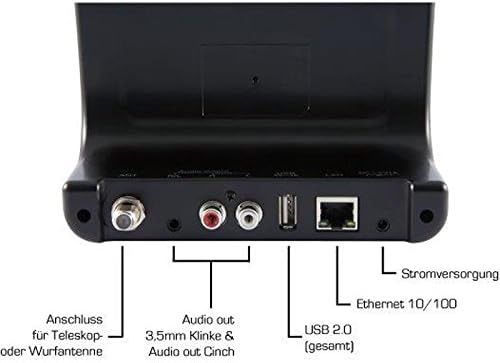
Image: The rear panel of the Imperial DABMAN i400, detailing its various connection ports. From left to right: Antenna connection (ANT), Audio output (RCA L/R and 3.5mm jack), USB 2.0 ports, Ethernet 10/100 (LAN), and Power supply (DC 5V/1A).
- 개미: F-connector for connecting the telescopic or wire antenna for DAB+/FM reception.
- Audio Output (R/L): RCA (Cinch) stereo audio output for connecting to an amplifier 또는 스테레오 시스템.
- 오디오 출력(3.5mm 잭): 3.5mm stereo audio output for connecting to other audio devices.
- USB 2.0: USB port for playing media from a USB storage device.
- LAN : Ethernet port (RJ45) for wired network connection.
- DC 5V/1A: 동봉된 전원 어댑터의 전원 입력 단자입니다.
5. 설정
- 안테나 연결: Screw the telescopic antenna or connect the wire antenna to the 개미 F-connector on the rear panel. Extend the telescopic antenna for optimal reception.
- 오디오 시스템에 연결: Use the provided RCA cable to connect the Audio Output (R/L) on the DABMAN i400 to an available audio input (e.g., AUX, CD, LINE IN) on your amplifier or stereo system. Alternatively, use the 3.5mm audio cable if your system has a compatible input.
- 네트워크 연결 :
- 유선(LAN): 라우터에서 이더넷 케이블을 연결하세요. 랜 port on the rear of the DABMAN i400.
- Wireless (WLAN): The device will prompt you to set up Wi-Fi during the initial startup wizard. Select your network and enter the password.
- 전원 연결: 전원 어댑터를 콘센트에 꽂으십시오. 직류 5V/1A input on the rear panel, then plug the adapter into a wall outlet. The device will power on automatically or enter standby mode.
- 초기 설정 마법사: Upon first power-on, the device will guide you through an initial setup process, including language selection, time/date settings, and network configuration. Follow the on-screen instructions.
6. 사용 설명서
기본 탐색
Use the control buttons on the top of the device or the remote control to navigate menus, select options, adjust volume, and change modes.
모드 선택
Press the 'Mode' button (or equivalent on remote) to switch between available modes:
- 인터넷 라디오: Access thousands of online radio stations worldwide. Browse by genre, location, or search for specific stations.
- DAB+ 디지털 라디오: Enjoy high-quality digital radio broadcasts. The device will scan for available stations in your area.
- FM 라디오 : 기존 아날로그 FM 라디오 방송에 맞춰보세요.
- 블루투스: 블루투스 기능이 있는 스마트폰, 태블릿 또는 컴퓨터에서 오디오를 무선으로 스트리밍하세요.

Image: Bluetooth connectivity icon.
To pair: Select Bluetooth mode on the DABMAN i400. On your external device, search for available Bluetooth devices and select 'DABMAN i400'.
- UPnP/DLNA: 음악 스트리밍 files from compatible devices on your local network (e.g., a network-attached storage (NAS) drive or a computer running a media server).

Image: UPnP (Universal Plug & Play) icon.
- USB 재생 : 오디오 재생 files (e.g., MP3) from a USB flash drive connected to the USB port on the rear of the device.

Image: MP3 music file 상.
사전 설정
Save your favorite stations as presets for quick access. Refer to the on-screen menu for instructions on how to save and recall presets.
Air Music Control App
Control your DABMAN i400 using the Air Music Control App available for smartphones and tablets. This app allows for convenient remote control and browsing of stations.

Image: Air Music Control App icon.
7. 유지관리
- 청소: 부드럽고 마른 보풀 없는 천으로 기기를 닦으십시오. 연마성 세척제, 왁스 또는 용제를 사용하지 마십시오.
- 소프트웨어 업데이트: Periodically check for available software updates through the device's system settings menu to ensure optimal performance and access to new features.
- 저장: 장기간 기기를 보관할 경우 전원을 끄고 서늘하고 건조한 곳에 보관하세요.
8. 문제 해결
- 전원 없음:
- 전원 어댑터가 장치에 안전하게 연결되어 있고 전원 콘센트가 제대로 작동하는지 확인하세요.
- 다른 전원 콘센트를 사용해 보세요.
- 소리 없음:
- Check the volume level on both the DABMAN i400 and your connected audio system.
- Ensure the audio cables are correctly connected to the appropriate input on your audio system.
- Verify that your audio system is set to the correct input source.
- Cannot Connect to Wi-Fi/Internet:
- Wi-Fi 라우터가 켜져 있고 올바르게 작동하는지 확인하세요.
- Wi-Fi 비밀번호를 다시 한번 확인하세요.
- Try moving the device closer to your Wi-Fi router or use a wired LAN connection.
- Restart your router and the DABMAN i400.
- Poor DAB+/FM Reception:
- Ensure the antenna is fully extended and positioned for optimal reception.
- Try repositioning the device or antenna.
- Check if you are in an area with good DAB+ or FM coverage.
- 블루투스 페어링 문제:
- Ensure the DABMAN i400 is in Bluetooth pairing mode.
- Make sure your external device's Bluetooth is enabled and discoverable.
- Move your external device closer to the DABMAN i400.
- 기기의 페어링을 해제한 후 다시 페어링해 보세요.
9. 사양
| 특징 | 사양 |
|---|---|
| 상표 | 장엄한 |
| 모델 번호 | 22-241-00 |
| 색상 | 검은색 |
| 화면 크기 | 3.2 인치 |
| 연결 기술 | Bluetooth, LAN (Ethernet), WLAN (Wi-Fi), RCA (Cinch) L/R, 3.5mm Audio Jack |
| 특별 기능 | Portable (as an adapter), Internet Radio, DAB+, FM, UPnP/DLNA |
| 총 USB 포트 | 1 |
| 호환 장치 | Bluetooth devices, UPnP/DLNA compatible devices |
| 전원 | AC (via power adapter) |
| 지원되는 라디오 대역 | FM, DAB, DAB+, 인터넷 라디오 |
| 제품 치수 | 15L x 8.1W x 14H 센티미터 |
| 포함된 구성 요소 | Power Adapter, Telescopic Antenna, Wire Antenna, RCA Cable, Audio Cable, Remote Control, User Manual |
| 지원 언어 | German, English, French, Dutch |
10. 보증 및 지원
제조업체 보증
The Imperial DABMAN i400 comes with a manufacturer's warranty. Please refer to the warranty card included in your package or the manufacturer's official website for specific terms and conditions. Spare parts availability is guaranteed for 1 year.
고객 지원
For technical assistance, troubleshooting beyond this manual, or warranty claims, please contact Imperial customer support. Contact information can typically be found on the manufacturer's web사이트 또는 제품 포장.


