1. 서론
This user manual provides essential information for the safe and efficient operation of your APC Smart-UPS SMT1500I. Please read this manual thoroughly before installation and use, and retain it for future reference. The APC Smart-UPS SMT1500I is designed to provide reliable power protection for electronic equipment, safeguarding against power outag전압 변동, 전압 강하, 전압 급증 및 기타 전력 장애.
1.1 안전 정보
- 전기 안전: Always connect the UPS to a grounded outlet. Do not remove the grounding prong.
- 배터리 안전: Batteries can present a risk of electrical shock and high short-circuit current. Observe proper precautions. Refer to the battery replacement section for service.
- 환경: Install the UPS indoors in a controlled environment, free from excessive dust, corrosive fumes, and conductive contaminants. Avoid direct sunlight and heat sources.
- 무게: The UPS is heavy. Use proper lifting techniques or assistance during installation to prevent injury.
2. 패키지 내용
Verify that all components are present upon unpacking. If any items are missing or damaged, contact your dealer or APC customer support.
- APC Smart-UPS SMT1500I Unit
- 사용 설명서 (본 문서)
- USB 통신 케이블
- 직렬 통신 케이블
- Power Chute Software CD (or download instructions)
- 입력 전원 코드
- Output Power Cords (quantity may vary by region)
3. 설정 및 설치
3.1 포장 풀기 및 배치
Carefully remove the UPS from its packaging. Place the UPS on a flat, stable surface. Ensure adequate airflow around the unit; do not block ventilation openings. Maintain a minimum of 20 cm (8 inches) clearance from the rear and sides of the unit.
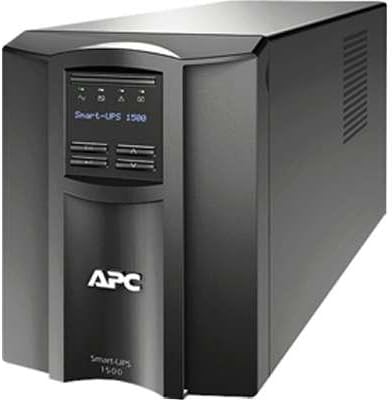
그림 1: 전면 view of the APC Smart-UPS SMT1500I. This image displays the front panel of the APC Smart-UPS SMT1500I, featuring the LCD screen, control buttons, and the APC logo. The unit is a compact, tower-style UPS designed for reliable power backup.
3.2 전력망 연결
- Connect the provided input power cord to the UPS input receptacle.
- Plug the other end of the input power cord into a grounded 230V AC utility outlet.
- 배터리 용량이 완전히 충전되도록 중요 장비를 연결하기 전에 UPS를 최소 24시간 동안 충전하십시오.
3.3 연결 장비
Connect your electronic equipment to the output receptacles on the rear of the UPS. Ensure that the total load does not exceed the UPS's rated capacity (980W for SMT1500I).
- 배터리 백업 콘센트: Connect critical equipment (e.g., computers, monitors, network devices) that require continuous power during outages to these outlets.
- Surge Only Outlets (if applicable): Connect non-critical equipment (e.g., printers, scanners) that only require surge protection to these outlets.
3.4 초기 시작
After connecting the UPS to utility power and allowing initial charging, press the power button on the front panel to turn on the UPS. The LCD display will illuminate, and the UPS will perform a self-test.
4. UPS 작동 방법
4.1 LCD 디스플레이 및 제어 버튼
The front panel LCD provides real-time status information and allows configuration of UPS settings. Use the navigation buttons (Up, Down, Enter, Escape) to browse menus and adjust settings.
- 전원 버튼: 무정전 전원 공급 장치(UPS)를 켜거나 끕니다.
- 메뉴 탐색: Allows access to various UPS settings and status screens.
- 상태 표시기 : Icons on the LCD display indicate operational status, battery charge, load level, and active alarms.
4.2 기본 작업
- 전원 켜기/끄기: Press and hold the power button for a few seconds to turn the UPS on or off.
- 자가 진단: Initiate a self-test through the LCD menu to verify battery and UPS functionality.
- 알람 관리: The UPS will emit audible alarms during power events or system faults. These can often be silenced temporarily via the LCD menu.
5. 유지관리
5.1 배터리 교체
The UPS contains a user-replaceable, hot-swappable battery module. Refer to the specific battery replacement instructions provided with your replacement battery kit or consult the APC website for detailed procedures. Always use genuine APC replacement batteries to ensure optimal performance and safety.
- 경고: Risk of electrical shock. Disconnect the UPS from utility power before servicing the battery.
- 처분: 사용한 배터리는 지역 규정에 따라 적절하게 폐기하십시오.
5.2 청소
Periodically clean the exterior of the UPS with a soft, dry cloth. Do not use liquid cleaners or solvents. Ensure ventilation openings are free from dust and debris.
6. 문제 해결
This section addresses common issues you might encounter with your APC Smart-UPS SMT1500I. For more detailed troubleshooting, refer to the APC support web대지.
6.1 일반적인 문제 및 해결 방법
- UPS가 켜지지 않습니다.
- Ensure the input power cord is securely connected to both the UPS and a live utility outlet.
- Verify the utility outlet is providing power.
- Check if the battery is properly connected inside the UPS.
- UPS에서 계속해서 경고음이 울리고 있습니다.
- This usually indicates the UPS is operating on battery power due to a utility power outage.
- If utility power is present, check for an overload condition (too much equipment connected).
- A continuous alarm might also indicate a battery fault; perform a self-test.
- Equipment connected to UPS is not receiving power:
- Ensure the UPS is turned on.
- Check if the equipment's power cords are securely plugged into the UPS outlets.
- Verify that the UPS is not in an overload state.
7. 사양
The following table outlines the technical specifications for the APC Smart-UPS SMT1500I.
| 특징 | 사양 |
|---|---|
| 모델 번호 | SMT1500I |
| 용량 (VA) | 1500VA |
| 용량(와트) | 980와트 |
| 공칭 출력 볼륨tage | 230V |
| 입력 Voltage | 230V |
| 폼 팩터 | Tower (Rack convertible with optional kit) |
| 제품 크기(높이 x 너비 x 깊이) | 1 x 1 x 1 인치 |
| 품목 무게 | 2파운드 |
| 한국어: | 779184352259 |
| ASIN | B01M27PUON |
| 첫 번째 이용 가능 날짜 | 31년 2016월 XNUMX일 |
8. 보증 및 지원
APC provides a limited warranty for this product. For detailed warranty information, please refer to the warranty card included with your product or visit the official APC website. For technical support, product registration, or to locate service centers, please visit www.apc.com/support or contact your local APC representative.
When contacting support, please have your model number (SMT1500I) and serial number readily available.


