1. 서론
This manual provides essential information for the safe and efficient operation of your COTEK SP-4000-124 Pure Sine Wave Inverter. This high-frequency inverter is designed to convert 24VDC battery power into 120VAC household electricity, offering a pure sine wave output suitable for sensitive electronics. Please read this manual thoroughly before installation and use.
2. 안전 지침
Adherence to these safety guidelines is crucial to prevent personal injury and damage to the inverter or connected equipment.
- Installation must be performed by qualified personnel in accordance with all applicable electrical codes.
- 인버터를 비, 습기 또는 극한의 온도에 노출시키지 마십시오.
- 과열을 방지하려면 인버터 주변을 적절하게 환기시키십시오.
- Connect the inverter only to a 24VDC power source. Connecting to a different voltage 손상을 일으킬 수 있습니다.
- Always disconnect the DC power source before performing any maintenance or wiring.
- 인버터가 올바르게 접지되었는지 확인하세요.
- 인버터 c를 열지 마십시오.asing. 내부에는 사용자가 수리할 수 있는 부품이 없습니다.
3. 제품 특징
The COTEK SP-4000-124 Inverter incorporates advanced features for reliable power conversion:
- Pure sine wave output for compatibility with all AC loads.
- Power ON/OFF remote control capability via green terminal.
- Input and output are fully isolated for enhanced safety.
- Temperature and load-controlled cooling fan for optimal thermal management.
- User-friendly interface with 3-color LED status indicators.
- Output frequency (50/60 Hz) selectable via DIP switch.
- 출력 볼륨tage selectable via DIP switch.
- Power saving mode adjustable by variable resistor.
- Comprehensive input protection: Reverse Polarity (Fuse), Under Voltage, 권 이상tage.
- Robust output protection: Short Circuit, Overload, Over Temperature.
- Type 1 Indoor Aluminum Enclosure.
- E13 / UL / CE / FCC approved.
4. 제품 오버view
Familiarize yourself with the physical components and connections of your inverter.

This image displays the COTEK SP-4000-124 Pure Sine Wave Inverter, showcasing 견고한 파란색 casing and overall design from an elevated, angled perspective.
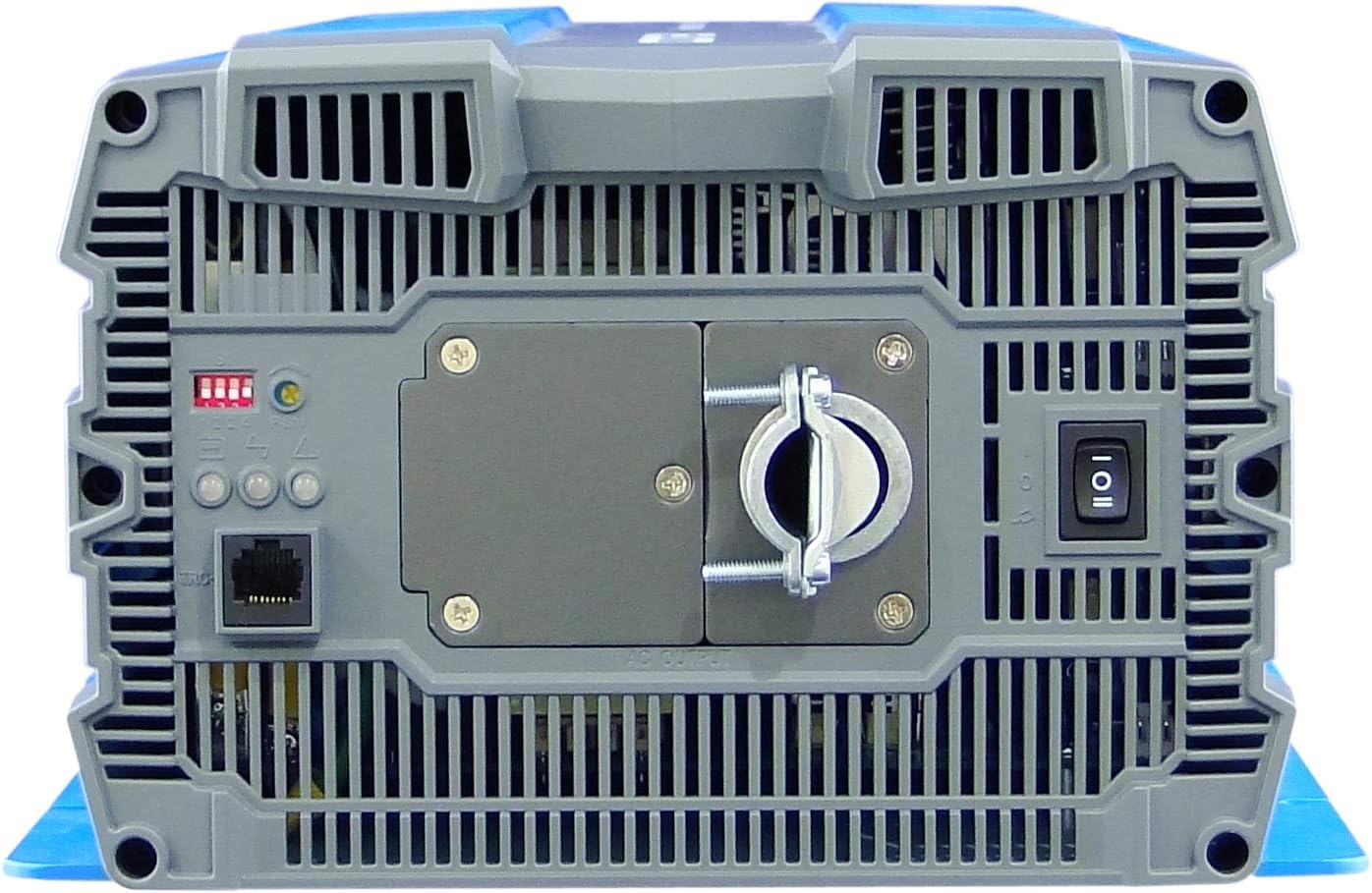
This image shows the rear panel of the COTEK SP-4000-124 Inverter, featuring the hardwire AC output terminal, the main power switch, and a set of LED status indicators and DIP switches for configuration.
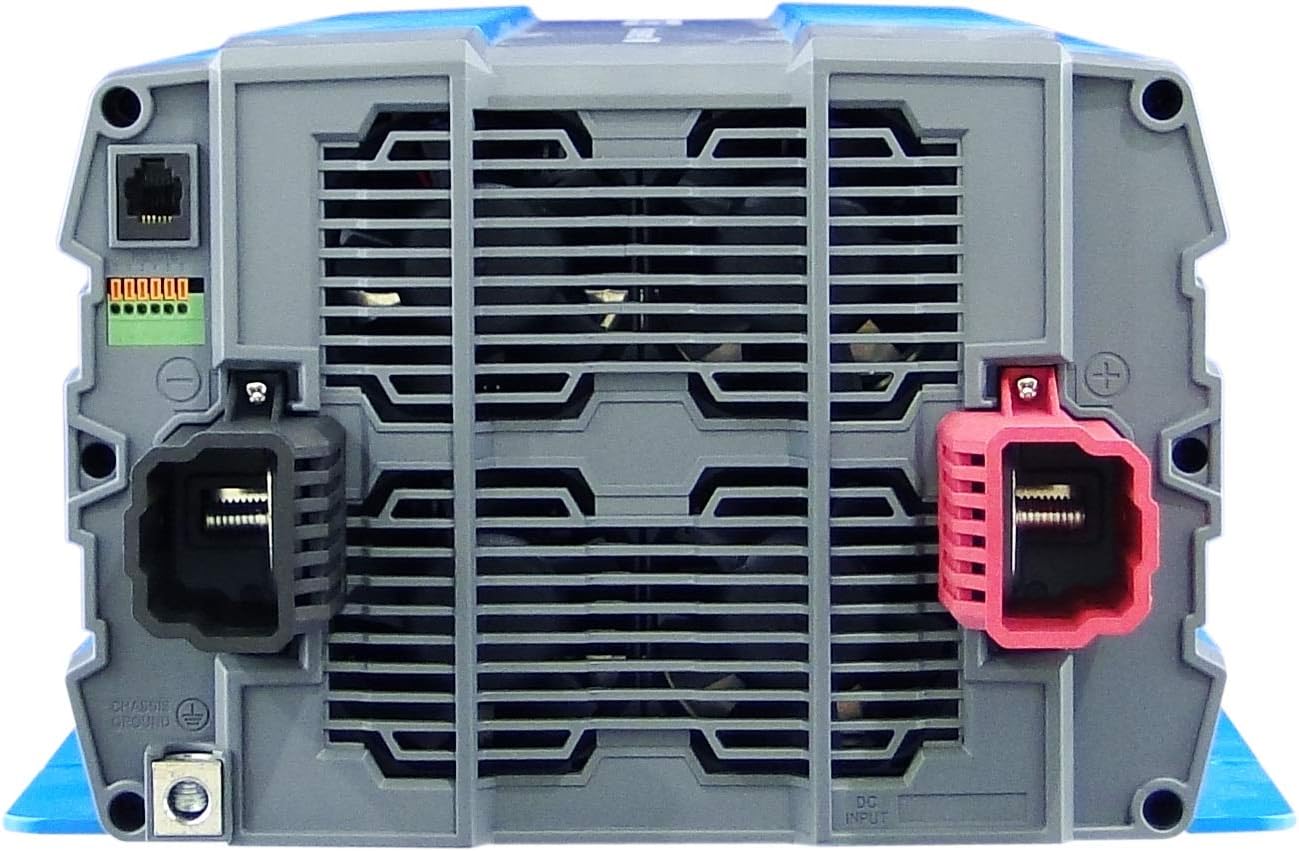
The front panel of the COTEK SP-4000-124 Inverter is depicted, highlighting the robust DC input terminals (red for positive, black for negative) and the chassis ground connection point.

This technical drawing provides detailed mechanical dimensions and outlines of the COTEK SP-4000 series inverter from multiple perspectives (top, front, side), indicating measurements in both millimeters and inches.
5. 설정 및 설치
Proper installation is critical for the performance and safety of the inverter. It is highly recommended that installation be performed by a certified electrician or qualified technician.
5.1 장착
- Choose a dry, well-ventilated, and cool location.
- Mount the inverter securely to a stable surface, ensuring adequate clearance for airflow around the cooling fins.
- Avoid mounting near flammable materials or in direct sunlight.
5.2 DC 입력 연결
- Ensure the DC power source (battery bank) is rated for 24VDC.
- Use appropriately sized cables to minimize voltage drop and ensure safe current handling.
- Connect the positive (+) terminal of the inverter to the positive terminal of the battery bank.
- Connect the negative (-) terminal of the inverter to the negative terminal of the battery bank.
- Install an external DC fuse or circuit breaker between the battery and the inverter for protection.
5.3 AC 출력 연결
- The inverter features a hardwire AC outlet. Connect your AC loads directly to this terminal.
- Ensure all AC wiring complies with local electrical codes.
- Do not exceed the inverter's rated output power.
5.4 접지
- Connect the inverter's chassis ground terminal to a reliable earth ground point.
6. 사용 설명서
6.1 전원 켜기/끄기
- After all connections are secure, switch on the external DC circuit breaker (if installed).
- Locate the main power switch on the inverter's rear panel and switch it to the 'ON' position.
- The LED indicators will illuminate, indicating the inverter's status.
- To power off, switch the main power switch to 'OFF', then disconnect the DC power source.
6.2 LED 표시등
The 3-color LED indicators provide visual feedback on the inverter's operational status and any potential faults.
- 녹색: 정상 작동.
- 노란색 : Warning (e.g., low battery, overload warning). Refer to troubleshooting.
- 빨간색: Fault (e.g., overload shutdown, over-temperature shutdown). The inverter will shut down.
6.3 Output Frequency and Voltage 선택
The inverter allows for selection of output frequency (50/60 Hz) and voltage via DIP switches. Consult the label near the DIP switches for specific settings. Ensure the inverter is off before adjusting DIP switches.
7. 유지관리
정기적인 유지관리를 통해 인버터의 최적의 성능과 수명을 보장할 수 있습니다.
- 청소: Periodically clean the exterior of the inverter and ensure cooling vents are free from dust and debris. Use a dry, soft cloth. Do not use liquid cleaners.
- 사이: Annually inspect all DC and AC connections for tightness and corrosion. Loose connections can cause overheating and poor performance.
- 환경: 작동 환경이 지정된 온도 및 습도 범위 내에 유지되도록 하세요.
8. 문제 해결
이 섹션에서는 일반적인 문제에 대한 안내를 제공합니다. 복잡한 문제의 경우 자격을 갖춘 서비스 담당자에게 문의하십시오.
| 문제 | 가능한 원인 | 해결책 |
|---|---|---|
| No AC output, Red LED on | Overload, Over-temperature, Input over/under voltage | Reduce load, allow cooling, check battery voltage. Cycle power. |
| 노란색 LED 켜짐 | 배터리 용량이 부족합니다tage warning, minor overload warning | Charge batteries, reduce load. |
| 인버터가 켜지지 않습니다 | No DC input power, loose connections, blown DC fuse | Check battery connections, verify battery voltage, inspect DC fuse/breaker. |
| AC output unstable | Poor DC input connections, excessive load, faulty AC wiring | Tighten DC connections, reduce load, inspect AC wiring. |
9. 사양
Detailed technical specifications for the COTEK SP-4000-124 Pure Sine Wave Inverter.
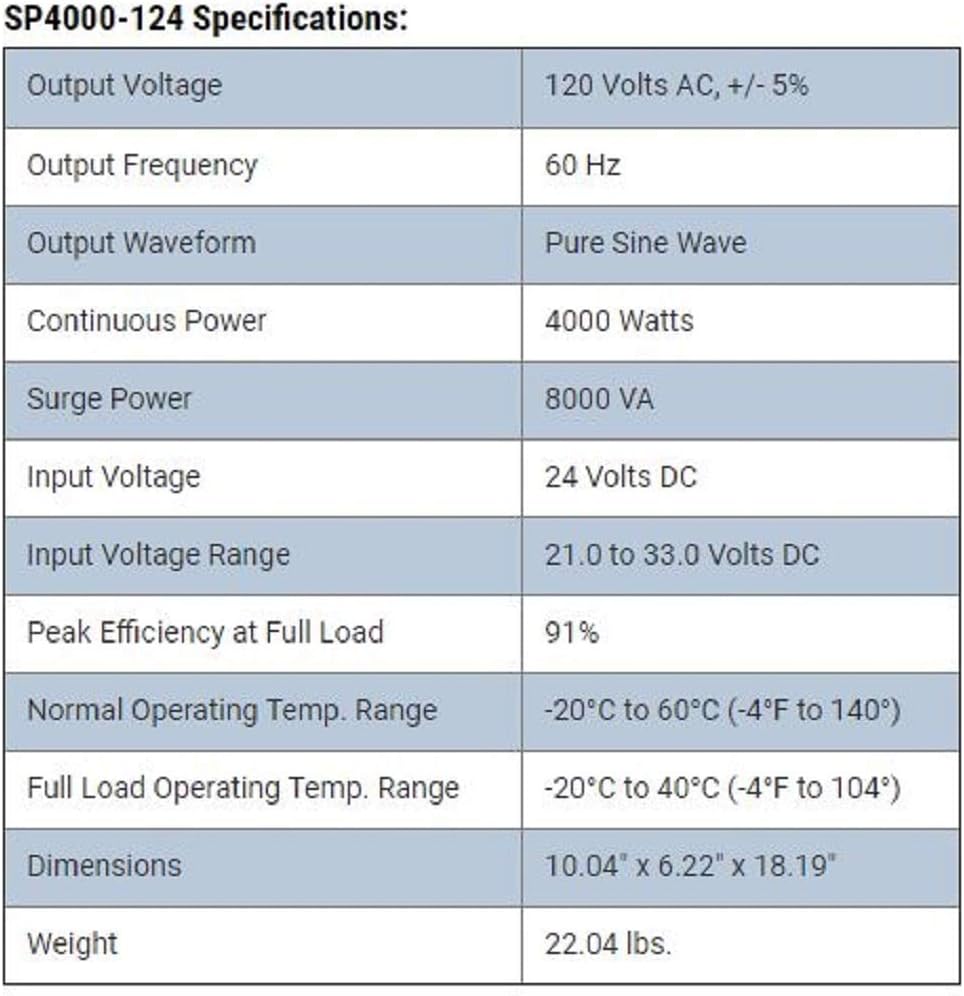
A table detailing the technical specifications of the COTEK SP4000-124 inverter, including output voltage, frequency, waveform, continuous power, surge power, input voltage, efficiency, operating temperature range, dimensions, and weight.
| 매개변수 | 값 |
|---|---|
| 출력 볼륨tage | 120 Volts AC, +/- 5% |
| 출력 주파수 | 60Hz |
| 출력파형 | 순수한 사인 웨이브 |
| 연속 전력 | 4000 와트 |
| 서지 파워 | 8000VA |
| 입력 Voltage | 24볼트 직류 |
| 입력 Voltag및 범위 | 21.0~33.0볼트 DC |
| Peak Efficiency at Full Load | 91% |
| Normal Operating Temp. Range | -20°C to 60°C (-4°F to 140°) |
| Full Load Operating Temp. Range | -20°C to 40°C (-4°F to 104°) |
| 치수(길이 x 너비 x 높이) | 18.66 x 12.56 x 9.53인치(474 x 319 x 242mm) |
| 무게 | 24.8파운드(11.25kg) |
10. 보증 및 지원
For warranty information and technical support, please refer to the documentation provided with your purchase or contact COTEK customer service directly. Keep your purchase receipt as proof of purchase for warranty claims.


