소개
The C2G 40914 Compact Ampliifier는 다음과 같이 설계되었습니다. amplify dynamic microphone or stereo audio signals, providing 15 Watts of power per channel to a sound reinforcement system. This amplifier features a discreet installation and remote control capability via an included wall plate. It is suitable for various audio setups requiring compact amplification and external volume management.
상자 안에 무엇이 들어있나요?
설치를 진행하기 전에 모든 구성 요소가 있는지 확인하세요.
- 콤팩트 Amp리퍼
- Decorator Volume Control Wall Plate
- 페이스 플레이트 커버
- 전원 어댑터
- Bracket Mounting Screws 6-32 (25mm) qty. 2
- Wall Plate Mounting Screw M3.5 (8mm) qty. 3
- 사용자 설명서
제품 끝view
익숙해지세요 amplifier and wall plate components.

그림 1: 앞쪽 view of the C2G 40914 Compact Amplifier. This image displays the local volume control knob, power indicator LED, 1/4 inch microphone input, 3.5mm auxiliary input, and input select switch.

그림 2: 뒤쪽 view of the C2G 40914 Compact Amp리퍼. 이것 view shows the speaker output terminals (L+, L-, R+, R-), the remote volume control port (RJ45), and the DC 12V power input.

그림 3: Decorator Volume Control Wall Plate and face plate cover. The wall plate features a rotary volume knob and a power indicator LED.
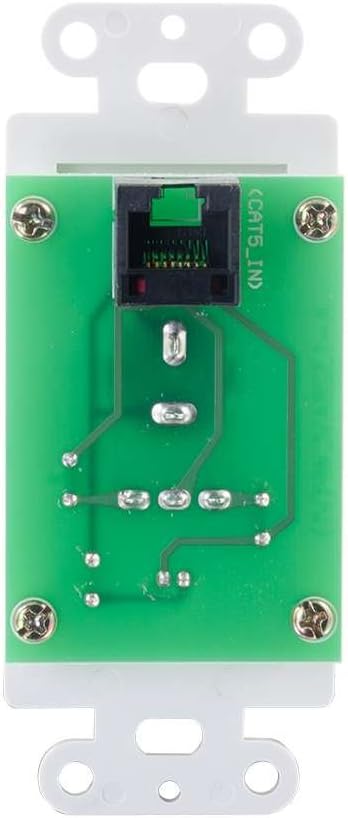
그림 4: 뒤쪽 view of the Decorator Volume Control Wall Plate, showing the RJ45 connector for remote communication with the amp리퍼.
설정
-
장착 Amp정수기:
그만큼 amplifier includes a built-in mounting bracket. Secure the amplifier to a suitable surface using the provided 6-32 (25mm) mounting screws. Ensure adequate ventilation around the unit.
-
스피커 연결:
패시브 스피커를 본체 후면의 스피커 출력 단자에 연결하십시오. amplifier (L+, L-, R+, R-). Ensure correct polarity (+ to + and - to -) for each speaker channel. The amplifier provides 15 watts per channel.
-
오디오 소스 연결:
- 마이크 입력: Connect a dynamic microphone to the 1/4 inch MIC IN jack on the front panel.
- 보조 입력: Connect an audio source (e.g., smartphone, media player) to the 3.5mm AUX IN jack on the front panel.
-
Connecting the Remote Wall Plate:
Install the Decorator Volume Control Wall Plate in a standard wall box. Connect a Cat5e/Cat6 cable (not included) from the RJ45 port on the rear of the wall plate to the REMOTE port (RJ45) on the rear of the amplifier. Secure the wall plate with the provided M3.5 (8mm) screws and attach the face plate cover.
-
전원 공급 Amp정수기:
Connect the included power adapter to the DC 12V input on the rear of the amplifier, then plug the adapter into a standard AC power outlet. The power indicator LED on the amplifier and wall plate will illuminate.
작동 지침
-
전원 켜기/끄기:
그만큼 amplifier powers on automatically when connected to power. The power indicator LED on both the amplifier and the wall plate will light up.
-
입력 선택:
사용하세요 입력 선택 switch on the front panel of the amplifier to choose between the MIC IN and AUX IN audio sources.
-
볼륨 조절:
그만큼 amplifier offers both local and remote volume control options:
- Local Volume: Adjust the rotary knob labeled 용량 전면 패널에서 amp리퍼.
- Remote Volume: Adjust the rotary knob labeled 용량 on the Decorator Volume Control Wall Plate.
사용하세요 볼륨 선택 스위치를 켜다 amplifier to determine whether the local or remote volume control is active. Set to 'LOCAL' to use the amplifier's knob, or 'REMOTE' to use the wall plate's knob.
-
마이크 사용법:
When MIC IN is selected, speak into the connected dynamic microphone. Adjust the volume using the selected volume control (local or remote) to achieve the desired output level.
유지
- 유지하다 amplifier and wall plate clean by wiping with a soft, dry cloth.
- Avoid using liquid cleaners or aerosol sprays, which may damage the unit.
- 적절한 환기를 확보하세요 amp과열을 방지하는 lifier.
- 제품을 과도한 습기나 극한 온도에 노출시키지 마십시오.
문제 해결
If you encounter issues with your C2G 40914 Compact Amp증폭기 관련 문의는 다음의 일반적인 해결 방법을 참고하십시오.
-
오디오 출력 없음:
- Ensure the power adapter is securely connected and the power indicator LEDs are lit.
- Verify that speakers are correctly wired to the amp앰프의 출력 단자를 올바른 극성으로 연결하십시오.
- 확인해보십시오 입력 선택 switch is set to the correct source (MIC or AUX).
- 확인해주세요 볼륨 선택 switch is set to the active volume control (LOCAL or REMOTE) and that the volume knob is turned up.
- Test with a different audio source or microphone to rule out source device issues.
-
Remote Volume Control Not Working:
- Ensure the Cat5e/Cat6 cable connecting the wall plate to the amplifier is securely plugged into both RJ45 ports.
- 확인해주세요 볼륨 선택 스위치를 켜다 amplifier is set to 'REMOTE'.
- Check the wall plate's power indicator LED to ensure it is receiving power.
-
왜곡된 오디오:
- 양쪽 모두의 볼륨 레벨을 낮추세요 amplifier/wall plate and the audio source device.
- 스피커 임피던스가 일치하는지 확인하십시오. amplifier's requirements (typically 4-8 ohms).
- 모든 케이블 연결 부위를 점검하여 느슨함이나 손상이 없는지 확인하세요.
명세서
| 특징 | 세부 사항 |
|---|---|
| 제품 치수 | 1.95 x 1.3 x 4.05인치(L x W x H) |
| 품목 무게 | 1 파운드 |
| 모델 번호 | 40914 |
| 출력 전력 | 15 Watts per channel (30W total) |
| 입력 커넥터 | 1/4 inch Dynamic Microphone, 3.5mm Stereo Audio Line Level |
| 출력 커넥터 | Speaker Terminals (L+, L-, R+, R-) |
| 원격 제어 | RJ45 for external volume control wall plate |
| 전원 공급 장치 | DC 12V (Power Adapter included) |
| 호환 장치 | 스피커 |
| 색상 | 검은색 |
보증 및 지원
The C2G 40914 Compact Amplifier is thoroughly inspected and tested to ensure quality and comes with a warranty for your complete satisfaction. For specific warranty terms and conditions, please refer to the documentation included with your purchase or visit the official C2G web대지.
For technical support, troubleshooting assistance, or further inquiries, please visit the C2G Store 또는 공식 지원 채널을 통해 지원받을 수 있습니다.


