1. 서론
The JUSHENG Spovan SPV600 is a versatile outdoor digital pocket watch designed for enthusiasts of climbing, running, fishing, and other sports. It integrates multiple functions including a barometer, altimeter, thermometer, weather forecast, and smart fishing time reminders, providing essential data for your outdoor activities. This manual will guide you through the setup, operation, and maintenance of your SPV600 device.
2. 제품 오버view
Familiarize yourself with the components and display of your SPV600 pocket watch.

그림 2.1: 전면 View 및 메인 디스플레이
This image shows the front of the SPV600 pocket watch, highlighting its digital display. The display currently shows the time as 19:20 and the date as 07.26. Above the time, a barometric pressure trend graph is visible, along with a weather forecast icon, indicating its multi-functional capabilities. The watch features four control buttons around its bezel.
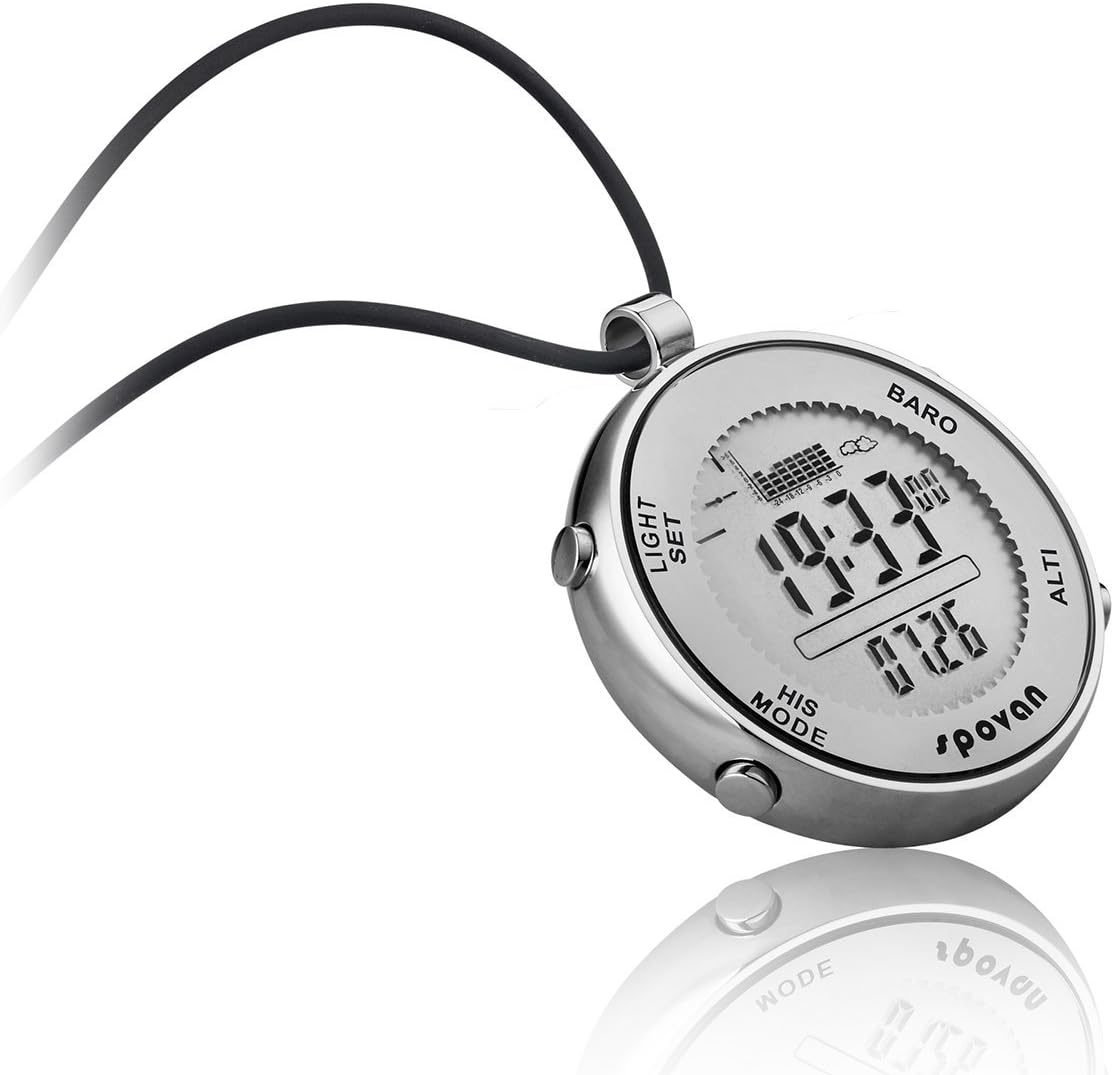
그림 2.2: 각도 View 버튼이 있는
An angled perspective of the SPV600, providing a clearer view of the side buttons labeled "LIGHT", "SET", "HIS", and "MODE". The display shows the time as 19:33 and the date as 07.26, with the barometer graph and weather icon also visible. This view emphasizes the watch's robust design and button placement for easy access.

Figure 2.3: Temperature Display Mode
This image illustrates the SPV600 in its thermometer mode, showing the time as 19:12 and a temperature reading of 30.8°C. The barometric pressure graph remains visible at the top, demonstrating the device's ability to switch between different data displays while retaining core information.

그림 2.4: 후면 View and Engravings
The back of the SPV600 pocket watch is shown, featuring engravings that confirm its construction from "STAINLESS STEEL" and its "WATER RESISTANT" capabilities. The "ELEMENTUM SERIES" and "spovan" brand logos are also clearly visible, along with a "CE" mark, indicating compliance with European standards.
버튼 기능:
- 빛: 어두운 환경에서 시인성을 높이기 위해 EL 백라이트를 활성화합니다.
- 세트: 설정 모드로 들어가고 선택 사항을 확인하는 데 사용됩니다.
- HIS (History): Accesses historical data records, such as pressure trends or fishing logs.
- 오시는 길 : Cycles through different operational modes (Time, Barometer, Altimeter, Thermometer, Fishing, etc.).
3. 설정
3.1 초기 전원 켜기 및 기본 설정
- Upon first use, the device may prompt for initial setup.
- 를 누르세요 세트 버튼을 눌러 설정 모드로 들어갑니다.
- 사용하세요 방법 or 그의 buttons to navigate between settings (e.g., 12/24 hour format, time zone).
- 사용하세요 세트 button to adjust values (e.g., hour, minute, year, month, day).
- 누르다 세트 again to confirm and move to the next setting, or hold 방법 종료합니다.
3.2 유닛 구성
The SPV600 supports various units for temperature, pressure, and altitude. To change units:
- In the respective mode (e.g., Barometer or Altimeter), press and hold the 세트 단추.
- The unit display will begin to flash.
- 사용하세요 방법 or 그의 buttons to cycle through available units (e.g., °C/°F for temperature, hPa/inHg for pressure, m/ft for altitude).
- 누르다 세트 선택을 확인하세요.
4. 사용 설명서
The SPV600 features multiple modes accessible via the 방법 단추.
4.1 Time and Date Mode
- This is the default display mode, showing current time (hour, minute, second) and date (month, day).
- To adjust time/date: Press and hold 세트. 사용 방법/그의 to change values, and 세트 다음 필드로 이동합니다.
4.2 기압계 모드
- 누르다 방법 until "BARO" is displayed.
- Displays current atmospheric pressure and a 24-hour barometric pressure trend chart.
- Includes barometric pressure change arrow indication for quick reference.
- Weather forecast icon changes based on pressure trends.
- Storm Alarm: The device will alert you to rapid pressure drops indicating potential storms.
4.3 고도계 모드
- 누르다 방법 until "ALTI" is displayed.
- 현재 고도를 표시합니다.
- Altitude can be calibrated manually if a known reference altitude is available. Press and hold 세트 캘리브레이션 모드로 들어갑니다.
4.4 온도계 모드
- 누르다 방법 to cycle to the temperature display.
- Displays ambient temperature. Ensure the device is not directly exposed to body heat for accurate readings.
4.5 낚시 모드
- 누르다 방법 to enter Fishing Mode.
- Smart Fishing Time Remind: The device analyzes barometric pressure trends to suggest optimal fishing times.
- Fishing Place Tracking: Track up to six different fishing locations. For each location, the device records air pressure, temperature, and can estimate fishing water depth.
- Real-time Pressure Tracking: Monitors pressure changes at your current fishing spot.
- To set/view fishing locations: Use 세트 그리고 그의 buttons within this mode.
4.6 스톱워치 및 카운트다운 타이머
- Access these functions by cycling through modes with the 방법 단추.
- 스톱워치: 사용 세트 to start/stop, 그의 재설정합니다.
- 카운트 다운 : Set desired time using 세트, then start. An alarm will sound when the countdown finishes.
4.7 알람 기능
- The SPV600 includes a daily alarm.
- To set the alarm: Navigate to the alarm setting mode (usually after time/date settings or a dedicated alarm mode). Use 세트 to adjust time and 방법/그의 탐색하다.
4.8 EL 백라이트
- 를 누르세요 빛 버튼을 누르면 디스플레이가 몇 초 동안 밝아집니다.
- This feature is useful in low-light conditions.
5. 유지관리
- 청소: 부드러운 천으로 장치를 닦으십시오. damp 천으로 닦으세요. 강한 화학 물질이나 연마재는 피하세요.
- 방수 기능: The SPV600 is 30m waterproof. This means it is suitable for splashes, rain, and brief immersion in water. It is not recommended for diving or prolonged underwater use. Ensure all buttons are not pressed while submerged.
- 저장: 사용하지 않을 때는 기기를 서늘하고 건조한 곳에 보관하세요. 극한의 온도는 피하세요.
- 배터리: The device uses a standard watch battery. When the display dims or functions become erratic, it may be time for a battery replacement. It is recommended to have battery replacement performed by a qualified technician to maintain water resistance.
6. 문제 해결
| 문제 | 가능한 원인 | 해결책 |
|---|---|---|
| 디스플레이가 어둡거나 아무것도 표시되지 않습니다. | 배터리가 부족합니다. | 배터리를 교체하세요. |
| Inaccurate temperature/pressure/altitude readings. | Sensor obstruction, uncalibrated sensor, or rapid environmental changes. | Ensure sensors are clean. Calibrate altimeter if a known reference is available. Allow time for readings to stabilize after significant environmental changes. |
| 버튼이 반응하지 않습니다. | Device frozen or water ingress. | Try a soft reset (if applicable, refer to manufacturer's specific reset procedure). If water ingress is suspected, cease use and allow to dry completely, then seek professional service. |
| 디스플레이 내부에 물이 있습니다. | 밀봉이 손상되었거나 수중에서 버튼이 눌렸습니다. | Immediately cease use. Do not attempt to dry with heat. Seek professional repair to prevent further damage. |
7. 사양
- 모델: SPV600
- 제조업체: JUSHENG Electronic Technology Co.,Ltd
- 치수: 약 4.29 x 3.54 x 3.22인치(패키지 크기)
- Item Display Length: 47.5 밀리미터
- 무게: 약 10.58온스
- 방수 기능: 30미터 (3ATM)
- 기능: Barometer, Altimeter, Thermometer, Weather Forecast, Storm Alarm, Time, Date, Smart Fishing Time Remind, Pressure Tracking, Alarm, Stopwatch, Countdown, EL Backlight.
8. 보증 및 지원
The JUSHENG Spovan SPV600 is designed for durability and performance. While specific warranty details are not provided in this manual, the product is generally expected to be free from defects in materials and workmanship under normal use. Some product information indicates a "Lifetime Warranty Against Sweat".
For technical support, warranty claims, or service inquiries, please contact JUSHENG customer service through their official channels or the retailer from whom you purchased the device. Please retain your proof of purchase for any warranty-related requests.


