소개
Thank you for choosing the Domo DO7280S Vacuum Cleaner. This manual provides essential information for the safe and efficient use, maintenance, and troubleshooting of your appliance. Please read it thoroughly before first use and keep it for future reference.
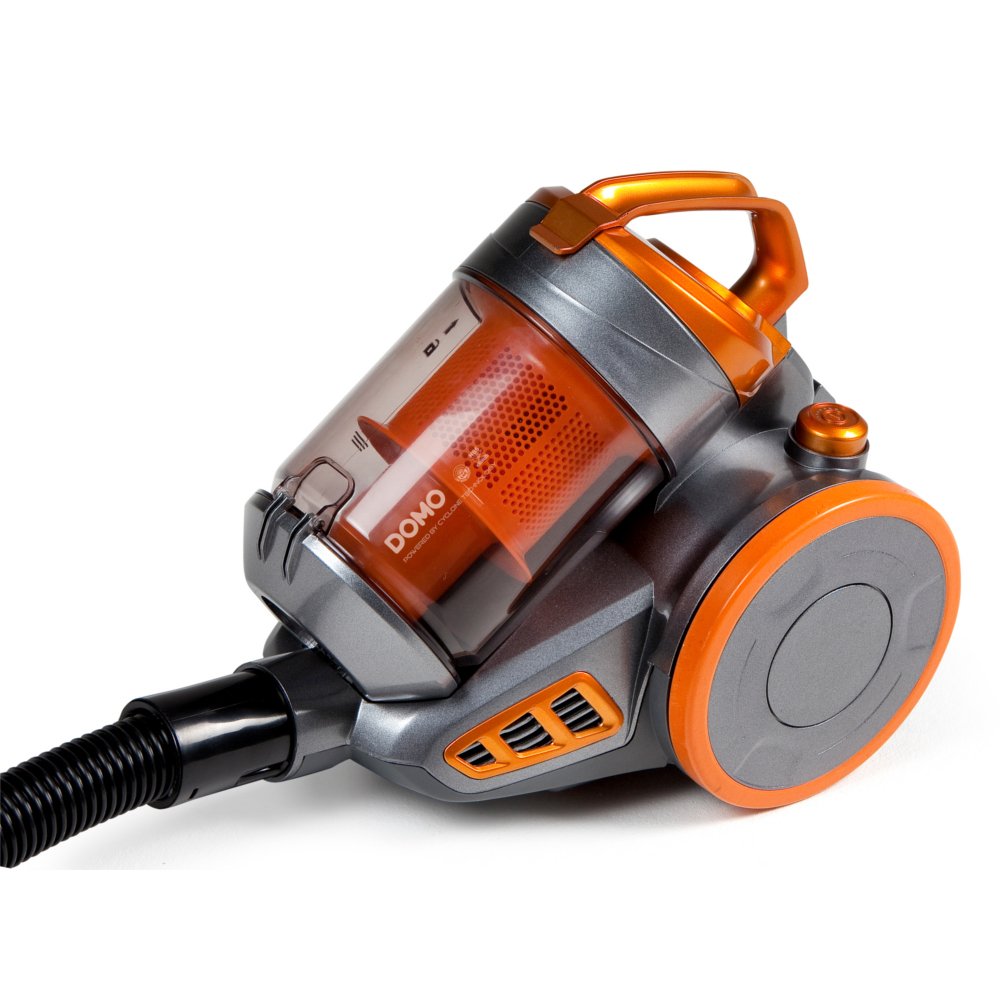
Image: The Domo DO7280S vacuum cleaner, fully assembled with its hose, telescopic tube, and floor brush, ready for use. The main unit is grey and orange.
안전 지침
화재, 감전, 신체 상해의 위험을 줄이려면 전기 제품을 사용할 때 항상 기본적인 안전 예방 조치를 준수하세요.
- 전원 공급 장치 볼륨을 확인하십시오.tage는 기기의 정격 라벨과 일치합니다.
- 물이나 젖은 물질을 빨아들이는 데 진공청소기를 사용하지 마십시오.
- 인화성 물질이나 가연성 물질, 뜨거운 재, 날카로운 물체를 진공청소기로 빨아들이지 마십시오.
- 머리카락, 느슨한 옷, 손가락 및 신체의 모든 부분을 구멍이나 움직이는 부품에서 멀리 두십시오.
- 청소나 유지관리를 하기 전에 반드시 전원 콘센트에서 기기의 플러그를 뽑으세요.
- 손상된 코드나 플러그로 진공 청소기를 작동하지 마세요.
- 이 제품은 가정용으로만 사용하세요.
제품 끝view
The Domo DO7280S is a cylinder vacuum cleaner designed for efficient cleaning across various surfaces. It features a multi-filter system and electronic suction control.
주요 구성 요소 :
- Main Unit (Motor, Dust Container, Filters)
- 유연한 호스
- 신축식 금속 튜브
- Eco-brush Floor Nozzle
- Crevice Tool with Brush (Accessory)

이미지: 측면 view of the Domo DO7280S vacuum cleaner, highlighting the main unit, large wheels, and the connection point for the hose and telescopic tube.
설정
- 짐 풀기: 모든 구성품을 포장에서 조심스럽게 꺼내세요. 나중에 보관하거나 운반할 수 있도록 포장을 보관하세요.
- Attaching the Flexible Hose: 유연한 호스 끝을 본체의 흡입구에 삽입하여 제자리에 단단히 고정될 때까지 밀어 넣습니다.
- 텔레스코픽 튜브 조립: Connect the handle end of the flexible hose to the telescopic metal tube. Adjust the tube length by pressing the release button and sliding it to the desired height.
- Connecting the Floor Nozzle: Attach the Eco-brush floor nozzle to the end of the telescopic tube. Ensure it is firmly connected.
- 전원 연결: Extend the power cord from the main unit and plug it into a suitable electrical outlet.
운영
- 전원 켜기/끄기: 진공 청소기를 켜거나 끄려면 본체에 있는 전원 버튼을 누르세요.
- 흡입력 조정: Use the electronic suction control dial or buttons on the main unit to adjust the suction strength according to the surface being cleaned. Lower settings are suitable for delicate fabrics, while higher settings are for carpets and hard floors.
- Using the Eco-brush: The Eco-brush is designed for efficient cleaning on various floor types. For optimal performance, move the nozzle slowly over the surface.
- 액세서리 사용: For specific cleaning tasks, detach the Eco-brush and attach the crevice tool with brush for corners, edges, and upholstery.
- Dust Container Full Indicator: The vacuum cleaner is equipped with an indicator that signals when the dust container needs to be emptied. Observe this indicator for optimal performance.
유지
Regular maintenance ensures the longevity and optimal performance of your Domo DO7280S vacuum cleaner. Always unplug the appliance before performing any maintenance.
먼지통 비우기:
- 분리 버튼을 눌러 먼지통을 본체에서 분리합니다.
- 먼지통을 쓰레기통 위에 놓으세요.
- Open the bottom lid of the dust container to release the collected dirt.
- Close the lid securely and reattach the dust container to the main unit.
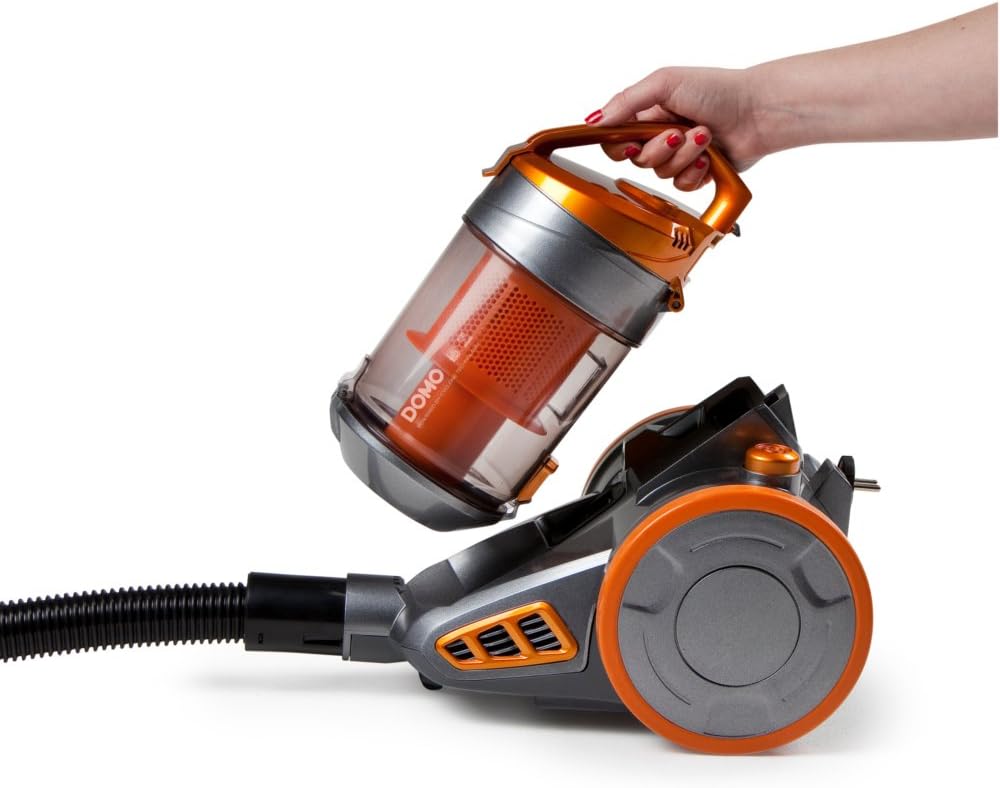
Image: A hand demonstrating the removal of the transparent orange dust container from the main body of the Domo DO7280S vacuum cleaner.

Image: A hand opening the bottom lid of the transparent orange dust container, revealing the internal filter system, ready for emptying.
필터 청소:
The Domo DO7280S features a multi-filter system. Regular cleaning of these filters is crucial for maintaining suction power.
- After emptying the dust container, remove the internal filters.
- Tap the filters gently over a bin to dislodge fine dust.
- If washable, rinse filters under cold running water. Ensure they are completely dry before reinserting.
- Do not use detergents or hot water on filters unless specified.
- Replace filters if they are damaged or excessively worn.
문제 해결
| 문제 | 가능한 원인 | 해결책 |
|---|---|---|
| 전원이 없습니다 | 플러그가 꽂혀 있지 않음; 콘센트에 결함이 있음; 전원 버튼을 누르지 않음. | 플러그 연결 상태를 확인하세요. 다른 기기로 콘센트를 테스트하세요. 전원 버튼을 단단히 누르세요. |
| 흡입력이 약함 | 먼지통이 가득 찼습니다. 필터가 막혔습니다. 호스/튜브/노즐이 막혔습니다. | Empty dust container; clean or replace filters; check for and remove blockages. |
| 비정상적인 소음 | Blockage in hose/tube/nozzle; motor issue. | 막힌 곳이 있는지 확인하고 제거하십시오. 소음이 계속되면 고객 지원 센터에 문의하십시오. |
| 먼지 탈출 | 먼지통이 제대로 닫히지 않았거나, 필터가 잘못 설치되었거나 손상되었습니다. | Ensure dust container is securely closed; check filter installation; replace damaged filters. |
명세서
| 특징 | 세부 사항 |
|---|---|
| 상표 | 도모 |
| 모델 번호 | DO7280S |
| 제품 치수 | 43 x 32.99 x 27cm |
| 품목 무게 | 5.58kg |
| Capacity (Dust Container) | 1.5리터 |
| 왓tage | 1000 와트 |
| 에너지 효율 등급 | C |
| 연간 에너지 소비량 | 연간 38킬로와트시 |
| 표면 추천 | 모든 층 |
| 폼 팩터 | 깡통 |
보증 및 지원
For warranty information, technical support, or service inquiries, please refer to the warranty card included with your product or contact Domo customer service directly. Keep your proof of purchase for warranty claims.


