소개
Welcome to the Jura J80 Automatic Coffee Center. This manual provides essential information for the safe and efficient operation, maintenance, and troubleshooting of your new coffee machine. Please read all instructions carefully before using the appliance for the first time and keep this manual for future reference.

Image: The Jura J80 Automatic Coffee Center, a sleek black machine, is shown from an angled perspective, actively brewing a layered latte into a clear glass. The control panel and spouts are visible.
안전 지침
안전한 작동과 손상 방지를 위해 다음 안전 수칙을 준수하십시오.
- 기기를 작동하기 전에 모든 지침을 자세히 읽으십시오.
- 이 제품은 가정용으로만 사용하도록 설계되었습니다.
- 기기, 전원 코드 또는 플러그를 물이나 다른 액체에 담그지 마십시오.
- 볼륨을 확보하세요tag기기에 표시된 전압이 연결하기 전에 해당 지역의 전원 공급 장치와 일치하는지 확인하십시오.
- 뜨거운 표면에 닿지 않도록 하세요. 손잡이나 손잡이를 사용하세요.
- 어린이의 손이 닿지 않는 곳에 보관하세요.
- 사용하지 않을 때와 청소하기 전에 콘센트에서 기기의 플러그를 뽑으십시오.
- 코드나 플러그가 손상된 경우 또는 기기가 오작동하거나 어떤 식으로든 손상된 경우에는 기기를 작동하지 마십시오.
설정
Follow these steps for the initial setup of your Jura J80:
- 짐 풀기: Carefully remove all components from the packaging. Retain packaging for potential future transport.
- 놓기: Position the coffee machine on a stable, level, and heat-resistant surface, away from direct sunlight and heat sources. Ensure adequate ventilation around the appliance.
- 수조: Remove the water tank, rinse it, and fill it with fresh, cold tap water up to the 'Max' mark. Reinsert the tank securely.
- 콩 용기: Open the aroma preservation cover and fill the bean container with fresh coffee beans. Close the cover firmly.
- 전원 연결: Connect the power cord to the machine and then plug it into a grounded electrical outlet.
- 초기 헹굼: The machine will prompt you to perform an initial rinse cycle. Follow the on-screen instructions to complete this process. This primes the system and ensures optimal coffee quality.
운영
Your Jura J80 is designed for intuitive operation. Here’s how to brew your favorite beverages:
- 전원 켜기: Press the power button to turn on the machine. The display will show the readiness status.
- 음료 선택: Use the display and navigation buttons to scroll through and select your desired beverage, such as Cappuccino, Espresso, Latte Macchiato, Coffee, or Hot Water.
- 설정 조정: Before brewing, you can often adjust settings like coffee strength and water volume. Follow the on-screen prompts to customize your drink.
- 양조: Place a cup or glass under the coffee and/or milk spouts. Press the start button for the selected beverage. The machine will automatically grind the beans, brew, and dispense your drink.
- 전원 끄기 : To turn off the machine, press the power button. The machine will perform an automatic rinse before shutting down.
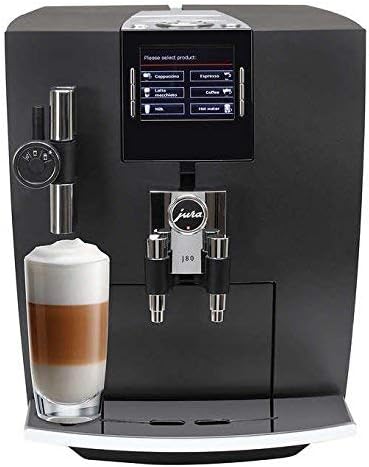
이미지: 앞면 view of the Jura J80 Automatic Coffee Center. The display shows beverage options, and a clear glass with a layered latte is positioned under the milk frother and coffee spout.
유지
Regular maintenance ensures the longevity and optimal performance of your Jura J80. The machine will prompt you for necessary cleaning cycles.
- 매일 우유 시스템 청소: After preparing milk-based beverages, it is crucial to clean the milk system daily. Failure to do so can lead to blockages and malfunction of the frother. Rinse the frother system with water after each use, and perform a full cleaning with Jura milk system cleaner as prompted by the machine.
- 물받이와 커피찌꺼기 용기: Empty and clean the drip tray and coffee grounds container regularly, typically when prompted by the machine. Rinse with warm water.
- Integrated Cleaning Program: The machine will periodically request a cleaning program. Use Jura cleaning tablets and follow the on-screen instructions. This is typically a monthly cleaning process.
- 석회질 제거 : The J80 features an intelligent descaling program. When prompted, use Jura descaling tablets and follow the step-by-step instructions on the display.
- 정수 필터 교체: If you are using a CLARIS water filter, replace it when indicated by the machine to ensure optimal water quality and reduce the frequency of descaling.
문제 해결
If you encounter issues with your Jura J80, consult the following common troubleshooting tips:
- 커피 제공 없음:
- Check if the water tank is filled and correctly inserted.
- Ensure the bean container has enough coffee beans.
- Verify that the brewing unit is not blocked.
- Milk Frother Not Working / Poor Foam Quality:
- This is often due to insufficient cleaning. Perform a thorough cleaning of the milk system using Jura milk system cleaner. Disassemble the frother components and soak them if necessary.
- Ensure the milk is fresh and cold.
- 기계가 켜지지 않음:
- Check if the power cord is securely plugged into both the machine and a functional electrical outlet.
- 다른 기기로 콘센트를 테스트하십시오.
- 표시되는 오류 메시지:
- Note the specific error code or message. Consult the Jura support website or your full user manual for detailed explanations and solutions.
If the problem persists after attempting these solutions, please contact Jura customer support.
명세서
| 상표 | 주라 |
| 모델 | J80 |
| 제품 치수 | 17 x 11.2 x 13.3 인치 |
| 품목 무게 | 31.9파운드 |
| 용량 | 14 온스 |
| 재료 | Glass (for certain components) |
| 특징 | 프로그래밍 가능 |
| 커피 메이커 유형 | 에스프레소 머신 |
| 휴먼 인터페이스 입력 | 버튼 |
| 한국어: | 794151411197 |
| ASIN | B01F96ITWK |
보증 및 지원
For detailed warranty information, technical assistance, or to purchase accessories and cleaning products, please visit the official Jura website or contact Jura customer service directly. Keep your proof of purchase for warranty claims.
주라 공식 Web대지: us.jura.com


