1. 제품 오버view
The Kit Magnetic Bluetooth Keyboard Case transforms your 9-10 inch tablet into a portable laptop, offering both protection and enhanced typing capabilities. Its sleek design features a leather-effect finish and an integrated stand for versatile use. The detachable Bluetooth keyboard ensures quick and easy pairing with a wide range of devices.
주요 특징:
- 블루투스 연결: Seamlessly connect the wireless keyboard to your tablet.
- 폭넓은 호환성: Designed for 9-10 inch iOS, Android, and Windows tablets, including various iPad and Samsung Galaxy Tab models.
- 긴 배터리 수명: The rechargeable battery provides approximately 65 hours of continuous typing.
- 통합 스탠드: Folds into a stable stand for comfortable view입력 및 타이핑 각도.
- 자기 디자인: Securely holds the tablet and keyboard in place.

Image: The Kit Magnetic Bluetooth Keyboard Case with a tablet securely placed, illustrating its use as a portable workstation.
2. 시작하기
2.1 패키지 내용
- Kit Magnetic Bluetooth Keyboard Case
- USB 충전 케이블
- 사용자 설명서
2.2 키보드 충전
Before first use, fully charge the keyboard. Connect the provided USB charging cable to the keyboard's charging port and plug the other end into a USB power source (e.g., computer USB port, USB wall adapter). The charging indicator light will illuminate during charging and turn off when fully charged.
2.3 태블릿 삽입하기
- Open the keyboard case flat.
- Carefully slide your 9-10 inch tablet into the designated slot or frame within the case. Ensure it is securely seated and aligned with any cutouts for buttons or ports.
- The magnetic design will help hold the tablet in place.
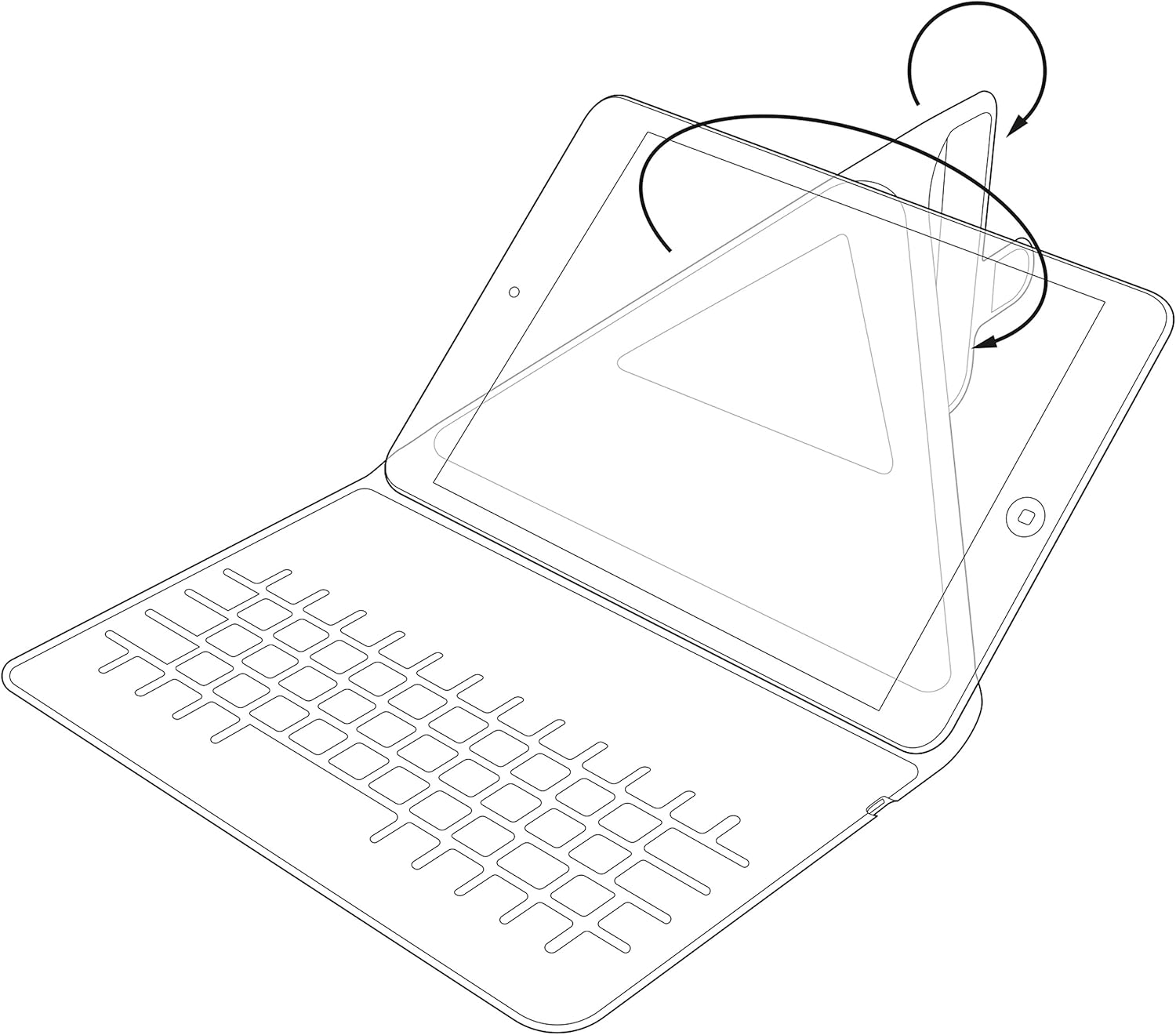
Image: Diagram showing the process of inserting a tablet into the case's holding mechanism.
2.4 블루투스 키보드 페어링
- 전원 스위치를 'ON' 위치로 밀어 키보드를 켜십시오. 전원 표시등이 잠시 켜집니다.
- Press the 'Connect' or 'Pair' button on the keyboard (refer to the keyboard layout for exact button location). The Bluetooth indicator light will start blinking, indicating it is in pairing mode.
- On your tablet, go to 'Settings' > 'Bluetooth'. Ensure Bluetooth is enabled.
- Your tablet will search for available Bluetooth devices. Select 'Kit Keyboard' or a similar name from the list of found devices.
- If prompted, enter the pairing code displayed on your tablet screen using the keyboard, then press 'Enter'.
- Once paired, the Bluetooth indicator light on the keyboard will stop blinking and remain solid or turn off, and your tablet will show the keyboard as 'Connected'.
3. 사용 설명서
3.1 키보드 기능
The keyboard features a standard QWERTY layout with additional function keys (Fn) for quick access to multimedia controls, volume, and other tablet-specific functions. Refer to the key labels for their specific actions. For example, you may find keys for Home, Search, Volume Up/Down, Play/Pause, etc.

이미지: 상세 view of the keyboard layout, highlighting various function keys and standard alphanumeric keys.
3.2 일체형 스탠드 사용하기
The case is designed to fold into a stable stand, allowing you to position your tablet at an optimal viewing angle for typing, watching videos, or making video calls. Simply fold the back cover of the case to create a triangular support structure.

Image: Diagram demonstrating the folding mechanism of the case to create a stable viewing stand for the tablet.
4. 관리 및 유지 보수
- 청소: 부드러운 d를 사용하세요amp cloth to wipe the exterior of the case. For the keyboard, use a dry, lint-free cloth. Avoid harsh chemicals or abrasive cleaners.
- 저장: 장기간 사용하지 않을 때는 키보드 케이스를 서늘하고 건조한 곳에 보관하십시오.
- 배터리 관리 : 배터리 수명을 연장하려면 키보드를 자주 완전히 방전시키지 마십시오. 완전히 방전되지 않았더라도 정기적으로 충전하십시오.
- 액체를 피하세요: Keep the keyboard case away from water and other liquids to prevent damage to electronic components.
5. 문제 해결
5.1 키보드가 연결/페어링되지 않음
- 키보드가 켜져 있고 완전히 충전되었는지 확인하십시오.
- 태블릿에서 블루투스가 켜져 있는지 확인하세요.
- Place the keyboard and tablet within close proximity (within 10 meters).
- Delete any previous pairings of the keyboard from your tablet's Bluetooth settings and attempt to pair again.
- Restart both the keyboard (turn off and on) and your tablet.
5.2 키가 응답하지 않음
- 키보드의 배터리 잔량을 확인하고 필요하면 충전하세요.
- Ensure the keyboard is properly connected via Bluetooth. Re-pair if needed.
- 키 주변의 이물질을 청소하세요.
5.3 충전 문제
- Verify that the charging cable is securely connected to both the keyboard and the power source.
- 다른 USB 포트나 전원 어댑터를 사용해 보세요.
- 충전 케이블이 손상되지 않았는지 확인하세요.
6. 제품 사양
| 상표 | 전부 |
| 모델 번호 | KBMAG10BK |
| 제품 치수 | 1.6 x 20 x 24.5cm |
| 품목 무게 | 356g |
| 색상 | 검은색 |
| 재료 | 가죽 |
| 연결 기술 | 블루투스 |
| 배터리 유형 | 리튬폴리머 |
| 배터리 에너지 함량 | 1W 시간 |
| 호환 장치 | 9-10 inch iOS, Android, Windows Tablets (e.g., iPad, Samsung Galaxy Tab) |
7. 보증 및 지원
This Kit Magnetic Bluetooth Keyboard Case comes with a full one-year warranty from the date of purchase. For any technical assistance, troubleshooting, or warranty claims, please contact Kit's experienced and friendly UK-based customer service team. Refer to your purchase documentation for specific contact details.