소개
This manual provides comprehensive instructions for the Paulmann URail Remote, Model 952.96. This remote control is specifically designed for operating the Paulmann URail wireless adapter, enabling convenient switching and dimming of your URail lighting system. With its multi-channel capabilities, you can achieve individual or group control over various lighting scenarios. Please read this manual carefully before use to ensure proper installation and operation.
설정
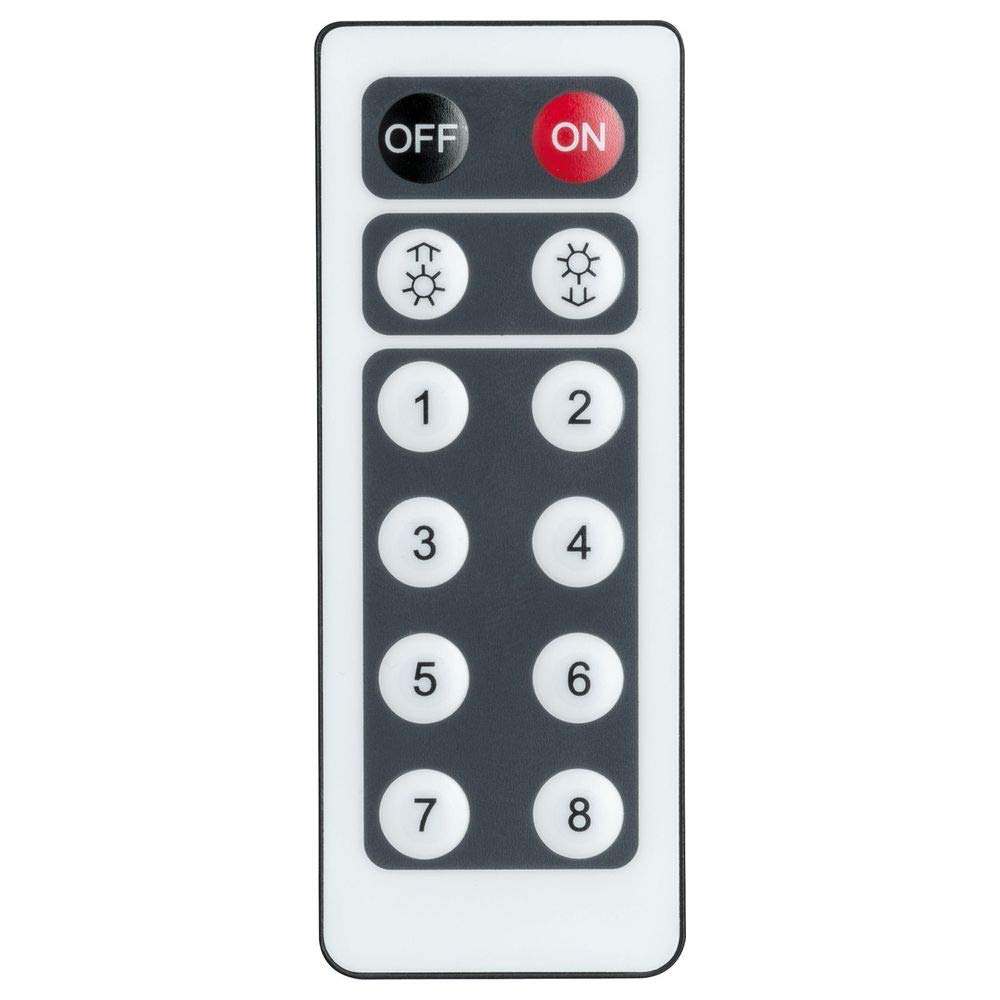
Image: The Paulmann URail Remote Control (Model 952.96) with its various buttons for power, dimming, and channel selection.
1. 배터리 설치
The URail Remote requires a Lithium-ion battery. Please check the battery compartment for the exact type and ensure it is correctly installed.
- 리모콘 뒷면에 있는 배터리함 덮개를 찾으세요.
- 덮개를 밀거나 돌려서 여세요.
- 배터리를 삽입할 때 극성(+ 및 - 단자)을 올바르게 맞춰주세요.
- 배터리함 덮개를 단단히 다시 닫으십시오.
2. Pairing with URail Wireless Adapter
To control your URail lighting, the remote must be paired with the URail wireless adapter (sold separately). The pairing process is designed to be straightforward.
- Ensure the URail wireless adapter is correctly installed in your URail system and powered on.
- Refer to the instruction manual of your URail wireless adapter for specific pairing mode activation steps. This typically involves a button press on the adapter itself.
- While the adapter is in pairing mode, press and hold the designated pairing button on your URail Remote (often a specific button combination or a small button inside the battery compartment).
- A visual confirmation (e.g., flashing light on the adapter or remote) will indicate successful pairing.
- Test the remote's functionality by attempting to switch the connected lights on/off or dim them.
The remote supports multiple channels (A, B, C, D), allowing you to pair it with several adapters for individual or group control. Repeat the pairing process for each adapter or group you wish to control.
작동 지침
The Paulmann URail Remote provides intuitive control over your URail lighting system.
기본 기능
- 켜기/끄기: Press the large round 'ON' button to turn the lights on, and the large round 'OFF' button to turn them off.
- 디밍 : Use the rocker switch labeled 'DIM'. Press the top part (+) to increase light intensity and the bottom part (-) to decrease it. Hold the button for continuous dimming.
Channel and Group Control
If you have paired your remote with multiple URail wireless adapters on different channels, you can control them individually or as groups using the 'A', 'B', 'C', 'D' buttons.
- 개별 제어: Select the desired channel (A, B, C, or D) by pressing its corresponding button before pressing On/Off or Dim.
- 그룹 제어: To control multiple adapters simultaneously, ensure they are paired to the same channel. Alternatively, some systems may allow a master control or specific group channels to operate multiple adapters.

이미지: 전직ample of a Paulmann URail lighting system installed in a modern dining room, featuring both spotlights and pendant lights. This system can be controlled by the URail Remote.
유지
To ensure the longevity and optimal performance of your Paulmann URail Remote, follow these simple maintenance guidelines:
- 청소: Wipe the remote control with a soft, dry cloth. Do not use abrasive cleaners, solvents, or harsh chemicals, as these can damage the surface.
- 배터리 교체: Replace the battery when the remote's range decreases or it becomes unresponsive. Dispose of old batteries according to local regulations.
- 저장: 리모컨은 직사광선과 극한의 온도를 피해 건조한 곳에 보관하세요.
- 물 노출: Avoid exposing the remote to water or high humidity, as it is not waterproof.
문제 해결
If you encounter issues with your Paulmann URail Remote, try the following troubleshooting steps:
- 원격 응답 없음:
- Check the battery: Ensure the battery is correctly inserted and has sufficient charge. Replace if necessary.
- Check line of sight: Ensure there are no obstructions between the remote and the URail wireless adapter.
- Verify range: The maximum range is 10 meters. Ensure you are within this distance.
- Lights Not Dimming/Switching:
- Re-pair the remote: Follow the pairing instructions in the "Setup" section to re-establish the connection with the URail wireless adapter.
- Check adapter power: Ensure the URail wireless adapter is powered on and functioning correctly.
- Verify channel selection: If using multiple channels, ensure the correct channel (A, B, C, or D) is selected on the remote for the desired adapter.
- 간섭:
- Other infrared devices: Ensure other infrared remote controls are not interfering with the URail system.

Image: A Paulmann URail track system illuminating a modern living and dining area, demonstrating the versatility of the system controlled by the remote.
명세서
| 상표 | 파울만 |
| 모델 번호 | 952.96 |
| 모델명 | URail Remote |
| 색상 | 매트 크롬 |
| 재료 | 플라스틱 |
| 특별 기능 | 스위칭 및 디밍 |
| 연결 기술 | 적외선 |
| 컨트롤러 유형 | 버튼 제어 |
| 최대 범위 | 10 미터 |
| 배터리 유형 | 리튬이온 |
| 호환 장치 | Light Control Systems (specifically Paulmann URail Wireless Adapters) |

Image: An illustration of a Paulmann URail track system featuring both large pendant lights and smaller spotlights, highlighting its adaptability in various interior designs.
보증 및 지원
For information regarding warranty coverage, please refer to the documentation provided with your purchase or visit the official Paulmann web대지.
If you require further assistance or have questions not covered in this manual, please contact Paulmann customer support. Contact details can typically be found on the Paulmann web사이트 또는 제품 포장에 표시하세요.


