소개
The Nissin i60A Flashgun is a compact and powerful external flash unit designed for Sony cameras, offering advanced lighting capabilities for photographers. Weighing approximately 300g and standing less than 4.5 inches high, it is one of the smallest and lightest high-power portable flashes available. It features a guide number of 60 (at 200mm zoom head position, ISO 100) and supports TTL exposure control, making it versatile for various shooting conditions.
This manual provides detailed instructions on the setup, operation, maintenance, and specifications of your Nissin i60A Flashgun to ensure optimal performance and longevity.
상자 안에 무엇이 들어있나요?
패키지를 열 때 다음 품목이 모두 포함되어 있는지 확인하세요.
- Nissin i60A Flashgun
- 보관 가방
- 미니 스탠드
- Soft Box (for softening light output)

Image: The Nissin i60A Flashgun, showcasing its compact design and the included soft box and stand.
설정
1. 배터리 설치
The i60A Flashgun operates on 4 AA batteries (not included). For optimal performance, use high-quality alkaline or Ni-MH rechargeable batteries.
- Locate the battery compartment on the side of the flashgun.
- 배터리실 커버를 밀어서 엽니다.
- 배터리 4개를 넣고, 배터리 칸 안쪽에 표시된 대로 극성(+/-)을 올바르게 맞춰 넣으세요.
- 배터리 덮개를 단단히 닫으세요.

이미지: 클로즈업 view of the battery compartment, showing where to insert the 4 AA batteries.
2. 카메라에 부착하기
The i60A Flashgun features a hot shoe mount for secure attachment to your camera.
- Ensure both the flashgun and camera are powered off.
- Slide the flashgun's hot shoe foot into the camera's hot shoe slot until it clicks into place.
- Secure the flashgun by rotating the locking mechanism (if present on your camera or flash) to prevent accidental detachment.
3. External Power Source Connection (Optional)
For reduced flash cycle time during constant high power output, an external power source (not included) can be connected.
- Locate the external power pack socket on the side of the flashgun.
- Connect a compatible Nissin power pack or original factory power pack to this socket.

Image: The external power port on the side of the flashgun, used for connecting an optional power pack.
작동 지침
1. 전원 켜기/끄기
Press and hold the power button on the control panel to turn the flashgun on or off.

Image: The control panel of the Nissin i60A, showing the power button, mode dial, and other controls.
2. 모드 선택
The i60A features a color LCD with dial control for easy mode selection. Available modes include:
- 자동 모드 : Automatically adjusts flash output for optimal exposure.
- 수동 모드: Allows manual control of flash power from 1/256 to 1/1 in 1/3 step increments.
- TTL 모드: Through-The-Lens metering for automatic flash exposure.
- Wireless Mode (2.4GHz Nissin Air System & Optical): Supports wireless operation with A, B, C channel selection. Includes optical wireless TTL slave (SD) and non-TTL slave (SF) modes.
Use the dial control to navigate through the menu and select your desired mode.
3. 줌 조정
The flash zoom range can be adjusted automatically or manually from 24-200mm. When using the built-in diffuser, the coverage extends to 16mm.
4. LED Video Light Function
The i60A includes a 9-level LED video light function, providing continuous light for video recording. It can operate for up to 3.5 hours on a full charge of batteries.

이미지: 앞면 view of the flashgun, highlighting the integrated LED video light.
5. 바운스 및 회전 헤드
The flash head can be bounced and swiveled to direct light indirectly, creating softer and more natural illumination.
- Bounce Position: Up 0-90 degrees.
- Swivel Position: Left & right 0-180 degrees.
An inbuilt bounce card can be extended or retracted, even when the soft box is in place, to further refine light direction.

이미지: 위에서 아래로 view illustrating the flash head's ability to swivel 180 degrees in either direction.
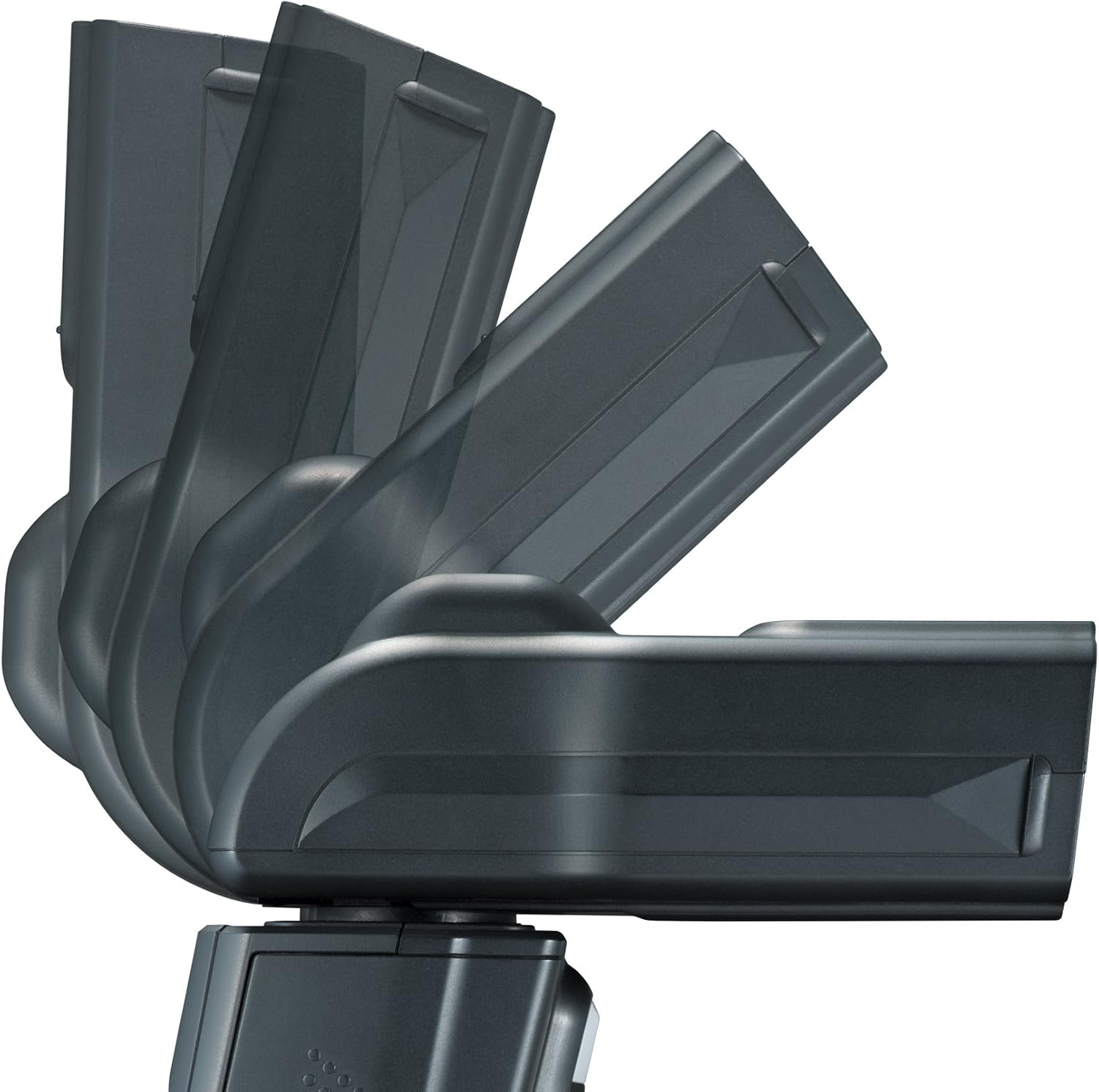
이미지: 측면 view demonstrating the flash head's ability to tilt upwards for bounce flash.

Image: The flashgun with its built-in bounce card extended, used for directing light.
유지
Proper maintenance ensures the longevity and optimal performance of your Nissin i60A Flashgun.
- 청소: Use a soft, dry cloth to clean the exterior of the flashgun. For the flash tube and LCD screen, use a microfiber cloth specifically designed for optics. Avoid using abrasive cleaners or solvents.
- 배터리 관리 : Remove batteries if the flashgun will not be used for an extended period to prevent leakage. Store batteries in a cool, dry place.
- 저장: Store the flashgun in its included bag in a dry, dust-free environment, away from extreme temperatures and direct sunlight.
- 손질: Avoid dropping the flashgun or subjecting it to strong impacts, as this can damage internal components.
문제 해결
If you encounter issues with your Nissin i60A Flashgun, please refer to the following common troubleshooting steps:
- 플래시가 터지지 않음:
- 배터리 잔량을 확인하고 배터리가 올바르게 삽입되었는지 확인하십시오.
- Ensure the flashgun is securely mounted on the camera's hot shoe.
- Verify that the flashgun is powered on and not in sleep mode.
- Check camera settings to ensure external flash is enabled and compatible sync modes are selected.
- 플래시 출력이 일정하지 않음:
- Ensure batteries have sufficient power. Low battery can lead to slow recycling and inconsistent output.
- Check for obstructions between the flash and subject, especially in wireless modes.
- Verify that the flash mode (TTL, Manual) is appropriate for your shooting conditions.
- LED Video Light Not Working:
- 배터리 수준을 확인하세요.
- Ensure the LED light function is activated via the control panel.
- 무선 통신 문제:
- Ensure the flashgun and trigger (if applicable) are set to the same channel and group.
- Check the distance between the flash and trigger; ensure it's within the effective range (up to 30 meters for 2.4GHz Nissin Air System).
- Minimize physical obstructions between units.
If problems persist, consult the Nissin support web추가 지원이 필요하면 사이트를 방문하거나 고객 서비스에 문의하세요.
명세서
| 특징 | 세부 사항 |
|---|---|
| 가이드 넘버(ISO 100) | GN60 (at 200mm zoom head position) |
| Focal Length Coverage | 24 - 200mm (16mm with built-in diffuser) |
| 전원 | 4 x AA batteries or external power source |
| 재활용 시간 | 0.1~5.5초 |
| Number of Flashes (approx.) | 220 - 1,500 flashes |
| LED Video Light Operation Time | 3.5시간 |
| 플래시 지속 시간 | 1/800 - 1/20,000초 |
| 색온도 | 5,600K |
| 노출 제어 | 시간 |
| 무선 모드 | 2.4GHz Nissin Air System radio wireless, Optical wireless TTL slave (SD), Non-TTL slave (SF) |
| EV Compensation on Flash | +/- 2EV in 1/3 EV increments |
| Bounce Position | Up 0-90 degrees |
| Swivel Position | Left & right 0-180 degrees |
| 플래시 노출 제어 | 1st & 2nd curtain synchronisation, high speed sync, red eye reduction, slow sync (dependent on camera), FE/FV lock (set on camera) |
| AF-Assist Beam Effective Range | 0.7~5미터 |
| 조작 패널 | Colour LCD with dial control |
| Manual Mode Power Ratio | 1/256 - 1/1 with 1/3 step control |
| 치수 | 2.87 x 3.86 x 4.41인치(7.29 x 9.80 x 11.20cm) |
| 품목 무게 | 10.6 온스(300g) |
| 모델 번호 | NFG015S |
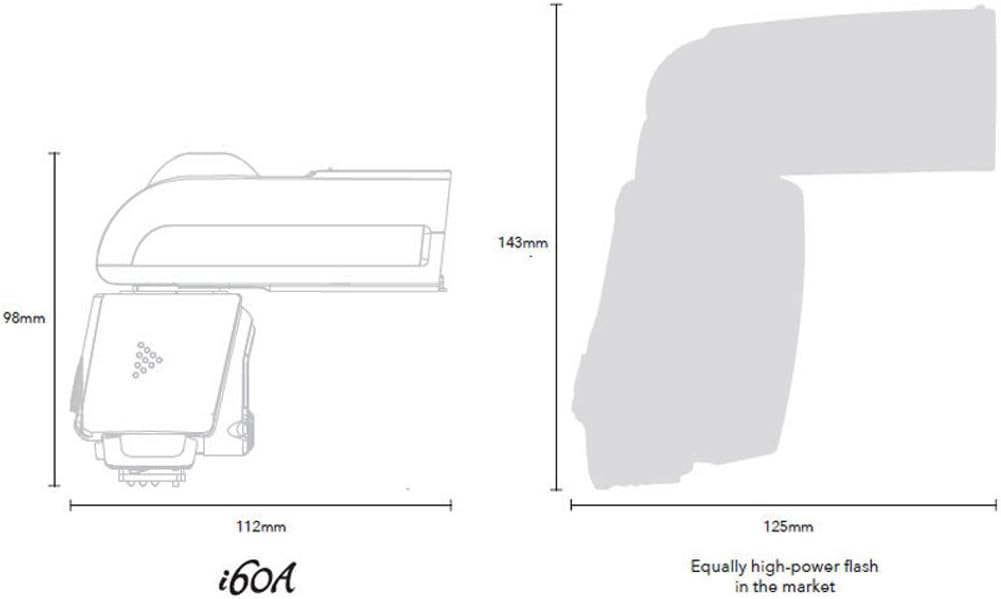
Image: Diagram illustrating the compact dimensions of the Nissin i60A Flashgun compared to other high-power flashes.
보증 및 지원
Specific warranty details for the Nissin i60A Flashgun are not provided within this manual. For information regarding warranty coverage, technical support, and service, please visit the official Nissin web웹사이트를 방문하거나 가까운 공인 대리점에 문의하십시오.
제품을 제조사 웹사이트에 등록하는 것이 좋습니다. web업데이트와 지원을 받을 수 있는 사이트입니다.
추가 지원이 필요한 경우 다음을 참조할 수도 있습니다. 아마존의 닛신 스토어.


