1. 서론
This manual provides instructions for the installation and operation of your GOTHAM 1237924 Rear View Camera Kit. This kit is designed to enhance vehicle safety by providing a clear view of the area behind your vehicle, aiding in parking and reversing maneuvers. It includes a waterproof camera and a 4.2-inch color LCD monitor with an anti-glare visor.

Image 1: The GOTHAM Rear View Camera Kit, showing the product packaging, 4.2-inch LCD monitor, and the compact rear view camera with its wiring.
2. 안전 정보
Please read all safety instructions before installing and operating this product. Failure to follow these instructions may result in injury or damage to the product or vehicle.
- 전문 설치 권장: 설치 과정 중 확실하지 않은 부분이 있으면 자격을 갖춘 자동차 정비사에게 문의하십시오.
- 전원: Connect the system only to a 12V DC power source. Incorrect voltag장치가 손상될 수 있습니다.
- 배선: Ensure all wiring is properly insulated and secured to prevent short circuits or interference. Avoid routing cables near hot engine parts or sharp edges.
- 시계: 운전자의 시야를 방해하지 마십시오. view with the monitor. Mount it in a location that is easily visible but does not impede driving.
- 방수 기능: The camera is water-resistant, but avoid submerging it or directing high-pressure water jets directly at it.
- 주차 보조 장치: This system is a parking aid and should not replace careful driving and direct observation. Always check your surroundings manually before reversing.
3. 패키지 내용
패키지에 모든 구성 요소가 들어 있는지 확인하세요.
- 4.2-inch Color LCD Monitor with Anti-Glare Visor
- 뒤쪽 View 마운트가 있는 카메라
- Video Cable (RCA)
- Power Cables for Monitor and Camera
- 사용 설명서(본 문서)

Image 2: All components of the GOTHAM Rear View Camera Kit, including the monitor, camera, and various cables, laid out on a white surface.
4. 설정 및 설치
Follow these steps for proper installation of your GOTHAM Rear View Camera Kit.
4.1. 카메라 설치
- 장착 위치를 선택하세요: The camera should be mounted at the rear of the vehicle, typically above the license plate or near the trunk handle, to provide a clear, unobstructed view. Refer to Image 4 for ideal placement suggestions.
- 카메라 보안: Use the provided mount and screws to securely attach the camera to the chosen location. Ensure the camera is angled correctly for optimal view주고받음.
- Route Camera Cables: Carefully route the camera's video and power cables into the vehicle interior. Ensure cables are protected from moisture, heat, and moving parts.

Image 3: The compact GOTHAM rear view camera with its attached RCA video cable (yellow connector) and power cable (red connector).

Image 4: A diagram illustrating recommended external mounting positions for the rear view camera on a vehicle, typically near the license plate or bumper.
4.2. 모니터 설치
- 모니터를 장착하세요: Place the 4.2-inch LCD monitor on your dashboard or another suitable location that does not obstruct your view of the road. The monitor comes with a stand for easy placement.
- 비디오 케이블 연결: Connect the yellow RCA video cable from the camera to the video input (AV1 or AV2) on the monitor.
- 전원 연결: Connect the monitor's power cable to a 12V DC power source. For automatic activation, connect the camera's power cable to the vehicle's reverse light circuit. Connect the monitor's power cable to a switched 12V source or also to the reverse light circuit if you only want it on when reversing.
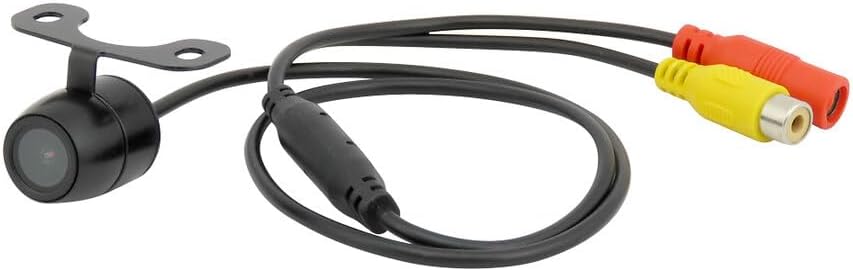
Image 5: The GOTHAM 4.2-inch LCD monitor, featuring an anti-glare visor and RCA input connectors for video and power.
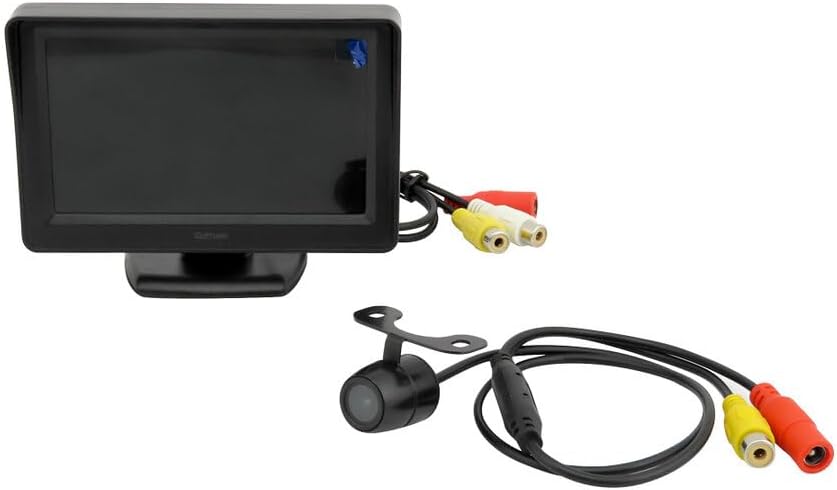
Image 6: The GOTHAM 4.2-inch LCD monitor and the rear view camera, shown together with their respective connection cables.
5. 사용 설명서
Once installed, the GOTHAM Rear View Camera Kit operates simply:
- 자동 활성화 : If wired to the reverse light circuit, the monitor will automatically display the camera feed when the vehicle is shifted into reverse gear.
- 주차라인: The camera provides colored parking assistance lines on the screen to help estimate distance and trajectory.
- 모니터 디스플레이: The 4.2-inch color LCD provides a wide-angle, high-definition view. The anti-glare visor helps improve visibility in bright conditions.
6. 유지관리
To ensure the longevity and optimal performance of your camera kit:
- 카메라 렌즈 청소하기: 부드러운 천으로 카메라 렌즈를 정기적으로 청소하세요.amp 먼지, 때 또는 물 얼룩 등 시야를 가릴 수 있는 부분을 닦아낼 천 view. 연마성 세척제는 피하세요.
- 모니터 화면 청소하기: Use a soft, lint-free cloth to clean the LCD screen. Do not spray cleaning solutions directly onto the screen.
- 연결 확인: 케이블 연결부가 안전하게 고정되어 있고 부식이나 손상이 없는지 정기적으로 점검하십시오.
- 날씨 보호: While the camera is water-resistant, extreme weather conditions (e.g., heavy snow, ice) may temporarily affect performance. Clear any obstructions from the lens before use.
7. 문제 해결
If you encounter issues with your GOTHAM Rear View Camera Kit, refer to the following common problems and solutions:
| 문제 | 가능한 원인 | 해결책 |
|---|---|---|
| 모니터에 이미지가 없습니다 | No power to monitor or camera; Loose video cable connection; Faulty camera or monitor. | Check all power connections; Ensure video cable is securely plugged in; Test components if possible. |
| 이미지 품질이 좋지 않음 (흐릿하거나 왜곡됨) | Dirty camera lens; Loose video connection; Electrical interference. | Clean camera lens; Secure video cable; Reroute cables away from power sources if interference is suspected. |
| Monitor does not turn on automatically | Camera/monitor not wired to reverse light circuit; Faulty reverse light switch. | Verify wiring to reverse lights; Check reverse light functionality. |
8. 사양
카메라 사양:
- 감지기: CMOS
- 조명: 0.01 럭스
- 유효 픽셀: 720x576
- 해결: 480 TV 라인
- View각도: 170°
- Image Vision Area: 4.3x3.4mm
- 비디오 시스템: 팔/NTSC
- 힘: DC 11-13V
- S/N 비율: >50dB
- 비디오 출력: 1.0Vp-p, 75 Ohms
- 내후성: Water-resistant for all weather conditions
모니터 사양:
- 유형: TFT LCD
- 화면 크기: 4.2 인치
- 해결: 480(W) RGB x 272(H)
- 종횡비: 16시 9분
- 비디오 시스템: 팔/NTSC
- 비디오 입력 : 2 AV Inputs
- 전원 공급 장치: 직류 12V
- 소비: 1.3와트
- 충전 전류: 100mA
9. 보증 및 지원
For warranty information and technical support, please refer to the documentation provided with your purchase or contact GOTHAM customer service. Specific warranty details may vary by region and retailer.
제조업체: 고담
모델 번호: PARK/LCD-DIS-42+CAM/BK
ASIN: B01BKDA32K


