소개
This manual provides essential instructions for the setup, operation, maintenance, and troubleshooting of your HP Flexible Thin Client T520. Please read this document thoroughly before using the device to ensure proper functionality and longevity.
1. 설정
1.1 포장 풀기 및 내용물 확인
모든 구성품을 포장에서 조심스럽게 꺼내세요. 다음 품목이 모두 있는지 확인하세요.
- HP Flexible Thin Client T520 unit
- 전원 어댑터 및 케이블
- 건반
- 생쥐
- Vertical stand (if included)
- 문서(이 매뉴얼)
1.2 주변기기 연결하기
Before powering on the thin client, connect all necessary peripherals.
- 디스플레이 연결: Use a DisplayPort or VGA cable to connect your monitor to the corresponding port on the rear of the thin client. The T520 supports up to 3840x2160 resolution via DisplayPort.
- USB 장치 연결: Plug the keyboard and mouse into any available USB ports. The thin client features USB 3.0 (SuperSpeed) ports on the front and USB 2.0 ports on the rear.
- 네트워크 연결: For a wired connection, insert an Ethernet cable into the RJ-45 network port on the rear.
- 오디오 연결: If using external speakers or a headset, connect them to the audio output jack. A microphone can be connected to the microphone input jack.
- 전원 연결: Insert the power adapter cable into the DC-in port on the rear of the thin client, then plug the power cord into an electrical outlet.
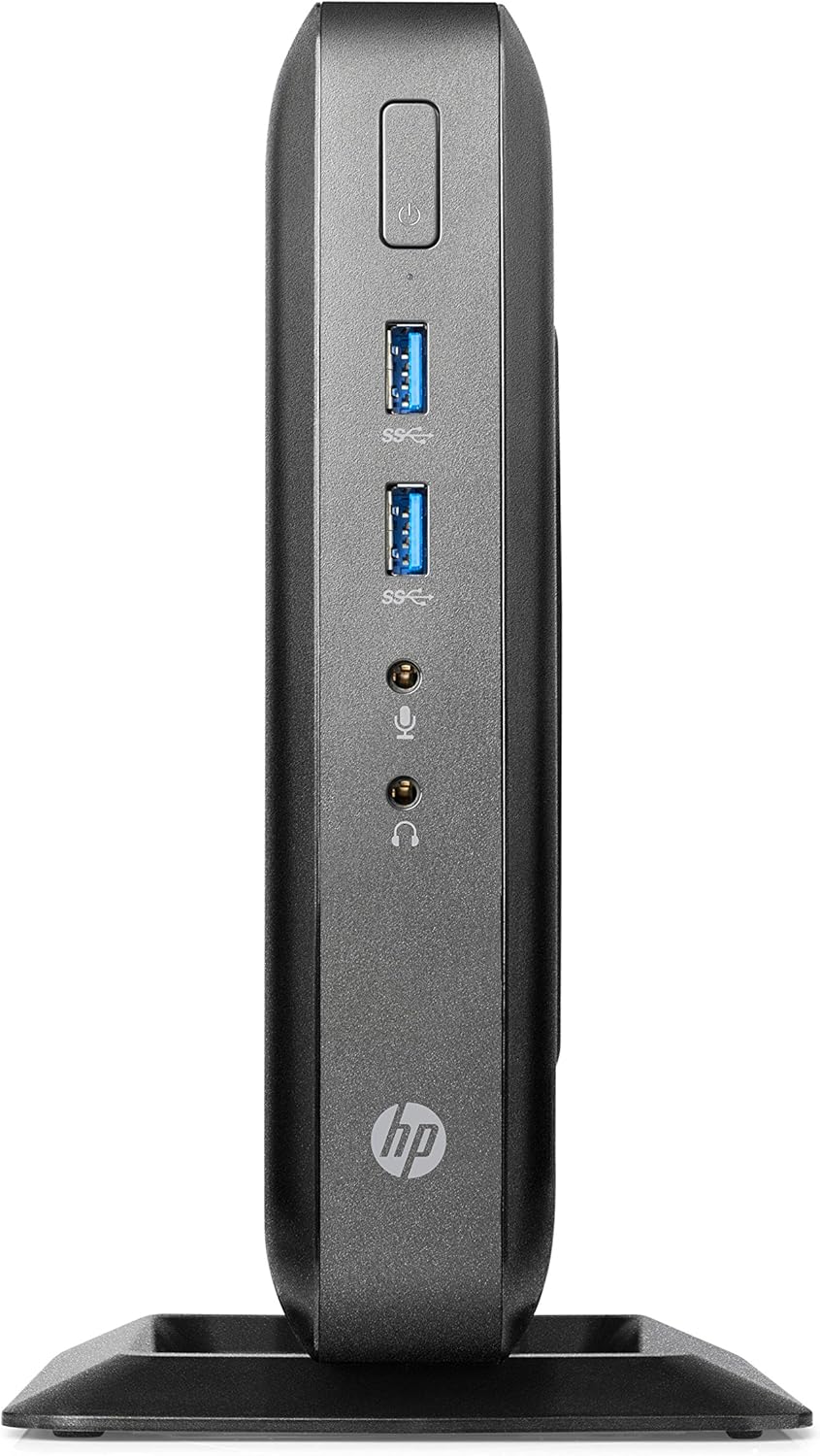
Figure 1: Front panel connections of the HP Flexible Thin Client T520. This view shows the power button, two SuperSpeed USB (USB 3.0) ports, a headphone jack, and a microphone jack.

Figure 2: Rear panel connections of the HP Flexible Thin Client T520. This view includes the Ethernet port, DisplayPort, HDMI port, VGA port, multiple USB 2.0 ports, and the DC power input.
1.3 초기 전원 켜기
After connecting all peripherals and power, press the power button located on the front of the thin client. The device will boot into the Windows Embedded Standard 7E operating system.
2. 사용 설명서
2.1 전원 켜기 및 끄기
- 전원을 켜려면: 전면 패널의 전원 버튼을 누릅니다.
- 종료하려면: From the Windows Embedded Standard 7E desktop, click the 시작 버튼을 누른 후 선택하세요 종료하다. Allow the system to power off completely before disconnecting power.
- 재시작하기 위해: From the Windows Embedded Standard 7E desktop, click the 시작 버튼을 누른 후 선택하세요 다시 시작.
2.2 운영 체제 오버view
The HP Flexible Thin Client T520 runs on Windows Embedded Standard 7E, a specialized operating system designed for thin client environments. It provides a familiar Windows interface for accessing remote desktops, virtual applications, and web-based services.
2.3 네트워크 연결
The thin client is designed for network-centric operations. Ensure a stable wired Ethernet connection for optimal performance. Network settings can be configured through the Windows Control Panel, typically managed by your IT administrator in a corporate environment.
3. 유지관리
3.1 장치 청소
최적의 성능과 외관을 유지하려면:
- Ensure the thin client is powered off and disconnected from the power source before cleaning.
- 부드럽고 보풀이 없는 천을 살짝 사용하십시오. damp물이나 부드럽고 연마성이 없는 세척 용액으로 세척하세요.
- 장치에 액체를 직접 뿌리지 마십시오.
- 강한 화학 물질, 용매 또는 연마재의 사용을 피하세요.
3.2 소프트웨어 업데이트
Regularly check for and apply any available operating system or firmware updates as recommended by HP or your IT department. This ensures security and performance enhancements.
3.3 스토리지 관리
The T520 features a 16 GB SSD. While primarily used for the operating system and client software, it is advisable to monitor available storage space. Avoid storing large, unnecessary files directly on the thin client's local drive.
4. 문제 해결
This section addresses common issues you might encounter with your HP Flexible Thin Client T520.
4.1 전원 없음
- Verify the power cable is securely connected to both the thin client and the electrical outlet.
- 다른 장치로 테스트하여 전원 콘센트가 제대로 작동하는지 확인하십시오.
- 전원 어댑터에 눈에 보이는 손상이 있는지 확인하세요.
4.2 디스플레이 출력 없음
- Confirm the monitor is powered on and connected correctly to the thin client's DisplayPort or VGA port.
- 모니터에서 올바른 입력 소스가 선택되었는지 확인하세요.
- Test with a different monitor or display cable if available.
4.3 네트워크 연결 문제
- Check that the Ethernet cable is securely plugged into both the thin client and the network router/switch.
- Verify network status lights on the Ethernet port are active.
- Consult your network administrator for network configuration assistance.
4.4 주변 장치가 응답하지 않음
- USB 장치(키보드, 마우스)가 USB 포트에 제대로 연결되어 있는지 확인하십시오.
- 기기를 다른 USB 포트에 연결해 보세요.
- Test the peripherals on another computer to confirm they are functional.
5. 사양
The following table outlines the key technical specifications for the HP Flexible Thin Client T520 (G9F08AA#ABA):
| 특징 | 사양 |
|---|---|
| 프로세서 | AMD G-Series GX-212JC 1.2 GHz |
| 숫양 | 4GB DDR3 SDRAM |
| 저장 | 16GB SSD |
| 운영 체제 | Windows Embedded Standard 7E |
| 그래픽 코프로세서 | AMD Embedded G-Series (Integrated) |
| 최대 화면 해상도 | 3840x2160 (via DisplayPort) |
| 포트(전면) | 2x USB 3.0, Headphone, Microphone |
| 포트(후면) | Ethernet (RJ-45), DisplayPort, HDMI, VGA, Multiple USB 2.0, DC-in |
| 품목 무게 | 7.73파운드 |
| 치수(패키지) | 20 x 12 x 6.9 인치 |
6. 보증 및 지원
6.1 제조업체 보증
The HP Flexible Thin Client T520 typically comes with a 3-year manufacturer warranty. Please refer to the warranty documentation included with your product or visit the official HP support web구체적인 이용 약관은 해당 사이트에서 확인하세요.
6.2 기술 지원
기술 지원, 드라이버 다운로드 또는 추가 문제 해결을 위해서는 HP 공식 지원 웹사이트를 방문하십시오. website or contact HP customer service. Have your product model (T520) and serial number ready when seeking support.


