소개
The Gallagher W310 v2 Automatic Weigh Scale is an entry-level device designed for efficient and accurate livestock weighing. It features basic two-way drafting capability and seamless integration with the HR5 Hand Held EID Tag Reader. This manual provides comprehensive instructions for setting up, operating, and maintaining your W310 v2 weigh scale to ensure optimal performance and longevity.

Figure 1: The Gallagher W310 v2 Automatic Weigh Scale, shown in its open position, displaying the screen and control buttons.
주요 특징:
- Automatic Weight Capture: Enables rapid and accurate weight capture regardless of animal movement.
- Two-Way Drafting: Basic drafting capability with a second screen for statistics display, including number of animals weighed, maximum, and minimum individual weights.
- 장치 통신: Inbuilt communication port for sending weight data to computers or printers, equipped with APS standard.
- 블루투스 연결: Allows a Bluetooth adapter to be powered from the weigh scale, enabling weight data transfer to HR5 Hand Held EID Tag Readers or custom software applications.
- 다양한 계량 모드: Choose between Auto-weighing, Manual weighing, and Fine weighing for various operational needs.
- 사용자 친화적인 인터페이스: Large, easy-to-read backlit display screen, clearly labelled push buttons, and a smooth-action rotary switch for mode selection.
- 내구성 있는 디자인: Tough, water-resistant case for protection in harsh environments.
- 내부 충전식 배터리: Long-lasting battery with charge indicator and low voltage shutdown, can be powered externally if needed.
설정 및 설치
Proper setup is crucial for accurate and reliable operation of your Gallagher W310 v2 Weigh Scale. Follow these steps carefully:
- 짐 풀기: Carefully remove the weigh scale from its packaging. Inspect for any signs of damage. Retain packaging for future transport or storage.
- 배터리 충전: The W310 v2 has an internal rechargeable battery. Before first use, fully charge the unit using the provided AC adapter. Connect the adapter to the charging port on the scale and plug it into a suitable power outlet. The charge indicator on the display will show charging status.
- Connecting Load Bars: The W310 v2 is designed for use with Gallagher load bars (sold separately). Connect the load bar cables to the appropriate ports on the weigh scale. Ensure connections are secure.
- Mounting the Scale: Mount the weigh scale in a secure, stable location, typically near the weighing platform or crush. Ensure it is protected from direct impact and excessive moisture, although it features a water-resistant case.
- 초기 전원 켜기: Press and hold the power button to turn on the scale. The display will illuminate, and the system will perform a self-check.
- Connecting to External Devices (Optional):
- HR5 Hand Held EID Tag 리더: To connect via Bluetooth, ensure the Bluetooth adapter is powered from the weigh scale. Follow the pairing instructions for your HR5 reader to establish a connection.
- Computer/Printer: Use the inbuilt communication port (serial or USB, depending on model/adapter) to connect to a computer or printer for data transfer. Refer to your computer's or printer's manual for specific connection details.

Figure 2: The Gallagher W310 v2 Weigh Scale mounted and in operation within a livestock handling system, demonstrating a typical installation.
작동 지침
The W310 v2 offers multiple weighing modes to suit different operational needs. Familiarize yourself with the controls and modes for efficient weighing.
컨트롤 오버view:
- Rotary Selector Knob: Used to navigate between different weighing modes and settings.
- WEIGH Key: Initiates a manual weighing cycle.
- ZERO 키: Zeros the scale before weighing.
- 삭제 키: Deletes the last recorded weight or clears data.
- F1/F2 Keys: Function keys for additional options or settings.
- 백라이트 디스플레이 : Shows weight, mode, battery status, and other information.
Weighing Modes:
Rotate the selector knob to choose your desired weighing mode:
- Auto-weighing Mode:
In this mode, the animal's weight locks automatically once stable, allowing for fast, hands-free weighing. This is ideal for high-throughput operations.
- Ensure the scale is zeroed before an animal enters the platform.
- Once the animal is on the platform, the scale will detect its presence and automatically lock onto a stable weight.
- The locked weight will be displayed and can be recorded or sent to connected devices.
- Manual Weighing Mode:
This mode gives the operator full control over the weighing cycle. The weight is recorded only when the WEIGH key is pressed.
- Place the animal on the platform.
- Wait for the animal to settle.
- 를 누르세요 달다 key to capture and record the weight.
- Fine Weighing Mode:
Designed for small load weighing, this mode operates with no zero tracking for greater accuracy. It is suitable for precise measurements where minimal movement is expected.
- Ensure the platform is clear and stable.
- Place the item to be weighed carefully on the platform.
- The scale will display the precise weight.
데이터 관리:
- Statistics Display: The second screen provides statistics such as the number of animals weighed, maximum weight, and minimum weight.
- Sending Weights: If connected to an HR5 Hand Held EID Tag Reader or other devices via Bluetooth or communication port, weights can be sent and recorded against individual animal IDs.
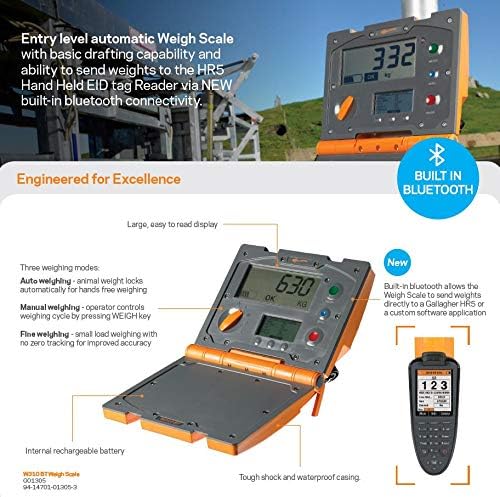
그림 3: 상세 view of the Gallagher W310 v2 Weigh Scale highlighting its key features, including built-in Bluetooth connectivity, multiple weighing modes, and the large display.
유지
Regular maintenance ensures the longevity and accuracy of your Gallagher W310 v2 Weigh Scale.
- 청소:
The W310 v2 has a tough, water-resistant case. Clean the unit regularly with a damp cloth. Avoid using abrasive cleaners or solvents that could damage the display or casing. Ensure all ports are free of debris.
- 배터리 관리 :
To maximize battery life, avoid fully discharging the battery frequently. Recharge the unit when the low voltage indicator appears. If storing the unit for an extended period, ensure it is charged to approximately 50% and recharge every few months.
- 저장:
When not in use, store the weigh scale in a dry, cool place, away from direct sunlight and extreme temperatures. Use the original packaging if available for added protection.
- 점검:
Periodically inspect cables, connectors, and the casing for any signs of wear or damage. Replace damaged components immediately to prevent further issues.
문제 해결
This section provides solutions to common issues you might encounter with your W310 v2 Weigh Scale.
| 문제 | 가능한 원인 | 해결책 |
|---|---|---|
| 저울이 켜지지 않습니다. | 배터리가 완전히 방전되었거나 고장났습니다. | Connect the AC adapter and charge the unit. If it still doesn't turn on, the battery may need replacement or contact support. |
| 부정확한 무게 측정. | Load bars not properly connected or damaged; scale not zeroed; unstable weighing platform. | Ensure load bars are securely connected. Press the ZERO key before weighing. Verify the weighing platform is stable and level. |
| Cannot connect to HR5 Reader via Bluetooth. | Bluetooth adapter not powered; incorrect pairing procedure; interference. | Ensure the Bluetooth adapter is powered. Re-attempt pairing following instructions for both devices. Reduce interference by moving closer to the HR5 reader. |
| 디스플레이가 어둡거나 깜빡입니다. | 배터리 부족; 극한 온도. | Recharge the battery. Operate the scale within its specified temperature range. |
If you encounter issues not listed here or if the suggested solutions do not resolve the problem, please contact Gallagher customer support.
명세서
| 특징 | 세부 사항 |
|---|---|
| 제조업체 | 갈라거 |
| 부품 번호 | 13053 |
| 제품 치수 | 23.5 x 21.5 x 9.5cm |
| 품목 무게 | 3.4kg |
| 색상 | 주황색 |
| 디스플레이 스타일 | 액정표시장치 |
| 특별 기능 | Backlit Display, Internal Rechargeable Battery, Bluetooth Connectivity (via adapter) |
| 전원 | Internal Rechargeable Battery / AC Adapter |
| 첫 번째 가능한 날짜 | 11년 2020월 XNUMX일 |
보증 및 지원
The Gallagher W310 v2 Automatic Weigh Scale comes with a 1년 보증 구매일로부터. 이 보증은 정상적인 사용 하에서 재료 및 제조상의 결함을 포함합니다.
For warranty claims, technical support, or further assistance, please contact Gallagher customer service. You can typically find contact information on the official Gallagher web사이트 또는 지역 유통업체를 통해 구매하세요.
지원팀에 문의하실 때는 제품 모델 번호(13053)와 구매 증빙 서류를 준비해 주세요.


