1. 서론
This manual provides detailed instructions for the installation, operation, and maintenance of your Kicker IQ500.4 Q-Class Amp앰프입니다. 설치 또는 작동 전에 본 설명서를 꼼꼼히 읽어 올바른 사용법을 숙지하고 손상을 방지하십시오.
The Kicker IQ500.4 is a 4-channel car amplifier featuring advanced digital signal processing (DSP) capabilities, designed to deliver high-quality audio performance in automotive environments.
2. 안전 정보
항상 다음 안전 예방 조치를 준수하십시오.
- Disconnect the vehicle's battery before making any power connections.
- 전기 위험을 방지하기 위해 적절한 접지를 확인하십시오.
- 노출시키지 마십시오 amp습기 또는 극한의 온도에 적응합니다.
- 설치 설명서에 명시된 대로 전원 및 스피커 연결에는 적절한 굵기의 전선을 사용하십시오.
- 설치 과정의 어떤 부분이든 확실하지 않은 경우 전문 설치자에게 문의하세요.
- 이 제품에는 캘리포니아주에서 암과 선천적 기형 또는 기타 생식 기능 장애를 유발하는 것으로 알려진 화학 물질이 포함되어 있습니다(제안 65호 경고).
3. 패키지 내용
패키지에 모든 품목이 들어 있는지 확인하세요.
- 키커 IQ500.4 Q-클래스 Amp리퍼
- 장착 하드웨어
- 사용 설명서 (본 문서)
- USB Cable (for TWEEQ app connection)
4. 설정 및 설치
4.1 장착 Amp리퍼
Select a dry, stable location for mounting the amplifier, ensuring adequate ventilation. Avoid mounting in direct sunlight or areas prone to vibration.
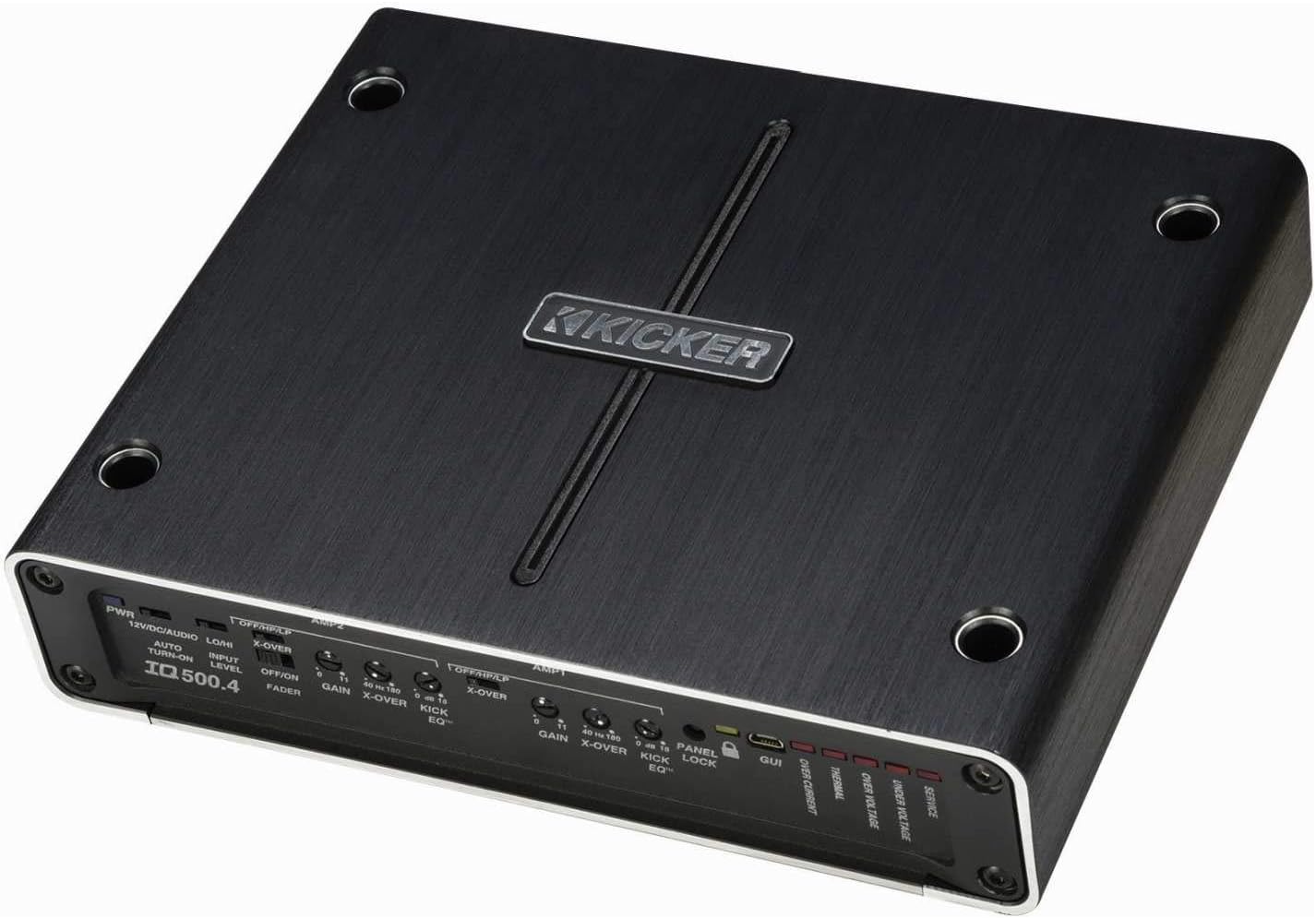
그림 4.1: 상단 view of the Kicker IQ500.4 Q-Class Amplifier, highlighting the control panel and overall design.
4.2 배선 연결
Ensure all connections are secure and properly insulated. Refer to the diagram below for typical wiring configurations.

그림 4.2: 후면 view of the Kicker IQ500.4 Q-Class Amplifier, detailing the power, ground, remote, input, and output connections.
전원 연결 :
- +12V(전원): Connect to the positive terminal of the vehicle's battery using appropriate gauge wire (e.g., 4-gauge for optimal performance).
- GND(접지): Connect to a clean, unpainted metal surface of the vehicle chassis. Ensure a solid connection.
- REM(원격 켜기): 헤드 유닛의 원격 켜기 리드에 연결합니다.
입력/출력 연결:
- 입력(RCA): 헤드 유닛 또는 신호 처리 장치의 RCA 출력에 연결하십시오.
- Output (Speaker): Connect to your speakers. The amplifier supports 4-ohm stable bridged mode.
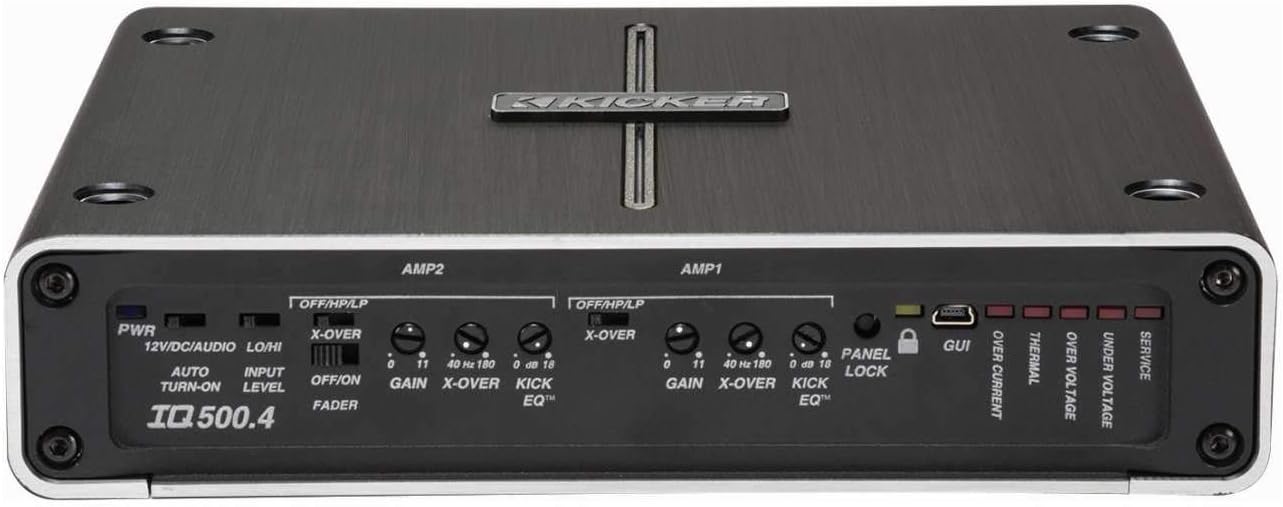
그림 4.3: 상세 view 의 amplifier's control panel, showing gain, crossover, and KickEQ adjustments.

Figure 4.4: Close-up of the input and output terminals, including RCA inputs and speaker wire connections.
5. 운영 Amp리퍼
5.1 Initial Setup and Gain Matching
After installation, set the gain controls to match the output voltage of your head unit. Start with the gain at minimum and slowly increase until distortion is heard, then back off slightly.
5.2 Digital Signal Processing (DSP) with TWEEQ App
The IQ500.4 features advanced DSP capabilities accessible via the TWEEQ app for PC, iOS, or Android. Download the app from kicker.com/tweeq. Connect your device to the ampUSB를 통해 Lifier.
TWEEQ App Features:
- TWEEQ Wizard: Automatically sets basic tune, including speaker type/size and time-alignment based on listening position.
- Input Signal Routing and Mixing: Customize signal paths.
- Variable High- and Low-Pass Filters: Adjustable from 10-20,000 Hz with selectable crossover characteristics (Butterworth, Linkwitz) and slopes (6, 12, 18, 24 dB/octave).
- Variable KickEQ+ Bass Boost: Adjustable from 0-18 dB, 24-80 Hz, with 0.5-10 Q.
- 조정 가능한 시간 지연: Fine-tune sound staging (0-20 ms in 0.02, 0.1, and 1.0 ms increments).
- 31밴드 그래픽 이퀄라이저: +/-12 dB/band for precise frequency adjustments.
- Dynamic Compressor/Limiter: Fully adjustable (1:1 to 10:1 ratio).
The Panel Lock function disables onboard controls when using the TWEEQ app, ensuring settings are managed digitally.
6. 유지관리
- 유지하다 amp깨끗하고 먼지가 없는 상태로 유지하세요. 청소 시에는 부드럽고 마른 천을 사용하세요.
- 적절한 환기를 확보하세요 amp과열을 방지하는 lifier.
- 모든 배선 연결부의 견고성과 부식 여부를 주기적으로 점검하세요.
7. 문제 해결
| 문제 | 가능한 원인 | 해결책 |
|---|---|---|
| 전원이 없습니다 | Blown fuse; Loose power/ground connection; No remote turn-on signal. | Check/replace fuse; Secure connections; Verify remote wire connection to head unit. |
| 오디오 출력 없음 | Incorrect input/output connections; Gain set too low; Speaker wires shorted. | Verify RCA and speaker connections; Adjust gain; Check speaker wiring for shorts. |
| 왜곡된 소리 | 게인이 너무 높게 설정되었거나, 크로스오버 설정이 잘못되었거나, 스피커 임피던스가 일치하지 않는 경우입니다. | Reduce gain; Adjust crossover settings via TWEEQ app; Ensure speaker impedance is compatible. |
| Amp리파이어 과열 | 환기가 부족함; 임피던스 부하가 낮음; 장시간 고용량 사용. | Ensure clear airflow around amplifier; Check speaker impedance; Reduce volume or allow cool-down period. |
8. 사양
| 특징 | 세부 사항 |
|---|---|
| 모델 | IQ500.4 |
| 채널 | 4채널 |
| 실효 전력(4옴) | 65와트 x 4 |
| 실효 전력(2옴) | 125와트 x 4 |
| 실효 출력(브리지 모드 4옴) | 250와트 x 2 |
| CEA-2006 준수 | 예 |
| 가변 고역 통과 필터 | 40-180Hz, 24dB/옥타브 |
| 가변 저역 통과 필터 | 40-180Hz, 24dB/옥타브 |
| KickEQ 베이스 부스트 | 0Hz에서 18-40dB |
| 디지털 신호 처리(DSP) | Via TWEEQ app (PC, iOS, Android) |
| 평형 장치 | 31-band graphic (+/-12 dB/band) |
| 시간 지연 | 0~20밀리초 |
| 치수(길이 x 너비 x 높이) | 9.45 x 7.52 x 2.05 인치 |
| 품목 무게 | 6.67파운드 |
| 권tage | 14.4 볼트 |
9. 보증 및 지원
For warranty information and technical support, please refer to the official Kicker website or contact Kicker customer service directly. Keep your proof of purchase for warranty claims.
Kicker Official Web대지: www.kicker.com


