
제품 끝view
This manual provides essential information for the proper use and maintenance of your Mars Replacement Controller for the Original Xbox system. This controller is designed to offer a familiar gaming experience, serving as a direct replacement for your existing or worn Original Xbox controllers. It features a classic layout with ten buttons, a D-pad, and two joysticks, built for durability and extended gameplay sessions.
설치 지침
Follow these steps to connect your new controller to your Original Xbox console:
- 컨트롤러 포트를 찾으십시오: Identify an available controller port on the front of your Original Xbox console. The Original Xbox typically has four controller ports.
- 컨트롤러 연결: Align the proprietary connector of the Mars Replacement Controller with the chosen port on the console. Gently push the connector firmly into the port until it clicks into place.
- 콘솔 전원 켜기: Turn on your Original Xbox console. The controller should be automatically recognized by the system.
- 테스트 기능: Once the console is on, test all buttons, joysticks, and the D-pad to ensure proper functionality before starting a game.
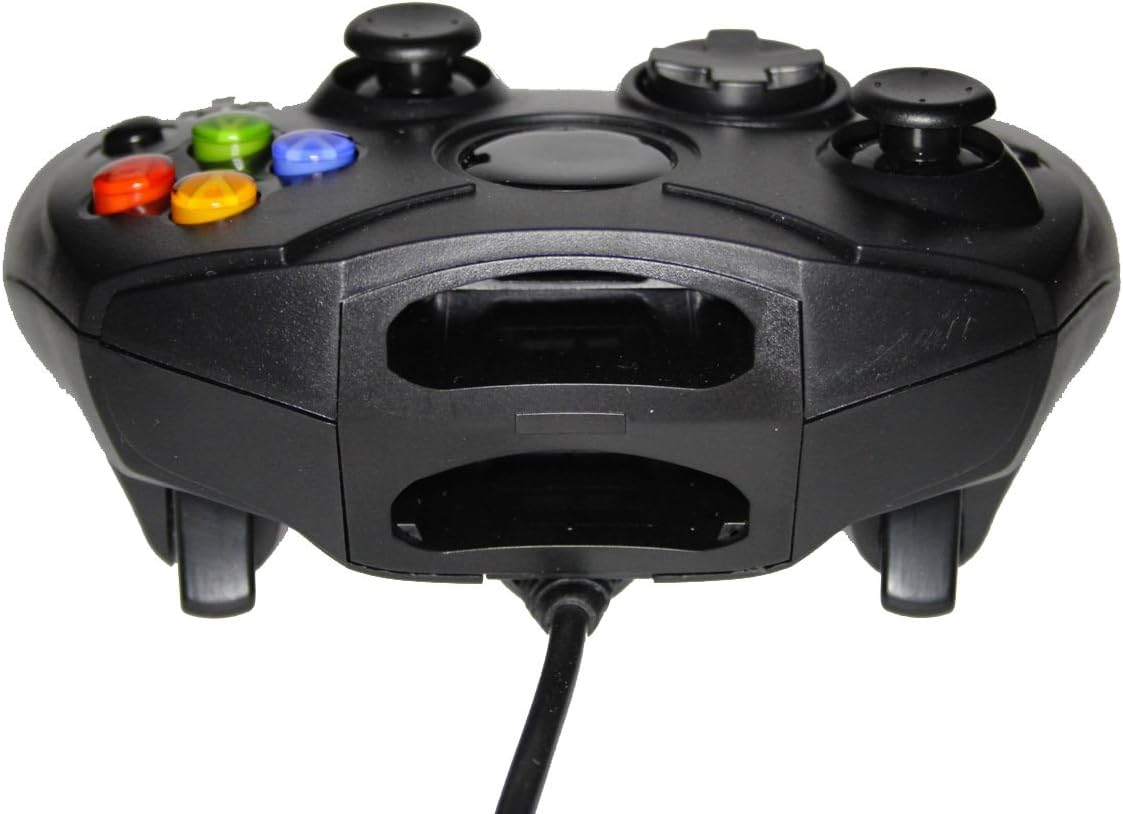
그림 1: 전면 view of the controller, highlighting the proprietary Xbox connector and memory card slots.
컨트롤러 조작하기
The Mars Replacement Controller features the standard button layout for the Original Xbox, providing intuitive control for your games.

그림 2: 상단 view of the controller, displaying the button layout.
버튼 기능:
- A, B, X, Y 버튼: Primary action buttons, typically used for jumping, attacking, interacting, or confirming selections.
- D-패드(방향 패드): Used for precise directional input, menu navigation, or specific in-game actions.
- 왼쪽 및 오른쪽 아날로그 스틱: Provide 360-degree movement and camera control. Pressing them down often activates additional functions (L3/R3).
- Black and White Buttons: Auxiliary action buttons, often used for secondary actions or specific game mechanics.
- 시작 버튼: 일반적으로 게임을 일시 정지하거나, 게임 내 메뉴에 접근하거나, 선택 사항을 확인하는 데 사용됩니다.
- 뒤로가기 버튼: Often used to access maps, inventories, or return to previous menus.
- Left and Right Triggers: Analog triggers on the underside of the controller, commonly used for acceleration, braking, or firing weapons.
Specific button assignments may vary depending on the game. Refer to your game's instruction manual for detailed control schemes.
관리 및 유지 보수
To ensure the longevity and optimal performance of your Mars Replacement Controller, follow these care guidelines:
- 청소: 부드럽고 마른 천을 사용하여 컨트롤러를 정기적으로 닦으세요. 잘 지워지지 않는 오염의 경우, 가볍게 두드리세요.ampen the cloth with water or a mild, non-abrasive cleaner. Avoid excessive moisture, especially near buttons and ports.
- 저장: Store the controller in a clean, dry place away from direct sunlight, extreme temperatures, and excessive dust. Avoid wrapping the cable too tightly around the controller to prevent damage.
- 손질: Do not drop the controller or subject it to strong impacts. Avoid pulling the cable forcefully when disconnecting it from the console; always grasp the connector itself.
- 액체 노출: Keep the controller away from liquids. Spills can cause internal damage and void any potential warranty.
문제 해결
컨트롤러 사용 중 문제가 발생하면 다음의 일반적인 문제 및 해결 방법을 참조하십시오.
| 문제 | 가능한 해결책 |
|---|---|
| 컨트롤러가 응답하지 않습니다. |
|
| Buttons or joysticks are unresponsive or sticky. |
|
| Controller disconnects intermittently. |
|
이러한 해결 방법을 시도한 후에도 문제가 지속되면 고객 지원팀에 문의하세요.
기술 사양
| 특징 | 세부 사항 |
|---|---|
| 제품 치수 | 7 x 5.6 x 2.4 인치 |
| 품목 무게 | 3.99 온스 |
| 호환 장치 | Original Xbox Console |
| 컨트롤러 유형 | 게임패드 |
| 연결성 | Wired (Proprietary Xbox Connector) |
| 색상 | 검은색 |
| 제조업체 | Mars Devices |
보증 정보
This Mars Replacement Controller is covered by a manufacturer's warranty. For specific details regarding warranty duration, coverage, and claims procedures, please refer to the official Mars Devices web해당 웹사이트를 방문하거나 고객 지원팀에 직접 문의하십시오. 보증 적용을 위해 구매 증빙 자료를 보관하십시오.
고객 지원
For further assistance, technical support, or inquiries regarding your Mars Replacement Controller, please contact Mars Devices customer support. Contact information can typically be found on the product packaging or the official Mars Devices web대지.
온라인 리소스: Mars Devices Store on Amazon


