소개
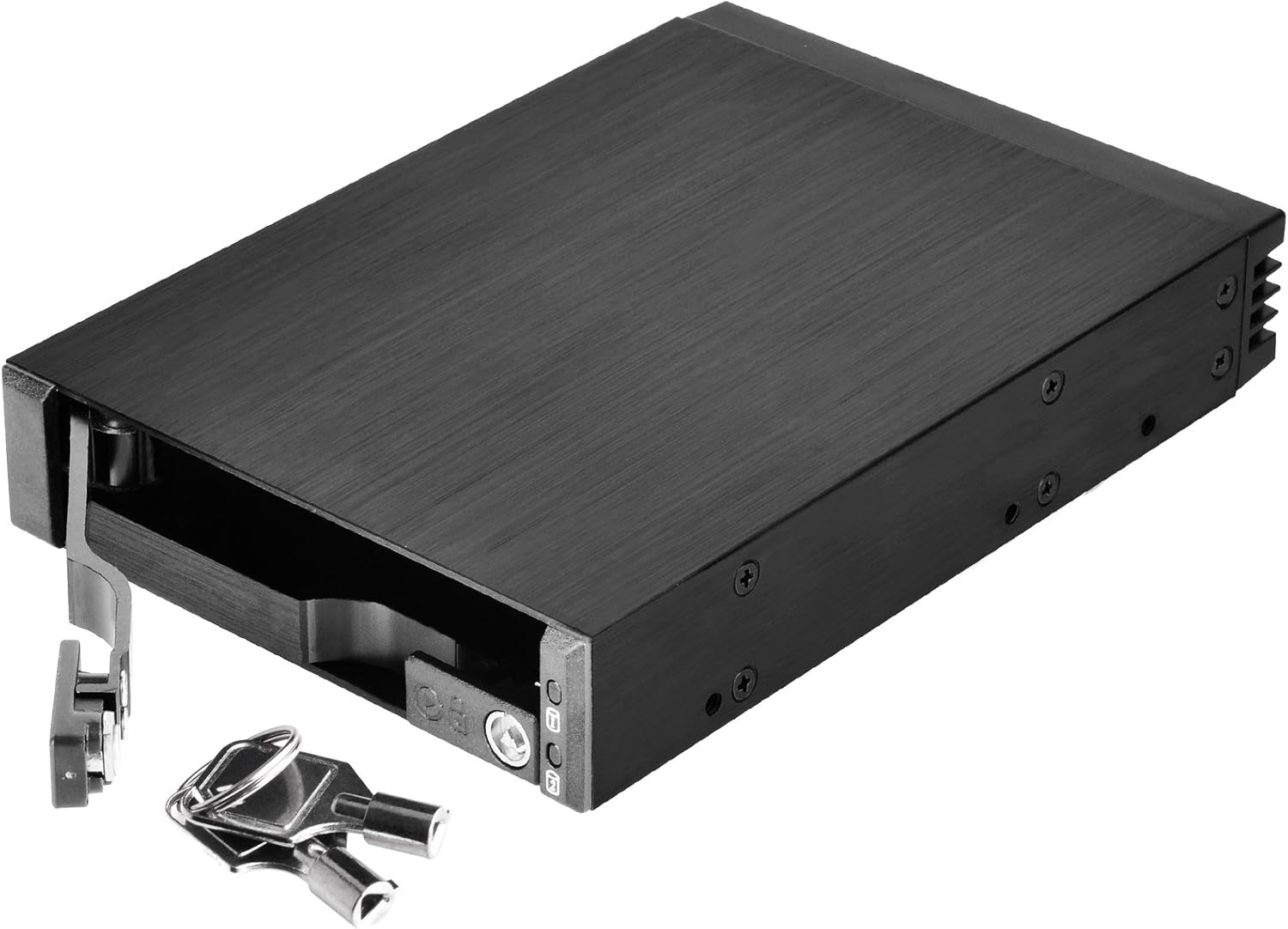
The SilverStone SST-FS202 is a versatile removable case designed to optimize space and convenience for computer users. This 3.5" device bay solution allows for the installation of two 2.5" SAS/SATA hard disk drives or solid-state drives. Featuring a durable aluminum construction and a hot-swap design, it provides easy drive management and enhanced data security with individual key locks for each drive.
제품 특징
- Dual Drive Support: Accommodates two 2.5" SAS/SATA drives (HDD or SSD) within a single 3.5" device bay.
- 강화된 보안: Features individual metal key locks for each drive bay, providing extra security for your data.
- 프리미엄 건설: Constructed with an all-aluminum body and a refined hairline brushed finish for durability and aesthetics.
- 핫스왑 기능: Fully supports SATA hot-swap, allowing drives to be inserted or removed without system shutdown.
- Trayless & Screwless Design: Simplifies drive installation and removal, eliminating the need for trays or screws.
- Independent Drive Status LED: Each drive bay includes an independent LED indicator to show power and access status.
- 높은 데이터 전송률: Supports data transfer rates up to 6 Gbit/s (dependent on drive speed).
패키지 내용
- 1x SilverStone SST-FS202 Removable Case
- 2x Keys for drive locks
- 장착 나사
- 사용자 설명서
설정 및 설치
1. Physical Installation into PC Case
- Identify an available 3.5" device bay in your computer case.
- Slide the SST-FS202 into the 3.5" bay until it is flush with the front panel.
- Secure the case using the provided mounting screws through the side screw holes into the drive bay.



2. Drive Installation (2.5" SAS/SATA HDD/SSD)
- Unlock the drive bay lever using the provided key and pull the lever outwards to open the bay.
- Gently slide your 2.5" SAS or SATA HDD/SSD into the open bay. Ensure the drive is oriented correctly so the connectors align with the backplane.
- Push the drive firmly until it seats completely into the connectors.
- Close the drive bay lever and lock it with the key for security.


3. 케이블 연결
- Connect the SATA data cables from the SST-FS202's rear ports to your motherboard's SATA ports.
- Connect the SATA power cable from your power supply unit (PSU) to the SST-FS202's rear power port.

Video 1: Demonstrates how to install and connect the SilverStone SST-FS202, including power and data cables.
작업
- 전원 켜기: Once connected, power on your computer. The drive status LEDs on the front panel will illuminate (blue for power, blinking blue for access).
- 핫스왑: The SST-FS202 supports hot-swapping. To remove a drive, ensure it is safely ejected or unmounted from your operating system first. Then, unlock the bay with the key, pull the lever, and carefully slide the drive out.
- Inserting Drives: To insert a new drive, follow the drive installation steps outlined above. The system should detect the new drive automatically.

유지
- Keep the unit clean and free from dust to ensure optimal airflow and prevent overheating.
- 정기적으로 케이블 연결을 점검하여 안전한지 확인하세요.
- 장치를 극단적인 온도나 습도에 노출시키지 마십시오.
문제 해결
| 문제 | 가능한 원인 | 해결책 |
|---|---|---|
| 드라이브가 감지되지 않았습니다. | Loose SATA data/power cables, drive not fully seated, BIOS/OS settings. | Ensure all cables are securely connected. Re-insert the drive firmly. Check your motherboard's BIOS settings for SATA port enablement and hot-swap support. Verify drive functionality in another system if possible. |
| LED 표시등이 켜지지 않습니다. | No power to the unit, faulty drive. | Check the SATA power connection from the PSU. Ensure the drive is properly inserted and functional. |
| Drive not securely locked. | Lever not fully closed, key not turned. | Ensure the drive lever is pushed all the way in and the key is turned to the locked position. |
명세서
| 특징 | 세부 사항 |
|---|---|
| 모델 번호 | SST-FS202 |
| 재료 | Aluminum body, plastic front bezel |
| 드라이브 지원 | 2 x 2.5" SAS/SATA HDD or SSD |
| 디바이스 베이 | 1 x 3.5" device bay |
| 호스트 인터페이스 | 7-Pin SATA connector x 2 (for data) |
| 전원 커넥터 | SATA 15핀 x 1 |
| 데이터 전송 속도 | Up to 6 Gbit/s (dependent on drive speed) |
| Drive Door Security | Individual metal key lock design |
| LED 표시등 | Power On: Blue, Accessing: Blinking Blue |
| 순중량 | 0.22kg(7.7온스) |
| 치수(길이x너비x높이) | 146mm (D) x 101.5mm (W) x 25.4mm (H) / 5.75" x 4" x 1" |
| 한국어: | 04710007222492 |
For more detailed information, please visit the official product page: SilverStone SST-FS202 Product Page
보증 및 지원
SilverStone products are designed for reliability and performance. For warranty information, technical support, or to register your product, please visit the official SilverStone web사이트 또는 고객 서비스 부서에 문의하십시오.
You can also find more products and information at the SilverStone Amazon Store.


