소개
This manual provides comprehensive instructions for the operation and maintenance of your ONN X5 HiFi Music Player. Please read this manual thoroughly before using the device to ensure proper functionality and to maximize your listening experience. The ONN X5 is designed to deliver high-fidelity audio playback in a compact and user-friendly format.
제품 끝view
The ONN X5 is a portable HiFi music player featuring a 2.0-inch TFT screen and an aluminum alloy shell. It supports a wide range of audio formats, including lossless files, and offers expandable storage via a MicroSD card.
주요 특징:
- 고성능 오디오: Supports WAV, FLAC, ALAC, APE, OGG lossless formats, and high-definition music up to 24Bit/192 KHz.
- 표시하다: 2.0-inch TFT screen (176x220 pixels) for clear navigation and information display.
- 저장: 8GB internal memory, expandable up to 32GB with a MicroSD/TF card.
- 내구성 있는 디자인: Lightweight aluminum alloy body (60g) for enhanced durability and reduced external interference noise.
- 사용자 인터페이스: Intuitive key-based operation.
- 추가 기능: FM Radio support.
- 배터리: High-capacity rechargeable lithium polymer battery.
- 다국어 지원: English, Russian, Korean, German, Japanese, Polish, Indonesian, Chinese.
장치 레이아웃:

이미지: 앞면 view of the ONN X5 HiFi Music Player, showing its display and control buttons. The screen displays track information, audio quality (e.g., 24BIT, 88HHZ), and playback status.

이미지: 측면 view of the ONN X5 HiFi Music Player, illustrating the location of the MicroSD card slot on the right side of the device.

이미지: 앞면과 뒷면 view of the ONN X5 HiFi Music Player. The back panel shows the model number "X5" and branding information.
설정
1. 장치 충전:
- Connect the ONN X5 to a power source using the provided USB cable.
- 화면의 배터리 표시등은 충전 상태를 보여줍니다.
- A full charge is recommended before first use. The device uses a high-capacity rechargeable lithium polymer battery.
2. Inserting a MicroSD/TF Card:
- Locate the MicroSD/TF card slot on the side of the player.
- Gently insert a compatible MicroSD/TF card (up to 32GB) into the slot until it clicks into place.
- 카드가 손상되지 않도록 올바르게 삽입되었는지 확인하십시오.

Image: Contents of the ONN X5 package, showing the player, USB charging cable, and other accessories. This illustrates the components available for setup.
3. 음악 전송 Files:
- Connect the ONN X5 to your computer using the USB cable.
- 해당 장치는 이동식 저장 장치로 표시됩니다.
- 원하는 오디오를 드래그 앤 드롭하세요 files (MP3, WMA, APE, FLAC, WAV, ALAC, OGG) into the player's internal storage or the MicroSD card.
- USB 케이블을 분리하기 전에 컴퓨터에서 장치를 안전하게 꺼내십시오.
작동 지침
전원 켜기/끄기:
- To power on, press and hold the power button (usually marked with a universal power symbol) until the screen illuminates.
- 전원을 끄려면 장치가 종료될 때까지 전원 버튼을 길게 누릅니다.
항해:
The ONN X5 uses physical buttons for navigation. Refer to the device layout for button identification.
- VOL : 볼륨을 조정합니다.
- M (Menu): Accesses menus and confirms selections.
- 화살표 버튼(< / >): Navigate through menus, select tracks, or fast forward/rewind during playback.
- 전원 버튼: Also functions as a play/pause button during music playback.
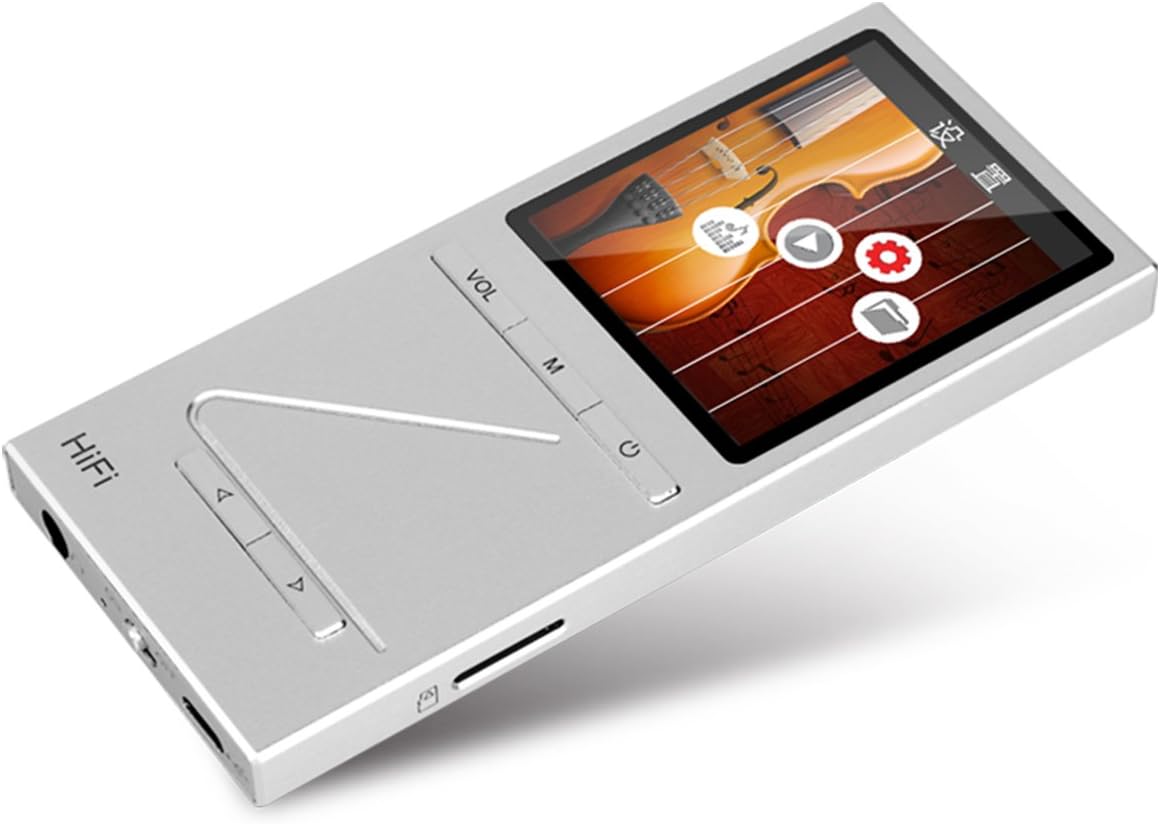
이미지: 각도 view of the ONN X5 HiFi Music Player, showing the screen with various menu icons, indicating the user interface for navigation.
음악 재생:
- From the main menu, navigate to "Music" or "Files ".
- Browse through your folders and select a track to play.
- Press the Power/Play button to start or pause playback.
- Use the arrow buttons to skip tracks or fast forward/rewind.
- VOL 버튼을 사용하여 볼륨을 조절하세요.
FM 라디오 :
- Navigate to the "FM Radio" option from the main menu.
- 탐색 버튼을 사용하여 방송국을 검색하거나 수동으로 주파수를 맞추세요.
- Ensure headphones are connected as they often act as the antenna for FM radio.
언어 설정:
이 기기는 여러 언어를 지원합니다. 언어를 변경하려면 다음 단계를 따르세요.
- 메인 메뉴에서 "설정"으로 이동하세요.
- Select "Language" and choose your preferred language from the list (English, Russian, Korean, German, Japanese, Polish, Indonesian, Chinese).
유지
- 청소: 부드럽고 마른 천을 사용하여 기기를 닦으세요. 액체 세척제나 연마재는 사용하지 마세요.
- 저장: 플레이어를 직사광선과 극한의 온도를 피해 서늘하고 건조한 곳에 보관하세요.
- 배터리 관리 : 배터리 수명을 연장하려면 배터리를 자주 완전히 방전하지 마십시오. 장시간 사용하지 않더라도 정기적으로 충전하십시오.
- 충격 방지: The aluminum alloy shell provides durability, but avoid dropping the device or subjecting it to strong impacts.
- 물 노출: 이 기기는 방수 기능이 없습니다. 물이나 높은 습도에 노출시키지 마십시오.
문제 해결
Device Will Not Power On:
- 배터리가 충전되어 있는지 확인하십시오. 기기를 전원에 연결하고 최소 30분 동안 충전한 후 다시 전원을 켜십시오.
- Try performing a hard reset (if applicable, refer to manufacturer's specific instructions for hard reset, usually involves holding power button for an extended period).
소리 없음:
- 음량을 확인하고 음소거되어 있지 않은지 확인하십시오.
- Verify that headphones or external speakers are properly connected.
- Test with different headphones or audio output devices.
- 오디오 확인 file is not corrupted or in an unsupported format.
전송할 수 없습니다 Files:
- USB 케이블이 플레이어와 컴퓨터에 제대로 연결되어 있는지 확인하십시오.
- 컴퓨터의 다른 USB 포트나 다른 USB 케이블을 사용해 보세요.
- Verify that the device is recognized by your computer as a removable drive.
- Check if the MicroSD card is properly inserted and not full.
화면이 응답하지 않거나 멈췄습니다.
- 강제로 재시작하려면 전원 버튼을 약 10~15초 동안 길게 누르십시오.
- If the issue persists, ensure the battery is charged.
명세서
| 특징 | 세부 사항 |
|---|---|
| 모델 번호 | X5 |
| 상표 | 온 |
| 화면 크기 | 2.0 Inches TFT (176x220 PIXEL) |
| 내부 메모리 | 8GB (XNUMX기가바이트) |
| 확장 가능한 스토리지 | MicroSD/TF card up to 32 GB |
| 지원되는 오디오 형식 | APE, FLAC, ALAC, WAV, WMA, OGG, MP3 (up to 24Bit/192 KHz) |
| 연결 기술 | AUX, USB |
| 특징 | FM 라디오 |
| 배터리 | 1 Lithium Ion battery required (High-capacity rechargeable lithium polymer) |
| 품목 무게 | 7 온스(약 0.2 킬로그램) |
| 패키지 크기 | 6.21 x 4.7 x 1.2 인치 |
| 제조업체 | SZTZWY |
보증 및 지원
For detailed warranty information, please refer to the warranty card included with your purchase or visit the official ONN product support website. For technical assistance or further inquiries, please contact ONN customer support through their official channels.


