1. 제품 오버view
The Safescan TP-230 is a compact and robust thermal receipt printer designed to seamlessly integrate with various Safescan money counters. It enables automatic printing of detailed reports for counting results, including denominations and total amounts, making it an ideal solution for administrative processes and daily cash reports.
Utilizing modern thermal printing technology, the TP-230 operates quickly and quietly, producing clear and crisp printouts. It is lightweight, compact, and uses standard 58mm thermal paper, which is widely available.
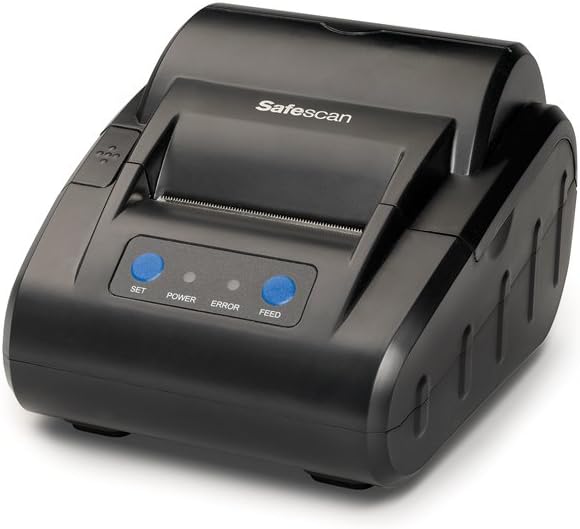
앞쪽 view of the Safescan TP-230 Thermal Receipt Printer, showcasin컴팩트한 디자인과 제어 버튼이 특징입니다.
주요 특징:
- Detailed Reports: Optimizes cash administration processes by generating detailed printouts of counting results from compatible Safescan money counters.
- 실용적인 디자인 : Features a compact and lightweight design, making it easy to use anywhere. It prints on standard 58mm thermal paper for convenience.
- 최적의 호환성: Compatible with a wide range of Safescan money counters, including models 1250, 1450, 2265, 2465-S, 2665-S, 2685-S, 2865-S, 2985-SX, 2995-SX, 6165, and 6185.
2. 패키지 내용
Before setting up your Safescan TP-230, please verify that all components are present in the box:
- Safescan TP-230 열전사 영수증 프린터
- 전원 어댑터
- USB 프린터 케이블
- Thermal Print Paper (1 roll)

Image showing the Safescan TP-230 printer along with its power adapter, USB cable, and a roll of thermal paper.
3. 설정
3.1 프린터 연결
- Connect the provided USB printer cable to the USB port on the back of the TP-230 printer.
- Connect the other end of the USB cable to the compatible Safescan money counter.
- Plug the power adapter into the power input port on the back of the printer.
- 전원 어댑터를 적합한 전기 콘센트에 연결하십시오.

뒤쪽 view of the Safescan TP-230, highlighting the power input, USB port, and serial port for connectivity.
3.2 감열지 넣기
- Gently press the lid release button (if present) or lift the top cover of the printer to open the paper compartment.
- Insert the thermal paper roll into the compartment, ensuring the paper feeds from the bottom of the roll and the leading edge extends slightly out of the printer slot.
- Close the top cover firmly until it clicks into place. Ensure the paper is properly aligned and not jammed.

맨 위 view of the Safescan TP-230 with the paper compartment open, showing a thermal paper roll correctly inserted.
4. 사용 설명서
4.1 전원 켜기/끄기
Locate the power switch on the side or back of the printer. Flip the switch to the 'ON' position to power on the device. The 'POWER' indicator light on the front panel should illuminate. To power off, flip the switch to the 'OFF' position.
4.2 보고서 인쇄
Once the TP-230 is connected to a compatible Safescan money counter and powered on, it is ready to print. The printing process is initiated directly from the connected money counter's interface. Refer to your specific Safescan money counter's user manual for detailed instructions on how to generate and print counting reports.
The TP-230 will automatically receive data from the counter and print a detailed report of the counted denominations and total amounts. You can use the 밥을 먹이다 button on the printer's front panel to advance the paper manually.

The Safescan TP-230 printer positioned next to a Safescan banknote counter, demonstrating its intended use for printing counting results.

The Safescan TP-230 printer shown alongside a Safescan coin counter, illustrating its compatibility with various money counting devices.
5. 유지관리
5.1 청소
To ensure optimal performance and longevity of your Safescan TP-230, regular cleaning is recommended:
- 외부: Wipe the exterior of the printer with a soft, dry, lint-free cloth. For stubborn marks, a slightly damp 순한 세제를 묻힌 천으로 닦아낼 수 있으며, 기기 내부로 액체가 들어가지 않도록 주의하십시오.
- 프린트 헤드: The thermal print head should be cleaned periodically to maintain print quality. Use a specialized thermal printer cleaning pen or a cotton swab lightly damp이소프로필 알코올로 세척하십시오. 프린트 헤드 표면을 부드럽게 닦아주세요. 완전히 건조시킨 후 사용하십시오.
주의: Never use abrasive cleaners, solvents, or spray directly onto the printer.
5.2 용지 교체
Always use high-quality standard 58mm thermal paper rolls for the Safescan TP-230. Using incorrect paper types can lead to poor print quality, damage to the print head, or paper jams. Replace the paper roll as described in Section 3.2 when the current roll is depleted.
6. 문제 해결
This section addresses common issues you might encounter with your Safescan TP-230 printer.
| 문제 | 가능한 원인 | 해결책 |
|---|---|---|
| 전원이 없습니다 | Power cable not connected; Power outlet faulty; Printer power switch off. | Ensure power cable is securely connected to printer and outlet. Test outlet with another device. Flip power switch to 'ON'. |
| No Print Output | Printer not connected to money counter; Paper roll empty or incorrectly loaded; Print head dirty; 'ERROR' light illuminated. | Verify USB connection. Load new paper roll correctly (refer to Section 3.2). Clean print head (refer to Section 5.1). Check money counter settings for printing. |
| 인쇄 품질 불량 | Thermal paper loaded incorrectly; Print head dirty; Low quality thermal paper. | Ensure paper is loaded with the thermal side facing the print head. Clean print head (refer to Section 5.1). Try a new roll of high-quality thermal paper. |
| 종이 걸림 | Paper not loaded straight; Foreign object in paper path. | Open the paper compartment and carefully remove any jammed paper. Ensure paper is loaded straight and aligned. Remove any foreign objects. |
| 'ERROR' Light On | Paper out; Lid open; Print head overheating. | Check if paper roll is empty and replace if necessary. Ensure the lid is fully closed. If the light persists after checking these, power off the printer, wait a few minutes, and power it back on. |
7. 사양
Detailed technical specifications for the Safescan TP-230 Thermal Receipt Printer:
| 특징 | 사양 |
|---|---|
| 모델 번호 | 티피-230 |
| 상표 | 세이프스캔 |
| 기술을 인쇄 | 열의 |
| 연결 기술 | USB |
| 프린터 출력 | 단색화 |
| 최대 흑백 인쇄 속도 | 분당 10페이지 |
| 제품 크기(L x W x H) | 13.8 x 12 x 20cm |
| 무게 | 380g |
| 전력 소비 | 10와트 |
| 포함된 구성 요소 | Adapter, USB Printer Cable, Thermal Print Paper (1 roll) |
| 보증 유형 | 3년 |
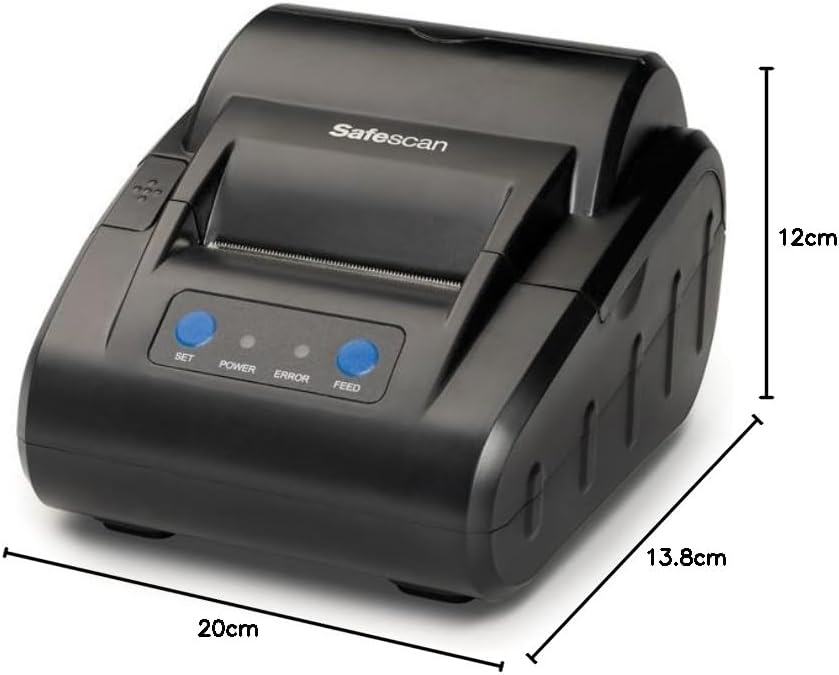
Diagram illustrating the dimensions of the Safescan TP-230 printer: 20cm (length), 13.8cm (width), and 12cm (height).
8. 보증 및 지원
8.1 보증 정보
The Safescan TP-230 Thermal Receipt Printer comes with a 3년 보증 구매일로부터. 본 보증은 정상적인 사용 중 발생하는 재료 및 제조상의 결함에 적용됩니다. 보증 청구를 위해 구매 증빙 자료를 보관해 주십시오.
8.2 고객 지원
For technical assistance, troubleshooting beyond this manual, or warranty inquiries, please contact Safescan customer support. Refer to the official Safescan website or your product packaging for the most up-to-date contact information and support resources.
또한 방문할 수 있습니다 Safescan Brand Store 자세한 제품 정보와 지원을 원하시면.


