1. 제품 오버view
The Linear MCS412001 Multi-Code 2-Channel Visor Transmitter is designed for use with automatic door and gate operator applications. This portable transmitter features raised dimples on its buttons for easy identification, including for vision-impaired users. It operates on a 9-volt battery and includes a visor clip for convenient mounting.
The transmitter utilizes a multi-code format with two 10-position coding switches, offering 1,024 possible codes per channel. This allows for independent coding to activate different devices, such as a common gate and a private door. The transmitter will only activate receivers that are set with the identical code.

앞쪽 view of the Linear MCS412001 Multi-Code 2-Channel Visor Transmitter.
주요 특징:
- Easy access to battery and coding switches.
- 1,024 possible codes per channel for enhanced security.
- Powered by a standard 9-Volt battery (included).
- Includes a durable visor clip for vehicle mounting.
- Compatible with 300 MHz multi-code receivers, including models 109950 and 302850.
2. Setup and Coding Instructions
Before placing your transmitter into service, it is essential to set your codes to ensure security and prevent interference with neighboring systems. The model 4120 transmitter features two 10-position coding switches. Avoid using several common coding schemes (e.g., ALL ON, ALL OFF, 2, 4, 6, 8, 10 ON; 1, 3, 5, 7, 9 ON) as these positions are frequently used or similar to other manufacturers' test positions.
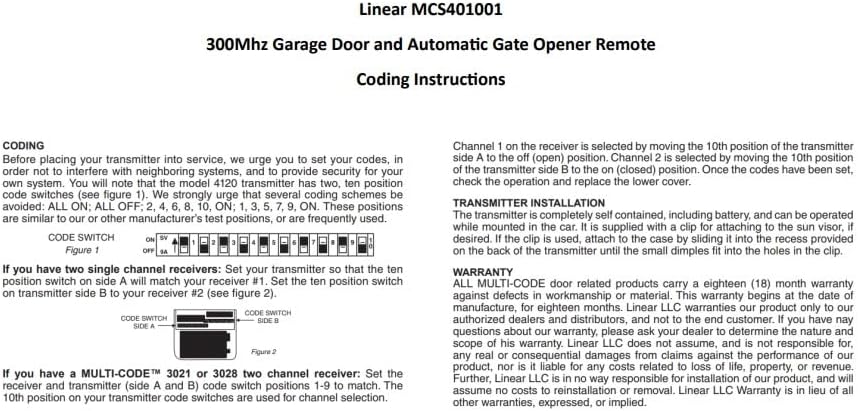
내부 view of the coding switches (Figure 1).
Setting the Code Switches:
- Open the transmitter case to access the coding switches.
- For a single receiver: Set the ten position switch on the transmitter to match your receiver's code.
- For two single channel receivers: Set the ten position switch on Side A of the transmitter to match your first receiver (#1). Set the ten position switch on Side B of the transmitter to match your second receiver (#2).
- For a MULTI-CODE™ 3021 or 3028 two-channel receiver: Set the receiver and transmitter (Side A and B) code switch positions 1-9 to match. The 10th position on your transmitter code switches is used for channel selection. Channel 1 on the receiver is selected by moving the 10th position of the transmitter side A to the OFF (open) position. Channel 2 is selected by moving the 10th position of the transmitter side B to the ON (closed) position.
- Once the codes have been set, check the operation and replace the lower cover.
송신기 설치:
The transmitter is a self-contained unit, including the battery, and can be operated while mounted in your vehicle. It is supplied with a clip for attaching to the sun visor. If desired, slide the clip into the recess provided on the back of the transmitter until it snaps into place.

뒤쪽에 view with visor clip attached.
3. 사용 설명서
The Linear MCS412001 transmitter features two distinct buttons for operation:
- 그만큼 왼쪽 버튼 controls Signal One.
- 그만큼 오른쪽 버튼 controls Signal Two.
Press the desired button firmly to activate the corresponding channel. The red indicator light on the transmitter will illuminate during transmission.
Video demonstrating the features and operation of the Linear MCS412001 Multi-Code 2-Channel Visor Transmitter.
4. 배터리 정보 및 유지 관리
The Linear MCS412001 transmitter is powered by one 9-volt alkaline battery, which is included with the unit. The average battery life is approximately 17,520 hours under normal usage conditions.
배터리 교체:
- To replace the battery, carefully open the transmitter case.
- Remove the old 9-volt battery.
- Insert a new 9-volt alkaline battery, ensuring correct polarity.
- Close the transmitter case securely.
Regularly check the transmitter's operation. If the indicator light dims or the range decreases, it may be time to replace the battery.
5. 문제 해결
If your Linear MCS412001 transmitter is not functioning as expected, consider the following troubleshooting steps:
- 배터리 확인: Ensure the 9-volt battery is properly installed and has sufficient charge. A weak battery can result in reduced range or intermittent operation. Replace the battery if necessary.
- Verify Code Settings: Confirm that the 10-position coding switches inside the transmitter are set to exactly match the code switches on your receiver(s). Any discrepancy will prevent activation. Refer to Section 2 for detailed coding instructions.
- 수신기 호환성: Ensure your receiver is compatible with 300 MHz multi-code transmitters. This transmitter is compatible with multi-code receivers and models 109950 and 302850.
- Obstructions/Interference: Large metal objects, walls, or other electronic devices can interfere with the signal. Try operating the transmitter from a different location or closer to the receiver.
- 표시등: Observe the test/operate indicator light. If it does not illuminate when a button is pressed, the battery may be dead or there could be an internal issue.
이러한 단계를 거쳐도 문제가 해결되지 않으면 고객 지원팀에 문의하세요.
6. 사양
| 기인하다 | 값 |
|---|---|
| 상표 | 선의 |
| 모델 번호 | MCS412001 |
| 색상 | Soft Gray |
| 스타일 | 현대의 |
| 품목 무게 | 4 온스(0.25 파운드) |
| 제품 치수 | 3.75 x 2.5 x 3.75 인치 |
| 배터리 | 1 Product Specific 9-Volt Alkaline battery (included) |
| 평균 배터리 수명 | 17520시간 |
| 채널 | 2 |
| Coding Switches | Two 10-position |
| Possible Codes | 채널당 1,024개 |
| 빈도 | 300MHz |
| 포함된 구성 요소 | Transmitter, 9-Volt Battery, Visor Clip |
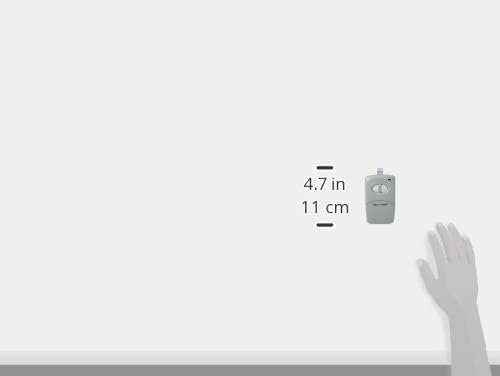
Product dimensions illustration.
7. 보증 정보
All MULTI-CODE door related products carry an eighteen (18) month warranty against defects in workmanship or material. This warranty begins at the date of manufacture, for eighteen months. Linear LLC warrants our product only to our authorized dealers and distributors, and not to the end customer. If you have any questions about our warranty, please ask your dealer to determine the nature and scope of this warranty. Linear LLC does not assume, and is not responsible for, any real or consequential damages from claims against the performance of our product, nor is it liable for any costs related to loss of life, property, or revenue. Further, Linear LLC is in no way responsible for installation of our product, and will assume no costs to reinstallation or removal. Linear LLC Warranty is in lieu of all other warranties, expressed, or implied.
8. 연락처 및 지원
For further assistance, technical support, or warranty claims, please contact your authorized Linear dealer or distributor. You may also visit the official Linear web추가 리소스 및 연락처 정보는 사이트를 참조하십시오.


