
소개
Thank you for choosing the Calypso K5684/6 Digital Watch. This manual provides essential information for the proper setup, operation, and maintenance of your watch. Please read it carefully to ensure optimal performance and longevity of your device.
The Calypso K5684/6 is a sporty and fashionable digital multifunction watch featuring a clear LCD display, 10 ATM (100 meters) water resistance, a durable plastic strap, chronograph, alarm, and dual time zone functions.
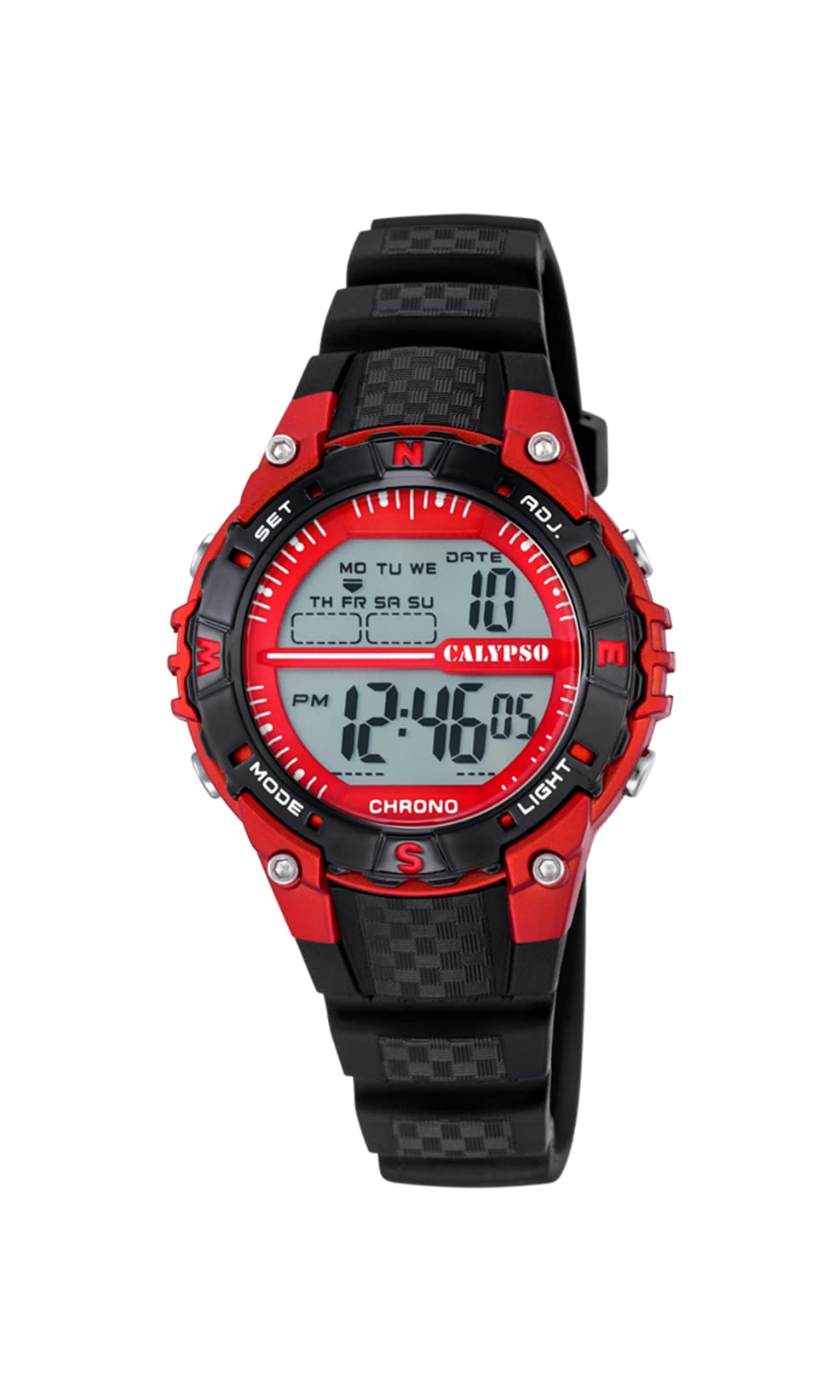
정면 view of the Calypso K5684/6 digital watch, showcasing its LCD display, black plastic case, and strap. The display shows time, date, and mode indicators.
초기 설정
버튼 기능 이상view
Your Calypso K5684/6 watch features four primary control buttons:
- 오시는 길 : Cycles through different display modes (Time, Alarm, Chronograph, Dual Time).
- 세트: Used to enter and confirm settings in various modes.
- ADJ (Adjust): Used to adjust values (increment/decrement) during setting. Also functions as Start/Stop for Chronograph.
- 빛: 어두운 환경에서도 가시성을 높이기 위해 백라이트를 활성화합니다.

클로즈업 view of a Calypso digital watch, highlighting the 'MODE', 'SET', 'ADJ', and 'LIGHT' buttons on the sides of the watch case. The display shows 'MON 12:44 8-17 06'.
작동 지침
1. 시간 및 날짜 설정
- 일반 시간 표시에서 다음을 누릅니다. 방법 초침이 깜빡이기 시작할 때까지 버튼을 반복해서 누르세요. 그러면 시간 설정 모드에 진입한 것입니다.
- 를 누르세요 세트 버튼을 눌러 설정을 순환할 수 있습니다: 초 → 시 → 분 → 년 → 월 → 일.
- 값이 깜빡이는 동안에는 다음을 사용하십시오. 형용사 button to increase or decrease the value. Hold 형용사 더 빠른 조정을 위해.
- 모든 설정이 정확해지면 다음을 누릅니다. 방법 설정 모드를 종료하고 일반 시간 표시로 돌아가려면 버튼을 누르세요.
2. 알람 기능
- 를 누르세요 방법 button until the alarm time is displayed (usually indicated by 'AL' or a bell icon).
- 를 누르고 계세요 세트 알람 시간이 깜빡이기 시작할 때까지 버튼을 누르세요.
- 사용하세요 형용사 원하는 알람 시간을 설정하려면 버튼을 클릭하세요.
- 누르다 세트 again to move to the alarm minutes, then use 형용사 분을 설정합니다.
- 누르다 세트 알람 설정을 확인하고 종료하려면 클릭하세요.
- 알람 모드에서 알람을 활성화/비활성화하려면 버튼을 누르십시오. 형용사 버튼을 누르면 디스플레이에 알람 아이콘이 나타나거나 사라집니다.
3. 크로노그래프(스톱워치)
- 를 누르세요 방법 button until 'CHRONO' or 'STW' is displayed. The display will show '00:00:00'.
- 를 누르세요 형용사 크로노그래프를 시작하는 버튼입니다.
- 누르다 형용사 다시 크로노그래프를 중지합니다.
- 크로노그래프를 0으로 재설정하려면 버튼을 누르십시오. 세트 크로노그래프가 멈춰있는 동안 버튼을 누르십시오.
4. 이중 시간대
- 를 누르세요 방법 button until 'DT' or 'DUAL TIME' is displayed.
- 를 누르고 계세요 세트 시간이 깜빡이기 시작할 때까지 버튼을 누르세요.
- 사용하세요 형용사 button to set the desired hour for the second time zone.
- 누르다 세트 again to move to the minutes, then use 형용사 to set the minutes (minutes are usually synchronized with the main time zone).
- 누르다 세트 to confirm and exit the dual time setting.
5. 백라이트
를 누르세요 빛 이 버튼을 누르면 디스플레이가 몇 초 동안 밝아집니다. 이 기능은 어두운 환경에서 유용합니다.
관리 및 유지 보수
1. 청소
- Wipe the watch case and strap regularly with a soft, dry cloth to remove dirt and moisture.
- 잘 지워지지 않는 먼지에는 약간의 d를 사용하세요.amp 순한 비누를 묻힌 천으로 닦은 후 바로 닦아 말리세요.
- 화학 세척제, 용제 또는 연마재는 시계의 마감재와 밀봉재를 손상시킬 수 있으므로 사용을 피하십시오.
2. 방수 관련 주의사항
Your Calypso K5684/6 watch is water-resistant up to 10 ATM (100 meters), making it suitable for swimming and snorkeling. However, please observe the following:
- 시계가 물에 잠겨 있는 동안에는 어떠한 버튼도 조작하지 마십시오. 이로 인해 방수 기능이 저하될 수 있습니다.
- Avoid exposing the watch to hot water, steam, or extreme temperature changes, as this can affect the seals.
- 소금물에 노출된 후에는 깨끗한 물로 시계를 헹구고 완전히 말리세요.
3. 배터리 교체
디스플레이가 어두워지거나 시계가 작동하지 않으면 배터리를 교체해야 할 수 있습니다. 방수 기능을 유지하려면 자격을 갖춘 시계 기술자에게 배터리를 교체하는 것이 좋습니다.
문제 해결
| 문제 | 가능한 원인 | 해결책 |
|---|---|---|
| 디스플레이가 비어 있거나 어둡습니다. | 배터리가 부족하거나 방전되었습니다. | 배터리를 교체하십시오. 전문 시계 수리 기사에게 문의하십시오. |
| 버튼이 반응하지 않습니다. | 시계가 잠금 모드이거나 배터리가 부족할 수 있습니다. | Try pressing the MODE button to cycle through modes. If unresponsive, consider battery replacement. |
| 시간이 정확하지 않습니다. | 시간이 제대로 맞춰지지 않았거나 시계가 강한 자기장에 노출되었습니다. | 시간을 재설정하려면 "시간 및 날짜 설정" 섹션을 참조하세요. |
| 시계 내부에 물이 들어있습니다. | 방수 기능이 저하됨(예: 물속에서 버튼을 눌렀거나, 씰이 손상됨). | 더 이상의 손상을 방지하기 위해 즉시 시계를 전문 시계 수리점에 가져가십시오. |
제품 사양
| 특징 | 세부 사항 |
|---|---|
| 모델 번호 | K5684/6 |
| 상표 | 칼립소 |
| 디스플레이 유형 | 디지털 LCD |
| 케이스 소재 | Polycarbonate with Stainless Steel Back |
| 스트랩 소재 | 플라스틱 |
| 방수성 | 10 ATM(100미터) |
| 기능 | Time, Date, Day, Alarm, Chronograph, Dual Time Zone, Backlight |
| 제품 크기(L x W x H) | 17.4 x 8.99 x 8.2cm |
| 품목 무게 | 50그램 |
| 원산지 | 스페인 |
보증 정보
Calypso watches typically come with a manufacturer's warranty covering defects in materials and workmanship. The specific terms and duration of your warranty are usually provided with your purchase documentation. Please retain your proof of purchase for any warranty claims.
The warranty does not cover damage resulting from improper use, accidents, unauthorized repairs, or normal wear and tear.
고객 지원
For further assistance, technical support, or service inquiries regarding your Calypso K5684/6 Digital Watch, please contact your retailer or the official Calypso customer service in your region. Contact details can often be found on the Calypso official web현장이나 포장재에.


