PRORECK Party 15 Portable PA Speaker System
사용자 설명서
Model: PARTY 15
소개
구매해주셔서 감사합니다asing the PRORECK Party 15 Portable PA Speaker System. This system is designed to deliver powerful and clear audio for various applications, including parties, DJ events, home studios, and social gatherings. Featuring Bluetooth connectivity, USB/SD card playback, FM radio, and integrated LED lights, the Party 15 offers versatile audio solutions. Please read this manual thoroughly before operating the system to ensure proper use and to maximize its performance and longevity.
중요한 안전 정보
화재, 감전, 부상의 위험을 줄이려면 이 제품을 사용할 때 항상 기본적인 안전 예방 조치를 따르세요.
- 이 장비를 비나 습기에 노출시키지 마십시오.
- Do not open the speaker enclosure. There are no user-serviceable parts inside. Refer all servicing to qualified service personnel.
- 전원 공급 장치 볼륨을 확인하십시오.tage는 vol과 일치합니다tage 장치에 지정되어 있습니다.
- 전원 코드가 밟히거나 끼지 않도록 보호하세요. 특히 플러그, 편의용 콘센트 및 기기에서 나오는 부분은 보호하세요.
- 번개 폭풍 시 또는 장기간 사용하지 않을 때는 기기의 플러그를 뽑아두세요.
- 환기구를 막지 마십시오. 제조업체의 지침에 따라 설치하십시오.
- 제조업체에서 지정하거나 장비와 함께 판매되는 카트, 스탠드, 삼각대, 브래킷 또는 테이블만 사용하십시오.
상자 안에 무엇이 들어있나요?
Carefully unpack your PRORECK Party 15 system and ensure all items listed below are present and in good condition. If any items are missing or damaged, please contact your retailer immediately.

Image: Complete PRORECK Party 15 system with all included accessories.
- 1 x 액티브 스피커
- 패시브 스피커 1개
- 2 x 스피커 스탠드
- 1 x 유선 마이크
- 1 x Speakon Cable (for connecting active to passive speaker)
- 1 x 전원 케이블
- 1 x 원격 제어

이미지: 상세 view of the wired microphone, remote control, and various cables.
설정
Follow these steps to set up your PRORECK Party 15 speaker system.
1. 스피커 스탠드 조립
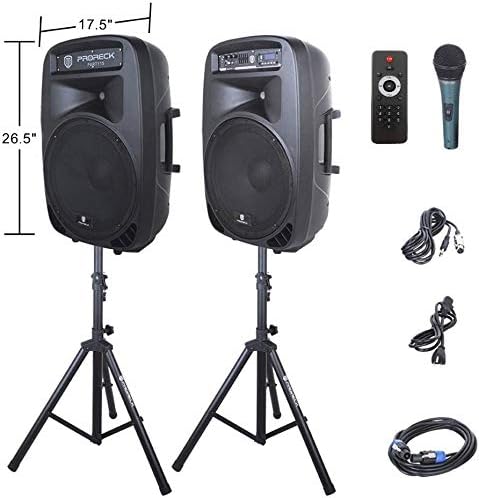
Image: The two included speaker stands.
- Unfold the tripod legs of each speaker stand until they are fully extended and stable.
- Loosen the height adjustment knob on the stand and extend the pole to your desired height. Ensure the safety pin is inserted through the appropriate hole to secure the height.
- 높이 조절 손잡이를 단단히 조입니다.
2. 스피커 배치
- Carefully lift each speaker and place it onto the top pole of a speaker stand. Ensure the speaker is securely seated.
- Position the active speaker (the one with the control panel) near a power outlet.
- Place the passive speaker within reach of the included Speakon cable from the active speaker.
Image: PRORECK Party 15 speakers set up on their stands.
3. 스피커 연결
- Locate the Speakon output on the rear panel of the active speaker and the Speakon input on the rear panel of the passive speaker.
- Connect one end of the Speakon cable to the active speaker's Speakon output and the other end to the passive speaker's Speakon input. Ensure a secure connection.

Image: Rear panels of the active and passive speakers, highlighting the Speakon connection.
4. 전원 연결
- Ensure the master volume knob on the active speaker is turned down to its minimum setting.
- Connect the power cable to the active speaker's power input and then plug it into a suitable electrical outlet.
작동 지침
This section details how to operate your PRORECK Party 15 speaker system and utilize its various features.
제어판 이상view

이미지: 상세 view of the active speaker's control panel.
The active speaker features a comprehensive control panel with an LCD display, various input options, volume controls, and an equalizer.
1. 전원 켜기/끄기
- After connecting the power cable, locate the power switch on the rear panel of the active speaker.
- Flip the switch to the "ON" position to power on the system. The LCD display will illuminate.
- 전원을 끄려면 스위치를 "OFF" 위치로 돌리십시오.
2. 모드 선택
를 누르세요 방법 button on the control panel or remote control to cycle through available input modes: Bluetooth, USB, SD Card, FM Radio, and Line Input.
3. 블루투스 연결
- Select "Bluetooth" mode using the 방법 button. The LCD display will show "BLUE".
- 블루투스 기능이 있는 기기(스마트폰, 태블릿 등)에서 사용 가능한 블루투스 기기를 검색하세요.
- Select "PRORECK PARTY 15" from the list. Once paired, the speaker will emit a confirmation sound.
- You can now play audio from your device through the speakers.
4. USB/SD 카드 재생
- MP3 오디오 파일이 들어 있는 USB 드라이브 또는 SD 카드를 삽입하세요. file제어판의 해당 슬롯에 삽입하십시오.
- The system will automatically switch to USB or SD mode and begin playing the first compatible audio file그렇지 않으면, 을 누르세요. 방법 올바른 입력값을 선택하려면 버튼을 클릭하세요.
- 사용하세요 재생/일시정지, 이전의, 그리고 다음 buttons on the control panel or remote to manage playback.
5. FM 라디오
- Select "FM Radio" mode using the 방법 단추.
- 를 누르세요 재생/일시정지 button to initiate an automatic scan for available FM stations. The system will save detected stations.
- 사용하세요 이전의 그리고 다음 저장된 역들을 탐색하는 버튼입니다.
6. 마이크 사용
- Connect the wired microphone to the 1/4'' MIC input on the control panel.
- Adjust the "MIC VOL" knob to control the microphone's volume level.
- 피드백을 방지하려면 메인 볼륨이 적절하게 설정되어 있는지 확인하십시오.
7. 원격 제어 기능
Image: The included remote control.
The remote control allows for convenient operation from a distance (up to 20 feet). Functions include:
- 오시는 길 : 입력 모드를 전환하세요.
- 재생/일시 정지: 오디오 재생을 재생하거나 일시 정지합니다.
- 이전 다음: 트랙을 건너뛰거나 FM 방송국을 탐색하세요.
- 볼륨+/볼-: 마스터 볼륨을 조정합니다.
- EQ : 이퀄라이저 프리셋을 순환하며 살펴봅니다.
- Numeric buttons for direct track selection (in USB/SD mode).
8. 이퀄라이저 조정
The control panel features a 5-band graphic equalizer. Adjust the sliders to fine-tune the audio output to your preference. Experiment with different settings to achieve the desired sound for various music genres or vocal performances.
9. LED 조명

Image: PRORECK Party 15 speakers demonstrating various LED light colors.
The PRORECK Party 15 speakers are equipped with built-in LED lights that activate with sound. These lights enhance the party atmosphere. There is a dedicated switch on the rear of the active speaker to turn the LED lights on or off.
유지
적절한 유지 관리는 스피커 시스템의 수명 연장과 최적의 성능을 보장합니다.
- 청소: Use a soft, dry cloth to clean the exterior of the speakers. Do not use abrasive cleaners, waxes, or solvents.
- 저장: 장기간 사용하지 않을 경우 스피커를 직사광선과 극한 온도 변화를 피해 서늘하고 건조한 곳에 보관하십시오.
- 통풍: 과열을 방지하기 위해 환기구에 먼지와 이물질이 쌓이지 않도록 하십시오.
- 케이블 : 모든 케이블에 마모나 손상 흔적이 있는지 정기적으로 점검하십시오. 손상된 케이블은 즉시 교체하십시오.
문제 해결
If you encounter issues with your PRORECK Party 15 system, refer to the following common problems and solutions.
| 문제 | 가능한 원인 | 해결책 |
|---|---|---|
| 전원이 없습니다 | 전원 케이블이 연결되지 않았습니다. 전원 스위치가 꺼져 있습니다. 콘센트가 고장났습니다. | Ensure power cable is securely connected and plugged into a working outlet. Check power switch on rear panel. |
| 스피커에서 소리가 나지 않음 | Volume too low; Incorrect input mode; Speakon cable loose/damaged; Audio source issue. | Increase master volume. Select correct input mode. Check Speakon cable connection between active and passive speakers. Verify audio source is playing. |
| 블루투스가 페어링되지 않습니다 | Speaker not in Bluetooth mode; Device too far; Device already paired to another speaker. | Ensure speaker is in Bluetooth mode ("BLUE" on display). Move device closer to speaker. Disconnect device from other Bluetooth connections. |
| 마이크가 작동하지 않습니다 | Mic volume too low; Microphone not connected properly; Microphone faulty. | Increase "MIC VOL" knob. Ensure microphone is fully inserted into the 1/4'' input. Test with another microphone if available. |
| 왜곡된 소리 | Volume too high; Input signal too strong; Equalizer settings. | Reduce master volume or input source volume. Adjust equalizer settings. |
| LED 조명이 작동하지 않음 | LED switch off; Volume too low for activation. | Ensure the LED switch on the rear panel is in the "ON" position. Increase volume to activate sound-reactive lights. |
명세서
| 모델명 | 파티 15 |
| 스피커 유형 | 우퍼 |
| 스피커 크기 | 15 인치 |
| 스피커 최대 출력 전력 | 2000 Watts P.M.P.O (Peak Music Power Output) |
| 연결 기술 | 유선, 무선(블루투스) |
| 무선 통신 기술 | 블루투스 |
| 블루투스 범위 | 10미터(약 33피트) |
| 특별 기능 | LED Light, FM Radio, USB Port, SD Card Reader, Digital LCD Display |
| 입력 | 1/4'' Mic, RCA Line Inputs, USB, SD Card |
| 출력 | Speakon Output (for passive speaker), RCA Line Output |
| 재료 | 아크릴로니트릴 부타디엔 스티렌(ABS) |
| 제품 치수(각 스피커) | 19"D x 30"W x 29"H (approximate, likely including handles/feet) |
| 품목 무게(전체) | 81.6 파운드 |
| 전원 | 코드식 전기 |
보증 및 지원
PRORECK products come with a limited warranty. For specific warranty terms and conditions, please refer to the warranty card included with your product or visit the official PRORECK website. For technical support, troubleshooting assistance, or parts inquiries, please contact PRORECK customer service through their official channels.
Manufacturer: PRORECK AUDIO